
FormBlink - AI Form Builder
FormBlink uses AI to build complete forms from a single prompt in seconds, eliminating manual setup and costly integrations.
VisitPublished on:
April 20, 2026
Pricing:
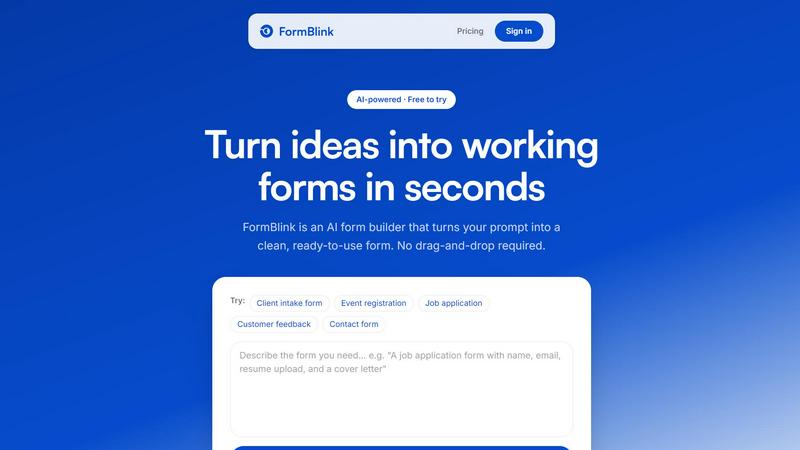
About FormBlink - AI Form Builder
FormBlink is an enterprise-grade AI form builder that redefines the speed and simplicity of online form creation. Unlike traditional platforms like Typeform and Jotform that rely on manual drag-and-drop workflows, FormBlink operates on a single, powerful principle: describe the form you need in plain English, and the AI generates a complete, production-ready form in seconds. This eliminates the typical 30 to 60 minute build process, reducing it to approximately 10 seconds. The product is designed for founders, marketers, service businesses, and any professional who needs to collect data without the complexity of conventional form editors.
The core value proposition of FormBlink is its AI-first architecture. Other tools may offer AI as an add-on or a helper feature, but FormBlink uses it as the primary interface. Users simply type a prompt, such as "A client intake form with name, email, phone, project description, and budget range," and the system instantly generates the form with appropriate field types, labels, validation rules, and logical structure. Each form is clean, responsive, and optimized by default, requiring no design work or learning curve. Furthermore, FormBlink integrates directly with essential business tools like Google Sheets, Slack, Notion, HubSpot, and webhooks, automating the flow of responses and eliminating manual data entry. For businesses seeking a modern, high-productivity alternative to Jotform or Typeform, FormBlink delivers the fastest path from idea to a live, data-collecting form.
Features of FormBlink - AI Form Builder
AI Form Generation from Natural Language
This core feature allows users to create an entire form by describing it in plain English. Instead of choosing a template or dragging fields, you simply type a prompt like "A webinar signup form with name, email, company, and preferred session." The AI interprets your request and generates a complete form with all necessary fields, labels, and structure in roughly 10 seconds. This reduces form creation time from hours to seconds, directly improving operational efficiency and allowing teams to iterate on data collection strategies rapidly. The more detail you provide in your prompt, the more accurate and tailored the first draft will be.
Conversational Editing by Typing
FormBlink extends its AI capabilities to the editing process. Users can modify any aspect of a generated form by typing a new instruction, such as "make question 3 optional," "add a country dropdown," or "split this into two pages." This eliminates the need to navigate complex drag-and-drop editors or configuration menus. The average edit turnaround is 4 seconds from a natural language instruction. This feature significantly reduces the time spent on form refinement, enabling non-technical team members to make changes instantly without a learning curve, and ensures that the form-building workflow remains consistent from creation to finalization.
All-Inclusive Integrations
Unlike competitors that gate integrations behind higher pricing tiers, FormBlink provides access to all integrations on every plan, including the free tier. Users can connect their forms to over 12 tools, including Google Sheets, Slack, Notion, HubSpot, and webhooks, with a single click. This feature allows for the automatic routing of form responses to the appropriate business systems, such as adding a lead to a CRM, sending a notification to a sales Slack channel, and appending data to a spreadsheet. This eliminates the manual, weekly tasks of exporting CSVs and copy-pasting data, saving significant administrative hours and reducing the risk of data entry errors.
Unlimited Forms and Responses
FormBlink offers unlimited form creation and unlimited response collection on its entry-level plan. This directly addresses a major pain point with competitors like Typeform and Jotform, which often cap responses at 100 per month on their basic tiers. For growing businesses, this feature removes the anxiety of hitting response limits during critical campaigns or high-traffic periods. It provides predictable, scalable data collection without surprise overage fees or forced upgrades. This allows marketing teams to run multiple lead generation forms, surveys, and feedback requests simultaneously without worrying about per-response costs or data caps.
Use Cases of FormBlink - AI Form Builder
Lead Generation for Marketing Teams
Marketing teams can use FormBlink to instantly create high-converting lead generation forms. By simply describing the desired fields, such as "A lead form for a B2B SaaS product, collecting name, work email, company size, and primary challenge," the AI generates a clean, responsive form in seconds. The form can then be connected directly to HubSpot or Google Sheets to automatically capture and organize leads. This eliminates the two-hour setup process typical of other tools, allowing marketers to launch campaigns faster, test different form variations, and capture leads without delay, directly improving lead velocity and campaign ROI.
Client Intake for Service Businesses
Consultants, agencies, and professional service providers can streamline their client onboarding process. A prompt like "A client intake form with name, email, phone, project description, budget range, and preferred start date" generates a professional form instantly. The form can be shared via a simple link or embedded on a website. By integrating with Slack, the team receives an immediate notification when a new lead submits the form, enabling faster response times. This use case automates a traditionally manual and time-consuming process, reducing administrative overhead and improving the client experience with a seamless, digital first interaction.
Event Registration and Management
Event organizers can create registration forms for webinars, conferences, or workshops in under a minute. A prompt such as "A signup form for my webinar. Collect name, email, company, and which session they prefer: morning or afternoon" generates the form with conditional logic if needed. Responses are automatically collected and can be sent to a Google Sheet for real-time attendee tracking. This eliminates the need for third-party event platforms for simple registrations, reduces setup time from hours to seconds, and provides a direct, no-friction path for attendees to register, improving conversion rates for the event.
Customer Feedback and Surveys
Businesses can rapidly deploy customer satisfaction surveys or product feedback forms. By typing a prompt like "A customer feedback form with a rating scale of 1-5, a text area for comments, and a question about likelihood to recommend," the AI generates a survey with appropriate field types. The form can be connected to a webhook to push data directly into a business intelligence tool or CRM. This allows for agile, continuous feedback collection without the overhead of building and maintaining complex survey tools. The speed of creation enables teams to iterate on survey questions quickly, leading to higher quality data and faster insights.
Frequently Asked Questions
How does FormBlink's AI form generation work?
FormBlink's AI interprets your natural language description to automatically generate a complete form. You simply type what you need, such as "A job application form with name, email, resume upload, and years of experience." The AI then creates the form with the appropriate field types, labels, validation rules, and structure. This process takes approximately 10 seconds, replacing the traditional 30 to 60 minute manual build process. You can then refine the form by typing additional instructions, making the entire workflow prompt-based and eliminating the need for a drag-and-drop editor.
What integrations does FormBlink support, and are they available on all plans?
FormBlink supports over 12 integrations, including Google Sheets, Slack, Notion, HubSpot, and webhooks. A key differentiator is that all integrations are available on every plan, including the free tier. This means you can connect your form to your CRM, send notifications to your team, and log responses to a spreadsheet without paying for a higher-tier plan. This policy eliminates the common frustration of "tier gating" found in competitors like Typeform and Jotform, where essential integrations are locked behind more expensive subscriptions.
How does FormBlink compare to Typeform and Jotform in terms of pricing and features?
FormBlink offers a significantly faster and more cost-effective solution. While Typeform and Jotform can take up to 2 hours to build a form and often cap responses at 100 per month on their entry-level plans ($29/mo), FormBlink builds a form in 10 seconds and offers unlimited forms and unlimited responses on its entry plan. FormBlink also includes native AI form generation and the ability to edit forms by typing, which are not standard features on competitor plans. Additionally, FormBlink removes branding on all plans, a feature that is typically a paid upgrade elsewhere.
Is there a free version of FormBlink, and what are its limitations?
Yes, FormBlink is currently in beta and offers a free tier to try the product. The free tier provides access to the core AI form generation and editing features, as well as all integrations. There are no credit cards required to sign up. The key differentiator is that FormBlink does not cap responses on its entry-level plans, which is a common limitation of free tiers from competitors. This allows users to fully evaluate the product's capabilities in a real-world scenario without hitting artificial data collection limits.
Pricing of FormBlink - AI Form Builder
FormBlink offers flexible pricing to suit different business needs, with a focus on providing exceptional value by removing common limitations. The entry price is $29 per month, which includes unlimited forms, unlimited responses, all integrations, and the removal of FormBlink branding. This directly contrasts with competitors like Typeform and Jotform, which offer fewer features and lower response limits at the same price point. For users who prefer not to commit to a subscription, FormBlink also offers a one-time purchase option, a payment model that is unique in the market and provides a permanent, cost-effective solution for form building.
Similar to FormBlink - AI Form Builder

Apps and files on an infinite canvas where people and AI agents work together.

Upload one portrait. Bulin AI puts you in the official Bulin 47 freestyle. The source video guides the moves and camera. No prompt.

AIPetGen turns a photo of your dog, cat, or other pet, or a written description, into a new picture or a short animation.

Signage and kiosk infrastructure for AI agents. Your agent publishes images, video, streams, web pages and apps to screens via one plugin.screenRIG is

Two photos become one hotel lobby video. One person stands on each side of the hanging microphone. No prompt.

A tray helper for every AI coding tool: one searchable library of past sessions, waiting alerts and usage across 9 providers.

Generate original duet clips or portraits from two consenting adults’ photos; browser workflow with paid credits.
