
AskFormulas
AskFormulas generates and validates Excel and Sheets formulas with guaranteed accuracy, eliminating debugging time.
Visit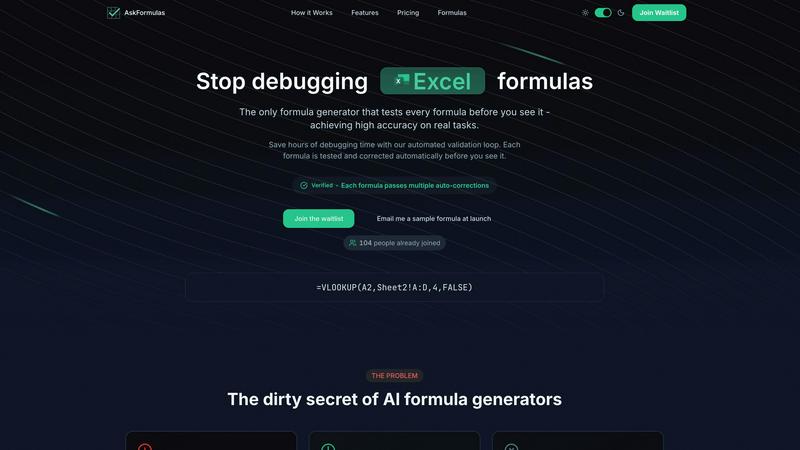
About AskFormulas
AskFormulas is an enterprise-grade AI solution engineered to eliminate the critical business inefficiency of broken spreadsheet formulas. It directly addresses the 40-60% failure rate common in standard AI formula generators by implementing a proprietary, automated validation loop. This process rigorously tests and auto-corrects every formula in a secure sandbox environment before it is delivered to the user. The core value proposition is unparalleled accuracy, exceeding 95%, which translates directly into measurable ROI by reclaiming hours lost to debugging and troubleshooting. Professionals simply describe their calculation needs in plain English, and AskFormulas returns a verified, ready-to-use formula for either Microsoft Excel or Google Sheets. This tool is indispensable for financial analysts seeking error-free models, revenue managers requiring reliable data consolidation, small business owners lacking deep technical expertise, and any knowledge worker who depends on accurate spreadsheet outputs to drive decision-making. By shifting focus from formula construction to data analysis, AskFormulas transforms spreadsheets from a source of frustration into a powerful, reliable engine for business intelligence.
Features of AskFormulas
Automated Validation Loop
Every formula request undergoes a rigorous three-step validation process. First, natural language is parsed into formula intent. Second, the generated syntax is auto-tested against synthetic template data in a secure sandbox. Third, any errors like #REF! or #VALUE! trigger iterative auto-corrections until the formula is verified. This closed-loop system is the technological foundation that guarantees the published accuracy rate of over 95%, ensuring users receive only working formulas.
Platform-Agnostic Formula Generation
With a simple one-click toggle, users can seamlessly switch between Microsoft Excel and Google Sheets syntax. The system automatically handles the nuanced differences between platforms, such as converting VLOOKUP for Excel or managing ARRAYFORMULA for Sheets. This feature ensures cross-functional and cross-platform team compatibility, eliminating the need to learn or manually translate formula syntax between the two dominant spreadsheet applications.
Intelligent Error Detection & Correction
AskFormulas proactively identifies and resolves formula errors during its validation phase. If a generated formula results in a common spreadsheet error, the system does not present it to the user. Instead, it diagnoses the issue—be it a range reference error, incorrect function argument, or syntax mismatch—and automatically iterates on a corrected version. This pre-emptive troubleshooting is what saves users significant debugging time.
Formula History & One-Click Integration
The platform maintains a personal library of the user's last ten generated formulas, providing easy access and reusability. Once a formula is verified, it can be copied to the clipboard with a single click, ready for immediate pasting into a live spreadsheet. This streamlined workflow minimizes friction and context-switching, enabling a transition from request to implemented solution in a matter of seconds.
Use Cases of AskFormulas
Financial Modeling & Reporting
Financial analysts can rapidly build complex, error-free models by describing logic like "calculate quarterly EBITDA margin" or "net present value of project cash flows in column C." The validation loop ensures all nested functions like XIRR, XNPV, and SUMIFS work correctly on the first try, protecting the integrity of critical financial reports and forecasts and reducing model audit time.
Sales & Revenue Data Consolidation
Revenue managers and sales operations specialists can use plain English to generate formulas for consolidating disparate data sets. Commands such as "VLOOKUP the contract value from Sheet2 where the client ID matches" or "sum all sales in Region West for Q3" yield validated formulas that accurately merge and calculate data, providing a single source of truth for pipeline and performance analysis.
Operational Reporting for Non-Technical Users
Small business owners, marketing managers, and operational staff without formal Excel training can independently create powerful reports. By asking, "count how many transactions were above $500" or "average the customer satisfaction scores in column D," they gain immediate access to advanced data analysis capabilities, democratizing insights and reducing dependency on technical team members.
Automated Data Cleaning & Preparation
Data analysts can expedite the tedious process of data preparation by instructing AskFormulas to generate formulas for tasks like "remove leading and trailing spaces from text in column A" (TRIM) or "extract the domain name from email addresses in column B" (MID and FIND). Receiving pre-validated formulas for these repetitive tasks dramatically accelerates the data cleaning phase of any project.
Frequently Asked Questions
How accurate are the generated formulas?
AskFormulas achieves an accuracy rate of over 95% on real-world tasks, a significant improvement over the 40-60% failure rate observed in standard AI formula generators. This high reliability is a direct result of our proprietary automated validation loop, which tests and auto-corrects every formula in a simulated spreadsheet environment before it is delivered to the user.
Does it work with both Excel and Google Sheets?
Yes, AskFormulas is fully compatible with both Microsoft Excel and Google Sheets. A simple toggle within the interface allows you to select your desired platform. The system automatically adjusts the formula syntax to match the correct function names and structural requirements of either application, ensuring seamless cross-platform functionality.
How many formulas can I generate per month?
Usage limits are based on your subscription plan. The Starter plan includes 500 formulas per month, the Pro plan offers 2,000 formulas, and the Team plan provides 6,000 formulas shared among up to 5 users. This tiered structure ensures scalability for individual power users, professionals, and collaborative small teams.
What happens if my generated formula has an error?
If a formula encounters an error during our automated validation testing, it is not shown to you. Instead, our system's validation loop identifies the error type (e.g., #REF!, #VALUE!, #N/A) and automatically initiates a correction cycle. It iteratively adjusts the formula syntax and retests it until a fully functional, verified formula is produced, guaranteeing you only see working outputs.
Explore more in this category:
Similar to AskFormulas

AI Email Filter sorts incoming mail into folders using plain-language prompts you write. Works with any IMAP mailbox; bring your own LLM if you want.

Free collection of online developer utilities, code formatters, and digital converters designed to streamline your daily workflow.

The #1 Native Form Builder Plugin for Framer - No Code, No Embeds, No External Platforms.

A free launch checklist for SaaS, apps, AI tools and more. Every step says why it matters and when you can skip it.

Practical, independent guides to home repairs, maintenance, costs, troubleshooting, and everyday fixes.

Highlight faster. Study in flow with custom shortcuts and a workflow built around you. Print smarter, or turn any page into a tiled poster.


Build Mode is a Mac app that turns focused sessions into visible progress, so you can see the work adding up before the results arrive.