
TinyFast vs Wipyly
Side-by-side comparison to help you choose the right AI tool.

Optimize images, videos, and documents locally on your Mac with TinyFast for fast, secure, and private file compression.
Last updated: February 28, 2026

Wipyly simplifies cleaning business management with tools for scheduling, team coordination, and inventory tracking.
Last updated: March 4, 2026
Visual Comparison
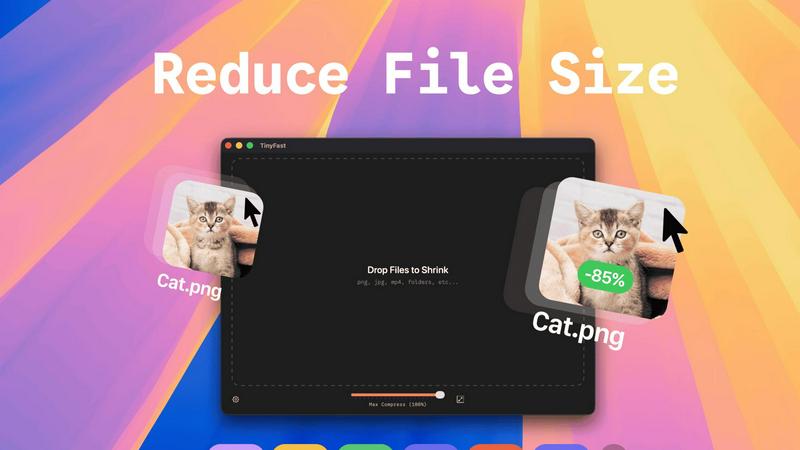
TinyFast
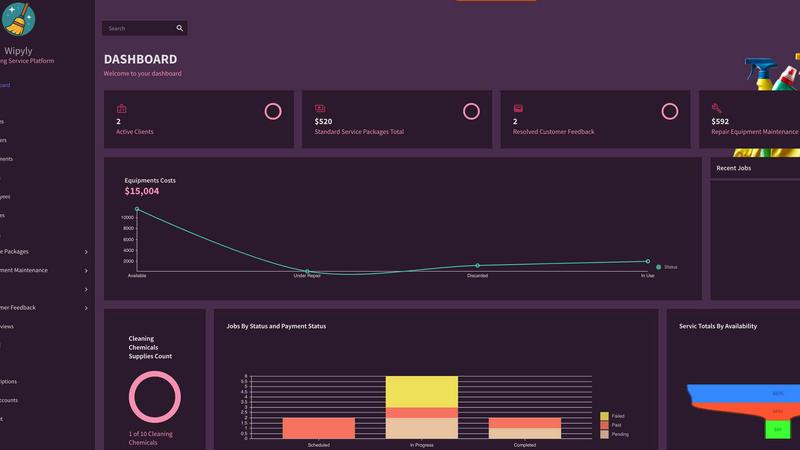
Wipyly
Feature Comparison
TinyFast
Batch & Drag-Drop Shrink
TinyFast enables users to drop entire folders into the application, allowing for the swift and efficient compression of multiple files simultaneously. This batch processing feature significantly reduces the time required for file optimization, making it ideal for users who need to manage large volumes of assets.
Blazing-Fast Compression
With optimized native engines built for speed, TinyFast provides blazing-fast compression capabilities that allow users to shrink large files in mere seconds. By eliminating the tedious waiting times associated with uploads and downloads, the app enhances workflow efficiency and productivity.
Resize Resolution
TinyFast includes an automatic resolution resizing feature for images and videos, allowing users to set specific dimensions for their assets. This functionality is essential for ensuring that files meet the requirements for various platforms and applications while maintaining visual quality.
100% Local & Private
TinyFast guarantees that all files remain on the user's device throughout the compression process, ensuring complete privacy and security. With no uploads to cloud servers, users can compress sensitive documents with confidence, knowing that their data is never exposed to external parties.
Wipyly
Custom Setup
Wipyly allows users to effortlessly tailor service packages and settings to fit their specific cleaning business needs. This feature ensures that each aspect of the service can be customized, enhancing client satisfaction and simplifying operations.
Operational View
Gain comprehensive visibility into your cleaning operations with modules dedicated to Jobs and Equipment Maintenance. This feature provides real-time insights into your business activities, enabling better management of resources and improved service delivery.
Financial Insights
Wipyly features robust financial modules that track costs, payroll, and total compensation. This transparency helps business owners monitor their financial health and make informed decisions to drive profitability.
Feedback Utilization
Leverage customer feedback to continuously improve service quality and enhance client experiences. Wipyly facilitates easy collection and analysis of client input, ensuring that businesses can adapt and evolve based on customer needs.
Use Cases
TinyFast
Graphic Designers
Graphic designers can leverage TinyFast to compress large image files for web use, ensuring that their visuals load quickly without sacrificing quality. This optimization is crucial for enhancing user experience on websites and reducing bandwidth usage.
Video Editors
Video editors benefit from TinyFast by quickly compressing raw footage and exported videos, making it easier to share large files with clients or collaborators. The instant compression allows editors to maintain a smooth workflow without delays.
Content Creators
Content creators can use TinyFast to optimize images and videos for social media platforms, ensuring that their posts are visually appealing and load efficiently. This capability helps maintain a professional appearance across various channels.
Developers
Developers can integrate TinyFast into their asset management workflows, compressing various file types, including code and documentation. This ensures that applications load faster and consume less storage space, ultimately enhancing application performance.
Wipyly
Solo Operator Management
For solo cleaning business owners, Wipyly simplifies the management of bookings, schedules, and client communications. This enables them to focus more on providing exceptional service rather than getting bogged down in administrative tasks.
Team Coordination
Cleaning companies with multiple teams can use Wipyly to streamline team coordination and scheduling. The platform allows managers to assign jobs efficiently, ensuring that every team member is utilized effectively and clients receive timely service.
Inventory Management
Wipyly aids cleaning businesses in managing their inventory by tracking supplies and equipment. This feature ensures that businesses maintain optimal stock levels, preventing service interruptions due to lack of necessary materials.
Performance Tracking
Utilize Wipyly's performance tracking features to monitor team productivity and service quality. This data-driven approach allows cleaning businesses to identify areas for improvement and implement changes that enhance overall efficiency.
Overview
About TinyFast
TinyFast is an innovative macOS application dedicated to providing efficient, local file compression tailored specifically for images, videos, and documents. Designed with developers, designers, and content creators in mind, TinyFast supports an extensive range of file formats, including PNG, JPEG, MP4, MOV, PDF, SVG, WebP, MP3, and GIF. Its core value proposition lies in the ability to perform file compression locally on the user's device, eliminating the need for potentially insecure uploads to external servers. This approach not only enhances user privacy but also significantly boosts efficiency, allowing users to drag and drop files for instant compression without compromising on quality. As a result, TinyFast distinguishes itself in a crowded market of online compression tools by prioritizing speed, security, and user privacy, enabling professionals to focus on their projects with peace of mind regarding data exposure.
About Wipyly
Wipyly is a comprehensive software solution designed for modern cleaning businesses, both residential and commercial. This cloud-based platform serves as a centralized command center, integrating all essential operations, including booking, scheduling, customer management, invoicing, and performance tracking, into one intuitive system. It is tailored for cleaning business owners, whether they operate solo or manage multiple teams. Wipyly's primary value proposition lies in its ability to streamline workflows, reduce administrative burdens, and enhance the overall client experience. By replacing chaotic spreadsheets and sticky notes with a cohesive digital platform, Wipyly empowers users to make informed, data-driven decisions, maintain organization, and confidently scale their operations. It is more than just software; it's a strategic partner in building a successful cleaning service.
Frequently Asked Questions
TinyFast FAQ
How does TinyFast ensure file privacy?
TinyFast performs all file compressions locally on your device, meaning no files are uploaded to external servers. This design guarantees that your sensitive information remains secure and private.
What file formats does TinyFast support?
TinyFast supports a wide array of file formats, including images (PNG, JPEG, GIF, SVG), videos (MP4, MOV), documents (PDF, DOCX), code files (JS, CSS, JSON), and audio files (MP3), making it a versatile tool for various needs.
Is there a limit to the number of compressions I can perform?
With the free version of TinyFast, users can compress up to 5 files per day. However, with a lifetime plan or monthly subscription, users can enjoy unlimited local compressions, enhancing their productivity.
Can I try TinyFast before committing to a purchase?
Yes, TinyFast offers a 3-day trial period for the monthly subscription plan. This allows users to explore all features and determine if the application meets their needs before making a financial commitment.
Wipyly FAQ
What types of cleaning businesses can benefit from Wipyly?
Wipyly is designed for both residential and commercial cleaning services, making it suitable for a wide range of cleaning businesses, from solo operators to larger companies managing multiple teams.
Is Wipyly easy to use for someone without technical skills?
Yes, Wipyly is built with user-friendliness in mind. Its intuitive interface allows users with varying levels of technical expertise to navigate the platform and manage their cleaning operations effectively.
Can I access Wipyly from any device?
Absolutely. Wipyly is a cloud-based platform, meaning you can access it from anywhere with an internet connection. This flexibility allows you to manage your cleaning business on-the-go.
How does Wipyly help improve client satisfaction?
By streamlining operations, enhancing communication, and utilizing customer feedback for service improvement, Wipyly enables cleaning businesses to deliver a better experience for their clients, ultimately leading to higher satisfaction and retention rates.
Alternatives
TinyFast Alternatives
TinyFast is a robust application designed for macOS that specializes in the local compression of images, videos, and documents. It falls into the category of tech tools aimed at enhancing productivity for developers, designers, and content creators by optimizing digital assets while ensuring data privacy. Users often seek alternatives to TinyFast for a variety of reasons, including pricing considerations, feature sets, compatibility with different operating systems, and specific performance needs that may not be fully met by TinyFast. When searching for an alternative, it is essential to evaluate the core functionalities that matter most to your workflow. Look for applications that offer similar batch processing capabilities, speed of compression, and the ability to maintain local privacy. Additionally, consider the range of file formats supported, ease of use, and any unique features that could enhance your productivity and asset management processes.
Wipyly Alternatives
Wipyly is an all-in-one command center specifically designed for managing and growing cleaning businesses, encompassing both residential and commercial services. As a cloud-based platform, it integrates essential operations into a single, intuitive system, enabling users to streamline their processes from booking to billing. Users often seek alternatives to Wipyly for various reasons, including pricing considerations, feature sets that better align with their specific needs, or platform compatibility. When exploring alternatives, it’s crucial to assess factors such as usability, scalability, customer support, and integration capabilities to ensure that the chosen solution effectively enhances productivity and meets the unique demands of their cleaning business.