
SupaSidebar vs Yardyly
Side-by-side comparison to help you choose the right AI tool.

SupaSidebar
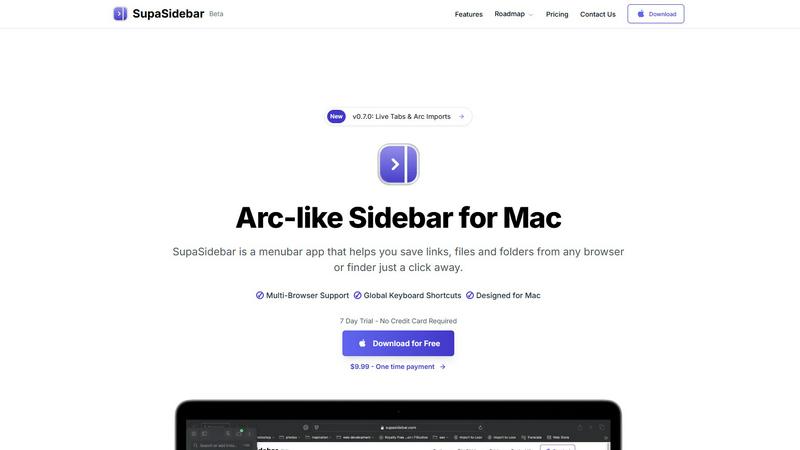
SupaSidebar boosts Mac productivity by providing instant keyboard access to links, files, and folders.
Last updated: February 28, 2026

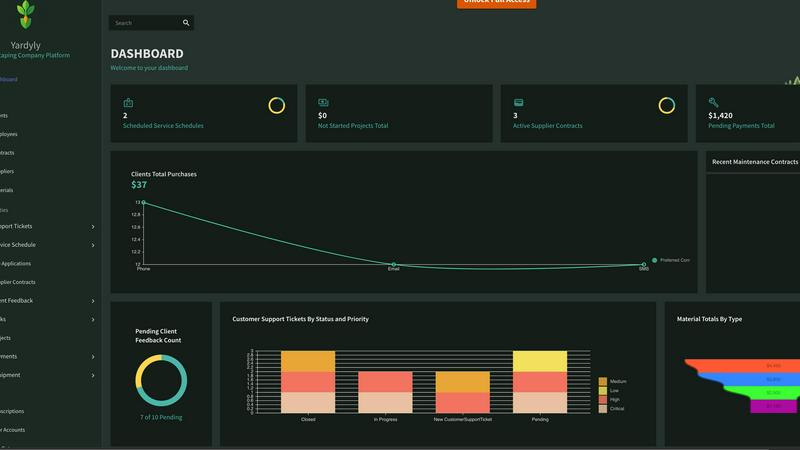
Yardyly is a comprehensive software solution that streamlines landscaping management, enhances productivity, and drives.
Last updated: March 4, 2026
Visual Comparison
SupaSidebar
Yardyly
Feature Comparison
SupaSidebar
Universal Browser Integration & Capture
SupaSidebar seamlessly integrates with all major web browsers, including Safari, Chrome, Arc, Firefox, and Brave. This allows users to capture or copy the current webpage URL from any browser instantly using dedicated, configurable global keyboard shortcuts (e.g., Command+Control+S to save, Command+Control+C to copy). This feature eliminates the cumbersome process of manually bookmarking or copying links across different platforms, centralizing web resource management into a single, always-accessible hub.
Intelligent Recents & Favorites Pinning
The application automatically tracks and displays every website accessed across all integrated browsers within the last 48 hours in a "Recents" section, serving as a powerful short-term memory aid. Users can pin frequently accessed links, files, or folders as Favorites, which are permanently elevated to the top of the sidebar for immediate, one-click access. This dual-system organization ensures both recent context and critical daily tools are always at hand, drastically reducing search time.
Global Instant Search (Command+Control+K)
Activating the universal search shortcut (Command+Control+K) opens a powerful search interface that indexes and retrieves items from across all saved links, files, folders, and applications in real-time. This feature enables users to bypass manual navigation entirely, finding any resource by name in seconds. It is engineered to minimize cognitive load and maintain workflow momentum, acting as a central command center for all digital assets on the Mac.
Native macOS Design & Local-Only Data
Built exclusively for macOS 13 and above, SupaSidebar adheres to Apple's Human Interface Guidelines, ensuring a familiar, intuitive, and performant user experience that feels like a native extension of the operating system. Critically, all user data—saved links, metadata, and organizational structures—is stored solely on the local device. This architecture guarantees maximum data privacy, security, and availability without reliance on external servers or cloud sync.
Yardyly
Automated Scheduling
Yardyly's automated scheduling feature allows you to easily optimize your team's work schedules with a user-friendly drag-and-drop interface. This ensures that resources are allocated efficiently, helping to reduce downtime and increase productivity across your landscaping projects.
Customer Relationship Management (CRM)
The integrated CRM system enables you to manage client interactions seamlessly. Store customer information, track communication history, and manage follow-ups all in one place, enhancing your ability to foster relationships and grow your clientele while ensuring high satisfaction rates.
Real-Time Feedback Integration
This feature allows you to gather and incorporate feedback from clients directly into ongoing projects. By prioritizing client input, you can enhance project outcomes, ensuring that client expectations are met and that they are more likely to recommend your services to others.
Financial Management Tools
Yardyly provides robust financial management tools that enable you to track all monetary transactions. From supplier contracts to client payments, this feature ensures that you maintain precise fiscal control, facilitating better financial planning and reducing the likelihood of errors.
Use Cases
SupaSidebar
Research and Academic Workflows
Researchers, analysts, and students can use SupaSidebar to aggregate source materials, reference papers, and data sets from myriad browser tabs and local folders into a single, categorized sidebar. The "Recents" feature allows for easy backtracking through a research trail, while pinned project folders keep core references instantly accessible, streamlining literature reviews and data compilation phases and reducing project cycle times.
Software Development and Technical Teams
Developers and engineers can pin frequently accessed documentation (e.g., API docs, internal wikis), project folders, code repositories, and debugging tools. The global search allows for rapid switching between technical resources and local project files without leaving the coding environment. This minimizes disruptive context shifts, keeping developers in a state of deep focus, which is critical for complex problem-solving and efficient sprint execution.
Content Creation and Digital Marketing
Content creators, marketers, and social media managers can save inspiration links, campaign dashboards, graphic asset folders, and publishing calendars directly in the sidebar. The ability to swiftly capture URLs during browsing sessions and later organize them into dedicated spaces for different clients or campaigns prevents valuable ideas and resources from being lost in a sea of bookmarks or forgotten tabs, enhancing creative throughput.
Executive and Administrative Assistance
Executives, managers, and administrative professionals can leverage SupaSidebar to maintain immediate access to key performance dashboards, recurring report files, board meeting materials, and communication platforms. By pinning these mission-critical resources, they can shave minutes off daily preparation tasks, enabling quicker decision-making and more efficient management of high-volume information streams essential for leadership roles.
Yardyly
Solo Operator Management
For individual landscapers just starting, Yardyly provides all the tools necessary to manage bookings, customer relations, and invoicing in one platform. This simplifies operations, allowing solo operators to focus on delivering quality service while efficiently handling business tasks.
Team Coordination for Growing Businesses
As landscaping businesses expand, managing a larger team can become complex. Yardyly enables seamless team coordination, allowing managers to assign tasks, track progress, and communicate effectively, ensuring that everyone is aligned and productive.
Project Tracking for Increased Efficiency
Yardyly's project tracking capabilities allow landscaping companies to oversee multiple projects simultaneously. With tools for monitoring status, budget, and resource allocation, businesses can ensure that projects are completed on time and within budget.
Supplier Management for Streamlined Operations
Landscaping companies often rely on various suppliers for materials. Yardyly simplifies supplier management by allowing users to track contracts and procurement processes, ensuring that materials are sourced efficiently and reducing delays in project execution.
Overview
About SupaSidebar
SupaSidebar is an enterprise-grade productivity application for macOS, engineered to streamline digital workflow and eliminate context-switching inefficiencies. It functions as a universal, Arc-inspired sidebar that provides instant, organized access to critical resources—including web links, local files, folders, and applications—directly from a persistent menubar interface. Designed for professionals, knowledge workers, researchers, and teams, its core value proposition is a significant reduction in time spent searching for information and managing digital clutter, directly translating to measurable gains in focused work time and operational throughput. By leveraging global keyboard shortcuts and deep system integration, SupaSidebar ensures that essential assets are never more than a keystroke away, fostering a state of continuous workflow. All data is stored locally on the user's Mac, guaranteeing privacy, security, and offline access. This tool is not merely an organizer; it is a strategic productivity companion that empowers users to reclaim an estimated 1-2 hours per week by minimizing disruptive tab and application hunting, thereby delivering a rapid and substantial return on investment through enhanced individual and team efficiency.
About Yardyly
Yardyly is an innovative all-in-one digital platform designed specifically for the landscaping, lawn care, and outdoor service industries. It addresses the unique challenges faced by professionals in the green industry by providing essential tools for online booking, job scheduling, customer relationship management (CRM), invoicing, and team coordination. By integrating these functionalities into a single, user-friendly cloud platform, Yardyly eliminates the chaos of managing multiple spreadsheets and applications. Whether you are a solo entrepreneur or leading a growing team, Yardyly empowers you to automate repetitive tasks, reduce administrative burdens, and enhance communication with both staff and clients. Its mobile-friendly design ensures that you can efficiently manage routes, check schedules, update job statuses, and track revenue from anywhere. Ultimately, Yardyly helps you focus on what you do best—creating stunning outdoor spaces—while cultivating business growth.
Frequently Asked Questions
SupaSidebar FAQ
Is SupaSidebar a browser extension?
No, SupaSidebar is not a browser extension. It is a standalone macOS menubar application that runs independently on your computer. It integrates with your browsers at the system level to capture URLs and activity, but it operates as a central hub outside of any single browser window, providing a unified interface for all your resources regardless of their origin.
Which browsers does SupaSidebar work with?
SupaSidebar offers comprehensive support for all major browsers on macOS, including Safari, Google Chrome, Arc, Mozilla Firefox, and Brave. This universal compatibility ensures that your workflow remains uninterrupted regardless of your browser preference or if you use multiple browsers for different tasks, making it a truly agnostic productivity solution.
What macOS version do I need?
SupaSidebar requires macOS 13 (Ventura) or a later version. This requirement ensures the application can utilize the latest macOS frameworks and security features, providing a stable, performant, and native-feeling experience that aligns with modern Apple system design and capabilities.
Where is my data stored?
All data captured and organized within SupaSidebar—including saved URLs, file references, and your organizational structure—is stored exclusively locally on your Mac. Nothing is sent to or stored on external servers. This local-first approach prioritizes user privacy, data security, and ensures instant access to your information even without an internet connection.
Yardyly FAQ
What types of businesses can benefit from Yardyly?
Yardyly is designed specifically for landscaping, lawn care, and outdoor service businesses, catering to both solo operators and larger teams looking to improve their operational efficiency.
How does Yardyly help in team collaboration?
Yardyly enhances team collaboration through features that allow for task assignment, progress tracking, and communication within the platform, ensuring everyone stays informed and engaged.
Can I access Yardyly from my mobile device?
Yes, Yardyly is mobile-friendly, allowing you to manage your landscaping operations from anywhere, whether you are in the field or at the office.
What kind of support does Yardyly offer?
Yardyly provides comprehensive support options, including FAQ resources, contact options for customer service, and user guides to help you make the most of the platform.
Alternatives
SupaSidebar Alternatives
SupaSidebar is a premium Mac productivity application designed to centralize and streamline access to digital resources. It operates within the browser enhancement and workflow management category, helping professionals reduce context-switching and digital clutter by providing instant sidebar access to links, files, and folders from any application. Users may explore alternatives for several strategic reasons. These include budget considerations, specific feature requirements not covered by a single solution, or the need for cross-platform compatibility beyond macOS. Evaluating the total cost of ownership against potential productivity gains is a common driver in this decision-making process. When selecting an alternative, key evaluation criteria should include seamless integration with your existing browser and tool stack, the efficiency of capture and retrieval workflows, and robust organization capabilities. The optimal solution should demonstrably reduce time spent on repetitive navigation tasks, thereby delivering a clear return on investment through recovered productive hours.
Yardyly Alternatives
Yardyly is an all-in-one software solution designed specifically for the landscaping, lawn care, and outdoor service industries. It provides essential tools like online booking, job scheduling, customer relationship management (CRM), invoicing, and team coordination, all integrated into a single cloud platform. This comprehensive approach helps businesses streamline operations, improve efficiency, and boost productivity. Users often seek alternatives to Yardyly due to various reasons, including pricing, specific feature sets, or platform compatibility. When exploring alternatives, it's crucial to assess factors such as ease of use, scalability, available integrations, and customer support to ensure that the chosen solution aligns with your business needs and objectives.