
AI Formatter vs Zovo
Side-by-side comparison to help you choose the right AI tool.
AI Formatter
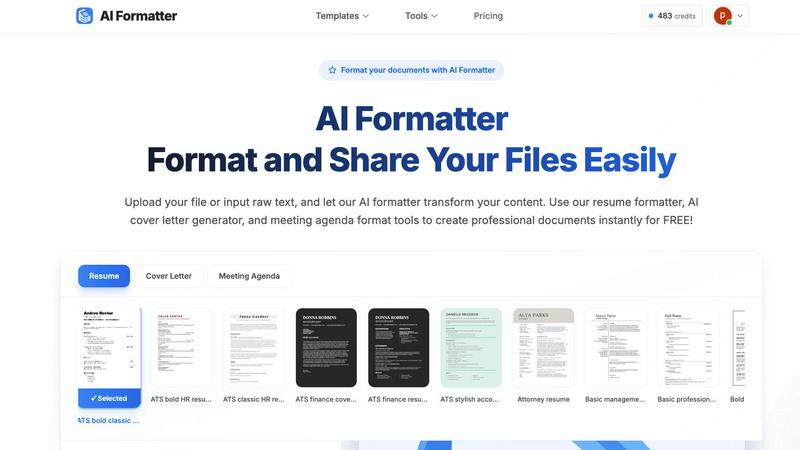
AI Formatter instantly transforms raw text into polished documents, enhancing productivity with professional templates.
Last updated: March 1, 2026

Unlock 20 privacy-focused Chrome extensions for developers and writers with Zovo, built by a solo developer for your.
Last updated: February 26, 2026
Visual Comparison
AI Formatter
Zovo

Feature Comparison
AI Formatter
AI-Powered Formatting
AI Formatter employs advanced AI algorithms to automatically format documents, ensuring adherence to professional standards while preserving the integrity of the content. This feature significantly reduces the manual effort typically associated with document preparation.
Extensive Template Library
Users can choose from a comprehensive library of over 100 ATS-optimized templates for various document types, including resumes, cover letters, and meeting agendas. This extensive selection allows users to find the perfect template for their specific needs and ensures compliance with ATS requirements.
Intuitive Editing Tools
After AI formatting, users can access an intuitive editing interface that allows for easy customization and refinement of their documents. With this feature, professionals can make adjustments and enhancements on the fly, ensuring their documents are polished and tailored to their preferences.
Multi-Format Export Options
AI Formatter supports multiple file formats for exporting documents, including Word and PDF. This flexibility allows users to easily share or print their finalized documents, accommodating various professional requirements and preferences.
Zovo
BeLikeNative
BeLikeNative offers an instant rewrite feature that allows users to write like native speakers with just one keystroke. It supports 80 languages and works seamlessly across various platforms, making it an essential tool for students, professionals, and anyone needing to improve their writing efficiency.
Tab Suspender Pro
Tab Suspender Pro helps users manage their browser’s memory usage by automatically suspending inactive tabs. This feature utilizes smart detection to identify tabs that are not currently in use, thereby freeing up system resources and enhancing overall browser performance.
Clipboard History Pro
Clipboard History Pro ensures that users never lose copied text again by retaining a searchable history of up to 10,000 clips. This feature enables instant search and smart paste capabilities, making it ideal for professionals who frequently copy and paste information.
Form Filler Pro
Form Filler Pro simplifies the process of filling out online forms by allowing users to save multiple profiles and fill forms with a single click. This feature significantly reduces the time spent on repetitive tasks, making it particularly useful for online shoppers and anyone who frequently completes forms.
Use Cases
AI Formatter
Job Seekers
AI Formatter serves as a vital tool for job seekers looking to enhance their resumes and cover letters. By using ATS-optimized templates, they can ensure their documents meet industry standards and stand out to potential employers.
Corporate Communication
Businesses can leverage AI Formatter to standardize their internal and external communications. By utilizing formatted templates for meeting agendas and reports, companies can maintain a consistent brand image across all documentation.
Academic Professionals
Academics and researchers can benefit from AI Formatter's capabilities by producing publication-ready documents quickly. This tool ensures compliance with formatting guidelines required by journals and conferences, facilitating smoother submission processes.
Freelancers and Consultants
Freelancers and consultants can streamline their workflow with AI Formatter by generating professional invoices and receipts effortlessly. This feature not only saves time but also enhances the professionalism of their business communications.
Zovo
Enhancing Writing Skills
BeLikeNative is perfect for non-native speakers and students who want to improve their writing skills. By providing instant rewrites, it helps users learn native expressions and phrases, thereby boosting their confidence in written communication.
Optimizing Browser Performance
Tab Suspender Pro is essential for users who often have multiple tabs open. By automatically suspending inactive tabs, it not only saves memory but also improves the browser's speed, resulting in a smoother user experience.
Managing Copied Text Efficiently
Clipboard History Pro is a game-changer for professionals who need to manage large volumes of text. By allowing users to search through their copied items quickly, it enhances productivity and makes information retrieval effortless.
Streamlining Online Forms
Form Filler Pro is invaluable for anyone who frequently fills out online forms, such as job applicants or e-commerce shoppers. Its one-click fill functionality saves time and reduces the frustration associated with repetitive data entry.
Overview
About AI Formatter
AI Formatter is a robust, enterprise-grade, cloud-based SaaS platform developed by Sun Sky LLC, designed to streamline the often tedious process of document preparation. By harnessing cutting-edge artificial intelligence, it transforms unstructured text and uploaded files into meticulously formatted, visually consistent documents in mere seconds. This platform is tailored for professionals and organizations looking to enhance productivity, delivering a remarkable return on investment by saving an average of over two hours per document. One of its standout features is a 95%+ pass rate on Applicant Tracking Systems (ATS) for essential career documents, ensuring job seekers maximize their chances of success. With a diverse library of over 100 ATS-optimized templates covering resumes, cover letters, business agendas, and financial documents, AI Formatter caters to a wide range of users. Whether you are a job seeker in a competitive market, a professional standardizing business communication, a company focused on brand consistency, or an academic needing publication-ready formatting, AI Formatter is the indispensable tool that operates within a secure, collaborative, and user-friendly online environment.
About Zovo
Zovo is a suite of 20 powerful Chrome extensions developed by Michael Lip, a seasoned solo developer with over a decade of experience and a remarkable track record of earning more than $400,000 on Upwork, all while maintaining a 100% success rate. The flagship extension, BeLikeNative, empowers over 3,300 users by enabling them to write like native speakers with a simple keystroke rewrite function, supporting 80 languages. This comprehensive suite includes various tools designed to enhance productivity and streamline everyday tasks, such as Tab Suspender Pro, JSON Formatter Pro, Clipboard History Pro, Form Filler Pro, and many more. Each extension is crafted with a privacy-first approach, ensuring that user data remains on their device without any form of data harvesting or investor interference. Zovo stands out by allowing users to actively participate in shaping the roadmap of features, fostering a community-driven environment where user feedback is valued. With new extensions released monthly and many tools available for free online, Zovo is the go-to solution for anyone looking to enhance their browsing experience while maintaining complete control over their data.
Frequently Asked Questions
AI Formatter FAQ
How does AI Formatter ensure my documents are ATS-compatible?
AI Formatter uses a library of over 100 templates specifically designed to meet ATS requirements. This ensures that your resumes and cover letters are formatted in a way that optimizes their chances of passing automated screening processes.
What types of documents can I format with AI Formatter?
AI Formatter can handle various types of documents, including resumes, cover letters, meeting agendas, financial reports, invoices, and receipts. Users can either upload existing files or input raw text for formatting.
Is my data secure when using AI Formatter?
Yes, AI Formatter prioritizes data security. The platform operates in a secure, cloud-based environment, ensuring that your documents and personal information are protected throughout the formatting process.
Can I customize my documents after they are formatted?
Absolutely! After the AI Formatter processes your content, you can use the intuitive editing tools to customize and refine your document as needed before downloading it in your preferred format.
Zovo FAQ
What makes Zovo different from other Chrome extension providers?
Zovo is unique because it is developed by a solo developer committed to privacy-first principles. Unlike many corporate solutions, Zovo does not engage in data harvesting or involve investors, ensuring that user data remains secure and private.
How can I request new features for Zovo extensions?
Users can submit feature requests directly to the developer. Every request is read and considered, and the most requested features are prioritized for development, promoting a community-driven approach to innovation.
Are Zovo extensions open source?
Yes, many of Zovo's extensions are open source, which allows users to inspect the code and contribute to the development process. This transparency fosters trust and collaboration within the user community.
Is there a support system in place for Zovo users?
Absolutely. Users can reach out directly to the developer via email or Discord for any questions or issues they encounter. This direct line of communication ensures prompt and personal support without the hassle of bots or ticket queues.
Alternatives
AI Formatter Alternatives
AI Formatter is a sophisticated enterprise-grade, cloud-based SaaS platform that revolutionizes document preparation by transforming raw text into polished, professional documents in seconds. As a leader in productivity and management tools, it is designed to eliminate the inefficiencies associated with manual formatting, allowing users to achieve significant time savings and improved ROI. Users often seek alternatives to AI Formatter for various reasons, including pricing, specific feature requirements, or the need for platform compatibility with existing workflows. When choosing an alternative, it is essential to consider factors such as the ease of use, the quality and variety of templates offered, the platform's ability to integrate with other tools, and the overall return on investment it can provide.
Zovo Alternatives
Zovo is a suite of 20 privacy-first Chrome extensions tailored for developers and writers, designed to enhance productivity and management. With tools like JSON Formatter, Tab Suspender, and Clipboard History, Zovo enables users to streamline their workflows while maintaining a strong commitment to data privacy. Many users seek alternatives due to varying needs such as pricing, desired features, or compatibility with specific platforms. When considering an alternative, it is important to evaluate the range of features offered, the developer's track record, user feedback, and the overall commitment to privacy. Choosing the right alternative involves assessing which tools best align with your productivity goals while ensuring that they maintain a focus on user privacy. Look for solutions that provide clear value, a strong support system, and a transparent development process. This will help ensure that you not only find a suitable replacement but also enhance your workflow efficiency.