
Very Good Calendar Sync
Very Good Calendar Sync effortlessly aligns your work and personal calendars while ensuring your privacy and eliminating double bookings.
Visit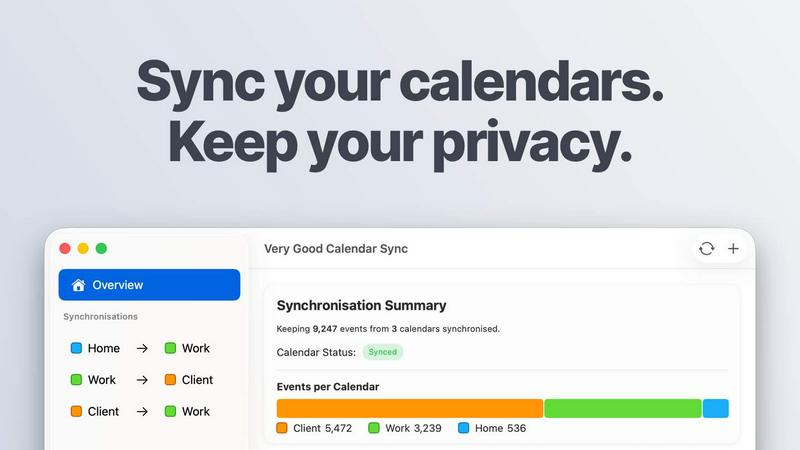
About Very Good Calendar Sync
Very Good Calendar Sync is a powerful macOS application designed to streamline calendar management by synchronizing multiple calendars seamlessly while ensuring user privacy. This tool eliminates the chaos of managing work, personal, and client calendars by automatically syncing changes in real-time without requiring any cloud storage or third-party access. Users can effortlessly set their preferences for synchronization, including specific days and hours, allowing for tailored calendar management that fits their unique schedules. Ideal for freelancers, consultants, and employees juggling multiple commitments, Very Good Calendar Sync provides a reliable solution that keeps your availability transparent and consistent. It empowers users to maintain their productivity, reduce scheduling conflicts, and eliminate the risk of double-bookings, all while safeguarding sensitive information.
Features of Very Good Calendar Sync
Seamless Integration with macOS
Very Good Calendar Sync works directly with the macOS Calendar.app, requiring no additional applications or complex configurations. This native integration ensures that your existing calendars—whether they are from Google, Microsoft, or Apple—are instantly synchronized without the hassle of linking accounts or sharing credentials.
Customizable Synchronization Rules
Users can create tailored synchronization rules to fit their specific needs. This includes the ability to choose which days to sync, set daily hours for synchronization, and determine a start date for when synchronization begins. This level of customization ensures that only relevant calendar events are synced.
Privacy-Focused Functionality
Your calendar data remains secure and private, as it never leaves your Mac. There is no need to share credentials with third-party services or store data on external servers. The app operates entirely on-device, ensuring that users maintain control over their sensitive information.
Availability Cloning and Redaction
Very Good Calendar Sync allows users to share their availability without compromising personal details. Events can be cloned with full details or redacted to show only that the user is busy, keeping titles, descriptions, and locations confidential while still providing essential scheduling information to others.
Use Cases of Very Good Calendar Sync
Consultants Managing Client Calendars
Consultants can keep their client calendars synchronized effortlessly, reducing the risk of double-bookings and ensuring that they are always aware of their availability for meetings and engagements.
Employees Balancing Work and Personal Schedules
Employees juggling multiple calendars can manage their work and personal schedules without confusion. This tool prevents double-bookings by ensuring that all appointments are visible and aligned in real-time.
Freelancers Juggling Multiple Projects
Freelancers can seamlessly manage various client commitments by synchronizing all relevant calendars. This ensures they are never caught off guard by overlapping appointments or deadlines, allowing for better time management and productivity.
Agencies and Cross-Functional Teams
Cross-functional teams can benefit from Very Good Calendar Sync by aligning internal and client-facing calendars. This tool allows team members to see real-time availability, facilitating smoother scheduling and collaboration across departments.
Frequently Asked Questions
Do you store any of my calendar data?
No, Very Good Calendar Sync does not store any of your calendar data. All synchronization is performed locally on your Mac, ensuring complete privacy and security.
Which calendar providers are supported?
Very Good Calendar Sync supports all calendars that are compatible with macOS Calendar.app, including Google Calendar, Microsoft Outlook/Exchange, Apple iCloud, and any CalDAV accounts.
Does it sync when my Mac is off or asleep?
No, for synchronization to occur, your Mac must be powered on and awake. The app operates in the background while your device is active.
Is this app available for Windows?
Currently, Very Good Calendar Sync is only available for macOS and does not have a Windows version. Users on other operating systems will need to look for alternative solutions.
Explore more in this category:
Similar to Very Good Calendar Sync

AI Email Filter sorts incoming mail into folders using plain-language prompts you write. Works with any IMAP mailbox; bring your own LLM if you want.

Free collection of online developer utilities, code formatters, and digital converters designed to streamline your daily workflow.

The #1 Native Form Builder Plugin for Framer - No Code, No Embeds, No External Platforms.

A free launch checklist for SaaS, apps, AI tools and more. Every step says why it matters and when you can skip it.

Practical, independent guides to home repairs, maintenance, costs, troubleshooting, and everyday fixes.

Highlight faster. Study in flow with custom shortcuts and a workflow built around you. Print smarter, or turn any page into a tiled poster.


Build Mode is a Mac app that turns focused sessions into visible progress, so you can see the work adding up before the results arrive.