
Tool.Video
Tool.Video is an all-in-one AI toolkit for seamless video creation, music generation, and eye-catching thumbnail design.
Visit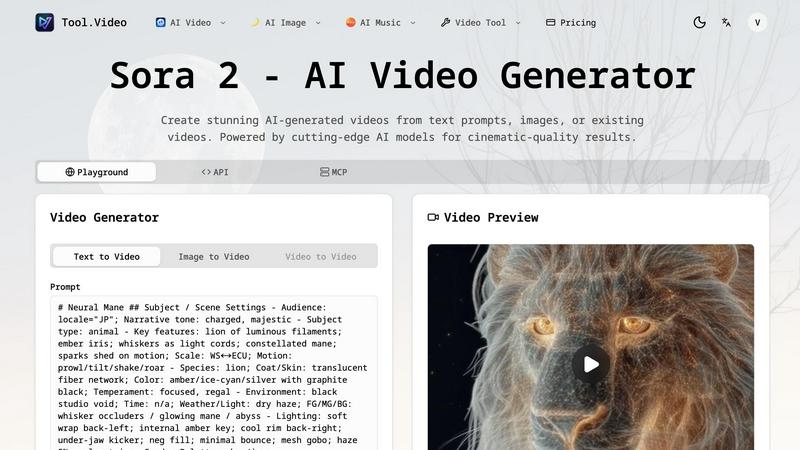
About Tool.Video
Tool.Video is a cutting-edge, all-in-one AI video generation platform that caters to the needs of creators, marketers, and developers. This innovative tool integrates a suite of advanced AI technologies, including Sora 2 for text-to-video generation, Nano Banana Pro for high-quality image creation, and Suno 5 for professional music composition. The primary value proposition of Tool.Video lies in its ability to streamline the content creation process, enabling users to generate realistic videos from text prompts, craft stunning visuals, and produce customized soundtracks. By consolidating multiple AI capabilities into a single user-friendly interface, Tool.Video enhances productivity, reduces the time and costs typically associated with traditional content creation methods, and drives user engagement. Furthermore, with robust API support, the platform allows seamless integration into existing workflows, empowering users to elevate their projects with state-of-the-art technology.
Features of Tool.Video
Sora 2 Video Generation
Sora 2 is Tool.Video's advanced text-to-video AI model, enabling users to create realistic and dynamic videos from simple text prompts. With its natural motion capabilities and stunning visual quality, Sora 2 transforms written content into engaging video narratives that resonate with viewers.
Nano Banana Pro
Nano Banana Pro offers high-quality image generation through both text-to-image and image-to-image modes. This feature allows users to create unique and visually captivating content in mere seconds, ensuring that the imagery enhances the overall narrative of their videos.
AI Music Generation with Suno 5
Suno 5 is a professional-grade AI music generator that produces customized soundtracks complete with lyrics, melodies, and arrangements in any genre. This feature empowers users to elevate their videos with tailored audio, enhancing viewer engagement and emotional connection.
Video Thumbnail Generator
The Video Thumbnail Generator automatically creates eye-catching thumbnails that are essential for boosting engagement and click-through rates. By using smart composition techniques, the tool selects the most compelling frames, ensuring that each video stands out in crowded feeds.
Use Cases of Tool.Video
Content Creation for Social Media
Marketers and social media managers can leverage Tool.Video to produce high-quality video content quickly, helping them maintain an active online presence. The ability to generate videos from text prompts allows for rapid production of promotional material, enhancing brand visibility.
Educational Video Production
Educators can utilize Tool.Video to create instructional videos that engage students. By transforming complex topics into visually stimulating narratives, educators can improve comprehension and retention, making learning more effective.
Advertising and Marketing Campaigns
Businesses can generate professional-quality advertisements in minutes using Tool.Video's AI TVC generator. This feature allows marketers to create compelling ads that capture attention and drive conversions, maximizing the return on their advertising investments.
Personal Projects and Creative Endeavors
Content creators, including vloggers and artists, can harness the full potential of Tool.Video to bring their creative visions to life. Whether crafting a travel vlog or producing a short film, the platform simplifies the process, making it accessible to creators of all skill levels.
Frequently Asked Questions
What types of videos can I create with Tool.Video?
Tool.Video allows users to create a variety of video types, including promotional content, educational videos, travel vlogs, and personal projects, all generated from text prompts or existing content.
Is Tool.Video user-friendly for beginners?
Yes, Tool.Video is designed with user experience in mind, offering a simple and intuitive interface that enables beginners to navigate the platform and create professional-quality videos without prior experience.
Can I integrate Tool.Video with my existing tools?
Absolutely. Tool.Video provides robust API support, allowing seamless integration with other platforms and tools, which enhances workflow efficiency and collaboration.
What kind of support does Tool.Video offer?
Tool.Video offers comprehensive support, including tutorials, user guides, and customer service, ensuring that users can maximize the potential of the platform and resolve any issues they may encounter.
Explore more in this category:
Similar to Tool.Video

Two-person AI video concept in a warm orange recording booth with one shared microphone.

Generate original duet clips or portraits from two consenting adults’ photos; browser workflow with paid credits.

Create videos from text, images, or references with Happy Horse AI flexible model and API workflows.

Create high-quality Hailuo AI videos from text or images with guided prompts, camera controls, flexible settings, task tracking, and downloads.

Motiofy is an AI creative workspace that helps creators and teams turn ideas into polished visual stories.

Turn podcasts, narration, voice recordings, or music into visual content with Audio to Video AI.

Kling AI video generator with text, image, motion control, lip sync, and API workflows.
