
Refbox
Refbox enhances your creative workflow by providing instant access to reference images and notes right above your.
Visit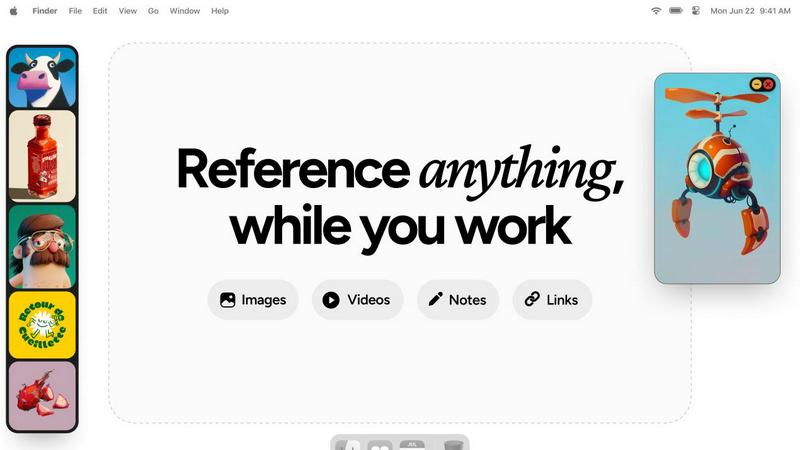
About Refbox
Refbox is a cutting-edge floating reference application specifically designed to enhance the productivity of creative professionals. By delivering an always-on-top visual workspace, Refbox allows users to pin essential media—such as images, GIFs, videos, and markdown notes—over any active application window. This feature is particularly beneficial for 3D artists, animators, UI/UX designers, illustrators, and photographers, who often require uninterrupted access to their reference materials. The main value proposition of Refbox lies in its ability to significantly reduce cognitive load and context-switching delays, leading to a measurable increase in focus and efficiency. By minimizing the disruptive need for constant alt-tabbing or window management, Refbox enables professionals to stay in their workflow, resulting in faster project completion times, higher accuracy, and a streamlined creative process. This all-in-one platform consolidates various tools into a single, organized ecosystem, ensuring that all reference assets are instantly accessible, meticulously categorized, and fully interactive from the desktop layer.
Features of Refbox
Floating Reference Frames
Refbox enables users to create resizable floating frames that can be placed over any application, ensuring that reference materials remain visible while working. This functionality eliminates the need for constant window switching, allowing professionals to maintain focus on their tasks.
Infinite Canvas
With Refbox, users can interact with an infinite canvas that allows for an expansive view of their reference materials. The ability to flip through items like a slideshow promotes quick comparisons and enhances the creative process, making it easier to visualize multiple references simultaneously.
Auto-Hide Functionality
Refbox includes an auto-hide feature that allows users to minimize distractions by keeping the reference box hidden until needed. This ensures that the workspace remains clutter-free and organized, enabling users to focus solely on their creative tasks without unnecessary interruptions.
Interactive Notes and GIF Playback
The platform supports interactive markdown notes that can include text styling and checklists, making it easy for users to jot down ideas or instructions. Additionally, GIF playback allows users to step through each frame, providing a dynamic way to analyze motion and behavior within their visual references.
Use Cases of Refbox
Efficient Moodboarding
Designers can use Refbox to create moodboards by pinning various visual inspirations directly on their desktop. This functionality allows for easy access and quick adjustments to the moodboard as they refine their creative vision, significantly speeding up the brainstorming process.
Streamlined Animation Workflow
Animators can take advantage of Refbox by keeping their reference images and videos visible while working in animation software. This allows them to view key poses or motion references without interrupting their workflow, leading to improved accuracy and efficiency in animation production.
Enhanced UI/UX Design
UI/UX designers can utilize Refbox to store and organize design references, user feedback, and inspiration in one accessible location. This ensures that they have quick access to everything they need for their design process, facilitating a smoother workflow from concept to completion.
Comprehensive Artistic Reference
Artists can leverage Refbox to maintain a library of reference images, color palettes, and instructional materials at their fingertips. This comprehensive organization of resources allows for a more focused and productive approach to their art creation, enhancing both creativity and execution.
Frequently Asked Questions
How does Refbox improve productivity?
Refbox enhances productivity by reducing the need for constant window switching, allowing users to keep their reference materials visible and accessible. This results in less cognitive load and allows professionals to maintain their workflow without disruptions.
Can I customize the layout of my references?
Yes, Refbox allows users to create resizable floating frames that can be positioned anywhere on the screen. This customization ensures that users can arrange their reference materials in a way that best suits their workflow.
Is Refbox compatible with all applications?
Refbox is designed to be compatible with any application that runs on your desktop. By pinning reference materials over active windows, it seamlessly integrates into various workflows across different creative disciplines.
What types of media can I use with Refbox?
Users can pin a variety of media types in Refbox, including images, GIFs, videos, and markdown notes. This versatility allows for a comprehensive visual workspace tailored to the specific needs of creative professionals.
Explore more in this category:
Similar to Refbox

AI Email Filter sorts incoming mail into folders using plain-language prompts you write. Works with any IMAP mailbox; bring your own LLM if you want.

Free collection of online developer utilities, code formatters, and digital converters designed to streamline your daily workflow.

The #1 Native Form Builder Plugin for Framer - No Code, No Embeds, No External Platforms.

A free launch checklist for SaaS, apps, AI tools and more. Every step says why it matters and when you can skip it.

Prompt-based Qwen Image Edit Online for background changes, text edits, product images, posters, outpainting, and creative workflows.

Practical, independent guides to home repairs, maintenance, costs, troubleshooting, and everyday fixes.

Highlight faster. Study in flow with custom shortcuts and a workflow built around you. Print smarter, or turn any page into a tiled poster.
