
ProcessSpy
ProcessSpy delivers enterprise-grade macOS process monitoring to boost IT productivity and optimize system resource allocation.
Visit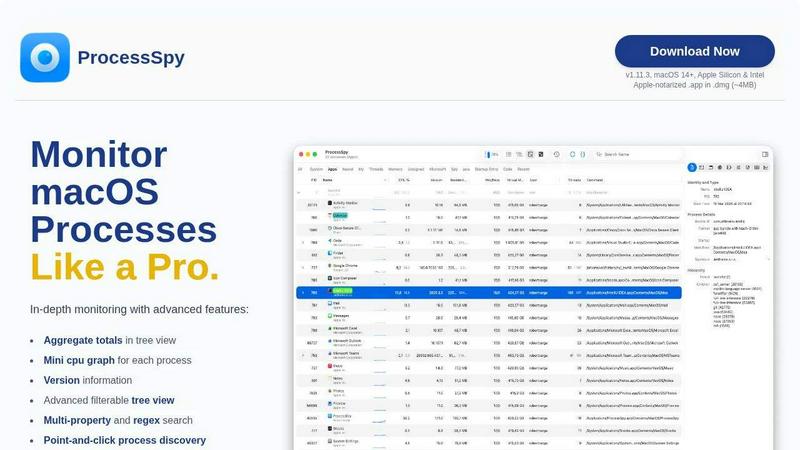
About ProcessSpy
ProcessSpy is a professional-grade process exploration and system monitoring utility engineered exclusively for macOS. It serves as a powerful, native alternative to the built-in Activity Monitor, designed for IT administrators, software developers, DevOps engineers, and security professionals who require deep visibility into their macOS systems. The core value proposition of ProcessSpy lies in its ability to reveal critical operational data that standard tools hide, thereby transforming system management from reactive troubleshooting to proactive oversight. By providing granular insights into process hierarchies, resource consumption, open files, environment variables, and application signatures, ProcessSpy empowers organizations to enhance system stability, accelerate debugging cycles, and enforce security compliance. Its native architecture ensures optimal performance and seamless integration with the macOS ecosystem, delivering a responsive and efficient tool that directly contributes to reduced mean time to resolution (MTTR) and improved operational productivity.
Features of ProcessSpy
Advanced Hierarchical Process Tree
ProcessSpy visualizes all running processes in an intuitive, collapsible tree view that mirrors their parent-child relationships. This hierarchy is not just visual; it includes aggregate totals for CPU usage, memory footprint, and thread counts for entire application families. This feature allows administrators to instantly identify which parent process is responsible for resource consumption, enabling precise resource management and cost attribution in shared or virtualized environments, leading to more efficient infrastructure utilization.
Multi-Property and Regex Search
Move beyond simple name matching. ProcessSpy's powerful search function supports regular expressions and simultaneous queries across multiple process properties. For instance, you can search for processes containing "nginx" in the name AND "worker_process" in the command-line arguments. This precision drastically reduces the time spent sifting through hundreds of processes, streamlining forensic analysis, security audits, and performance investigations for technical teams.
JavaScript-Based Filtering Engine
For complex, dynamic monitoring scenarios, ProcessSpy offers a programmable filtering system using JavaScript. Users can write custom scripts to filter processes based on any available property, such as CPU usage thresholds, specific entitlements, or recent startup times. This extensibility allows organizations to create tailored monitoring dashboards and automated alerts for specific applications or abnormal system behaviors, enhancing operational intelligence.
Comprehensive Process Context & Export
ProcessSpy provides a centralized pane of detailed context for any selected process, including version information, open network connections, loaded dynamic libraries (Dylibs), and open files. All this data can be exported to JSON format for external analysis, reporting, or integration with other IT management systems. This facilitates audit trails, compliance documentation, and collaborative troubleshooting across different technical teams.
Use Cases of ProcessSpy
Enterprise Security Auditing and Compliance
Security teams can utilize ProcessSpy to conduct thorough system audits. The ability to inspect entitlements, Info.plist contents, bundle IDs, and signature information for every process helps verify software integrity and detect unauthorized or malicious applications. Recording process history and remembering finished processes creates an invaluable forensic log for post-incident analysis, directly supporting compliance with security frameworks.
Software Development and Debugging
Developers working with multiple runtime instances (e.g., several Java applications on different JDK versions) use ProcessSpy to cut through ambiguity. By displaying full command-line paths, environment variables, and version details, it instantly distinguishes between identical process names. This clarity accelerates debugging, memory leak identification, and dependency conflict resolution, significantly reducing development cycle times.
IT System Administration and Performance Tuning
System administrators leverage the aggregate resource totals in the tree view and the mini CPU graphs to pinpoint resource-hogging applications and their sub-processes. The "Launched By" information helps trace daemons and agents back to their source. This deep insight is critical for proactive performance tuning, capacity planning, and swiftly terminating unresponsive processes that impact user productivity.
DevOps and CI/CD Pipeline Monitoring
In automated environments, ProcessSpy's ability to flag newly discovered processes and record historical CPU/memory data is vital. DevOps engineers can monitor the behavior of applications spawned by CI/CD pipelines, export performance metrics to CSV for trend analysis, and use JavaScript filters to create custom alerts for anomalous behavior, ensuring pipeline reliability and application performance stability.
Frequently Asked Questions
Is ProcessSpy safe for use on corporate-managed Macs?
Yes, ProcessSpy is engineered for enterprise environments. It is Apple-notarized and distributed as a cryptographically signed application within a DMG disk image. This guarantees the software has not been altered and is safe to run on both Intel and Apple Silicon Macs, meeting standard corporate security software requirements.
How does ProcessSpy differ from the native macOS Activity Monitor?
ProcessSpy provides a significantly deeper level of system insight tailored for technical professionals. Key differentiators include displaying full command-line arguments and paths, showing aggregate resource usage in hierarchy view, advanced multi-property search, and access to advanced metadata like entitlements and environment variables (paid features). It transforms generic monitoring into actionable, detailed intelligence.
What is the licensing model for the advanced paid features?
A one-time license fee unlocks all advanced features permanently. This license is priced at $24.99 and is per user, not per machine, allowing the licensed individual to use ProcessSpy on an unlimited number of their own devices. The license includes lifetime access to all future updates and new features, providing a strong return on investment.
Can ProcessSpy monitor processes in real-time and log historical data?
Yes, the core application provides real-time monitoring with auto-refreshing data. The licensed version unlocks the powerful "Process History Recording" feature, which logs historical values for CPU, memory, and thread counts over time. This historical data, including aggregate totals, can be exported to CSV for detailed performance analysis and capacity planning reports.
Similar to ProcessSpy

Jev turns text or JSON into Choice, Score and Noul answers with probabilities. Build decision flows and call the API.

Face recognition API, a drop-in replacement for AWS Rekognition. Index, search, compare and detect faces, billed per photo with no subscription.

Search 20,000+ open-source and SaaS tools by the job you need done or the app you want to replace.

Moderation, routing, intent and scoring for any text over one Jev-compatible API, hosted in the EU.

Free directory of 950+ projects built on Laya, the open-source model that turns text into typed decisions in milliseconds.

A free browser-based toolkit for creating, cutting, converting, and previewing sprite sheet animations.

The #1 Native Form Builder Plugin for Framer - No Code, No Embeds, No External Platforms.
