
Easymotion - AI Motion Graphic Generator
Easymotion turns static images, data, and ideas into professional motion graphics and map animations in minutes, helping teams ship 3x more projects.
Visit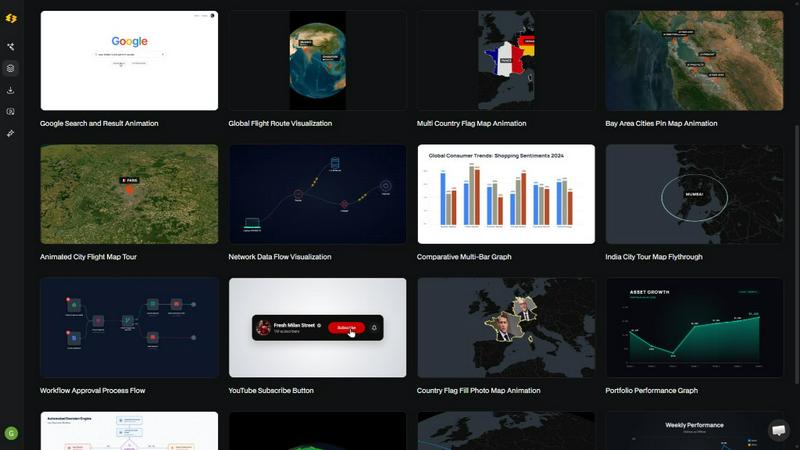
About Easymotion - AI Motion Graphic Generator
Easymotion is an enterprise-grade AI motion graphics generator and map animation platform designed to eliminate the bottleneck of complex video production for content creators, video editors, marketing teams, founders, and data storytellers. The platform enables users to transform ideas, static files, and raw data into polished, professional animated videos without requiring expertise in traditional timeline-based editing software like Adobe After Effects. By leveraging conversational AI, Easymotion reduces video production time from hours to under five minutes per asset, delivering a measurable return on investment through increased output and reduced reliance on external design resources. The platform supports a comprehensive range of motion graphics formats, including SaaS product promotions, animated flowcharts, dynamic data charts, UI explainer videos, interactive quizzes, and geographic storytelling visuals. Additionally, Easymotion functions as a specialized map animation maker for creating flight route visualizations, location pin animations, flag fill highlights, and other geographic narratives. Users can initiate projects by typing a natural language prompt, uploading an image for animation, converting spreadsheet data from CSV or XLSX files into animated charts, or transforming PDF documents into animation-ready scenes. After generation, users refine their animations through an intuitive chat interface, adjusting colors, pacing, labels, layout, and visual style with simple text commands. The platform also includes a premium template library with proven motion graphics layouts for maps, charts, social media content, and interface animations, which can be customized for brand consistency. Export options include MP4 and MOV formats, with support for transparent background videos containing alpha channels for seamless integration into existing editing workflows. Easymotion supports multiple aspect ratios including 16:9 for YouTube and landscape content, 9:16 for TikTok and Instagram Reels, 1:1 for square social posts, and 4:5 for feed-friendly vertical formats, ensuring optimized delivery across all major distribution channels.
Features of Easymotion - AI Motion Graphic Generator
Static Design to Animation
Upload any static image, such as a product screenshot, infographic, or brand graphic, and let the AI automatically animate it with professional motion effects. This feature eliminates the need for manual keyframing and complex animation curves, converting hours of tedious work into a few seconds of processing time. The AI analyzes the visual elements and applies appropriate motion paths, transitions, and effects to create engaging, polished animations that maintain brand integrity and visual quality.
Map Animations Made Easy
Create sophisticated geographic animations including flight routes, location pins, country flag highlights, and globe fly-throughs with simple text commands. The AI handles the complex geospatial rendering, allowing users to specify starting points, destinations, and visual styles without any GIS or animation software knowledge. This feature is particularly valuable for travel content, global business presentations, logistics visualizations, and educational geographic storytelling that requires accurate and visually compelling map representations.
Data to Animated Visuals
Upload CSV or XLSX spreadsheet files and let the AI automatically transform raw data into animated bar charts, line graphs, pie charts, and other data visualizations. The platform interprets the data structure, creates appropriate visual representations, and applies animation timing to reveal insights progressively. This capability enables data analysts, marketers, and business leaders to create compelling video content that drives engagement, with video posts achieving up to five times more engagement compared to static chart images.
Customize and Export with Transparency
Edit every element of the generated animation including text, logos, colors, and visual assets to ensure complete brand alignment. The platform supports transparent background export with alpha channels, allowing users to drop the final video directly into any editing software such as Adobe Premiere Pro, Final Cut Pro, or DaVinci Resolve. This feature is essential for professional video editors and marketing teams who need to maintain consistent branding across multiple video projects and integrate motion graphics seamlessly into larger productions.
Use Cases of Easymotion - AI Motion Graphic Generator
Social Media Video Production for Marketers
Marketing teams can create and iterate on brand-consistent video content for TikTok, Instagram Reels, YouTube, and LinkedIn without waiting for designers or freelancers. The platform enables same-day campaign execution by allowing marketers to generate motion graphics, animate product features, and create promotional videos directly in the browser. This reduces the typical back-and-forth email cycle and eliminates dependency on external creative resources, enabling faster campaign launches and more agile content strategies.
Data Storytelling for Analysts and Researchers
Data professionals can transform static charts and spreadsheet data into animated visualizations that capture audience attention on social media and in presentations. By converting quarterly reports, research findings, or performance metrics into animated bar charts and line graphs, analysts can communicate insights more effectively and drive higher engagement. Video content featuring animated data visualizations consistently outperforms static images, making this use case essential for organizations focused on data-driven marketing and thought leadership.
Geographic Content Creation for Travel and Logistics
Travel creators, logistics companies, and educational content producers can build multi-stop travel route animations, flight path visualizations, and location-based stories without specialized mapping software. The AI handles complex geospatial rendering and animation, allowing users to create compelling geographic narratives for travel vlogs, supply chain presentations, or historical documentaries. This capability reduces production time from hours to minutes while maintaining professional quality and geographic accuracy.
Product Explainer Videos for SaaS Companies
Software companies and startups can quickly produce animated product demos, UI explainers, and feature highlight videos to showcase their applications. By uploading screenshots or describing features in natural language, teams can generate polished motion graphics that demonstrate workflows, user interfaces, and value propositions. This enables startups to build their social media presence and product marketing materials without hiring expensive freelancers or investing in complex animation software, resulting in faster go-to-market timelines and reduced customer acquisition costs.
Frequently Asked Questions
What is Easymotion and how does it work?
Easymotion is an AI-powered motion graphics generator that enables users to create professional animated videos by chatting with artificial intelligence. The process works in three simple steps: first, describe the animation you want in plain English or upload an image, spreadsheet, or PDF; second, refine the result using chat commands to adjust colors, timing, map styles, or visual assets; third, export your completed video as MP4 or with a transparent background for use in any editing software. The AI handles all keyframes, animation curves, and rendering automatically, eliminating the need for complex software like Adobe After Effects.
What types of videos can I create with Easymotion?
You can create a wide variety of motion graphics including map animations with flight routes and location pins, animated data visualizations from spreadsheets, social media videos optimized for TikTok, Instagram Reels, and YouTube, product demo and UI explainer videos, flowchart and process animations, and animated charts and graphs. The platform supports multiple aspect ratios including 16:9, 9:16, 1:1, and 4:5, ensuring your content is optimized for every major distribution channel and social media platform.
How long does it take to create a video with Easymotion?
Most videos can be created in under five minutes from start to finish. The AI generates the initial animation within seconds of receiving your prompt or file upload, and subsequent refinements through chat commands take only moments. This represents a dramatic reduction from traditional motion graphics workflows, which often require hours or even days of manual keyframing and editing. Creators report completing up to three times more projects compared to using traditional animation software.
What export formats and options are available?
Easymotion supports export as MP4 and MOV video formats. A key professional feature is the ability to export videos with transparent backgrounds using alpha channels, allowing direct integration into editing software such as Adobe Premiere Pro, Final Cut Pro, and DaVinci Resolve. The platform also supports multiple aspect ratios including 16:9 for YouTube and landscape content, 9:16 for TikTok and Instagram Reels, 1:1 for square social posts, and 4:5 for feed-friendly vertical formats, ensuring your videos are ready for any platform without additional editing.
Similar to Easymotion - AI Motion Graphic Generator

Clone any webpage pixel-perfect, export HTML/CSS/ZIP or React/Vue components.

All-in-one AI workspace to generate images, videos, and audio with multiple leading AI models.

An adaptive AI tutor that turns topics or your materials into courses, lessons, and answers tailored to how you learn.

Generate iOS and Android app icons from any image and export all platform sizes for free.

Create images and edit photos with AI using prompts and references for backgrounds, outfits, product photos and social graphics.

AI-assisted social campaign preparation with captions, previews & scheduling


Create and edit AI images, generate videos, and compare models in one creative workbench.