
ButterKit
ButterKit accelerates app store localization workflows by automating multilingual screenshot and metadata creation to boost global conversion rates.
Visit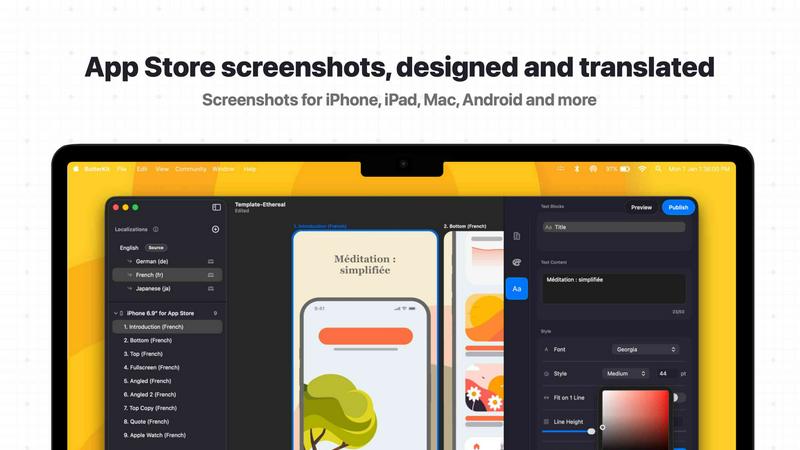
About ButterKit
ButterKit is a purpose-built native macOS application engineered to radically simplify and automate the App Store publishing workflow for Apple developers, design studios, and marketing agencies. At its core, ButterKit addresses the most time-consuming and error-prone aspects of app store optimization: creating photorealistic screenshots, managing multilingual metadata, and streamlining the upload process to App Store Connect. The product eliminates the need for complex design tools or manual translation workflows by integrating directly with Xcode Simulator, allowing users to capture screenshots effortlessly and place them into high-fidelity 3D device frames. ButterKit leverages advanced AI models to translate app metadata into all 50 App Store Connect languages in seconds, ensuring global reach without manual localization overhead. Its seamless integration with the App Store Connect API enables one-click uploads of polished screenshots and metadata, reducing publishing cycles from hours to minutes. Designed by a solo developer for fellow developers, ButterKit supports folder-linked input and output, making it a natural fit for CI/CD pipelines and Fastlane workflows. The product empowers teams to maintain brand consistency across all localizations while dramatically improving conversion rates through professional, device-framed imagery. With thousands of developers worldwide relying on ButterKit, it has become an essential tool for any organization seeking to maximize app store visibility and user acquisition efficiency.
Features of ButterKit
Intuitive Screenshot Capture and 3D Device Framing
ButterKit transforms the tedious process of creating App Store screenshots into a fluid, efficient workflow. Users can drag and drop PNG or JPG images directly onto photorealistic 3D device frames, or capture screenshots directly from the Xcode Simulator with a single click. Unlike web-based tools, ButterKit integrates natively with Xcode and Simulator, enabling rapid iteration and real-time design adjustments. The application is built on Apple's Metal framework, ensuring high-performance rendering at up to 120fps, which allows for instant feedback on edits like device rotation, background adjustments, and panoramic spanning across multiple artboards. This feature alone can reduce screenshot production time by over 80%, freeing developers to focus on core product development.
AI-Powered Multi-Language Translation
ButterKit eliminates the traditional bottleneck of app localization by using advanced AI models to translate app metadata and on-screen text into all 50 App Store Connect languages simultaneously. The translation process is instantaneous, maintaining design consistency across every localization. Designs remain fully synced across languages, meaning any update to the base language automatically propagates to all translations without manual intervention. This capability is critical for enterprises targeting global markets, as it removes the need for external translation services or in-house linguists, reducing localization costs by up to 90% and accelerating time-to-market for international launches.
Seamless App Store Connect Integration and Publishing
ButterKit integrates directly with the App Store Connect API, enabling users to upload finalized screenshots and localized metadata with a single click. The platform automatically organizes images in the correct order and format required by Apple, eliminating manual sorting and validation errors. Users can batch export high-resolution images or publish directly from within the application, with full preview capabilities to see how the app's story will appear on every device and in every language before going live. This integration reduces the risk of submission rejections due to formatting issues and cuts the publishing workflow from hours to minutes, directly impacting revenue by accelerating app update cycles.
Professional Design Tools and Template Marketplace
ButterKit provides a comprehensive suite of design tools that rival dedicated graphic software, including full font, gradient, and background editing controls. Users can choose from professionally designed templates bundled with the application or access a growing community marketplace of templates and add-ons. The 3D rendering engine supports high-resolution device frames that are fully adjustable, allowing for photorealistic presentations that drive higher conversion rates. For enterprise teams, the ability to create and save custom templates ensures brand consistency across multiple apps and product lines, while the folder-linking capability integrates seamlessly with CI/CD pipelines and Fastlane workflows for automated screenshot generation from Xcode UI tests.
Use Cases of ButterKit
Accelerating Global App Launches for Enterprise Teams
Enterprise development teams managing multiple apps across international markets use ButterKit to streamline their localization and publishing workflows. By translating metadata and screenshots into all 50 App Store languages simultaneously, teams can launch new apps or updates in global markets within a single day rather than weeks. The one-click upload to App Store Connect eliminates manual handoffs between design, localization, and publishing teams, reducing operational overhead and minimizing the risk of errors that could delay releases.
Automating Screenshot Generation in CI/CD Pipelines
Development teams leveraging continuous integration and deployment pipelines integrate ButterKit with Fastlane and Xcode UI tests to automate the entire screenshot generation process. By linking folders of test-generated images, ButterKit automatically applies 3D device frames, localizes text, and prepares assets for upload. This automation ensures that every build iteration has fresh, accurate screenshots without manual intervention, enabling faster release cycles and reducing the burden on QA and design resources.
Optimizing App Store Conversion Rates for Marketing Agencies
Marketing agencies specializing in app store optimization use ButterKit to create high-impact, photorealistic screenshots that significantly improve conversion rates. The ability to quickly iterate on designs, apply professional templates, and preview how screenshots appear across different devices and languages allows agencies to A/B test visual strategies efficiently. Clients report substantial improvements in download rates after switching to ButterKit-generated assets, directly impacting revenue and user acquisition metrics.
Managing Multi-Product Portfolios for Design Studios
Design studios managing portfolios of client apps use ButterKit's template and folder-linking capabilities to maintain brand consistency while scaling production. The platform's ability to sync designs across all localizations ensures that updates to a client's visual identity are applied globally in minutes. Studio teams can create reusable templates for different industries or app categories, dramatically reducing the time required to produce polished assets for new client engagements and enabling more competitive pricing through operational efficiency.
Frequently Asked Questions
How does ButterKit integrate with Xcode and the Simulator?
ButterKit provides a dedicated Capture Tool that integrates directly with Xcode and the iOS Simulator. Unlike web-based alternatives, this native integration allows users to capture screenshots from the Simulator with a single click, without needing to save images manually or switch between applications. The tool supports rapid iteration, enabling developers to adjust app state or UI elements and immediately capture updated screenshots, reducing the design cycle from minutes to seconds.
Can ButterKit handle screenshots generated by Fastlane or Xcode UI tests?
Yes, ButterKit is designed to work seamlessly with automated screenshot generation workflows. Users can link entire folders of images produced by Fastlane or Xcode UI tests, and ButterKit will automatically process all screenshots, apply 3D device frames, and handle localization. This makes it an ideal component in CI/CD pipelines, ensuring that every build has up-to-date, professionally framed screenshots without manual intervention.
How does the AI translation feature work and how accurate is it?
ButterKit uses advanced AI models to translate app metadata and on-screen text into all 50 App Store Connect languages. The translation is performed instantly within the application, with designs remaining fully synced across all languages. While the AI provides high-quality translations suitable for most use cases, users retain full control to review and edit any translated text before publishing. This feature reduces localization time from weeks to seconds and eliminates the need for external translation services.
What file formats and image resolutions does ButterKit support?
ButterKit supports standard PNG and JPG image formats for screenshot input. The application outputs high-resolution images that meet Apple's strict App Store requirements, including all required device sizes and aspect ratios. The 3D rendering engine, built on Metal, ensures that final exports are crisp and photorealistic, with support for up to 120fps rendering during editing for a smooth user experience.
Similar to ButterKit

Moderation, routing, intent and scoring for any text over one Jev-compatible API, hosted in the EU.

Free directory of 950+ projects built on Laya, the open-source model that turns text into typed decisions in milliseconds.

The #1 Native Form Builder Plugin for Framer - No Code, No Embeds, No External Platforms.

Where modern software products get discovered, launched, and distributed. Explore verified AI tools, SaaS startups, and developer software.


Free online screen and monitor tester with 28+ display tests for dead pixels, colors, brightness, contrast, gamma, and more.
