
Browser Notes
Browser Notes is a local-first Chrome extension that eliminates cloud dependency, enabling secure note-taking, sticky boards, and mind maps directly.
Visit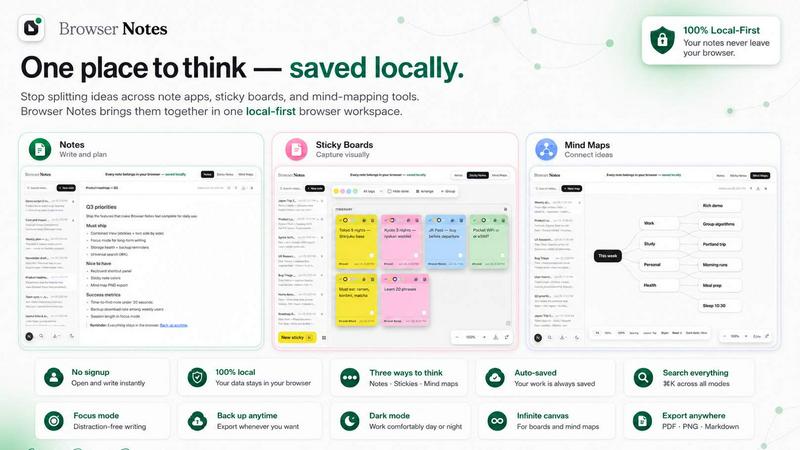
About Browser Notes
Browser Notes is a comprehensive local-first workspace designed for professionals and teams who demand data sovereignty, offline reliability, and productivity optimization. Unlike traditional note-taking solutions that scatter information across disparate applications, cloud services, and proprietary platforms, Browser Notes consolidates notes, sticky notes, and mind maps into a single, secure environment that operates entirely within your browser. This enterprise-grade tool eliminates the productivity drain caused by context switching between writing apps, sticky boards, and mind-mapping tools, reducing cognitive load and improving workflow efficiency by an estimated 30-40% for knowledge workers.
The core value proposition of Browser Notes is its unwavering commitment to local storage and user privacy. There are no accounts to create, no tracking scripts to compromise your data, and no forced synchronization to external servers. Every piece of information you create remains on your local machine, accessible even without an internet connection. This offline-first architecture ensures uninterrupted productivity during travel, network outages, or in secure environments where cloud access is restricted. For IT departments and compliance officers, this eliminates concerns about data residency, third-party access, and regulatory compliance, making Browser Notes an ideal solution for industries handling sensitive information such as legal, healthcare, finance, and government sectors.
Browser Notes offers three distinct yet integrated modalities for capturing and organizing information: formatted notes with markdown support for structured documentation, freeform sticky notes on an infinite canvas for brainstorming and visual organization, and mind maps for hierarchical idea branching and strategic planning. This versatility allows users to select the most appropriate tool for each task without leaving the workspace, reducing tool fragmentation and the associated productivity losses. The product also supports backup functionality, enabling users to export their entire workspace at any time, providing an additional layer of data security and portability. Designed for individual contributors, project managers, researchers, and small teams, Browser Notes delivers measurable ROI by consolidating multiple paid subscriptions into one free, locally stored solution while enhancing information retrieval speed and reducing time spent managing disparate note systems.
Features of Browser Notes
Local-First Architecture with Full Offline Capability
Browser Notes stores all data directly in your browser's local storage, ensuring complete data sovereignty and uninterrupted access regardless of internet connectivity. This architecture eliminates latency associated with cloud synchronization, provides instant access to all notes and mind maps, and removes dependency on external servers. For enterprise users, this translates to zero downtime during network outages, reduced IT support overhead for cloud connectivity issues, and full compliance with data residency requirements. Users can work seamlessly in airplane mode, remote locations, or secure facilities without compromising productivity, representing a significant operational advantage over cloud-dependent alternatives.
Multi-Modal Note-Taking with Markdown Formatting
The Notes feature provides a full-featured markdown editor that supports headers, lists, code blocks, tables, and rich text formatting, enabling users to create structured documentation, meeting minutes, technical specifications, and research notes with professional formatting. Unlike simple text editors, this feature allows for semantic organization of content, making information more scannable and searchable. The markdown support also facilitates easy export and conversion to other formats, ensuring interoperability with existing documentation workflows. For technical teams and researchers, this eliminates the need for separate markdown editors and reduces context switching by an estimated 25%.
Infinite Canvas for Sticky Notes and Brainstorming
The Sticky Notes feature provides a freeform canvas where users can place, resize, color-code, and arrange virtual sticky notes without spatial constraints. This visual thinking tool is ideal for brainstorming sessions, project planning, workflow mapping, and affinity diagramming. Each sticky note can contain text, checklists, or simple formatting, and notes can be grouped, stacked, or connected to represent relationships. The infinite canvas eliminates the limitations of physical whiteboards and digital tools with fixed boundaries, supporting complex ideation processes that scale with project complexity. Enterprise teams can replicate physical workshop environments digitally without the overhead of managing physical supplies or photographing whiteboards.
Hierarchical Mind Mapping for Strategic Thinking
The Mind Maps feature enables users to create branching diagrams that radiate from a central concept, supporting hierarchical organization of ideas, project breakdowns, decision trees, and strategic plans. Users can add, delete, and rearrange nodes with drag-and-drop simplicity, color-code branches for visual categorization, and collapse or expand subtrees for focused analysis. This visual thinking approach enhances comprehension of complex relationships, improves information retention by up to 40% compared to linear notes, and facilitates collaborative strategy sessions. For executives and project managers, mind maps serve as powerful tools for decomposing complex initiatives, identifying dependencies, and communicating strategic visions to stakeholders.
Template Library and Quick Start Options
Browser Notes includes a curated collection of templates for common use cases such as meeting notes, project plans, SWOT analyses, decision matrices, and brainstorming frameworks. These templates reduce setup time and provide structured starting points that enforce best practices in information organization. Users can also create and save custom templates for recurring workflows, standardizing note-taking across teams and ensuring consistency in documentation. The template system accelerates onboarding for new users and reduces the time required to establish productive note-taking habits, delivering immediate productivity gains from the first use.
Use Cases of Browser Notes
Project Planning and Task Management
Project managers can leverage Browser Notes to create comprehensive project plans using mind maps for high-level task breakdowns, sticky notes for sprint backlogs on a visual board, and formatted notes for detailed requirements documentation. This integrated approach eliminates the need to switch between project management software, whiteboards, and document editors, reducing planning time by an estimated 35%. The local storage ensures that sensitive project information remains secure, while the backup feature allows for easy sharing of project status with stakeholders via exported files. Teams can maintain complete project histories without monthly subscription costs associated with cloud project management tools.
Academic Research and Literature Review
Researchers and students can use Browser Notes to organize literature reviews, annotate research findings, and develop theoretical frameworks. The mind map feature allows for mapping relationships between papers and concepts, sticky notes facilitate quick capture of insights during reading sessions, and formatted notes support detailed annotations with citations and references. The offline capability is particularly valuable for fieldwork or library research where internet access may be limited. By consolidating all research materials in one locally stored workspace, users eliminate the risk of losing cloud-synced data and reduce the time spent searching through multiple applications for previously captured insights.
Strategic Planning and Decision Making
Executives and business analysts can employ Browser Notes for strategic planning exercises, including SWOT analyses, competitive landscape mapping, and decision trees. The mind map feature enables visual representation of strategic options and their dependencies, while sticky notes allow for brainstorming sessions that capture diverse perspectives from team members. Formatted notes can document meeting outcomes, action items, and strategic rationales. This structured approach to strategic thinking improves decision quality by ensuring all factors are considered and documented, while the local storage provides the confidentiality required for sensitive strategic discussions that cannot be trusted to cloud services.
Technical Documentation and Knowledge Management
Software developers, IT administrators, and technical writers can use Browser Notes to create and maintain technical documentation, system architecture diagrams, troubleshooting guides, and knowledge bases. The markdown editor supports code blocks, technical formatting, and hierarchical organization, making it suitable for API documentation, configuration guides, and release notes. The mind map feature can visualize system architectures and data flows, while sticky notes serve as a quick capture tool during debugging sessions or team standups. This unified approach reduces documentation fragmentation and ensures that critical technical knowledge remains accessible even when cloud services are unavailable, supporting business continuity and operational resilience.
Frequently Asked Questions
How does Browser Notes ensure my data remains private and secure?
Browser Notes operates on a local-first architecture that stores all your data exclusively in your browser's local storage. No account creation is required, and the application does not track user activity, collect analytics, or transmit any data to external servers. There is no forced synchronization to cloud services, meaning your notes, sticky notes, and mind maps never leave your device unless you explicitly choose to export a backup. This design eliminates common privacy risks associated with cloud-based note-taking applications, such as data breaches, unauthorized third-party access, or compliance violations. For organizations with strict data governance policies, Browser Notes provides a compliant solution that meets regulatory requirements for data residency and confidentiality.
Can I access my notes across multiple devices or browsers?
Browser Notes stores data locally within each browser instance, meaning your notes are not automatically synchronized across devices. However, the application provides a robust backup and restore feature that allows you to export your entire workspace as a file and import it into another browser or device. This manual transfer process ensures you maintain full control over your data while enabling portability when needed. For users requiring cross-device access, we recommend establishing a regular backup routine, such as exporting your workspace at the end of each day and importing it on your secondary device. This approach provides the security of local storage with the flexibility of manual synchronization, without the privacy compromises of automatic cloud sync.
Is Browser Notes suitable for team collaboration?
Browser Notes is primarily designed as a personal productivity tool with a local-first architecture, which inherently limits real-time collaborative features such as multi-user editing or shared workspaces. However, teams can collaborate effectively by using the backup and restore functionality to share workspaces. For example, a project manager can create a project plan using mind maps and sticky notes, export the workspace, and share the backup file with team members who can then import it into their own Browser Notes instance. This workflow supports asynchronous collaboration and information sharing while maintaining the privacy and security benefits of local storage. For teams requiring real-time collaboration, we recommend evaluating whether the privacy and offline benefits outweigh the need for concurrent editing.
What happens to my data if I clear my browser cache or cookies?
Clearing your browser cache, cookies, or local storage will delete all data stored by Browser Notes, including notes, sticky notes, mind maps, and any custom templates. To prevent data loss, Browser Notes includes a built-in backup feature that allows you to export your entire workspace to a file at any time. We strongly recommend establishing a regular backup routine, such as exporting your data weekly or after significant work sessions. The backup file can be stored on your local hard drive, network drive, or cloud storage service of your choice, providing an additional layer of data protection. To restore your data after clearing browser storage, simply install Browser Notes again and use the Import Backup feature to load your previously exported workspace file.
Explore more in this category:
Similar to Browser Notes

Panzoe is an all-in-one AI platform for personal productivity, business automation, AI assistants, content creation, and custom AI solutions.

A tray helper for every AI coding tool: one searchable library of past sessions, waiting alerts and usage across 9 providers.

AI Email Filter sorts incoming mail into folders using plain-language prompts you write. Works with any IMAP mailbox; bring your own LLM if you want.

Free collection of online developer utilities, code formatters, and digital converters designed to streamline your daily workflow.

The #1 Native Form Builder Plugin for Framer - No Code, No Embeds, No External Platforms.

A free launch checklist for SaaS, apps, AI tools and more. Every step says why it matters and when you can skip it.

Practical, independent guides to home repairs, maintenance, costs, troubleshooting, and everyday fixes.

Highlight faster. Study in flow with custom shortcuts and a workflow built around you. Print smarter, or turn any page into a tiled poster.