
HeyVid vs TinyFast
Side-by-side comparison to help you choose the right AI tool.

HeyVid AI streamlines content creation by generating professional videos and images to boost your team's productivity and ROI.
Last updated: April 4, 2026

Optimize images, videos, and documents locally on your Mac with TinyFast for fast, secure, and private file compression.
Last updated: February 28, 2026
Visual Comparison
HeyVid

TinyFast
Feature Comparison
HeyVid
Unified AI Model Marketplace
HeyVid provides a single point of access to over a dozen industry-leading AI video and image models, including Google Veo 3.1, OpenAI Sora 2, Kling AI, Midjourney, and Flux AI. This feature eliminates the need for businesses to manage multiple subscriptions and interfaces, centralizing workflow and ensuring teams can select the optimal model for each specific project requirement, whether it's cinematic quality, speed, or a particular artistic style, all from one dashboard.
Professional-Grade Video Generation Controls
The platform offers granular control for professional output, supporting resolutions up to 4K and multiple aspect ratios (16:9, 9:16). Advanced parameters like seed control for reproducible results, prompt translation, and custom watermarking allow businesses to maintain brand consistency and production standards. This level of control ensures generated content is ready for enterprise use in advertising, corporate communications, and digital campaigns without requiring extensive post-production.
End-to-End Creative Workflow Integration
HeyVid functions as a complete creative studio, integrating tools for AI video, image, voice, and music generation. This all-in-one approach streamlines the entire content pipeline from initial concept and storyboarding to final asset production. By consolidating these tools, HeyVid reduces context-switching for teams and accelerates project completion, turning comprehensive multimedia projects from complex orchestrations into simplified, sequential workflows within one platform.
Dedicated Solutions for Business Functions
The platform features tailored toolkits and templates for specific professional roles, including entrepreneurs, marketers, educators, and developers. These solutions provide guided workflows for creating pitch videos, product launch content, ad campaigns, training materials, and API-integrated demo videos. This business-focused design ensures that the AI output aligns with commercial objectives and industry-specific formats, driving higher utility and adoption across departments.
TinyFast
Batch & Drag-Drop Shrink
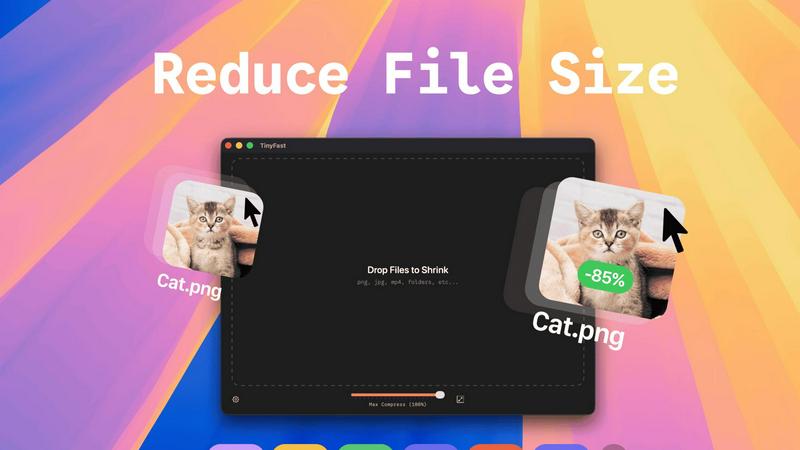
TinyFast enables users to drop entire folders into the application, allowing for the swift and efficient compression of multiple files simultaneously. This batch processing feature significantly reduces the time required for file optimization, making it ideal for users who need to manage large volumes of assets.
Blazing-Fast Compression
With optimized native engines built for speed, TinyFast provides blazing-fast compression capabilities that allow users to shrink large files in mere seconds. By eliminating the tedious waiting times associated with uploads and downloads, the app enhances workflow efficiency and productivity.
Resize Resolution
TinyFast includes an automatic resolution resizing feature for images and videos, allowing users to set specific dimensions for their assets. This functionality is essential for ensuring that files meet the requirements for various platforms and applications while maintaining visual quality.
100% Local & Private
TinyFast guarantees that all files remain on the user's device throughout the compression process, ensuring complete privacy and security. With no uploads to cloud servers, users can compress sensitive documents with confidence, knowing that their data is never exposed to external parties.
Use Cases
HeyVid
AI-Powered Marketing and Ad Campaigns
Digital agencies and marketing teams use HeyVid to rapidly produce high-volume, cost-effective video and image assets for social media ads, email marketing, and landing pages. The ability to quickly generate multiple visual variants for A/B testing allows for data-driven creative optimization, leading to improved click-through and conversion rates while slashing production budgets and timelines by up to 90% compared to traditional methods.
Dynamic Product Launch and Demo Content
Tech companies and entrepreneurs leverage HeyVid to create compelling product launch videos and dynamic software demos. By generating cinematic visuals and animations directly from product descriptions or screenshots, teams can build market anticipation and clearly communicate complex features without the need for expensive filming crews or animation studios, accelerating time-to-market for new offerings.
Scalable Educational and Training Material Production
Educational institutions and corporate training departments utilize HeyVid to transform curricula and manuals into engaging video tutorials and presentations. Instructors can convert text-based modules into visual and narrative-driven content, significantly improving knowledge retention and learner engagement while enabling the rapid scaling and updating of course materials to keep pace with evolving information.
Investor and Stakeholder Pitch Development
Startups and business development teams employ HeyVid to craft professional-grade pitch videos and brand story narratives. The platform enables the creation of visually stunning content that articulates a company's vision, mission, and value proposition to investors and stakeholders, enhancing credibility and emotional connection, which is critical for successful fundraising and partnership development.
TinyFast
Graphic Designers
Graphic designers can leverage TinyFast to compress large image files for web use, ensuring that their visuals load quickly without sacrificing quality. This optimization is crucial for enhancing user experience on websites and reducing bandwidth usage.
Video Editors
Video editors benefit from TinyFast by quickly compressing raw footage and exported videos, making it easier to share large files with clients or collaborators. The instant compression allows editors to maintain a smooth workflow without delays.
Content Creators
Content creators can use TinyFast to optimize images and videos for social media platforms, ensuring that their posts are visually appealing and load efficiently. This capability helps maintain a professional appearance across various channels.
Developers
Developers can integrate TinyFast into their asset management workflows, compressing various file types, including code and documentation. This ensures that applications load faster and consume less storage space, ultimately enhancing application performance.
Overview
About HeyVid
HeyVid is an enterprise-grade, all-in-one AI creative suite designed to transform business content production. It consolidates access to the world's most advanced AI video and image generation models into a single, streamlined platform. HeyVid empowers professionals across marketing, sales, education, and development to produce studio-quality video and image assets from simple text prompts or existing images, dramatically reducing production time from weeks to minutes. Its core value proposition lies in eliminating the traditional barriers of high cost, technical complexity, and lengthy timelines associated with professional media creation. By providing a unified dashboard to top models like Sora 2, Veo 3.1, Midjourney, and Flux AI, HeyVid ensures businesses can always leverage the best available technology without vendor lock-in. This results in a measurable ROI through increased content velocity, significant reduction in agency and production costs, and the ability to rapidly A/B test visual concepts for higher engagement and conversion rates.
About TinyFast
TinyFast is an innovative macOS application dedicated to providing efficient, local file compression tailored specifically for images, videos, and documents. Designed with developers, designers, and content creators in mind, TinyFast supports an extensive range of file formats, including PNG, JPEG, MP4, MOV, PDF, SVG, WebP, MP3, and GIF. Its core value proposition lies in the ability to perform file compression locally on the user's device, eliminating the need for potentially insecure uploads to external servers. This approach not only enhances user privacy but also significantly boosts efficiency, allowing users to drag and drop files for instant compression without compromising on quality. As a result, TinyFast distinguishes itself in a crowded market of online compression tools by prioritizing speed, security, and user privacy, enabling professionals to focus on their projects with peace of mind regarding data exposure.
Frequently Asked Questions
HeyVid FAQ
What AI models are available on HeyVid?
HeyVid provides access to a curated marketplace of top-tier AI models. For video generation, this includes models like Kling AI, Veo 3.1, Sora 2, Runway, and Pika AI. For image generation, available models encompass Midjourney, Flux AI, DALL-E, Stable Diffusion, and Ideogram. This aggregation ensures users have the best tool for any specific creative task without needing separate subscriptions.
Is content generated with HeyVid suitable for commercial use?
Yes, content generated through the HeyVid platform is designed for commercial use, enabling businesses to employ the videos and images in advertising, marketing, sales materials, and other corporate communications. Users should review the specific licensing terms of their chosen subscription plan and remain compliant with the platform's acceptable use policy regarding content subject matter.
How does HeyVid ensure consistent brand styling in generated assets?
HeyVid offers several features for brand consistency, including custom watermarking, seed control for reproducible visual styles, and advanced prompting techniques. For advanced users, the platform's detailed parameter controls allow teams to create and share prompt templates that encapsulate brand colors, tones, and compositional styles, ensuring a coherent look across all generated assets.
Can HeyVid be integrated into existing business workflows?
Absolutely. HeyVid is built with enterprise workflows in mind. Beyond its web studio, it offers API access for developers, allowing generated AI video and image capabilities to be embedded directly into custom applications, internal tools, or automated content pipelines for social media, e-commerce, and customer communication platforms.
TinyFast FAQ
How does TinyFast ensure file privacy?
TinyFast performs all file compressions locally on your device, meaning no files are uploaded to external servers. This design guarantees that your sensitive information remains secure and private.
What file formats does TinyFast support?
TinyFast supports a wide array of file formats, including images (PNG, JPEG, GIF, SVG), videos (MP4, MOV), documents (PDF, DOCX), code files (JS, CSS, JSON), and audio files (MP3), making it a versatile tool for various needs.
Is there a limit to the number of compressions I can perform?
With the free version of TinyFast, users can compress up to 5 files per day. However, with a lifetime plan or monthly subscription, users can enjoy unlimited local compressions, enhancing their productivity.
Can I try TinyFast before committing to a purchase?
Yes, TinyFast offers a 3-day trial period for the monthly subscription plan. This allows users to explore all features and determine if the application meets their needs before making a financial commitment.
Alternatives
HeyVid Alternatives
HeyVid is an all-in-one AI video and image generator positioned within the productivity and management software category. It enables businesses to create professional visual content rapidly, aiming to streamline marketing and communication workflows. Organizations often evaluate alternatives to such platforms for several strategic reasons. These include budget constraints, specific feature requirements like advanced editing or integration capabilities, and the need for solutions that align with existing enterprise technology stacks or compliance standards. When assessing an alternative, key considerations should include total cost of ownership, scalability to meet growing content demands, and measurable impact on team productivity and project ROI. The ideal platform should integrate seamlessly into your workflow, reducing production time while maintaining a high standard of output quality.
TinyFast Alternatives
TinyFast is a robust application designed for macOS that specializes in the local compression of images, videos, and documents. It falls into the category of tech tools aimed at enhancing productivity for developers, designers, and content creators by optimizing digital assets while ensuring data privacy. Users often seek alternatives to TinyFast for a variety of reasons, including pricing considerations, feature sets, compatibility with different operating systems, and specific performance needs that may not be fully met by TinyFast. When searching for an alternative, it is essential to evaluate the core functionalities that matter most to your workflow. Look for applications that offer similar batch processing capabilities, speed of compression, and the ability to maintain local privacy. Additionally, consider the range of file formats supported, ease of use, and any unique features that could enhance your productivity and asset management processes.