
Refbox vs Zovo
Side-by-side comparison to help you choose the right AI tool.

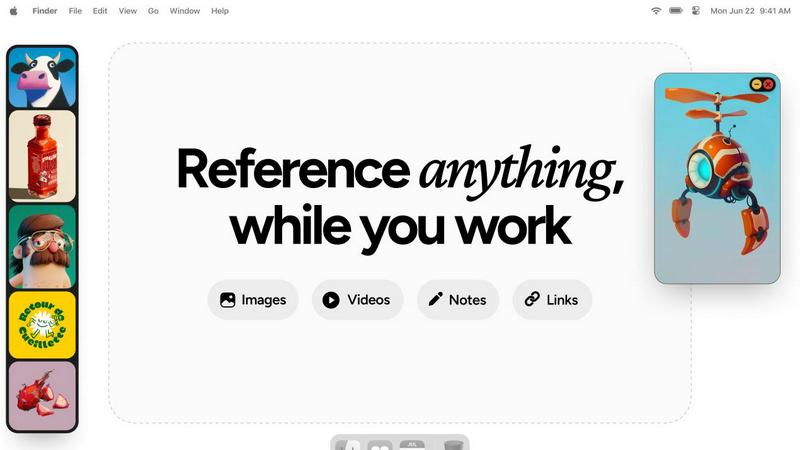
Refbox enhances your creative workflow by providing instant access to reference images and notes right above your.
Last updated: February 28, 2026

Unlock 20 privacy-focused Chrome extensions for developers and writers with Zovo, built by a solo developer for your.
Last updated: February 26, 2026
Visual Comparison
Refbox
Zovo

Feature Comparison
Refbox
Floating Reference Frames
Refbox enables users to create resizable floating frames that can be placed over any application, ensuring that reference materials remain visible while working. This functionality eliminates the need for constant window switching, allowing professionals to maintain focus on their tasks.
Infinite Canvas
With Refbox, users can interact with an infinite canvas that allows for an expansive view of their reference materials. The ability to flip through items like a slideshow promotes quick comparisons and enhances the creative process, making it easier to visualize multiple references simultaneously.
Auto-Hide Functionality
Refbox includes an auto-hide feature that allows users to minimize distractions by keeping the reference box hidden until needed. This ensures that the workspace remains clutter-free and organized, enabling users to focus solely on their creative tasks without unnecessary interruptions.
Interactive Notes and GIF Playback
The platform supports interactive markdown notes that can include text styling and checklists, making it easy for users to jot down ideas or instructions. Additionally, GIF playback allows users to step through each frame, providing a dynamic way to analyze motion and behavior within their visual references.
Zovo
BeLikeNative
BeLikeNative offers an instant rewrite feature that allows users to write like native speakers with just one keystroke. It supports 80 languages and works seamlessly across various platforms, making it an essential tool for students, professionals, and anyone needing to improve their writing efficiency.
Tab Suspender Pro
Tab Suspender Pro helps users manage their browser’s memory usage by automatically suspending inactive tabs. This feature utilizes smart detection to identify tabs that are not currently in use, thereby freeing up system resources and enhancing overall browser performance.
Clipboard History Pro
Clipboard History Pro ensures that users never lose copied text again by retaining a searchable history of up to 10,000 clips. This feature enables instant search and smart paste capabilities, making it ideal for professionals who frequently copy and paste information.
Form Filler Pro
Form Filler Pro simplifies the process of filling out online forms by allowing users to save multiple profiles and fill forms with a single click. This feature significantly reduces the time spent on repetitive tasks, making it particularly useful for online shoppers and anyone who frequently completes forms.
Use Cases
Refbox
Efficient Moodboarding
Designers can use Refbox to create moodboards by pinning various visual inspirations directly on their desktop. This functionality allows for easy access and quick adjustments to the moodboard as they refine their creative vision, significantly speeding up the brainstorming process.
Streamlined Animation Workflow
Animators can take advantage of Refbox by keeping their reference images and videos visible while working in animation software. This allows them to view key poses or motion references without interrupting their workflow, leading to improved accuracy and efficiency in animation production.
Enhanced UI/UX Design
UI/UX designers can utilize Refbox to store and organize design references, user feedback, and inspiration in one accessible location. This ensures that they have quick access to everything they need for their design process, facilitating a smoother workflow from concept to completion.
Comprehensive Artistic Reference
Artists can leverage Refbox to maintain a library of reference images, color palettes, and instructional materials at their fingertips. This comprehensive organization of resources allows for a more focused and productive approach to their art creation, enhancing both creativity and execution.
Zovo
Enhancing Writing Skills
BeLikeNative is perfect for non-native speakers and students who want to improve their writing skills. By providing instant rewrites, it helps users learn native expressions and phrases, thereby boosting their confidence in written communication.
Optimizing Browser Performance
Tab Suspender Pro is essential for users who often have multiple tabs open. By automatically suspending inactive tabs, it not only saves memory but also improves the browser's speed, resulting in a smoother user experience.
Managing Copied Text Efficiently
Clipboard History Pro is a game-changer for professionals who need to manage large volumes of text. By allowing users to search through their copied items quickly, it enhances productivity and makes information retrieval effortless.
Streamlining Online Forms
Form Filler Pro is invaluable for anyone who frequently fills out online forms, such as job applicants or e-commerce shoppers. Its one-click fill functionality saves time and reduces the frustration associated with repetitive data entry.
Overview
About Refbox
Refbox is a cutting-edge floating reference application specifically designed to enhance the productivity of creative professionals. By delivering an always-on-top visual workspace, Refbox allows users to pin essential media—such as images, GIFs, videos, and markdown notes—over any active application window. This feature is particularly beneficial for 3D artists, animators, UI/UX designers, illustrators, and photographers, who often require uninterrupted access to their reference materials. The main value proposition of Refbox lies in its ability to significantly reduce cognitive load and context-switching delays, leading to a measurable increase in focus and efficiency. By minimizing the disruptive need for constant alt-tabbing or window management, Refbox enables professionals to stay in their workflow, resulting in faster project completion times, higher accuracy, and a streamlined creative process. This all-in-one platform consolidates various tools into a single, organized ecosystem, ensuring that all reference assets are instantly accessible, meticulously categorized, and fully interactive from the desktop layer.
About Zovo
Zovo is a suite of 20 powerful Chrome extensions developed by Michael Lip, a seasoned solo developer with over a decade of experience and a remarkable track record of earning more than $400,000 on Upwork, all while maintaining a 100% success rate. The flagship extension, BeLikeNative, empowers over 3,300 users by enabling them to write like native speakers with a simple keystroke rewrite function, supporting 80 languages. This comprehensive suite includes various tools designed to enhance productivity and streamline everyday tasks, such as Tab Suspender Pro, JSON Formatter Pro, Clipboard History Pro, Form Filler Pro, and many more. Each extension is crafted with a privacy-first approach, ensuring that user data remains on their device without any form of data harvesting or investor interference. Zovo stands out by allowing users to actively participate in shaping the roadmap of features, fostering a community-driven environment where user feedback is valued. With new extensions released monthly and many tools available for free online, Zovo is the go-to solution for anyone looking to enhance their browsing experience while maintaining complete control over their data.
Frequently Asked Questions
Refbox FAQ
How does Refbox improve productivity?
Refbox enhances productivity by reducing the need for constant window switching, allowing users to keep their reference materials visible and accessible. This results in less cognitive load and allows professionals to maintain their workflow without disruptions.
Can I customize the layout of my references?
Yes, Refbox allows users to create resizable floating frames that can be positioned anywhere on the screen. This customization ensures that users can arrange their reference materials in a way that best suits their workflow.
Is Refbox compatible with all applications?
Refbox is designed to be compatible with any application that runs on your desktop. By pinning reference materials over active windows, it seamlessly integrates into various workflows across different creative disciplines.
What types of media can I use with Refbox?
Users can pin a variety of media types in Refbox, including images, GIFs, videos, and markdown notes. This versatility allows for a comprehensive visual workspace tailored to the specific needs of creative professionals.
Zovo FAQ
What makes Zovo different from other Chrome extension providers?
Zovo is unique because it is developed by a solo developer committed to privacy-first principles. Unlike many corporate solutions, Zovo does not engage in data harvesting or involve investors, ensuring that user data remains secure and private.
How can I request new features for Zovo extensions?
Users can submit feature requests directly to the developer. Every request is read and considered, and the most requested features are prioritized for development, promoting a community-driven approach to innovation.
Are Zovo extensions open source?
Yes, many of Zovo's extensions are open source, which allows users to inspect the code and contribute to the development process. This transparency fosters trust and collaboration within the user community.
Is there a support system in place for Zovo users?
Absolutely. Users can reach out directly to the developer via email or Discord for any questions or issues they encounter. This direct line of communication ensures prompt and personal support without the hassle of bots or ticket queues.
Alternatives
Refbox Alternatives
Refbox is a professional-grade floating reference application that enhances creative productivity by keeping essential reference images and notes visible above the workspace. It caters to a diverse range of creative professionals, such as 3D artists, animators, UI/UX designers, illustrators, and photographers, who need uninterrupted access to their visual materials. Users often seek alternatives to Refbox due to factors like pricing, specific feature sets, compatibility with different platforms, or unique workflow requirements. When choosing an alternative, it’s important to consider the core functionalities that align with your creative processes. Look for features that minimize workflow disruption, such as always-on-top capabilities, versatile organization modes, and ease of use. Additionally, evaluate the overall cost-effectiveness and whether the alternative can seamlessly integrate into your existing work environment, enhancing your productivity without added complexity.
Zovo Alternatives
Zovo is a suite of 20 privacy-first Chrome extensions tailored for developers and writers, designed to enhance productivity and management. With tools like JSON Formatter, Tab Suspender, and Clipboard History, Zovo enables users to streamline their workflows while maintaining a strong commitment to data privacy. Many users seek alternatives due to varying needs such as pricing, desired features, or compatibility with specific platforms. When considering an alternative, it is important to evaluate the range of features offered, the developer's track record, user feedback, and the overall commitment to privacy. Choosing the right alternative involves assessing which tools best align with your productivity goals while ensuring that they maintain a focus on user privacy. Look for solutions that provide clear value, a strong support system, and a transparent development process. This will help ensure that you not only find a suitable replacement but also enhance your workflow efficiency.