
Phishly vs Zovo
Side-by-side comparison to help you choose the right AI tool.

Phishly
Phishly leverages AI to swiftly detect phishing emails, enhancing security and productivity for Gmail users.

Unlock 20 privacy-focused Chrome extensions for developers and writers with Zovo, built by a solo developer for your.
Last updated: February 26, 2026
Visual Comparison
Phishly
Zovo

Feature Comparison
Phishly
AI-Powered Phishing Detection
Phishly utilizes cutting-edge artificial intelligence to analyze emails for various phishing indicators. This includes identifying suspicious domains, urgent language, and spoofed sender addresses, ensuring that users receive accurate assessments of potential threats.
Risk Assessment Classification
Upon scanning an email, Phishly provides a clear risk assessment categorized into Safe, Medium Risk, or High Risk. This classification helps users quickly understand the level of risk associated with an email, enabling them to take appropriate action.
User-Friendly Interface
The Phishly Chrome extension and web tool are designed with user experience in mind. With simple navigation and straightforward instructions, users can easily scan emails without needing any technical knowledge, making it accessible for everyone.
Privacy-Focused Analysis
Phishly respects user privacy by only analyzing emails that users explicitly choose to scan. This ensures that sensitive data remains confidential and only relevant information is processed, providing peace of mind for individuals and small businesses alike.
Zovo
BeLikeNative
BeLikeNative offers an instant rewrite feature that allows users to write like native speakers with just one keystroke. It supports 80 languages and works seamlessly across various platforms, making it an essential tool for students, professionals, and anyone needing to improve their writing efficiency.
Tab Suspender Pro
Tab Suspender Pro helps users manage their browser’s memory usage by automatically suspending inactive tabs. This feature utilizes smart detection to identify tabs that are not currently in use, thereby freeing up system resources and enhancing overall browser performance.
Clipboard History Pro
Clipboard History Pro ensures that users never lose copied text again by retaining a searchable history of up to 10,000 clips. This feature enables instant search and smart paste capabilities, making it ideal for professionals who frequently copy and paste information.
Form Filler Pro
Form Filler Pro simplifies the process of filling out online forms by allowing users to save multiple profiles and fill forms with a single click. This feature significantly reduces the time spent on repetitive tasks, making it particularly useful for online shoppers and anyone who frequently completes forms.
Use Cases
Phishly
Individual Email Safety
Individuals can utilize Phishly to scan their personal emails for phishing attempts. By quickly assessing the safety of emails, users can avoid falling victim to scams and protect their personal information.
Small Business Email Security
Small businesses often face unique cybersecurity threats. Phishly equips small business owners with the necessary tools to detect phishing attempts in their business communications, safeguarding client relationships and company reputation.
Educational Institutions
Educational institutions can benefit from Phishly by training staff and students on identifying phishing emails. With Phishly, they can promote a culture of cybersecurity awareness and reduce the risk of compromised accounts.
Remote Workforce Protection
As remote work becomes increasingly common, Phishly provides an additional layer of security for employees working from home. By scanning emails for phishing indicators, remote workers can confidently navigate their inboxes without jeopardizing company data.
Zovo
Enhancing Writing Skills
BeLikeNative is perfect for non-native speakers and students who want to improve their writing skills. By providing instant rewrites, it helps users learn native expressions and phrases, thereby boosting their confidence in written communication.
Optimizing Browser Performance
Tab Suspender Pro is essential for users who often have multiple tabs open. By automatically suspending inactive tabs, it not only saves memory but also improves the browser's speed, resulting in a smoother user experience.
Managing Copied Text Efficiently
Clipboard History Pro is a game-changer for professionals who need to manage large volumes of text. By allowing users to search through their copied items quickly, it enhances productivity and makes information retrieval effortless.
Streamlining Online Forms
Form Filler Pro is invaluable for anyone who frequently fills out online forms, such as job applicants or e-commerce shoppers. Its one-click fill functionality saves time and reduces the frustration associated with repetitive data entry.
Overview
About Phishly
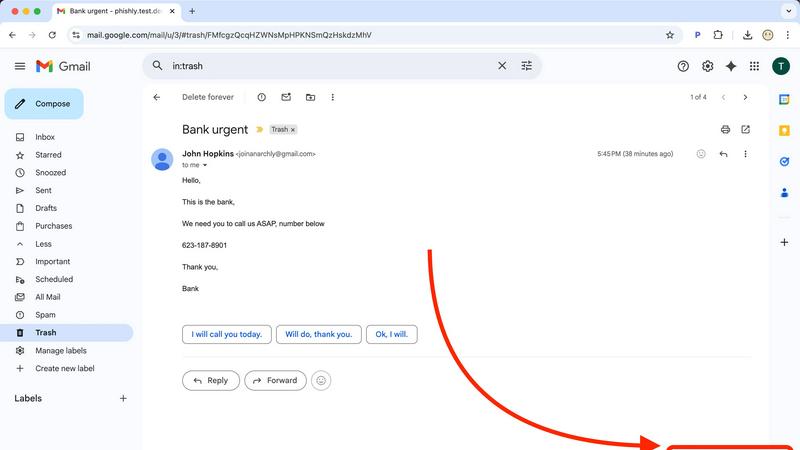
Phishly is an innovative AI-powered phishing detection platform designed specifically to enhance email security for individuals and small businesses. Available as a convenient Chrome extension for Gmail and as a web tool, Phishly simplifies the process of identifying potentially harmful emails. Users can easily scan emails by clicking "Scan with Phishly" in Gmail or by pasting suspicious emails on the Phishly website for immediate analysis. The platform employs advanced artificial intelligence to detect a variety of phishing indicators, including suspicious domains, urgent language, spoofed senders, and social engineering tactics. By providing clear and actionable risk assessments categorized as Safe, Medium Risk, or High Risk, Phishly empowers users to make informed decisions about their email interactions. This user-friendly solution offers a straightforward approach to phishing protection, eliminating the complexities often associated with enterprise-level cybersecurity tools. With a focus on privacy, Phishly only analyzes emails that users explicitly choose to scan, ensuring that sensitive information remains secure. Ideal for those seeking effective phishing protection without requiring technical expertise, Phishly delivers instant answers, thereby significantly enhancing productivity and peace of mind.
About Zovo
Zovo is a suite of 20 powerful Chrome extensions developed by Michael Lip, a seasoned solo developer with over a decade of experience and a remarkable track record of earning more than $400,000 on Upwork, all while maintaining a 100% success rate. The flagship extension, BeLikeNative, empowers over 3,300 users by enabling them to write like native speakers with a simple keystroke rewrite function, supporting 80 languages. This comprehensive suite includes various tools designed to enhance productivity and streamline everyday tasks, such as Tab Suspender Pro, JSON Formatter Pro, Clipboard History Pro, Form Filler Pro, and many more. Each extension is crafted with a privacy-first approach, ensuring that user data remains on their device without any form of data harvesting or investor interference. Zovo stands out by allowing users to actively participate in shaping the roadmap of features, fostering a community-driven environment where user feedback is valued. With new extensions released monthly and many tools available for free online, Zovo is the go-to solution for anyone looking to enhance their browsing experience while maintaining complete control over their data.
Frequently Asked Questions
Phishly FAQ
How does Phishly detect phishing emails?
Phishly employs advanced artificial intelligence algorithms to analyze email content and identify common phishing indicators, including suspicious domains, urgent wording, and other red flags.
Is Phishly easy to use for non-technical users?
Yes, Phishly is designed with user-friendliness in mind. The interface is intuitive, allowing users with no technical background to easily scan and assess the safety of their emails.
Does Phishly compromise my email privacy?
No, Phishly prioritizes user privacy by only analyzing emails that you explicitly choose to scan. Your personal information remains secure and confidential throughout the scanning process.
Is Phishly free to use?
Phishly is free to use, making it an accessible tool for individuals and small businesses looking to enhance their email security without incurring costs or engaging in complex setups.
Zovo FAQ
What makes Zovo different from other Chrome extension providers?
Zovo is unique because it is developed by a solo developer committed to privacy-first principles. Unlike many corporate solutions, Zovo does not engage in data harvesting or involve investors, ensuring that user data remains secure and private.
How can I request new features for Zovo extensions?
Users can submit feature requests directly to the developer. Every request is read and considered, and the most requested features are prioritized for development, promoting a community-driven approach to innovation.
Are Zovo extensions open source?
Yes, many of Zovo's extensions are open source, which allows users to inspect the code and contribute to the development process. This transparency fosters trust and collaboration within the user community.
Is there a support system in place for Zovo users?
Absolutely. Users can reach out directly to the developer via email or Discord for any questions or issues they encounter. This direct line of communication ensures prompt and personal support without the hassle of bots or ticket queues.