
Decode This Text vs Phishly
Side-by-side comparison to help you choose the right AI tool.

Decode This Text
Decode This Text provides quick, human-like analyses of conversations, helping you gain clarity in just 30 seconds.
Last updated: February 28, 2026

Phishly
Phishly leverages AI to swiftly detect phishing emails, enhancing security and productivity for Gmail users.
Visual Comparison
Decode This Text

Phishly
Feature Comparison
Decode This Text
Comprehensive Analysis
Decode This Text provides users with a detailed and human-like interpretation of their messages. By analyzing the emotional tone, context, and other critical factors, it helps users grasp the nuances of communication that might otherwise go unnoticed.
Screenshot Upload Option
For those who prefer not to type or paste text, Decode This Text allows users to upload screenshots of their conversations. This feature saves time and enhances convenience, making it easier for users to get clarity on complex messages.
Tone Evaluation
The tool evaluates the emotional tone of messages to determine whether the sender is being friendly, sarcastic, or indifferent. This feature helps users avoid misinterpretations and respond appropriately based on the emotional context.
Response Suggestions
In addition to analysis, Decode This Text offers users three tailored response options—calm, direct, or assertive—based on the analysis provided. This enables users to communicate effectively and with confidence, regardless of the situation.
Phishly
AI-Powered Phishing Detection
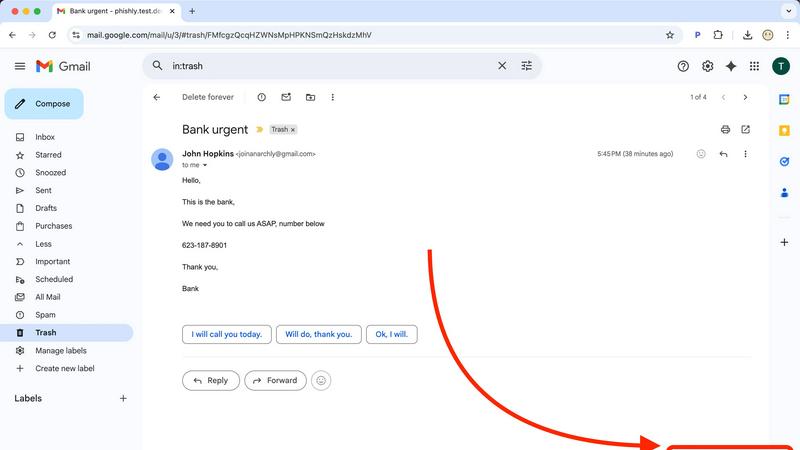
Phishly utilizes cutting-edge artificial intelligence to analyze emails for various phishing indicators. This includes identifying suspicious domains, urgent language, and spoofed sender addresses, ensuring that users receive accurate assessments of potential threats.
Risk Assessment Classification
Upon scanning an email, Phishly provides a clear risk assessment categorized into Safe, Medium Risk, or High Risk. This classification helps users quickly understand the level of risk associated with an email, enabling them to take appropriate action.
User-Friendly Interface
The Phishly Chrome extension and web tool are designed with user experience in mind. With simple navigation and straightforward instructions, users can easily scan emails without needing any technical knowledge, making it accessible for everyone.
Privacy-Focused Analysis
Phishly respects user privacy by only analyzing emails that users explicitly choose to scan. This ensures that sensitive data remains confidential and only relevant information is processed, providing peace of mind for individuals and small businesses alike.
Use Cases
Decode This Text
Personal Relationships
Users can use Decode This Text to analyze ambiguous messages from friends or family, helping them navigate potential misunderstandings and improve their relationships. By understanding the underlying tone and intent, they can respond more thoughtfully.
Professional Communication
In the workplace, Decode This Text is invaluable for deciphering terse or unclear emails from colleagues or supervisors. It provides insights into the sender's mood and intentions, allowing users to craft appropriate replies and maintain professional rapport.
Social Media Interactions
For those engaging in conversations on social media platforms, Decode This Text can clarify confusing comments or direct messages. This ensures that users can respond accurately and engage meaningfully with their contacts.
Conflict Resolution
When conflicts arise due to miscommunication, Decode This Text offers a way to dissect the messages exchanged between parties. By understanding the emotional undertones and intentions, users can formulate effective strategies for resolution.
Phishly
Individual Email Safety
Individuals can utilize Phishly to scan their personal emails for phishing attempts. By quickly assessing the safety of emails, users can avoid falling victim to scams and protect their personal information.
Small Business Email Security
Small businesses often face unique cybersecurity threats. Phishly equips small business owners with the necessary tools to detect phishing attempts in their business communications, safeguarding client relationships and company reputation.
Educational Institutions
Educational institutions can benefit from Phishly by training staff and students on identifying phishing emails. With Phishly, they can promote a culture of cybersecurity awareness and reduce the risk of compromised accounts.
Remote Workforce Protection
As remote work becomes increasingly common, Phishly provides an additional layer of security for employees working from home. By scanning emails for phishing indicators, remote workers can confidently navigate their inboxes without jeopardizing company data.
Overview
About Decode This Text
Decode This Text is a cutting-edge communication analysis tool designed to help users understand the true meaning behind messages that can often lead to confusion. It caters to individuals who find themselves perplexed by vague emails from coworkers, ambiguous texts from friends, or unclear messages from clients. By simply pasting the conversation or describing the context, users can receive a quick and comprehensive analysis of the underlying intentions, emotional tone, and optimal responses. This innovative tool is perfect for professionals, students, and anyone looking to improve their communication skills, strengthen relationships, and eliminate misunderstandings. With its user-friendly interface and rapid turnaround time, Decode This Text empowers users to communicate with confidence, alleviating the anxiety of overanalyzing every word.
About Phishly
Phishly is an innovative AI-powered phishing detection platform designed specifically to enhance email security for individuals and small businesses. Available as a convenient Chrome extension for Gmail and as a web tool, Phishly simplifies the process of identifying potentially harmful emails. Users can easily scan emails by clicking "Scan with Phishly" in Gmail or by pasting suspicious emails on the Phishly website for immediate analysis. The platform employs advanced artificial intelligence to detect a variety of phishing indicators, including suspicious domains, urgent language, spoofed senders, and social engineering tactics. By providing clear and actionable risk assessments categorized as Safe, Medium Risk, or High Risk, Phishly empowers users to make informed decisions about their email interactions. This user-friendly solution offers a straightforward approach to phishing protection, eliminating the complexities often associated with enterprise-level cybersecurity tools. With a focus on privacy, Phishly only analyzes emails that users explicitly choose to scan, ensuring that sensitive information remains secure. Ideal for those seeking effective phishing protection without requiring technical expertise, Phishly delivers instant answers, thereby significantly enhancing productivity and peace of mind.
Frequently Asked Questions
Decode This Text FAQ
How does Decode This Text ensure user privacy?
Decode This Text guarantees user privacy by maintaining a 100% anonymous process. No human reads your texts, ensuring that your conversations remain confidential.
Can I use Decode This Text for professional emails?
Absolutely. Decode This Text is designed to help interpret not only personal messages but also professional communications, making it easier to understand workplace dynamics and respond appropriately.
How quickly can I expect a response?
Users typically receive analyses within 30 seconds, allowing for rapid clarification in communication and timely responses to messages.
Is there a way to test the tool before using it?
Yes, Decode This Text offers a sample scenario feature. Users can try out the tool with a pre-set example to experience its capabilities before committing to their own analysis.
Phishly FAQ
How does Phishly detect phishing emails?
Phishly employs advanced artificial intelligence algorithms to analyze email content and identify common phishing indicators, including suspicious domains, urgent wording, and other red flags.
Is Phishly easy to use for non-technical users?
Yes, Phishly is designed with user-friendliness in mind. The interface is intuitive, allowing users with no technical background to easily scan and assess the safety of their emails.
Does Phishly compromise my email privacy?
No, Phishly prioritizes user privacy by only analyzing emails that you explicitly choose to scan. Your personal information remains secure and confidential throughout the scanning process.
Is Phishly free to use?
Phishly is free to use, making it an accessible tool for individuals and small businesses looking to enhance their email security without incurring costs or engaging in complex setups.