
Hush Touch | Voice-to-Text for MacOS vs ImageVibe
Side-by-side comparison to help you choose the right AI tool.

Hush Touch | Voice-to-Text for MacOS
Hush Touch offers offline voice-to-text for Mac, learning your vocabulary and enhancing productivity with every use.
Last updated: February 26, 2026

ImageVibe
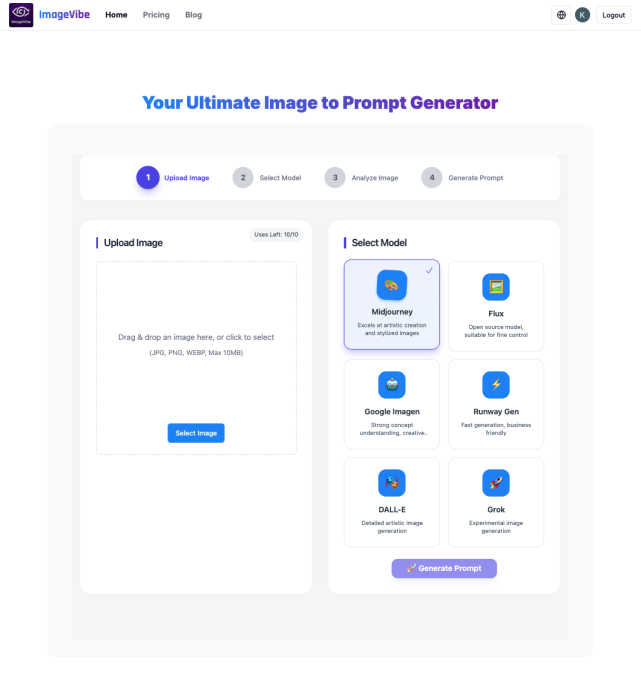
ImageVibe transforms your images into precise AI prompts to accelerate creative workflows and boost productivity.
Last updated: March 1, 2026
Visual Comparison
Hush Touch | Voice-to-Text for MacOS

ImageVibe
Feature Comparison
Hush Touch | Voice-to-Text for MacOS
Dual-Engine Recognition
Hush Touch employs a dual-engine recognition system that combines DictationTranscriber and SFSpeechRecognizer. This innovative approach ensures that natural flow and punctuation are accurately captured while boosting recognition of custom vocabulary, enhancing overall transcription accuracy.
Custom Vocabulary
With the ability to store up to 500 custom vocabulary terms and an auto-learning feature, Hush Touch excels in recognizing technical jargon, brand names, and medical terms. This ensures that the app understands and accurately transcribes what users actually say, significantly reducing frustration and errors.
Smart Text Processing
Hush Touch incorporates intelligent text processing capabilities that include filler word removal, auto-correction, and formatted lists. By processing these elements in real-time on-device, users enjoy a polished and professional output without the hassle of manual editing.
Context Modes & Hands-Free Operation
The app offers four distinct context modes—General, Email, Code, and Notes—allowing users to switch seamlessly according to their dictation needs. Moreover, with hands-free operation activated by Siri, users can dictate messages effortlessly, with automatic text insertion after a brief pause.
ImageVibe
Advanced AI-Powered Image Analysis
ImageVibe employs sophisticated computer vision algorithms to perform deep, granular analysis of uploaded images. It extracts not just objects and subjects, but also nuanced artistic styles, lighting conditions, color palettes, composition, and mood. This technical analysis forms the data foundation for generating highly detailed and structurally sound prompts that accurately capture the essence of the source material, ensuring generated art aligns with the original creative vision.
Multi-Model Prompt Optimization Engine
The platform features a dedicated optimization engine that tailors generated prompts for specific AI art models. Users can select their target platform—such as Midjourney, DALL-E 3, Stable Diffusion, or Flux—and ImageVibe automatically formats the prompt with model-specific parameters, syntax, and best practices. This ensures maximum compatibility and output quality, eliminating the need for manual adjustments and boosting first-attempt success rates for professional results.
Unified Creative Workflow Hub
ImageVibe consolidates multiple prompt-generation tools into a single, streamlined interface. Beyond Image-to-Prompt, it includes a Text-to-Prompt optimizer for refining ideas and an AI Image Reader for generating descriptive alt-text. This hub approach centralizes the ideation-to-prompt lifecycle, reducing context-switching for creative teams and providing a unified asset library for managing visual inspiration and corresponding prompt data.
Enterprise-Grade Output & Scalability
Designed for professional use, ImageVibe generates detailed, production-ready prompts that include technical parameters and artistic descriptors. The platform supports batch processing capabilities and is built for scalability, enabling agencies and large creative departments to maintain high-volume output without sacrificing consistency or quality. This feature directly contributes to predictable project delivery and scalable creative operations.
Use Cases
Hush Touch | Voice-to-Text for MacOS
Efficient Email Drafting
Hush Touch streamlines the email drafting process, allowing users to compose messages swiftly and hands-free. This is particularly beneficial for busy professionals who need to manage communications efficiently without interrupting their workflow.
Medical Documentation
For healthcare professionals, Hush Touch serves as an invaluable tool for dictating medical notes. The app's ability to recognize complex medical terminology ensures accurate documentation, saving time and reducing administrative burdens.
Coding and Technical Writing
Software engineers and technical writers can leverage Hush Touch to dictate code comments and technical documentation. The app's dual-engine recognition and custom vocabulary capabilities ensure that specialized terms are accurately transcribed, enhancing productivity in technical fields.
Note-Taking in Meetings
Hush Touch facilitates seamless note-taking during meetings and lectures by allowing users to dictate their thoughts in real-time. This hands-free approach enables participants to focus on discussions without the distraction of manual note-taking.
ImageVibe
Brand Asset Development & Style Guide Adherence
Marketing and branding agencies use ImageVibe to deconstruct successful brand imagery and mood boards into precise AI prompts. This allows for the rapid generation of new on-brand visual assets—from social media graphics to ad creatives—that maintain strict stylistic, color, and compositional consistency. It ensures all AI-generated content aligns perfectly with established brand guidelines, safeguarding visual identity.
Accelerated Concept Art & Storyboarding
Concept artists and game studios leverage the platform to quickly iterate on visual ideas. By converting inspirational artwork or rough sketches into optimized prompts, teams can generate multiple high-fidelity variations in minutes. This dramatically speeds up the concept development and storyboarding phases, allowing for more exploration and faster client or stakeholder approvals within tight production schedules.
Content Creation at Scale for Digital Media
Digital media companies and content creators utilize ImageVibe to produce large volumes of unique, themed artwork for articles, blogs, and video content. By using a core set of approved reference images to generate a library of tailored prompts, they can create diverse yet stylistically coherent illustrations efficiently, meeting the demands of constant content calendars without incurring prohibitive costs or time delays.
Educational Resource & Training Material Production
Educational institutions and corporate training departments employ ImageVibe to create custom, engaging visuals for courses and materials. Instructors can transform complex diagrams, historical photos, or abstract concepts into detailed prompts to generate clear, explanatory, and copyright-free imagery tailored to specific lesson plans, enhancing comprehension and production value.
Overview
About Hush Touch | Voice-to-Text for MacOS
Hush Touch is an innovative voice-to-text application specifically designed for macOS users seeking a seamless dictation experience. By utilizing advanced on-device processing, Hush Touch ensures that your voice data remains private and secure, eliminating the need for cloud dependency. The app combines two powerful Apple transcription engines with a final pass from Apple Intelligence, resulting in cleaner and more accurate text output. Lightweight at just 5.5 MB, Hush Touch integrates effortlessly into daily writing workflows, allowing users to draft emails, messages, and documents hands-free. Designed for professionals who prioritize privacy and efficiency, Hush Touch learns your unique vocabulary and adapts over time, ultimately enhancing productivity. For a one-time cost of $20, you gain a lifetime license to a robust dictation tool that operates offline, making Hush Touch an invaluable addition to any macOS user's toolkit.
About ImageVibe
ImageVibe is an enterprise-grade AI platform engineered to optimize creative workflows and deliver measurable ROI for professional artists, designers, marketing teams, and content creation agencies. It functions as a critical productivity engine by deconstructing the creative process, transforming visual assets into precise, actionable data for AI art generation. The platform's core value proposition lies in its three integrated modules: Image-to-Prompt conversion, Text-to-Prompt optimization, and AI Image Description generation. This allows teams to systematically reverse-engineer successful visual styles, maintain brand consistency across assets, and drastically reduce the time spent on prompt engineering. By supporting all major AI models—including Midjourney, DALL-E, Stable Diffusion, and Flux—ImageVibe eliminates tool fragmentation, ensuring seamless integration into existing production pipelines. For businesses, this translates to accelerated project timelines, higher-quality output, and a significant reduction in the trial-and-error costs typically associated with AI-assisted creative work, unlocking new levels of scalability and artistic expression.
Frequently Asked Questions
Hush Touch | Voice-to-Text for MacOS FAQ
Is Hush Touch fully offline?
Yes, Hush Touch operates entirely on-device, ensuring that all voice data is processed offline without any cloud dependency. This guarantees privacy and security for users.
How does Hush Touch learn my vocabulary?
Hush Touch features an adaptive learning system that detects corrections made during dictation. It automatically updates your custom vocabulary based on these corrections, allowing the app to better understand your unique language and terminology over time.
What is the cost of Hush Touch?
Hush Touch is available for a one-time purchase of $20, granting users a lifetime license with no subscription fees. This cost-effective model makes it an attractive option for anyone seeking dictation software.
Can I use Hush Touch for different types of writing?
Absolutely! Hush Touch includes various context modes, such as General, Email, Code, and Notes, allowing users to tailor their dictation experience according to their specific writing needs.
ImageVibe FAQ
What is the primary business value of the Image to Prompt tool?
The primary business value is a substantial increase in creative team productivity and a reduction in AI-related operational costs. By automating and optimizing the prompt engineering process, the tool cuts down the time required to produce usable AI art from hours to minutes. This leads to faster project turnaround, more time for high-level creative direction, and a quantifiable decrease in the computational credits wasted on ineffective trial-and-error generation.
How does the Multi-Model Support feature impact workflow efficiency?
Multi-Model Support directly eliminates workflow fragmentation and retraining overhead. Creative teams often use multiple AI models for different strengths. ImageVibe's model-specific optimization ensures prompts are correctly formatted for each platform (e.g., Midjourney parameters, DALL-E style cues) from a single source image. This removes the need for manual prompt translation, reduces errors, and allows teams to leverage the best model for each task without switching tools or relearning syntax.
Can ImageVibe be used to maintain consistency across a large campaign?
Absolutely. ImageVibe is engineered for brand and campaign consistency. By using a master set of approved reference images (e.g., key visuals, hero shots) to generate a prompt library, all subsequent AI-generated assets will inherit the core visual DNA—including color grading, lighting, and artistic style. This ensures that every piece of content, whether created by different team members or at different times, maintains a cohesive and professional look.
Is the platform suitable for users without prior AI art experience?
Yes, ImageVibe is designed to democratize professional-grade AI art generation. The platform's automated analysis and optimization lower the technical barrier to entry, allowing novices to generate high-quality results by simply uploading an image. For enterprise contexts, it enables subject matter experts (e.g., marketers, writers) to contribute visual concepts directly without needing deep technical knowledge of prompt engineering, streamlining cross-departmental collaboration.
Alternatives
Hush Touch | Voice-to-Text for MacOS Alternatives
Hush Touch | Voice-to-Text for MacOS is an innovative offline dictation tool specifically designed for macOS users. It leverages advanced Apple transcription engines to offer a seamless, natural dictation experience while maintaining user privacy through on-device processing. As part of the AI Assistants category, Hush Touch stands out by allowing users to create text hands-free, making it an efficient choice for drafting emails, messages, and documents. Users often seek alternatives to Hush Touch due to various factors, including pricing, feature sets, and platform compatibility. When searching for a suitable replacement, it’s essential to consider aspects like ease of use, transcription accuracy, and the level of offline functionality. Additionally, examining the app's ability to integrate into existing workflows and its privacy features can significantly influence the decision-making process.
ImageVibe Alternatives
ImageVibe is a specialized AI assistant designed to streamline creative workflows by converting images into detailed, actionable AI art prompts. It serves professionals in art, design, and content creation who need to bridge the gap between visual inspiration and text-based AI generation tools. Users may explore alternatives for various strategic reasons, including budget constraints, specific feature requirements not covered by a single platform, or the need for integration with other enterprise software ecosystems. The search often centers on finding a tool that aligns precisely with their operational scale and creative output goals. When evaluating other solutions, key considerations should include the accuracy of image analysis, the depth of prompt optimization for leading AI models, and the overall impact on project velocity and resource allocation. The right tool should demonstrably reduce iteration time and increase the quality of generated assets, providing a clear return on investment.