
AskFormulas vs Zovo
Side-by-side comparison to help you choose the right AI tool.

AskFormulas
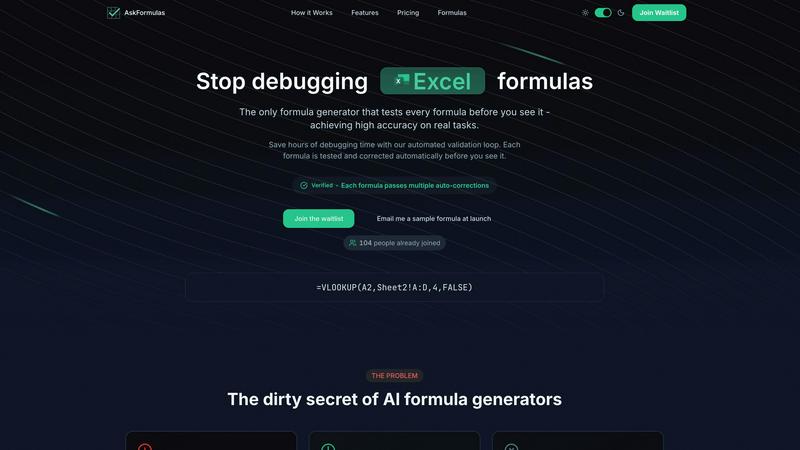
AskFormulas generates and validates Excel and Sheets formulas with guaranteed accuracy, eliminating debugging time.
Last updated: February 28, 2026

Unlock 20 privacy-focused Chrome extensions for developers and writers with Zovo, built by a solo developer for your.
Last updated: February 26, 2026
Visual Comparison
AskFormulas
Zovo

Feature Comparison
AskFormulas
Automated Validation Loop
Every formula request undergoes a rigorous three-step validation process. First, natural language is parsed into formula intent. Second, the generated syntax is auto-tested against synthetic template data in a secure sandbox. Third, any errors like #REF! or #VALUE! trigger iterative auto-corrections until the formula is verified. This closed-loop system is the technological foundation that guarantees the published accuracy rate of over 95%, ensuring users receive only working formulas.
Platform-Agnostic Formula Generation
With a simple one-click toggle, users can seamlessly switch between Microsoft Excel and Google Sheets syntax. The system automatically handles the nuanced differences between platforms, such as converting VLOOKUP for Excel or managing ARRAYFORMULA for Sheets. This feature ensures cross-functional and cross-platform team compatibility, eliminating the need to learn or manually translate formula syntax between the two dominant spreadsheet applications.
Intelligent Error Detection & Correction
AskFormulas proactively identifies and resolves formula errors during its validation phase. If a generated formula results in a common spreadsheet error, the system does not present it to the user. Instead, it diagnoses the issue—be it a range reference error, incorrect function argument, or syntax mismatch—and automatically iterates on a corrected version. This pre-emptive troubleshooting is what saves users significant debugging time.
Formula History & One-Click Integration
The platform maintains a personal library of the user's last ten generated formulas, providing easy access and reusability. Once a formula is verified, it can be copied to the clipboard with a single click, ready for immediate pasting into a live spreadsheet. This streamlined workflow minimizes friction and context-switching, enabling a transition from request to implemented solution in a matter of seconds.
Zovo
BeLikeNative
BeLikeNative offers an instant rewrite feature that allows users to write like native speakers with just one keystroke. It supports 80 languages and works seamlessly across various platforms, making it an essential tool for students, professionals, and anyone needing to improve their writing efficiency.
Tab Suspender Pro
Tab Suspender Pro helps users manage their browser’s memory usage by automatically suspending inactive tabs. This feature utilizes smart detection to identify tabs that are not currently in use, thereby freeing up system resources and enhancing overall browser performance.
Clipboard History Pro
Clipboard History Pro ensures that users never lose copied text again by retaining a searchable history of up to 10,000 clips. This feature enables instant search and smart paste capabilities, making it ideal for professionals who frequently copy and paste information.
Form Filler Pro
Form Filler Pro simplifies the process of filling out online forms by allowing users to save multiple profiles and fill forms with a single click. This feature significantly reduces the time spent on repetitive tasks, making it particularly useful for online shoppers and anyone who frequently completes forms.
Use Cases
AskFormulas
Financial Modeling & Reporting
Financial analysts can rapidly build complex, error-free models by describing logic like "calculate quarterly EBITDA margin" or "net present value of project cash flows in column C." The validation loop ensures all nested functions like XIRR, XNPV, and SUMIFS work correctly on the first try, protecting the integrity of critical financial reports and forecasts and reducing model audit time.
Sales & Revenue Data Consolidation
Revenue managers and sales operations specialists can use plain English to generate formulas for consolidating disparate data sets. Commands such as "VLOOKUP the contract value from Sheet2 where the client ID matches" or "sum all sales in Region West for Q3" yield validated formulas that accurately merge and calculate data, providing a single source of truth for pipeline and performance analysis.
Operational Reporting for Non-Technical Users
Small business owners, marketing managers, and operational staff without formal Excel training can independently create powerful reports. By asking, "count how many transactions were above $500" or "average the customer satisfaction scores in column D," they gain immediate access to advanced data analysis capabilities, democratizing insights and reducing dependency on technical team members.
Automated Data Cleaning & Preparation
Data analysts can expedite the tedious process of data preparation by instructing AskFormulas to generate formulas for tasks like "remove leading and trailing spaces from text in column A" (TRIM) or "extract the domain name from email addresses in column B" (MID and FIND). Receiving pre-validated formulas for these repetitive tasks dramatically accelerates the data cleaning phase of any project.
Zovo
Enhancing Writing Skills
BeLikeNative is perfect for non-native speakers and students who want to improve their writing skills. By providing instant rewrites, it helps users learn native expressions and phrases, thereby boosting their confidence in written communication.
Optimizing Browser Performance
Tab Suspender Pro is essential for users who often have multiple tabs open. By automatically suspending inactive tabs, it not only saves memory but also improves the browser's speed, resulting in a smoother user experience.
Managing Copied Text Efficiently
Clipboard History Pro is a game-changer for professionals who need to manage large volumes of text. By allowing users to search through their copied items quickly, it enhances productivity and makes information retrieval effortless.
Streamlining Online Forms
Form Filler Pro is invaluable for anyone who frequently fills out online forms, such as job applicants or e-commerce shoppers. Its one-click fill functionality saves time and reduces the frustration associated with repetitive data entry.
Overview
About AskFormulas
AskFormulas is an enterprise-grade AI solution engineered to eliminate the critical business inefficiency of broken spreadsheet formulas. It directly addresses the 40-60% failure rate common in standard AI formula generators by implementing a proprietary, automated validation loop. This process rigorously tests and auto-corrects every formula in a secure sandbox environment before it is delivered to the user. The core value proposition is unparalleled accuracy, exceeding 95%, which translates directly into measurable ROI by reclaiming hours lost to debugging and troubleshooting. Professionals simply describe their calculation needs in plain English, and AskFormulas returns a verified, ready-to-use formula for either Microsoft Excel or Google Sheets. This tool is indispensable for financial analysts seeking error-free models, revenue managers requiring reliable data consolidation, small business owners lacking deep technical expertise, and any knowledge worker who depends on accurate spreadsheet outputs to drive decision-making. By shifting focus from formula construction to data analysis, AskFormulas transforms spreadsheets from a source of frustration into a powerful, reliable engine for business intelligence.
About Zovo
Zovo is a suite of 20 powerful Chrome extensions developed by Michael Lip, a seasoned solo developer with over a decade of experience and a remarkable track record of earning more than $400,000 on Upwork, all while maintaining a 100% success rate. The flagship extension, BeLikeNative, empowers over 3,300 users by enabling them to write like native speakers with a simple keystroke rewrite function, supporting 80 languages. This comprehensive suite includes various tools designed to enhance productivity and streamline everyday tasks, such as Tab Suspender Pro, JSON Formatter Pro, Clipboard History Pro, Form Filler Pro, and many more. Each extension is crafted with a privacy-first approach, ensuring that user data remains on their device without any form of data harvesting or investor interference. Zovo stands out by allowing users to actively participate in shaping the roadmap of features, fostering a community-driven environment where user feedback is valued. With new extensions released monthly and many tools available for free online, Zovo is the go-to solution for anyone looking to enhance their browsing experience while maintaining complete control over their data.
Frequently Asked Questions
AskFormulas FAQ
How accurate are the generated formulas?
AskFormulas achieves an accuracy rate of over 95% on real-world tasks, a significant improvement over the 40-60% failure rate observed in standard AI formula generators. This high reliability is a direct result of our proprietary automated validation loop, which tests and auto-corrects every formula in a simulated spreadsheet environment before it is delivered to the user.
Does it work with both Excel and Google Sheets?
Yes, AskFormulas is fully compatible with both Microsoft Excel and Google Sheets. A simple toggle within the interface allows you to select your desired platform. The system automatically adjusts the formula syntax to match the correct function names and structural requirements of either application, ensuring seamless cross-platform functionality.
How many formulas can I generate per month?
Usage limits are based on your subscription plan. The Starter plan includes 500 formulas per month, the Pro plan offers 2,000 formulas, and the Team plan provides 6,000 formulas shared among up to 5 users. This tiered structure ensures scalability for individual power users, professionals, and collaborative small teams.
What happens if my generated formula has an error?
If a formula encounters an error during our automated validation testing, it is not shown to you. Instead, our system's validation loop identifies the error type (e.g., #REF!, #VALUE!, #N/A) and automatically initiates a correction cycle. It iteratively adjusts the formula syntax and retests it until a fully functional, verified formula is produced, guaranteeing you only see working outputs.
Zovo FAQ
What makes Zovo different from other Chrome extension providers?
Zovo is unique because it is developed by a solo developer committed to privacy-first principles. Unlike many corporate solutions, Zovo does not engage in data harvesting or involve investors, ensuring that user data remains secure and private.
How can I request new features for Zovo extensions?
Users can submit feature requests directly to the developer. Every request is read and considered, and the most requested features are prioritized for development, promoting a community-driven approach to innovation.
Are Zovo extensions open source?
Yes, many of Zovo's extensions are open source, which allows users to inspect the code and contribute to the development process. This transparency fosters trust and collaboration within the user community.
Is there a support system in place for Zovo users?
Absolutely. Users can reach out directly to the developer via email or Discord for any questions or issues they encounter. This direct line of communication ensures prompt and personal support without the hassle of bots or ticket queues.
Alternatives
AskFormulas Alternatives
AskFormulas is an AI-powered productivity tool designed to generate and validate Excel and Google Sheets formulas with exceptional accuracy. It addresses the critical business need for reliable data manipulation by eliminating the time-consuming debugging process, allowing professionals to focus on analysis and decision-making. Users may explore alternatives for various strategic reasons, including budget constraints, specific feature requirements not covered by a single platform, or the need for integration within a larger enterprise software ecosystem. Different organizational sizes and workflows necessitate tailored solutions. When evaluating any alternative, key considerations should include the tool's proven accuracy rate, its validation methodology to ensure formula integrity, compatibility with your primary spreadsheet platform, and the overall return on investment through measurable time savings and error reduction.
Zovo Alternatives
Zovo is a suite of 20 privacy-first Chrome extensions tailored for developers and writers, designed to enhance productivity and management. With tools like JSON Formatter, Tab Suspender, and Clipboard History, Zovo enables users to streamline their workflows while maintaining a strong commitment to data privacy. Many users seek alternatives due to varying needs such as pricing, desired features, or compatibility with specific platforms. When considering an alternative, it is important to evaluate the range of features offered, the developer's track record, user feedback, and the overall commitment to privacy. Choosing the right alternative involves assessing which tools best align with your productivity goals while ensuring that they maintain a focus on user privacy. Look for solutions that provide clear value, a strong support system, and a transparent development process. This will help ensure that you not only find a suitable replacement but also enhance your workflow efficiency.