
AskFormulas vs LuxSign
Side-by-side comparison to help you choose the right AI tool.

AskFormulas
AskFormulas generates and validates Excel and Sheets formulas with guaranteed accuracy, eliminating debugging time.
Last updated: February 28, 2026

LuxSign enables fast, secure electronic signatures for documents, ensuring compliance and efficiency across the EU.
Last updated: February 26, 2026
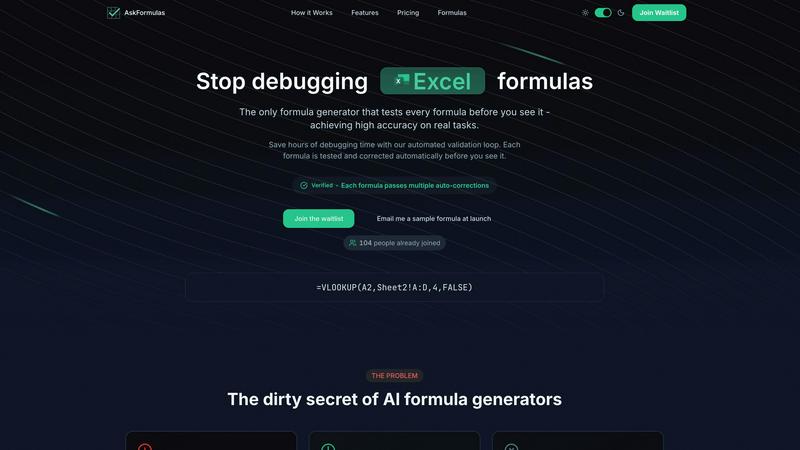
Visual Comparison
AskFormulas
LuxSign

Feature Comparison
AskFormulas
Automated Validation Loop
Every formula request undergoes a rigorous three-step validation process. First, natural language is parsed into formula intent. Second, the generated syntax is auto-tested against synthetic template data in a secure sandbox. Third, any errors like #REF! or #VALUE! trigger iterative auto-corrections until the formula is verified. This closed-loop system is the technological foundation that guarantees the published accuracy rate of over 95%, ensuring users receive only working formulas.
Platform-Agnostic Formula Generation
With a simple one-click toggle, users can seamlessly switch between Microsoft Excel and Google Sheets syntax. The system automatically handles the nuanced differences between platforms, such as converting VLOOKUP for Excel or managing ARRAYFORMULA for Sheets. This feature ensures cross-functional and cross-platform team compatibility, eliminating the need to learn or manually translate formula syntax between the two dominant spreadsheet applications.
Intelligent Error Detection & Correction
AskFormulas proactively identifies and resolves formula errors during its validation phase. If a generated formula results in a common spreadsheet error, the system does not present it to the user. Instead, it diagnoses the issue—be it a range reference error, incorrect function argument, or syntax mismatch—and automatically iterates on a corrected version. This pre-emptive troubleshooting is what saves users significant debugging time.
Formula History & One-Click Integration
The platform maintains a personal library of the user's last ten generated formulas, providing easy access and reusability. Once a formula is verified, it can be copied to the clipboard with a single click, ready for immediate pasting into a live spreadsheet. This streamlined workflow minimizes friction and context-switching, enabling a transition from request to implemented solution in a matter of seconds.
LuxSign
Multiple Signature Methods
LuxSign provides various methods for signing documents, allowing users to draw their signature, type their name, or upload an image. This flexibility ensures a user-friendly experience and quick document signing, catering to diverse preferences.
Advanced Security
The platform employs industry-standard encryption protocols to protect documents during upload, storage, and transmission. Coupled with secure storage in EU data centers, LuxSign guarantees that sensitive information remains safeguarded against unauthorized access.
Complete Audit Trail
LuxSign offers detailed audit trails that log every action taken within the platform. These logs include timestamps, IP addresses, and signer information, ensuring compliance and providing transparency for all document-related activities.
Collaboration Workspaces
Teams can create shared workspaces within LuxSign, allowing for organized document management. Members can collaborate seamlessly on signing workflows, manage access permissions, and store documents in structured folders, fostering teamwork and efficiency.
Use Cases
AskFormulas
Financial Modeling & Reporting
Financial analysts can rapidly build complex, error-free models by describing logic like "calculate quarterly EBITDA margin" or "net present value of project cash flows in column C." The validation loop ensures all nested functions like XIRR, XNPV, and SUMIFS work correctly on the first try, protecting the integrity of critical financial reports and forecasts and reducing model audit time.
Sales & Revenue Data Consolidation
Revenue managers and sales operations specialists can use plain English to generate formulas for consolidating disparate data sets. Commands such as "VLOOKUP the contract value from Sheet2 where the client ID matches" or "sum all sales in Region West for Q3" yield validated formulas that accurately merge and calculate data, providing a single source of truth for pipeline and performance analysis.
Operational Reporting for Non-Technical Users
Small business owners, marketing managers, and operational staff without formal Excel training can independently create powerful reports. By asking, "count how many transactions were above $500" or "average the customer satisfaction scores in column D," they gain immediate access to advanced data analysis capabilities, democratizing insights and reducing dependency on technical team members.
Automated Data Cleaning & Preparation
Data analysts can expedite the tedious process of data preparation by instructing AskFormulas to generate formulas for tasks like "remove leading and trailing spaces from text in column A" (TRIM) or "extract the domain name from email addresses in column B" (MID and FIND). Receiving pre-validated formulas for these repetitive tasks dramatically accelerates the data cleaning phase of any project.
LuxSign
Streamlining Contract Signing
Businesses can utilize LuxSign to expedite the contract signing process. By allowing multiple signers to access documents simultaneously, organizations can significantly reduce turnaround times, enabling faster decision-making and project initiation.
Enhancing Compliance in Legal Transactions
LuxSign's compliance with eIDAS SES standards makes it an ideal solution for legal firms that require secure and legally binding signatures on documents. This enhances the legitimacy of transactions and minimizes the risk of legal disputes.
Facilitating Remote Work
As remote work becomes increasingly prevalent, LuxSign provides an efficient solution for teams spread across different locations. Employees can sign documents from anywhere, ensuring business continuity and operational efficiency without the need for physical presence.
Improving Document Management for HR
Human resource departments can leverage LuxSign for managing employee contracts, onboarding documents, and policy agreements. The platform simplifies the signing process, reduces paperwork, and ensures all documents are securely stored and easily retrievable.
Overview
About AskFormulas
AskFormulas is an enterprise-grade AI solution engineered to eliminate the critical business inefficiency of broken spreadsheet formulas. It directly addresses the 40-60% failure rate common in standard AI formula generators by implementing a proprietary, automated validation loop. This process rigorously tests and auto-corrects every formula in a secure sandbox environment before it is delivered to the user. The core value proposition is unparalleled accuracy, exceeding 95%, which translates directly into measurable ROI by reclaiming hours lost to debugging and troubleshooting. Professionals simply describe their calculation needs in plain English, and AskFormulas returns a verified, ready-to-use formula for either Microsoft Excel or Google Sheets. This tool is indispensable for financial analysts seeking error-free models, revenue managers requiring reliable data consolidation, small business owners lacking deep technical expertise, and any knowledge worker who depends on accurate spreadsheet outputs to drive decision-making. By shifting focus from formula construction to data analysis, AskFormulas transforms spreadsheets from a source of frustration into a powerful, reliable engine for business intelligence.
About LuxSign
LuxSign is a cutting-edge electronic signature platform designed for businesses that require stringent compliance and security in document management. Developed in Luxembourg, LuxSign offers a fully cloud-based solution that ensures all documents are encrypted end-to-end and stored exclusively within Luxembourg's secure data centers. This guarantees adherence to GDPR regulations, making LuxSign a reliable choice for organizations concerned about data protection. The platform is compliant with eIDAS SES standards, allowing for legally binding signatures on contracts across the European Union. With user-friendly features such as drag-and-drop signature field placement, automated notifications, and flexible signing workflows, LuxSign empowers businesses to streamline their document signing processes. It caters to various industries, enhancing productivity by reducing the time and effort required to obtain signatures.
Frequently Asked Questions
AskFormulas FAQ
How accurate are the generated formulas?
AskFormulas achieves an accuracy rate of over 95% on real-world tasks, a significant improvement over the 40-60% failure rate observed in standard AI formula generators. This high reliability is a direct result of our proprietary automated validation loop, which tests and auto-corrects every formula in a simulated spreadsheet environment before it is delivered to the user.
Does it work with both Excel and Google Sheets?
Yes, AskFormulas is fully compatible with both Microsoft Excel and Google Sheets. A simple toggle within the interface allows you to select your desired platform. The system automatically adjusts the formula syntax to match the correct function names and structural requirements of either application, ensuring seamless cross-platform functionality.
How many formulas can I generate per month?
Usage limits are based on your subscription plan. The Starter plan includes 500 formulas per month, the Pro plan offers 2,000 formulas, and the Team plan provides 6,000 formulas shared among up to 5 users. This tiered structure ensures scalability for individual power users, professionals, and collaborative small teams.
What happens if my generated formula has an error?
If a formula encounters an error during our automated validation testing, it is not shown to you. Instead, our system's validation loop identifies the error type (e.g., #REF!, #VALUE!, #N/A) and automatically initiates a correction cycle. It iteratively adjusts the formula syntax and retests it until a fully functional, verified formula is produced, guaranteeing you only see working outputs.
LuxSign FAQ
What types of documents can I sign with LuxSign?
You can sign a variety of document formats including PDF, DOC, and DOCX. LuxSign also supports automatic conversion for easy handling of different file types.
How does LuxSign ensure document security?
LuxSign employs end-to-end encryption, ensuring that all documents are secured during upload, storage, and transmission. Additionally, documents are stored on secure servers located in Luxembourg, complying with EU data protection regulations.
Can I track the signing progress of my documents?
Yes, LuxSign provides real-time tracking of document status. You will receive automatic email notifications when documents are sent, viewed, and signed, keeping you informed throughout the process.
Is LuxSign compliant with GDPR?
Absolutely. LuxSign is fully compliant with GDPR and Luxembourg data protection laws, ensuring that your documents and personal information are handled with the highest levels of privacy and security.
Alternatives
AskFormulas Alternatives
AskFormulas is an AI-powered productivity tool designed to generate and validate Excel and Google Sheets formulas with exceptional accuracy. It addresses the critical business need for reliable data manipulation by eliminating the time-consuming debugging process, allowing professionals to focus on analysis and decision-making. Users may explore alternatives for various strategic reasons, including budget constraints, specific feature requirements not covered by a single platform, or the need for integration within a larger enterprise software ecosystem. Different organizational sizes and workflows necessitate tailored solutions. When evaluating any alternative, key considerations should include the tool's proven accuracy rate, its validation methodology to ensure formula integrity, compatibility with your primary spreadsheet platform, and the overall return on investment through measurable time savings and error reduction.
LuxSign Alternatives
LuxSign is a sophisticated electronic signature platform designed for businesses that demand stringent compliance and security. Built in Luxembourg, it adheres to eIDAS SES standards, ensuring that signatures are legally recognized across all EU member states. As a cloud-based solution, LuxSign emphasizes end-to-end encryption and GDPR compliance, making it a reliable choice for organizations handling sensitive documents. Users often seek alternatives to LuxSign for various reasons, including pricing constraints, specific feature requirements, or the need for integration with existing systems. When evaluating alternatives, it's crucial to consider factors such as compliance with legal standards, ease of use, scalability, and the ability to customize workflows and branding. These elements can significantly impact productivity and return on investment for businesses relying on electronic signature solutions.