
AIPhotoTalk vs Shrinkpad
Side-by-side comparison to help you choose the right AI tool.

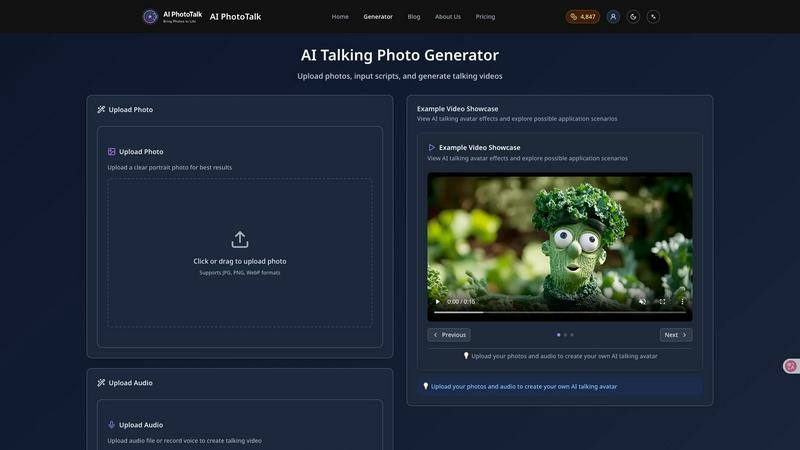
AI PhotoTalk transforms any photo into a professional talking video with perfect lip sync and 4K quality in 30 seconds.
Last updated: March 11, 2026

Shrinkpad
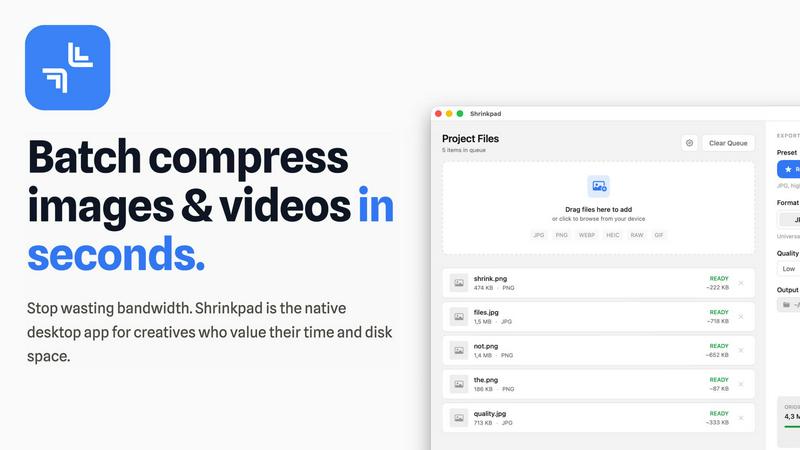
Shrinkpad is a native Mac app that batch compresses images and videos to optimize assets and boost productivity.
Last updated: February 28, 2026
Visual Comparison
AIPhotoTalk
Shrinkpad
Feature Comparison
AIPhotoTalk
Professional Lip Sync Technology
Powered by sophisticated deep learning models, this feature analyzes audio phonetics and facial geometry to generate perfectly synchronized lip movements and subtle, natural expressions. This ensures the animated photo delivers a convincing and professional talking head video, crucial for maintaining credibility in corporate presentations, training modules, and customer-facing marketing content.
Multi-Language Voice Synthesis
The platform includes a professional-grade text-to-speech engine supporting over 30 languages and various accents. This allows global enterprises to create localized video content for different markets instantly, from sales pitches to internal communications, without hiring multilingual voice actors, thereby slashing localization costs and timelines significantly.
4K Professional Video Output
AIPhotoTalk renders final videos in ultra-high-definition 4K resolution, ensuring output is suitable for professional applications including website hero videos, conference presentations, and high-fidelity social media ads. This feature guarantees that content maintains a premium, polished quality that reflects positively on your brand identity across all channels.
Cloud-Based Enterprise Platform
Requiring no software installation, the entire workflow is accessible directly via a web browser. This cloud-based architecture facilitates seamless team collaboration, easy asset management, and integration into professional workflows. It ensures security, scalability, and accessibility from any device, maximizing operational efficiency for distributed teams.
Shrinkpad
Intelligent Batch Processing
Shrinkpad eliminates manual, file-by-file workflows by enabling unlimited batch processing of mixed media. Users can drag and drop entire folders containing thousands of images and videos, and the application automatically detects and queues over 30 supported formats. This feature leverages multi-threaded compression optimized for Apple Silicon, processing massive queues without crashing, which translates to hours of saved labor and consistent, reliable output for large-scale projects.
Privacy-First Local Processing
All compression algorithms run entirely on the user's Mac, ensuring that sensitive client work, proprietary designs, and unreleased media never leave the local device. This feature is critical for businesses handling confidential assets, as it eliminates the security risks and bandwidth costs associated with cloud-based uploads, providing full compliance with internal data governance policies.
Smart Quality Optimization
The application automatically analyzes the visual complexity of each asset to apply a perfect, artifact-free compression ratio. This removes the guesswork from manual quality settings, ensuring optimal file size reduction while preserving perceptual quality. For professionals, this means consistently high-quality outputs suitable for web, app, and presentation use without iterative manual adjustments.
Advanced Format & Workflow Support
Shrinkpad supports a comprehensive range of professional formats including JPG, PNG, WEBP, AVIF, HEIC, RAW camera files, MP4, and MOV. It includes power features like automatic renaming, metadata stripping, and subfolder preservation. This seamless integration into existing creative pipelines allows teams to export assets at high resolutions from tools like Figma or Photoshop and let Shrinkpad handle final optimization in bulk.
Use Cases
AIPhotoTalk
Corporate Training & Onboarding
HR and L&D departments can animate photos of company leaders or subject matter experts to create consistent, engaging, and scalable training videos. This personalizes the learning experience for new hires across global offices, improves knowledge retention, and reduces the recurring cost and logistical complexity of live training sessions.
Automated Marketing & Sales Enablement
Marketing teams can generate a library of spokesperson videos for product launches, email campaigns, and social media ads. Sales representatives can personalize prospect outreach by creating quick videos with their own photo, leading to higher engagement rates and shorter sales cycles compared to traditional text-based communication.
Educational Content & E-Learning
Educators and ed-tech companies can bring historical figures, authors, or scientific concepts to life by animating relevant portraits. This creates captivating explainer videos and interactive learning modules that boost student engagement and comprehension, transforming static educational materials into dynamic visual experiences.
Customer Support & Communication
Businesses can enhance customer touchpoints by creating friendly AI spokesperson videos for FAQ sections, product update announcements, or personalized service messages. This humanizes digital interactions, improves clarity, and can reduce inbound support tickets by proactively addressing common queries in an engaging format.
Shrinkpad
Web Development & Digital Publishing Teams
Development and publishing teams use Shrinkpad to batch-optimize website assets, reducing bundle sizes and improving Core Web Vitals like Largest Contentful Paint (LCP). By compressing hero images, product shots, and promotional videos by an average of 70-90%, teams can achieve faster page load times, enhance user experience, and improve SEO rankings, directly contributing to higher conversion rates and reduced bounce rates.
Creative Agencies & Design Studios
Agencies handling multiple client projects compress final deliverables for email delivery, client portals, and digital campaigns. Shrinkpad's folder mode and mixed-media batching allow them to process entire project directories in one action, ensuring fast turnaround times, professional presentation, and significant savings on cloud storage and file transfer service costs.
Photographers & Videographers
Professionals managing large libraries of high-resolution RAW photos and 4K video footage use Shrinkpad to create optimized previews for client galleries and streamlined archives for long-term storage. The local processing guarantees client privacy, while the dramatic file size reduction frees up terabytes of expensive SSD storage, extending hardware lifecycle and improving system performance.
In-House Marketing & Content Teams
Marketing departments regularly produce large volumes of social media graphics, blog images, and webinar recordings. Shrinkpad enables them to maintain a consistent, optimized asset library, reducing upload times to CMS platforms and social networks by over 40%, thereby accelerating campaign deployment and improving team throughput.
Overview
About AIPhotoTalk
AIPhotoTalk is an enterprise-grade, AI-powered platform that transforms static portrait photographs into professional, realistic talking videos in under 30 seconds. It leverages advanced deep learning algorithms to achieve perfect lip synchronization and natural facial expressions, eliminating the need for complex video editing, expensive production crews, or actor fees. The platform is engineered for business productivity, supporting over 30 languages with high-quality voice synthesis and delivering broadcast-ready 4K video output. Its core value proposition lies in democratizing high-impact video creation, enabling organizations to scale personalized communication, enhance training materials, and accelerate marketing campaign production with unprecedented speed and cost-efficiency. Trusted by over 10,000 business users worldwide, AIPhotoTalk is designed for marketers, educators, corporate trainers, and content creators who require a reliable, scalable solution to produce engaging spokesperson videos, explainer content, and personalized communications that drive measurable ROI through increased engagement and reduced production overhead.
About Shrinkpad
Shrinkpad is an enterprise-grade desktop application engineered for macOS, delivering powerful batch compression for images and videos directly on your local machine. It is designed for professionals—including photographers, designers, content creators, developers, and marketing teams—who manage large volumes of digital assets and prioritize efficiency, data privacy, and storage optimization. The core value proposition lies in its ability to process hundreds or even thousands of files in seconds, reducing file sizes by up to 90% without ever uploading sensitive data to the cloud. This local-first approach ensures complete confidentiality for proprietary media while providing a significant return on investment. By reclaiming gigabytes of disk space and drastically reducing time spent on manual optimization, Shrinkpad streamlines workflows, accelerates project delivery, and improves key performance metrics like website load times, directly impacting operational productivity and cost savings.
Frequently Asked Questions
AIPhotoTalk FAQ
What is the quality of the lip-syncing in the generated videos?
AIPhotoTalk utilizes state-of-the-art deep learning algorithms specifically trained for facial animation. The technology ensures high-fidelity lip synchronization that matches the phonetic timing of the provided audio or script, resulting in realistic and natural-looking mouth movements that are suitable for professional business applications.
Can I use the videos generated with AIPhotoTalk for commercial purposes?
Yes. AIPhotoTalk includes a full commercial use license with its plans. This means businesses and creators are authorized to use the generated talking videos in marketing campaigns, client projects, paid advertising, online courses, and other commercial applications without requiring additional rights or clearances.
How many languages does the voice synthesis support?
The platform's advanced voice synthesis engine supports over 30 languages, including major global languages like English, Spanish, Mandarin, French, German, and Japanese. It also offers a selection of voice styles (e.g., professional, friendly, authoritative) within many languages to match the desired tone of your content.
What are the technical requirements to use AIPhotoTalk?
There are no specific hardware requirements as AIPhotoTalk is a fully cloud-based SaaS platform. You only need a modern web browser and an internet connection. The process is designed to be beginner-friendly: upload a high-quality frontal portrait photo, input your text script or audio file, and the AI generates your video on its servers.
Shrinkpad FAQ
Can I use Shrinkpad for free?
Yes, Shrinkpad offers a Free Starter tier that provides essential compression tools for casual use. This plan includes standard compression for common formats like JPG and PNG, with a limit of 10 files per batch and a maximum 1GB file size. It is an excellent way to evaluate the core functionality before upgrading to a paid plan for unlimited, professional use.
What file formats does Shrinkpad support?
Shrinkpad supports an extensive range of over 30 image and video formats. This includes standard web formats (JPG, PNG, WEBP, AVIF), professional and Apple formats (HEIC, RAW files from various cameras), and major video formats (MP4, MOV). The application automatically detects and optimally compresses each file type within a mixed batch.
Does Shrinkpad support video compression?
Absolutely. Shrinkpad provides robust video compression capabilities, allowing users to reduce the file size of MP4, MOV, and other common video formats by significant percentages. This is included in both the Personal and Team paid plans, enabling users to process images and videos together in the same, efficient batch workflow.
How many files can I process at once?
With the paid Personal and Team plans, Shrinkpad supports unlimited batch processing. You can queue and process thousands of images and videos simultaneously. The application is engineered for heavy-duty use and handles massive queues with stability, unlike many web-based tools that crash under large loads.
Alternatives
AIPhotoTalk Alternatives
AIPhotoTalk is an AI-powered video generation platform that specializes in transforming static portrait photos into realistic, lip-synced talking videos. This places it within the rapidly growing category of AI video synthesis and avatar creation tools, designed to streamline content production for professional and marketing use cases. Users often evaluate alternatives to such platforms for several strategic reasons. These can include budget constraints, specific feature requirements like advanced voice cloning or multi-language support, integration needs with existing marketing stacks, or a preference for downloadable software versus a browser-based service. The need for higher output resolution, more nuanced emotional controls, or different commercial licensing terms also drives the search for comparable solutions. When assessing an alternative, key considerations should focus on the total cost of ownership, the realism and quality of the generated video output, and the tool's ability to integrate into your existing workflow. Prioritize solutions that offer clear productivity gains, measurable ROI through time savings, and robust security protocols for handling proprietary images and scripts. The ideal platform will align with both your immediate creative needs and long-term scalability requirements.
Shrinkpad Alternatives
Shrinkpad is a specialized macOS application for batch compression of images and videos, falling into the digital asset optimization category. It is engineered for professionals who need to process large volumes of media files locally to save storage and streamline workflows. Users may explore alternatives for various strategic reasons, such as budget constraints, specific feature requirements not met by Shrinkpad, or the need for cross-platform compatibility beyond macOS. The search often centers on finding a tool that delivers a comparable return on investment through time savings and storage reclamation. When evaluating an alternative, key considerations should include the solution's processing methodology—local versus cloud—for data security, its support for required file formats, the efficiency of its batch processing engine, and the overall impact on team productivity. The optimal choice balances robust functionality with a clear, measurable benefit to operational efficiency.