
AI Photo Generator vs TinyFast
Side-by-side comparison to help you choose the right AI tool.

AI Photo Generator
Generate photorealistic AI images to accelerate creative production and reduce campaign costs with enterprise-grade workflows.
Last updated: March 11, 2026

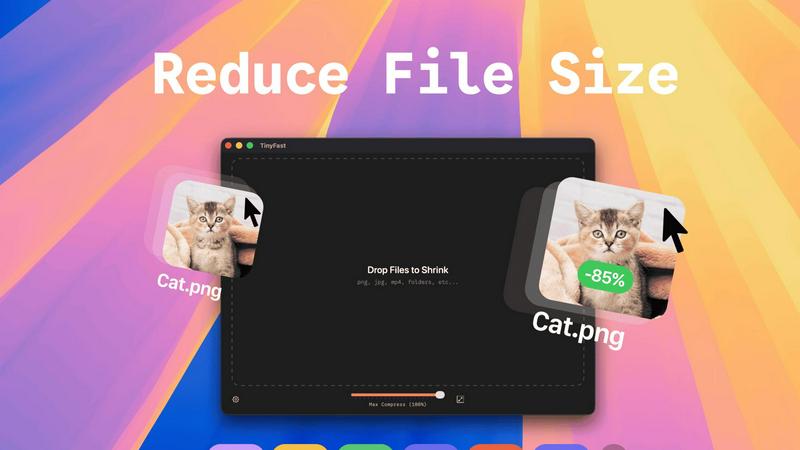
Optimize images, videos, and documents locally on your Mac with TinyFast for fast, secure, and private file compression.
Last updated: February 28, 2026
Visual Comparison
AI Photo Generator

TinyFast
Feature Comparison
AI Photo Generator
Advanced Prompt-to-Image Engine
Our fine-tuned AI models are specifically calibrated for high prompt fidelity, accurately interpreting detailed natural language descriptions to generate images that match precise specifications for lighting, composition, and detail. This engine supports a wide array of model presets, including options like Flux Kontext Pro and Imagen4 Fast, tailored for specific workflows such as product scenes, portraits, and advertising visuals, ensuring output aligns perfectly with commercial creative briefs.
Intelligent Image-to-Image Transformation
Go beyond text prompts by uploading reference images to guide generation. This powerful feature allows teams to restyle existing photos, change backgrounds, modify composition, or adjust mood while preserving core elements like subject identity or style continuity. It is essential for rebranding assets, creating character-consistent content, and expanding scenes for different aspect ratios without starting from scratch, all controlled through simple text instructions.
Curated Model Library & Style Control
The platform provides access to a diverse, optimized library of state-of-the-art AI models, such as Ideogram V3, Seedream, and Qwen. This allows users to select the perfect balance of speed, realism, and artistic style for each project—from ultra-realistic photography to vibrant anime or classic paintings. This control ensures teams can achieve the exact aesthetic required for their target audience and channel specifications.
Enterprise-Grade Speed & Scalability
Built on optimized cloud infrastructure, AI Photo Generator delivers image results in seconds, not minutes or hours. This rapid processing capability is critical for fast-paced production environments, enabling high-volume asset creation, real-time campaign adjustments, and efficient A/B testing cycles without bottlenecks, thereby maximizing team productivity and accelerating project timelines.
TinyFast
Batch & Drag-Drop Shrink
TinyFast enables users to drop entire folders into the application, allowing for the swift and efficient compression of multiple files simultaneously. This batch processing feature significantly reduces the time required for file optimization, making it ideal for users who need to manage large volumes of assets.
Blazing-Fast Compression
With optimized native engines built for speed, TinyFast provides blazing-fast compression capabilities that allow users to shrink large files in mere seconds. By eliminating the tedious waiting times associated with uploads and downloads, the app enhances workflow efficiency and productivity.
Resize Resolution
TinyFast includes an automatic resolution resizing feature for images and videos, allowing users to set specific dimensions for their assets. This functionality is essential for ensuring that files meet the requirements for various platforms and applications while maintaining visual quality.
100% Local & Private
TinyFast guarantees that all files remain on the user's device throughout the compression process, ensuring complete privacy and security. With no uploads to cloud servers, users can compress sensitive documents with confidence, knowing that their data is never exposed to external parties.
Use Cases
AI Photo Generator
Marketing & Advertising Campaigns
Marketing teams can rapidly generate a vast library of unique, copyright-free visuals for social media ads, website banners, and email campaigns. The platform enables quick iteration on concepts, allowing for cost-effective A/B testing of different visual styles and compositions to identify top-performing assets before committing significant budget to production.
E-commerce & Product Visualization
Online retailers and brands can create photorealistic product photos and lifestyle scenes without expensive photoshoots. Generate images of products in various settings, with different lighting and props, to populate catalogs, create compelling ads, and enhance product pages, significantly reducing photography costs and time-to-market for new listings.
Professional Branding & Personal Portraits
Businesses and professionals can generate consistent, high-quality headshots and team portraits for LinkedIn, company websites, and press kits. The AI Face Generator capability ensures character consistency, allowing for the creation of profile-ready imagery that aligns with brand identity, even for remote or large teams.
Content Creation & Social Media Assets
Content creators, bloggers, and social media managers can produce a constant stream of engaging thumbnails, blog graphics, and platform-specific visuals. The ability to quickly edit and restyle existing images or generate entirely new ones from text prompts ensures a fresh, professional visual presence that drives engagement without requiring graphic design expertise.
TinyFast
Graphic Designers
Graphic designers can leverage TinyFast to compress large image files for web use, ensuring that their visuals load quickly without sacrificing quality. This optimization is crucial for enhancing user experience on websites and reducing bandwidth usage.
Video Editors
Video editors benefit from TinyFast by quickly compressing raw footage and exported videos, making it easier to share large files with clients or collaborators. The instant compression allows editors to maintain a smooth workflow without delays.
Content Creators
Content creators can use TinyFast to optimize images and videos for social media platforms, ensuring that their posts are visually appealing and load efficiently. This capability helps maintain a professional appearance across various channels.
Developers
Developers can integrate TinyFast into their asset management workflows, compressing various file types, including code and documentation. This ensures that applications load faster and consume less storage space, ultimately enhancing application performance.
Overview
About AI Photo Generator
AI Photo Generator (aiphotogenerator.dev) is a premier, enterprise-grade creative platform engineered to transform business concepts into high-fidelity visual assets with unprecedented speed and precision. By leveraging a curated suite of advanced neural networks, the platform democratizes professional-grade digital art creation, eliminating the traditional barriers of technical skill, expensive software, and lengthy production timelines. Its core value proposition lies in delivering a measurable return on investment by drastically reducing the cost and time-to-market for visual content, from initial ideation to final, commercially-licensed output. Designed for productivity-focused teams, it serves a broad spectrum of professionals including marketing departments, content creators, entrepreneurs, and product designers who require a scalable, on-demand solution for generating photorealistic images, editing existing photos, and maintaining brand consistency across all digital channels. The platform's optimized cloud architecture ensures lightning-fast generation, enabling rapid iteration for A/B testing and campaign development, making it an indispensable tool for modern, agile businesses.
About TinyFast
TinyFast is an innovative macOS application dedicated to providing efficient, local file compression tailored specifically for images, videos, and documents. Designed with developers, designers, and content creators in mind, TinyFast supports an extensive range of file formats, including PNG, JPEG, MP4, MOV, PDF, SVG, WebP, MP3, and GIF. Its core value proposition lies in the ability to perform file compression locally on the user's device, eliminating the need for potentially insecure uploads to external servers. This approach not only enhances user privacy but also significantly boosts efficiency, allowing users to drag and drop files for instant compression without compromising on quality. As a result, TinyFast distinguishes itself in a crowded market of online compression tools by prioritizing speed, security, and user privacy, enabling professionals to focus on their projects with peace of mind regarding data exposure.
Frequently Asked Questions
AI Photo Generator FAQ
What is the quality and commercial license of the generated images?
Images generated on the platform are high-resolution and suitable for professional commercial use. The output is designed for realism and detail, matching the quality needed for advertising, web design, and print. Users retain full commercial rights to the images they create, making them safe for use in branded materials and campaigns.
How does the image-to-image feature work?
You can upload any reference photo to serve as a structural or stylistic baseline. Then, using natural language prompts, you instruct the AI on what to change—such as the background, colors, mood, or specific elements. The AI regenerates the image based on your reference and instructions, allowing for controlled edits while maintaining the original composition or subject identity.
Is there a free plan to test the platform?
Yes, AI Photo Generator offers a free-to-start plan that allows users to experience the core browser-based editor and test prompt strategies without initial investment. This free-first approach enables teams to evaluate the tool's capabilities, compare different AI models, and refine concepts before scaling up with a paid plan for higher-volume, production-grade work.
Which AI models are available, and how do I choose one?
The platform integrates multiple leading models like Flux, Ideogram, Qwen, and Seedream. Each model has strengths in different areas, such as speed, realism, or specific artistic styles. The interface provides recommendations and presets for common use cases (e.g., portraits, products), allowing you to select the optimal model for your specific need for fidelity and output quality.
TinyFast FAQ
How does TinyFast ensure file privacy?
TinyFast performs all file compressions locally on your device, meaning no files are uploaded to external servers. This design guarantees that your sensitive information remains secure and private.
What file formats does TinyFast support?
TinyFast supports a wide array of file formats, including images (PNG, JPEG, GIF, SVG), videos (MP4, MOV), documents (PDF, DOCX), code files (JS, CSS, JSON), and audio files (MP3), making it a versatile tool for various needs.
Is there a limit to the number of compressions I can perform?
With the free version of TinyFast, users can compress up to 5 files per day. However, with a lifetime plan or monthly subscription, users can enjoy unlimited local compressions, enhancing their productivity.
Can I try TinyFast before committing to a purchase?
Yes, TinyFast offers a 3-day trial period for the monthly subscription plan. This allows users to explore all features and determine if the application meets their needs before making a financial commitment.
Alternatives
AI Photo Generator Alternatives
AI Photo Generator is a leading platform in the AI image generation category, enabling users to create professional digital art from text prompts and existing photos. It is designed to democratize high-end visual creation for users of all technical skill levels. Businesses and creators often seek alternatives to such tools for various strategic reasons. These can include budget constraints, the need for specific niche features, integration with existing enterprise workflows, or platform-specific requirements like API access and usage limits for high-volume operations. When evaluating an alternative, key considerations should include the total cost of ownership, the quality and consistency of the AI's output, processing speed, data security and privacy policies, and the tool's ability to scale with your content production needs. The goal is to find a solution that aligns with your operational efficiency and return on investment objectives.
TinyFast Alternatives
TinyFast is a robust application designed for macOS that specializes in the local compression of images, videos, and documents. It falls into the category of tech tools aimed at enhancing productivity for developers, designers, and content creators by optimizing digital assets while ensuring data privacy. Users often seek alternatives to TinyFast for a variety of reasons, including pricing considerations, feature sets, compatibility with different operating systems, and specific performance needs that may not be fully met by TinyFast. When searching for an alternative, it is essential to evaluate the core functionalities that matter most to your workflow. Look for applications that offer similar batch processing capabilities, speed of compression, and the ability to maintain local privacy. Additionally, consider the range of file formats supported, ease of use, and any unique features that could enhance your productivity and asset management processes.