
xyOps
xyOps automates and monitors your entire infrastructure, streamlining job scheduling, alerting, and workflow management for enhanced efficiency.
Visit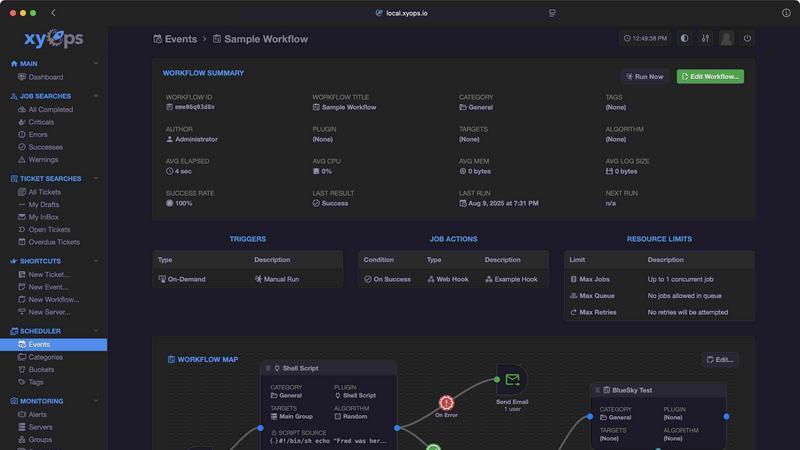
About xyOps
xyOps™ is a cutting-edge system designed for job scheduling, workflow automation, server monitoring, alerting, and incident response, all integrated into a single, cohesive platform. Targeting developers and operations teams, xyOps empowers users to maintain control over their automation stack without compromising on data integrity, freedom, or visibility. Unlike other platforms, xyOps does not restrict access to features through paywalls or redirect telemetry data elsewhere; it champions an open and extensible architecture that can operate across diverse environments—from cloud-based infrastructures to on-premises setups. xyOps streamlines operations by enabling teams to orchestrate their entire infrastructure, optimize performance, and respond to incidents with agility, making it an essential tool for organizations aiming to enhance productivity and ROI.
Features of xyOps
Job Scheduling Reimagined
xyOps transforms job scheduling by providing capabilities that go far beyond traditional cron jobs. With its flexible scheduler, users can target individual servers or groups, define multiple schedules, and even import existing crontab configurations. This advanced scheduling ensures that jobs can run at optimal times, reducing downtime and maximizing resource utilization.
Visual Workflow Builder
The intuitive graphical workflow editor allows users to build complex workflows visually. By connecting events, triggers, actions, and monitors, teams can create meaningful pipelines that automate processes seamlessly. This feature not only enhances clarity but also simplifies the orchestration of intricate workflows, making automation accessible to all team members.
Active Job Tracking
xyOps offers real-time tracking for jobs running in parallel, providing updates on progress and time remaining. Users can set maximum parallel limits and enforce resource usage caps, ensuring that system performance remains optimal. This feature enhances operational transparency and allows teams to make informed decisions based on job metrics and outcomes.
Integrated Ticketing System
The built-in ticketing system enables teams to respond swiftly to incidents. Alerts and job failures can automatically generate tickets, helping teams manage and resolve issues efficiently. This feature streamlines incident response workflows and enhances collaboration across teams, significantly improving service reliability and minimizing downtime.
Use Cases of xyOps
DevOps Automation
xyOps is ideal for DevOps teams looking to automate repetitive tasks, such as deployment and monitoring. By leveraging xyOps' workflow automation and job scheduling capabilities, teams can deploy applications faster and reduce the risk of human error, ultimately enhancing productivity and reliability.
Infrastructure Monitoring
Organizations can utilize xyOps to monitor their entire infrastructure in real-time. With customizable alerts and dashboards, teams can track server performance and resource utilization, allowing them to proactively address potential issues before they escalate into critical incidents.
Incident Management
In the event of an incident, xyOps facilitates rapid response through its integrated ticketing system. Teams can automate ticket creation for alerts and job failures, ensuring that issues are tracked and resolved efficiently, thereby minimizing service disruptions and enhancing customer satisfaction.
Plugin Development
Developers can take advantage of xyOps' extensible architecture to create and publish custom plugins. This feature allows organizations to tailor the platform to their specific needs, integrating with various third-party services and enhancing overall functionality, ultimately driving innovation and efficiency.
Frequently Asked Questions
What types of environments can xyOps run in?
xyOps is designed to be versatile and can operate in various environments, including cloud-based, on-premises, and hybrid infrastructures. This flexibility ensures that organizations can integrate xyOps into their existing systems without significant modifications.
How does xyOps handle scalability?
xyOps supports scalability by allowing multiple worker servers to operate within a cluster. It automatically manages the distribution of jobs across servers, ensuring that performance remains consistent even as the workload increases, which is crucial for growing organizations.
Can I customize alerts in xyOps?
Yes, xyOps provides rich alerting capabilities, allowing users to define custom triggers and notifications. Alerts can be configured to include detailed information about server status, and they can create tickets or trigger actions automatically, ensuring timely responses to issues.
Is xyOps open source?
Absolutely. xyOps is 100% free and open source under the BSD 3-Clause license. This commitment to open-source principles ensures that users have full access to all features and can contribute to the platform's development without any restrictive terms.
Similar to xyOps

A GEO SEO platform for creating and publishing multilingual content optimized for AI search visibility.


146 AI tools, grouped by the job you hire them to do. We paid for every one, used it on real work, and wrote down where it stops.

A SaaS directory that turns tools away. Everything listed here was screened and scored out of 100 before publication.

Tools Network is a curated directory of the best AI tools across 25+ categories. Compare ratings, pricing, and features to find the right one, fast.

Schedule and publish social content across 10 platforms with one dashboard, API, and MCP built for teams and AI agents.

Turn daily annoyances and raw ideas into inventions, products, and businesses. EntreDash provides a virual personal advisory board using AI automation

AI employee in Slack that connects your tools and gets work done across them.