
Sketch To
Sketch To leverages AI to instantly convert images into professional sketches, boosting creative productivity and ROI.
Visit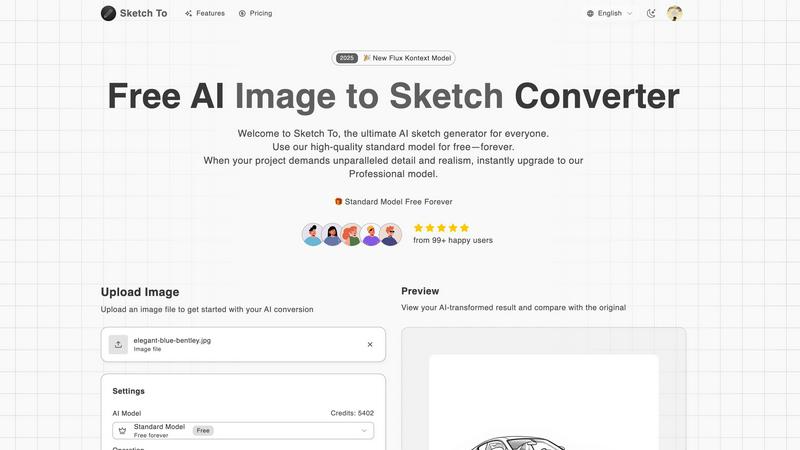
About Sketch To
Sketch To is an enterprise-grade AI image processing platform engineered to transform visual content creation workflows. It provides a sophisticated, cloud-based solution for bidirectional conversion between photographs and artistic sketches, leveraging advanced artificial intelligence models. The platform is designed for a broad spectrum of users, from marketing teams and product designers to architects and professional illustrators, addressing the critical need for rapid, high-fidelity visual prototyping and asset generation. Its core value proposition lies in delivering measurable ROI by drastically reducing the time and specialized skill required to produce studio-quality sketches from images, or to render conceptual sketches into photorealistic visuals. With a tiered model system, Sketch To offers a scalable solution: a robust Standard Model for cost-effective ideation and internal projects, and a premium Professional Model that delivers unparalleled detail and commercial-grade realism for client-facing work and final deliverables. The platform's instant processing, high-resolution output, and seamless integration into creative pipelines make it an indispensable tool for businesses seeking to enhance productivity, accelerate project timelines, and unlock new creative possibilities without capital investment in specialized talent or software.
Features of Sketch To
Bidirectional AI Conversion Engine
Sketch To's foundational technology is its dual-direction conversion capability. The platform can intelligently analyze a photograph and decompose it into a precise, artistic sketch across multiple styles like pencil, charcoal, ink, or watercolor. Conversely, its advanced Pro model can interpret hand-drawn sketches, adding texture, lighting, and material details to generate stunningly realistic images. This dual functionality provides a complete toolkit for iterative design and visual storytelling within a single platform.
Tiered AI Model Architecture for Scalable Workloads
The platform operates on a sophisticated two-tier model system to align cost with project requirements. The Standard Model provides high-quality, efficient conversions perfect for internal brainstorming, social media content, and preliminary drafts. For professional outputs, the Pro Model unlocks superior algorithmic processing for world-class detail, accuracy, and realism, ensuring results are suitable for commercial advertising, product visualization, and high-stakes client presentations.
Enterprise-Grade Processing Infrastructure
Built for business continuity and team productivity, Sketch To delivers instant processing through a powerful, cloud-based AI engine. This eliminates local hardware limitations and software installation, allowing teams to convert images in seconds directly from any web browser. The infrastructure supports high-resolution uploads and outputs, ensuring final assets are ready for print, digital campaigns, and integration into other professional design software without quality degradation.
Centralized Asset Management and Preview Tools
The platform streamlines the review and approval process with integrated professional tools. Users can manage conversions and access their asset history. A dedicated preview panel features a drag-to-compare slider, enabling precise before-and-after analysis critical for quality assurance and client reviews. This centralized workflow minimizes context switching and accelerates decision-making cycles for creative projects.
Use Cases of Sketch To
Marketing and Advertising Asset Production
Marketing teams can rapidly generate unique artistic visuals for campaigns, social media posts, and website content. Convert product photography into elegant sketch-style imagery for premium branding, or transform conceptual mood board sketches into realistic mock-ups to secure stakeholder buy-in before production, significantly shortening the creative development cycle.
Product Design and Architectural Visualization
Designers and architects can instantly convert CAD renders or product photos into hand-drawn style sketches for client presentations or portfolio pieces. More powerfully, they can sketch initial concepts by hand, upload them, and use the Pro model to generate photorealistic renderings of products, buildings, or interiors, facilitating faster iteration and more compelling visual proposals.
Entertainment and Storyboarding
Film, animation, and game development studios can use Sketch To to quickly convert location photos into storyboard-ready sketch art or transform rough storyboard panels into more detailed concept art. This accelerates pre-production, helps visualize scenes more effectively, and provides clear visual guidance for production teams, optimizing resource allocation.
Education and Training Material Development
Educational institutions and corporate training departments can enhance learning materials by converting complex diagrams, photographs, or technical illustrations into clear, simplified sketches. This improves comprehension and retention. Conversely, instructors can sketch out ideas and convert them into polished images for presentations, textbooks, and online course content, improving production value.
Frequently Asked Questions
What is the difference between the Standard and Professional AI models?
The Standard Model is optimized for speed and efficiency, delivering high-quality sketch conversions suitable for personal projects, internal drafts, and social media content. The Professional Model utilizes advanced, compute-intensive algorithms to produce outputs with exceptional detail, texture accuracy, and photorealistic quality. It is engineered for commercial use, professional artwork, and any project where the highest fidelity is a non-negotiable requirement, directly impacting perceived value and client satisfaction.
What file formats and resolutions does Sketch To support for input and output?
Sketch To accepts common image file formats for upload, including JPG and PNG. The platform is engineered to process high-resolution inputs, and outputs are generated in high resolution, making them suitable for both digital use and professional printing. For specific size limits and format details, users should refer to the upload interface within the tool, which is designed to guide optimal asset preparation.
How does the credit system work for image conversions?
Conversions on Sketch To consume credits. The Standard Model typically uses 1 credit per conversion, while the Professional Model, due to its advanced processing, uses 2 credits. New users receive complimentary trial credits to evaluate the Standard Model. Subsequent usage requires purchasing a subscription plan or credit pack, providing businesses with predictable budgeting and scalable access based on project volume and quality needs.
Is my data secure and private when using Sketch To?
Sketch To is built with a focus on professional use, which includes considerations for data handling. Uploaded images are processed securely via cloud infrastructure. For detailed information on data retention, privacy policies, and security protocols, users should consult the official Sketch To Terms of Service and Privacy Policy documents to ensure compliance with their organizational data governance standards.
Pricing of Sketch To
Sketch To offers flexible pricing plans to suit different business needs and usage volumes. Plans are available on a monthly or annual billing cycle, with annual subscriptions providing cost savings. The platform also offers individual Credit Packs for teams with variable or project-based needs. The entry-level Basic plan starts at $7.99 per month when billed annually, or $9.99 on a monthly basis. This tiered structure allows organizations to select a plan that aligns with their expected conversion volume and required model access, ensuring cost-effective scalability.
Similar to Sketch To


Free Chrome extension. Paste your rough point and Chrome's built-in AI writes a fresh reply for that post on X, LinkedIn, Facebook or Instagram.

Verla is an AI academic assistant for university and college students, combining AI essay writing, academic research, AI detection.

Apps and files on an infinite canvas where people and AI agents work together.

Signage and kiosk infrastructure for AI agents. Your agent publishes images, video, streams, web pages and apps to screens via one plugin.screenRIG is

A tray helper for every AI coding tool: one searchable library of past sessions, waiting alerts and usage across 9 providers.

Soul Cinema is a cinematic AI image generator that turns a written shot into a film-grade still, with Soul ID character consistency across a sequence,
