
ReceiptsApps
ReceiptsApps is an AI-powered online receipt maker that creates professional, customizable PDF receipts instantly from 150+ templates, saving.
Visit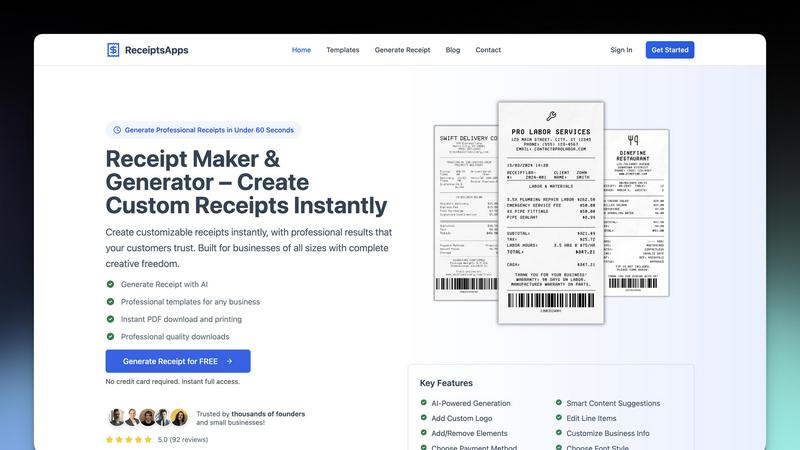
About ReceiptsApps
ReceiptsApps is a comprehensive, free online receipt maker and receipt generator engineered for small businesses, freelancers, and entrepreneurs who need to produce professional, tax-compliant receipts without the overhead of complex accounting software or design expertise. The platform operates entirely within a web browser, requiring no installation, downloads, or technical skills. Its core value proposition is speed and simplicity: users can generate a fully customized, print-ready receipt in under 60 seconds. ReceiptsApps provides access to over 150 industry-specific templates covering sectors such as retail, restaurants, hospitality, transportation, professional services, and rentals. Each template is fully customizable, allowing users to integrate their logo, business name, contact details, itemized line items, taxes, discounts, and payment methods. The platform features automatic calculations for subtotals, taxes, and totals, eliminating manual errors. An AI-powered receipt generator further accelerates the process, enabling users to describe their receipt in plain language and have the system build it instantly. For businesses focused on operational efficiency and professional documentation, ReceiptsApps reduces administrative time, enhances brand consistency, and delivers receipts in multiple formats, including PDF and JPG, compatible with thermal printers and standard office printers. With a free plan available and premium tiers unlocking advanced features such as watermark-free downloads, saved templates, and priority support, ReceiptsApps serves as a scalable solution for businesses at every stage of growth.
Features of ReceiptsApps
AI-Powered Receipt Generation
ReceiptsApps incorporates an intelligent AI receipt generator that transforms plain language descriptions into fully formatted, professional receipts. Users simply describe the transaction details, such as client name, services rendered, amounts, and payment method, and the AI automatically populates the correct template, calculates totals, and applies appropriate formatting. This feature eliminates manual data entry, reduces human error, and accelerates the receipt creation process by up to 80%, making it ideal for businesses that generate high volumes of receipts daily. The AI also suggests industry-specific formatting and fields based on the business type selected.
150+ Professional Industry-Specific Templates
The platform offers a continuously updated library of over 150 professionally designed templates tailored to specific industries, including retail, auto repair, bakery, camp, delivery, labor services, and hospitality. Each template includes pre-configured fields relevant to that business type, such as parts and labor for auto repair or itemized menu items for restaurants. This feature ensures that every receipt is compliant with industry standards and includes all necessary transaction details. Users can preview and select templates instantly, reducing the time spent on formatting and design from hours to seconds.
Full Customization with Drag-and-Drop Interface
ReceiptsApps provides eight customizable block types within a drag-and-drop interface, giving users complete control over receipt layout and content. Users can add or remove elements such as logos, business information, line items, tax fields, discount lines, payment methods, and footer notes. Color customization, font selection including five professional thermal printer fonts, and paper texture options are also available. This flexibility allows businesses to maintain brand consistency across all customer-facing documents without needing graphic design skills or external software.
Instant Multi-Format Export and Automatic Calculations
The platform automatically computes subtotals, taxes, discounts, and grand totals in real-time as users input data, eliminating manual calculation errors. Once finalized, receipts can be exported instantly as high-quality PDF or JPG files in three standard sizes: 80mm, 110mm, and A4. This supports both thermal printer output for point-of-sale environments and standard office printing for formal documentation. The instant export feature reduces the average receipt generation cycle from several minutes to under 60 seconds, directly improving operational throughput for busy businesses.
Use Cases of ReceiptsApps
Retail and E-commerce Transaction Documentation
Retail businesses and e-commerce operators can use ReceiptsApps to generate itemized receipts for in-store purchases, online orders, and merchandise sales. The retail-specific templates include fields for product descriptions, quantities, unit prices, sales tax, and payment method. This ensures customers receive clear, professional documentation that supports returns, exchanges, and warranty claims. For businesses processing high transaction volumes, the AI generation feature can create receipts in bulk, reducing administrative overhead and improving customer satisfaction through consistent, branded documentation.
Freelance and Contractor Payment Confirmation
Freelancers, independent contractors, and gig economy workers can leverage ReceiptsApps to issue professional receipts for project payments, hourly billing, and retainer fees. The labor receipt template includes fields for hours worked, hourly rates, service descriptions, and payment terms. This documentation is critical for tax filing, client record-keeping, and dispute resolution. The platform's ability to add custom logos and business information helps freelancers project a professional image, increasing client trust and reducing payment disputes. Automatic tax calculations ensure compliance with local reporting requirements.
Service Industry and Hospitality Receipts
Salons, spas, auto repair shops, and restaurants can use industry-specific templates to generate detailed service receipts. For example, auto repair shops can document parts replaced, labor hours, and warranty information, while restaurants can itemize menu items and gratuities. These receipts serve as both payment records and service documentation, supporting customer inquiries and insurance claims. The 80mm thermal printer format is particularly useful for point-of-sale environments, enabling instant printing at the time of transaction. This reduces wait times and enhances the customer experience.
Property Management and Rental Income Tracking
Landlords and property managers can issue rent receipts using dedicated rental templates that include fields for property address, lease period, rent amount, late fees, and security deposits. These receipts provide tenants with official documentation for rent payments, which is often required for tax deductions and rental assistance programs. For property managers handling multiple units, the saved templates feature allows for rapid generation of identical receipts with variable tenant details, streamlining monthly billing cycles. The PDF export ensures records are easily stored, emailed, or printed for physical filing.
Frequently Asked Questions
Is ReceiptsApps completely free to use?
Yes, ReceiptsApps offers a free plan that provides full access to the receipt maker, 150+ templates, customization options, automatic calculations, and instant PDF/JPG export. The free plan includes a watermark on downloaded receipts. For businesses requiring watermark-free downloads, saved templates, AI-powered receipt creation, and priority support, premium subscription plans are available. No credit card is required to start using the free plan, and users get instant full access upon signing up.
What types of businesses can use ReceiptsApps?
ReceiptsApps is designed for a wide range of businesses, including retailers, restaurants, auto repair shops, bakeries, camps, delivery services, freelancers, contractors, salons, landlords, and professional service providers. The platform offers over 150 industry-specific templates that cover retail, hospitality, transportation, professional services, rentals, and more. Any business that needs to issue professional, tax-compliant receipts can benefit from the platform, regardless of size or industry.
Can I customize the receipt to match my brand?
Absolutely. ReceiptsApps provides extensive customization options, including the ability to upload your company logo, adjust colors, choose from five professional thermal fonts, select paper textures, and arrange eight different block types using a drag-and-drop interface. You can add your business name, contact details, itemized line items, tax information, discounts, payment methods, and custom footer notes. This ensures every receipt reflects your brand identity and meets your specific documentation requirements.
What file formats and sizes are supported for receipt export?
ReceiptsApps supports instant export in both PDF and JPG formats. Users can choose from three standard paper sizes: 80mm (commonly used for thermal printers in retail and hospitality), 110mm (for wider thermal receipts), and A4 (for standard office printing). This flexibility ensures compatibility with various printing environments, from point-of-sale thermal printers to desktop office printers. Exported files are high-quality and print-ready, suitable for both digital sharing and physical distribution.
Explore more in this category:
Similar to ReceiptsApps

Apps and files on an infinite canvas where people and AI agents work together.

Jev turns text or JSON into Choice, Score and Noul answers with probabilities. Build decision flows and call the API.

Panzoe is an all-in-one AI platform for personal productivity, business automation, AI assistants, content creation, and custom AI solutions.

A tray helper for every AI coding tool: one searchable library of past sessions, waiting alerts and usage across 9 providers.

AI Email Filter sorts incoming mail into folders using plain-language prompts you write. Works with any IMAP mailbox; bring your own LLM if you want.

Free collection of online developer utilities, code formatters, and digital converters designed to streamline your daily workflow.

The #1 Native Form Builder Plugin for Framer - No Code, No Embeds, No External Platforms.

A free launch checklist for SaaS, apps, AI tools and more. Every step says why it matters and when you can skip it.