
Picture Enhancer
Picture Enhancer deblurs, upscales, and restores photos in your browser with AI intensity tiers, giving you three free guest tries before requiring.
Visit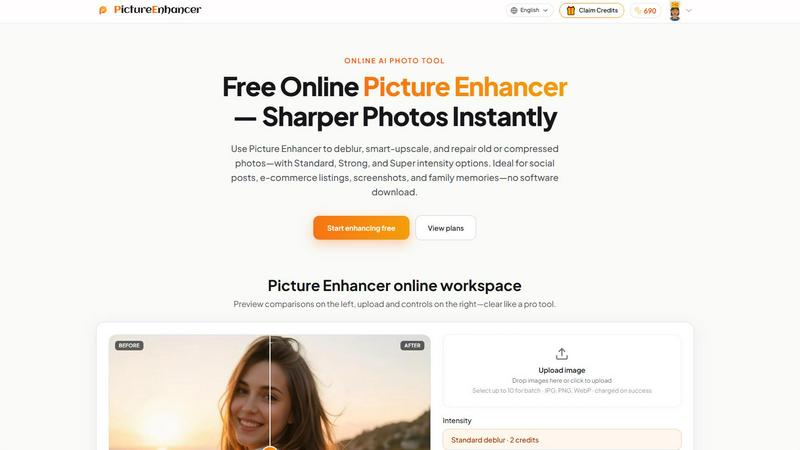
About Picture Enhancer
Picture Enhancer is a professional-grade, AI-powered online photo enhancement tool designed to deliver sharper, higher-quality images for creators, e-commerce sellers, and everyday users. The platform eliminates the need for complex software downloads or manual editing skills by providing an intuitive, three-step workflow: upload an image, select an enhancement mode and intensity level, and download a watermark-free result. Supporting JPG, PNG, and WebP formats, Picture Enhancer offers three core enhancement modes—Deblur, Upscale, and Restore—each with Standard, Strong, and Super intensity tiers to match the severity of image degradation and the desired output quality. The tool’s value proposition centers on speed, accessibility, and cost efficiency. Processing occurs in seconds, with a transparent credit-based billing system that charges users only on successful results, eliminating wasted spend on failed attempts. Guests receive three free lifetime tries per IP without requiring signup, lowering the barrier to entry. For registered users, a starter credit package enables immediate productivity, while paid plans unlock advanced capabilities such as Super intensity tiers and batch processing of up to 10 images simultaneously. Picture Enhancer is ideal for optimizing social media visuals, sharpening e-commerce product photos, cleaning up screenshots for documentation, and restoring old family photographs. By delivering enterprise-grade image processing through a simple web interface, Picture Enhancer reduces time-to-output and improves visual asset quality, directly supporting higher engagement rates, better conversion metrics, and more professional brand presentation across digital channels.
Features of Picture Enhancer
AI Deblur Technology
Picture Enhancer employs advanced AI algorithms to rebuild edges and texture details lost due to camera shake, soft focus, or mild motion blur. Users can select from three intensity levels—Standard, Strong, or Super—to precisely control the degree of sharpening applied. This feature is particularly effective for improving the clarity of faces, text, and product details, ensuring that even slightly blurred images become crisp and usable for professional applications. The AI analyzes each image’s unique blur pattern and applies targeted corrections, resulting in natural-looking enhancements without introducing artifacts.
Smart Upscaling for Enlargement
The Smart Upscaling feature enables users to enlarge images by 2x or 4x while intelligently adding detail to prevent pixelation or loss of quality. This capability is critical for transforming small source files into usable assets for social media cover photos, product hero shots, or print previews. Unlike traditional interpolation methods that simply stretch pixels, Picture Enhancer’s AI reconstructs fine details, textures, and edges to produce results that appear naturally high-resolution. This feature directly supports e-commerce workflows where product images must meet platform-specific size and quality requirements.
Old Photo and Damage Restoration
Picture Enhancer includes a dedicated Restore mode designed to reduce scratches, fade, compression artifacts, and other forms of image degradation common in scanned family prints or older digital files. The Strong and Super intensity settings are optimized for handling heavier damage, such as deep scratches, large faded areas, or significant compression noise. The AI analyzes the image context to intelligently fill in missing or corrupted areas while preserving original details as much as possible. This feature transforms archival and personal photo assets into shareable, high-quality digital memories.
Batch Processing and Super Tiers
Paid users gain access to Super intensity tiers, which apply the most aggressive enhancement algorithms for maximum image quality improvement, and batch processing capabilities that allow up to 10 images to be enhanced simultaneously. Batch processing significantly improves workflow efficiency for professionals managing large volumes of product photos, social media assets, or archive scans. By processing multiple images in a single session, users reduce manual repetition and accelerate content production timelines, directly contributing to higher operational productivity and faster time-to-market for visual assets.
Use Cases of Picture Enhancer
Social Media Content Optimization
Creators and social media managers use Picture Enhancer to reduce mild blur and improve the sharpness of portraits, lifestyle shots, and user-generated content before posting to platforms like Instagram, Facebook, or LinkedIn. Sharper images lead to higher engagement rates, as viewers are more likely to stop scrolling for clear, professional-looking visuals. The tool’s quick processing time enables rapid content turnaround, allowing teams to maintain a consistent posting schedule without sacrificing image quality. By enhancing the clarity of every post, businesses strengthen brand perception and audience retention.
E-Commerce Product Photography Enhancement
Online sellers and marketplace vendors rely on Picture Enhancer to upscale product detail images and reduce compression noise introduced by platform uploads. Sharper, more detailed product photos directly correlate with higher conversion rates, as customers can better evaluate product features and quality before purchase. The ability to batch enhance up to 10 images simultaneously streamlines the listing creation process, reducing the time spent on individual photo editing. This efficiency gain allows sellers to list more products faster, increasing revenue potential per unit of labor.
Screenshot and UI Capture Refinement
Technical writers, support teams, and documentation specialists use Picture Enhancer to sharpen text edges and improve overall clarity in screenshots and UI captures. Clearer screenshots enhance the readability of tutorials, help articles, and bug reports, reducing customer confusion and support ticket volume. By delivering crisp, professional-looking visuals, teams improve the effectiveness of their documentation and communication materials. The tool’s ability to handle compressed or low-resolution screenshots ensures that even legacy captures can be repurposed for current projects.
Family Photo and Archive Restoration
Individuals and genealogists leverage Picture Enhancer’s Restore mode to repair scratches, fade, and compression artifacts in scanned old photographs. This capability transforms fragile or damaged prints into digital assets that can be shared with family members, included in photo books, or preserved for future generations. The Strong and Super intensity tiers are particularly effective for heavily damaged images, breathing new life into cherished memories. By making restoration accessible without expensive software or professional services, Picture Enhancer democratizes photo preservation for everyday users.
Frequently Asked Questions
What is Picture Enhancer?
Picture Enhancer is a free online AI-powered tool that enhances image quality by deblurring, upscaling, and restoring photos. It is designed for creators, e-commerce sellers, and everyday users who need sharper, clearer images quickly without downloading software. The tool supports JPG, PNG, and WebP formats and offers three enhancement modes with three intensity levels each. Processing is fast, secure, and results are delivered watermark-free.
Can I try Picture Enhancer without signing in?
Yes, guests receive three free lifetime tries per IP address without requiring any signup or payment. This allows potential users to test the tool’s capabilities on their own images before committing to a paid plan. Each guest attempt can use any of the three enhancement modes at any intensity level. After exhausting guest tries, users must sign in to continue using the service.
How does billing work after sign-in?
After signing in, users receive starter credits to begin enhancing immediately. Credits are deducted only when an enhancement job succeeds, ensuring users never pay for failed attempts. Standard intensity costs 2 credits, Strong costs 4 credits, and Super costs 6 credits per image. Users can purchase monthly subscription plans that grant credits each billing cycle or permanent credit packs that never expire, providing flexibility based on usage volume.
Which modes does Picture Enhancer support?
Picture Enhancer supports three core enhancement modes: Deblur, which rebuilds edges and texture from camera shake or soft focus; Upscale, which enlarges images by 2x or 4x while adding detail; and Restore, which reduces scratches, fade, and compression artifacts in old or damaged photos. Each mode is available in Standard, Strong, and Super intensity tiers, with Super tiers requiring a paid subscription or credit pack.
Will downloads include a watermark?
No, all successful enhancements are delivered watermark-free. Users can download the original and enhanced versions of their images without any branding or restrictions. This ensures that enhanced photos are immediately usable for professional purposes, including e-commerce listings, social media posts, and print materials, without requiring additional editing to remove watermarks.
What is the difference between subscription and permanent credit packs?
Monthly subscription plans grant users a set number of credits each billing cycle, which is ideal for users with consistent or growing enhancement needs. Permanent credit packs are a one-time purchase that never expires, making them suitable for users with sporadic or project-based requirements. Both options unlock Super intensity tiers and batch processing capabilities, but permanent packs offer greater long-term value for infrequent users.
Are my photos safe?
Yes, Picture Enhancer processes all images with private, secure handling. Uploaded photos are used only to complete the enhancement request and are not stored or shared with third parties. The platform employs encryption during upload and processing to protect user data. Once the enhancement is complete and downloaded, users can manage or delete their assets from the My Assets section of their account.
Where do I check balance and history?
Signed-in users can view their credit balance, transaction history, and past enhancement results in the My Assets section of the website. This dashboard provides a clear overview of available credits, recent usage, and download links for previously enhanced images. Tracking usage helps users manage their budget and plan future enhancements efficiently.
Explore more in this category:
Similar to Picture Enhancer

AIPetGen turns a photo of your dog, cat, or other pet, or a written description, into a new picture or a short animation.

ImageGPT is an all-in-one AI creative platform for generating, editing and transforming images and videos using AI.

Create release-ready album covers from a prompt or photo. Generate, refine, and export art for singles, EPs, mixtapes, and playlists.

A free browser-based toolkit for creating, cutting, converting, and previewing sprite sheet animations.

Prompt-based Qwen Image Edit Online for background changes, text edits, product images, posters, outpainting, and creative workflows.

Turn flat images into editable transparent layers with AI.


Create photorealistic images, bilingual posters, ecommerce visuals, and social content with Z Image Turbo, flexible prompts, aspect ratios, seeds, and