
Published on:
November 16, 2026
Pricing:
About Drawcil
Drawcil is an interactive drawing learning platform that helps anyone learn to draw by turning any image into a simple, step-by-step drawing tutorial.
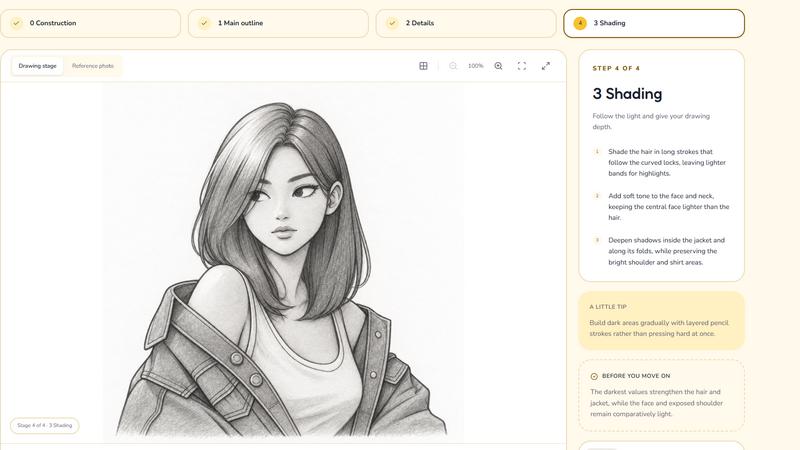
Unlike traditional drawing tutorials that teach you to recreate predefined images, Drawcil lets you choose what you want to draw. Simply upload an image, and Drawcil breaks it down into four essential drawing stages: sketching, line work, shading, and coloring. Follow each stage to understand how an artist approaches the drawing process, build your skills, and learn through hands-on practice.
Key Features:
- Practice with Images You Love: Stay motivated by learning to draw subjects that actually interest you.
- Four-Step Drawing Process: Learn through sketching, line work, shading, and coloring.
- Trace mode: Instead of free-handing you can apply a piece of paper to the screen, and draw line-by-line.
Drawcil makes learning to draw less about following generic tutorials and more about creating the art you actually want to make.
Similar to Drawcil

Turn chapter PDFs into a speaking AI voice tutor & quizzes. It is the ultimate AI buddy for your exam preparation.

Upload one photo for a free PSL score and face rating. 47 tools cover face shape, symmetry, color season and more. No signup needed.

Realistic dating profile photos from one selfie, plus free bio, prompt and photo-rating tools.

Try on clothes, glasses, rings, hairstyles, and hair colors on your own photos with AI.

Convert any FlipHTML5 flipbook into a high-quality PDF online - free, open source, no signup.

Turn brand descriptions into custom logos with AI. Refine styles and colors, try free PNG exports, and upgrade for SVG and commercial licensing.

Prepare photo cutouts online: remove backgrounds with AI, inspect the preview and download.

Restore old photos with RestoreOldPhoto.ai: repair scratches, creases and fading, sharpen faces and details, and optionally colorize family memories.