
Perkoon vs TinyFast
Side-by-side comparison to help you choose the right AI tool.

Perkoon enables unlimited, free peer-to-peer file transfers with no signup required.
Last updated: March 4, 2026

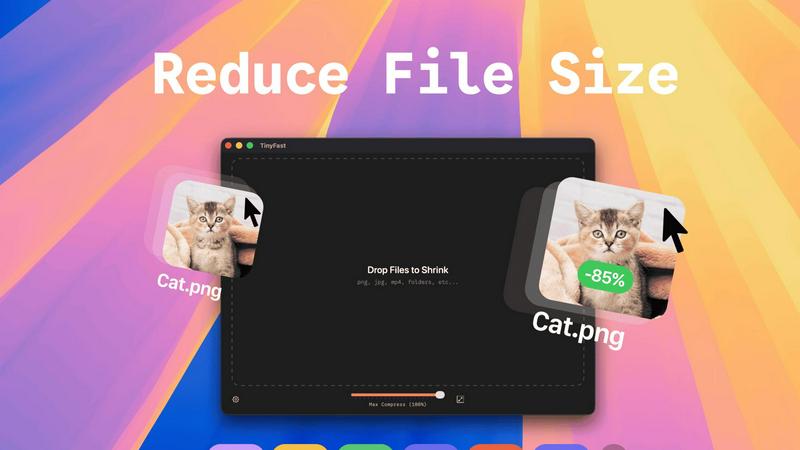
Optimize images, videos, and documents locally on your Mac with TinyFast for fast, secure, and private file compression.
Last updated: February 28, 2026
Visual Comparison
Perkoon

TinyFast
Feature Comparison
Perkoon
Unlimited Free P2P Transfers
Perkoon's flagship feature utilizes WebRTC-based peer-to-peer technology to facilitate direct browser-to-browser file transfers. This method imposes no file size limits, requires no user accounts, and ensures maximum privacy and speed as data never transits a central server. For businesses, this means zero-cost transfer of large datasets, video productions, or software builds between online collaborators, directly reducing operational expenses associated with data egress and premium service tiers.
Encrypted Cloud Storage for Offline Recipients
When immediate transfer is not possible, Perkoon provides secure, encrypted cloud storage as a paid service. Files are held securely until the recipient is available, with pricing transparently covering server infrastructure costs. This hybrid model guarantees delivery reliability without forcing users into a one-size-fits-all subscription, allowing businesses to pay only for the storage and bandwidth they actually consume.
Native AI & Automation Integration
Unlike legacy services, Perkoon is built with machine-to-machine interaction as a first-class citizen. It exposes a dedicated JavaScript object (window.__perkoon) and CLI tools, enabling AI agents and automation scripts to interact with the service programmatically. This eliminates the need for unreliable DOM scraping, allowing enterprises to seamlessly integrate secure file transfer into CI/CD pipelines, automated reporting systems, and AI-driven content workflows.
Privacy-First Data Governance
Perkoon enforces a strict policy of non-interference with user data. P2P transfers are inherently private, and all cloud-stored files are encrypted. The company explicitly does not scan, analyze, or sell user data for advertising. This commitment provides legal and compliance teams with assurance regarding data sovereignty and adherence to stringent regulatory frameworks like GDPR, mitigating corporate risk.
TinyFast
Batch & Drag-Drop Shrink
TinyFast enables users to drop entire folders into the application, allowing for the swift and efficient compression of multiple files simultaneously. This batch processing feature significantly reduces the time required for file optimization, making it ideal for users who need to manage large volumes of assets.
Blazing-Fast Compression
With optimized native engines built for speed, TinyFast provides blazing-fast compression capabilities that allow users to shrink large files in mere seconds. By eliminating the tedious waiting times associated with uploads and downloads, the app enhances workflow efficiency and productivity.
Resize Resolution
TinyFast includes an automatic resolution resizing feature for images and videos, allowing users to set specific dimensions for their assets. This functionality is essential for ensuring that files meet the requirements for various platforms and applications while maintaining visual quality.
100% Local & Private
TinyFast guarantees that all files remain on the user's device throughout the compression process, ensuring complete privacy and security. With no uploads to cloud servers, users can compress sensitive documents with confidence, knowing that their data is never exposed to external parties.
Use Cases
Perkoon
Media Production & Creative Agencies
Teams regularly exchanging multi-gigabyte raw video footage, design files, and final renders between editors, clients, and external partners can utilize free P2P transfers for instantaneous review cycles. Cloud storage holds deliverables for client download on their schedule, eliminating costly overages from traditional transfer services and accelerating project timelines.
Software Development & DevOps
Development teams can integrate Perkoon's CLI and API into their deployment pipelines to automatically transfer build artifacts, log files, or database dumps between environments or to stakeholders. The native automation support ensures reliable, hands-off operation critical for agile development and continuous integration/continuous deployment (CI/CD) processes.
Legal & Financial Services Compliance
Firms handling sensitive client documents, audit trails, and confidential reports require secure transfer without third-party data mining. Perkoon's privacy-centric model, with encrypted cloud holds and P2P direct sends, provides a verifiable chain of custody and ensures that sensitive information remains protected throughout its lifecycle, supporting compliance mandates.
Enterprise IT & Infrastructure Management
IT departments can leverage Perkoon for cost-effective large-scale data distribution, such as deploying software packages, VM images, or backup archives across global offices. The ability to mix free P2P for internal transfers with on-demand cloud storage for external partners optimizes bandwidth costs and simplifies digital asset logistics.
TinyFast
Graphic Designers
Graphic designers can leverage TinyFast to compress large image files for web use, ensuring that their visuals load quickly without sacrificing quality. This optimization is crucial for enhancing user experience on websites and reducing bandwidth usage.
Video Editors
Video editors benefit from TinyFast by quickly compressing raw footage and exported videos, making it easier to share large files with clients or collaborators. The instant compression allows editors to maintain a smooth workflow without delays.
Content Creators
Content creators can use TinyFast to optimize images and videos for social media platforms, ensuring that their posts are visually appealing and load efficiently. This capability helps maintain a professional appearance across various channels.
Developers
Developers can integrate TinyFast into their asset management workflows, compressing various file types, including code and documentation. This ensures that applications load faster and consume less storage space, ultimately enhancing application performance.
Overview
About Perkoon
Perkoon is a next-generation file transfer platform engineered for business efficiency and uncompromising data sovereignty. It eliminates the friction, cost overhead, and privacy concerns endemic to traditional cloud services by leveraging a dual-architecture model. The platform is designed for professionals, teams, and enterprises that require a reliable, scalable, and cost-predictable method for exchanging digital assets, from large multimedia files to sensitive project documents. Its core value proposition is a transparent, utility-based pricing model: unlimited, free peer-to-peer (P2P) transfers for real-time exchanges, and fairly priced encrypted cloud storage for asynchronous delivery. This approach directly translates to significant ROI by removing per-user seat licenses and arbitrary file size caps that cripple productivity. Furthermore, Perkoon is architected for the modern automation stack, offering native API access and AI-agent compatibility, positioning it as critical infrastructure for streamlined, automated workflows without the security risks of screen-scraping.
About TinyFast
TinyFast is an innovative macOS application dedicated to providing efficient, local file compression tailored specifically for images, videos, and documents. Designed with developers, designers, and content creators in mind, TinyFast supports an extensive range of file formats, including PNG, JPEG, MP4, MOV, PDF, SVG, WebP, MP3, and GIF. Its core value proposition lies in the ability to perform file compression locally on the user's device, eliminating the need for potentially insecure uploads to external servers. This approach not only enhances user privacy but also significantly boosts efficiency, allowing users to drag and drop files for instant compression without compromising on quality. As a result, TinyFast distinguishes itself in a crowded market of online compression tools by prioritizing speed, security, and user privacy, enabling professionals to focus on their projects with peace of mind regarding data exposure.
Frequently Asked Questions
Perkoon FAQ
How does Perkoon offer unlimited free P2P transfers?
The free P2P service is sustainable because it utilizes a direct connection between the sender's and recipient's web browsers. The file data never touches or is stored on Perkoon's servers, meaning the company incurs negligible infrastructure costs for this service. This cost-saving is passed directly to the user, allowing for truly unlimited, free transfers when both parties are online.
What happens if the recipient is not online when I send a file?
If the recipient is offline, the sender can opt to use Perkoon's Encrypted Cloud Storage. The file is securely uploaded and held on Perkoon's servers until the recipient is available to download it. This ensures guaranteed delivery. This is a paid feature, as it involves tangible server storage and bandwidth costs for Perkoon.
Is my data private and secure with Perkoon?
Yes. For P2P transfers, data is transmitted directly between browsers; Perkoon cannot see or access it. For files in cloud storage, they are encrypted at rest on Perkoon's servers. The company has a stated policy of no data scanning, analysis, or selling for advertising, ensuring your business data remains your own.
Can automated systems and AI agents use Perkoon?
Absolutely. Perkoon is designed for automation. It provides a native JavaScript API (window.__perkoon) accessible to browser-based AI agents and a Command Line Interface (CLI) tool. This allows scripts and autonomous agents to initiate and manage file transfers programmatically without the need for manual intervention or brittle screen-scraping techniques.
TinyFast FAQ
How does TinyFast ensure file privacy?
TinyFast performs all file compressions locally on your device, meaning no files are uploaded to external servers. This design guarantees that your sensitive information remains secure and private.
What file formats does TinyFast support?
TinyFast supports a wide array of file formats, including images (PNG, JPEG, GIF, SVG), videos (MP4, MOV), documents (PDF, DOCX), code files (JS, CSS, JSON), and audio files (MP3), making it a versatile tool for various needs.
Is there a limit to the number of compressions I can perform?
With the free version of TinyFast, users can compress up to 5 files per day. However, with a lifetime plan or monthly subscription, users can enjoy unlimited local compressions, enhancing their productivity.
Can I try TinyFast before committing to a purchase?
Yes, TinyFast offers a 3-day trial period for the monthly subscription plan. This allows users to explore all features and determine if the application meets their needs before making a financial commitment.
Alternatives
Perkoon Alternatives
Perkoon is a modern file transfer solution within the productivity and management software category, distinguished by its peer-to-peer architecture and AI-native design. Organizations evaluate alternatives to Perkoon for several strategic reasons, including specific compliance requirements, the need for deeper enterprise integrations, or budget structures that favor per-user licensing over transactional cloud storage fees. The decision often hinges on aligning the tool's capabilities with broader IT infrastructure and long-term digital workflow strategies. When selecting a file transfer alternative, key evaluation criteria should include total cost of ownership, security and compliance certifications, and scalability. Beyond core functionality, consider the solution's ability to enhance team productivity through automation and its API maturity for connecting to existing business systems. The optimal choice minimizes friction in data exchange while maximizing operational efficiency and control.
TinyFast Alternatives
TinyFast is a robust application designed for macOS that specializes in the local compression of images, videos, and documents. It falls into the category of tech tools aimed at enhancing productivity for developers, designers, and content creators by optimizing digital assets while ensuring data privacy. Users often seek alternatives to TinyFast for a variety of reasons, including pricing considerations, feature sets, compatibility with different operating systems, and specific performance needs that may not be fully met by TinyFast. When searching for an alternative, it is essential to evaluate the core functionalities that matter most to your workflow. Look for applications that offer similar batch processing capabilities, speed of compression, and the ability to maintain local privacy. Additionally, consider the range of file formats supported, ease of use, and any unique features that could enhance your productivity and asset management processes.