
SupaSidebar vs Zovo
Side-by-side comparison to help you choose the right AI tool.

SupaSidebar
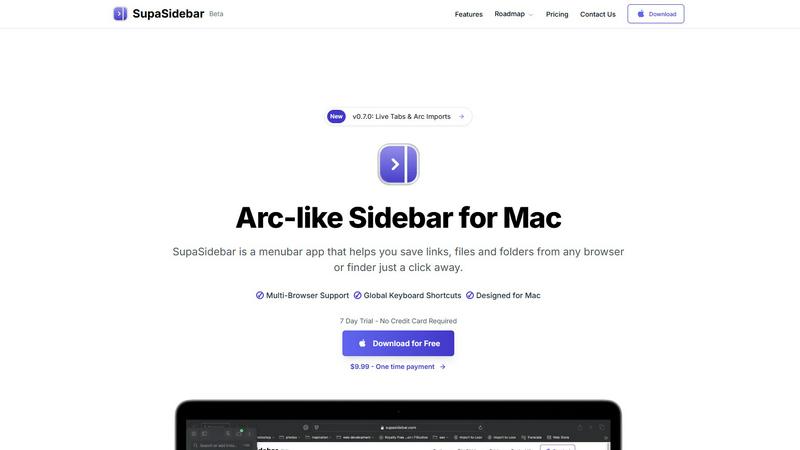
SupaSidebar boosts Mac productivity by providing instant keyboard access to links, files, and folders.
Last updated: February 28, 2026

Unlock 20 privacy-focused Chrome extensions for developers and writers with Zovo, built by a solo developer for your.
Last updated: February 26, 2026
Visual Comparison
SupaSidebar
Zovo

Feature Comparison
SupaSidebar
Universal Browser Integration & Capture
SupaSidebar seamlessly integrates with all major web browsers, including Safari, Chrome, Arc, Firefox, and Brave. This allows users to capture or copy the current webpage URL from any browser instantly using dedicated, configurable global keyboard shortcuts (e.g., Command+Control+S to save, Command+Control+C to copy). This feature eliminates the cumbersome process of manually bookmarking or copying links across different platforms, centralizing web resource management into a single, always-accessible hub.
Intelligent Recents & Favorites Pinning
The application automatically tracks and displays every website accessed across all integrated browsers within the last 48 hours in a "Recents" section, serving as a powerful short-term memory aid. Users can pin frequently accessed links, files, or folders as Favorites, which are permanently elevated to the top of the sidebar for immediate, one-click access. This dual-system organization ensures both recent context and critical daily tools are always at hand, drastically reducing search time.
Global Instant Search (Command+Control+K)
Activating the universal search shortcut (Command+Control+K) opens a powerful search interface that indexes and retrieves items from across all saved links, files, folders, and applications in real-time. This feature enables users to bypass manual navigation entirely, finding any resource by name in seconds. It is engineered to minimize cognitive load and maintain workflow momentum, acting as a central command center for all digital assets on the Mac.
Native macOS Design & Local-Only Data
Built exclusively for macOS 13 and above, SupaSidebar adheres to Apple's Human Interface Guidelines, ensuring a familiar, intuitive, and performant user experience that feels like a native extension of the operating system. Critically, all user data—saved links, metadata, and organizational structures—is stored solely on the local device. This architecture guarantees maximum data privacy, security, and availability without reliance on external servers or cloud sync.
Zovo
BeLikeNative
BeLikeNative offers an instant rewrite feature that allows users to write like native speakers with just one keystroke. It supports 80 languages and works seamlessly across various platforms, making it an essential tool for students, professionals, and anyone needing to improve their writing efficiency.
Tab Suspender Pro
Tab Suspender Pro helps users manage their browser’s memory usage by automatically suspending inactive tabs. This feature utilizes smart detection to identify tabs that are not currently in use, thereby freeing up system resources and enhancing overall browser performance.
Clipboard History Pro
Clipboard History Pro ensures that users never lose copied text again by retaining a searchable history of up to 10,000 clips. This feature enables instant search and smart paste capabilities, making it ideal for professionals who frequently copy and paste information.
Form Filler Pro
Form Filler Pro simplifies the process of filling out online forms by allowing users to save multiple profiles and fill forms with a single click. This feature significantly reduces the time spent on repetitive tasks, making it particularly useful for online shoppers and anyone who frequently completes forms.
Use Cases
SupaSidebar
Research and Academic Workflows
Researchers, analysts, and students can use SupaSidebar to aggregate source materials, reference papers, and data sets from myriad browser tabs and local folders into a single, categorized sidebar. The "Recents" feature allows for easy backtracking through a research trail, while pinned project folders keep core references instantly accessible, streamlining literature reviews and data compilation phases and reducing project cycle times.
Software Development and Technical Teams
Developers and engineers can pin frequently accessed documentation (e.g., API docs, internal wikis), project folders, code repositories, and debugging tools. The global search allows for rapid switching between technical resources and local project files without leaving the coding environment. This minimizes disruptive context shifts, keeping developers in a state of deep focus, which is critical for complex problem-solving and efficient sprint execution.
Content Creation and Digital Marketing
Content creators, marketers, and social media managers can save inspiration links, campaign dashboards, graphic asset folders, and publishing calendars directly in the sidebar. The ability to swiftly capture URLs during browsing sessions and later organize them into dedicated spaces for different clients or campaigns prevents valuable ideas and resources from being lost in a sea of bookmarks or forgotten tabs, enhancing creative throughput.
Executive and Administrative Assistance
Executives, managers, and administrative professionals can leverage SupaSidebar to maintain immediate access to key performance dashboards, recurring report files, board meeting materials, and communication platforms. By pinning these mission-critical resources, they can shave minutes off daily preparation tasks, enabling quicker decision-making and more efficient management of high-volume information streams essential for leadership roles.
Zovo
Enhancing Writing Skills
BeLikeNative is perfect for non-native speakers and students who want to improve their writing skills. By providing instant rewrites, it helps users learn native expressions and phrases, thereby boosting their confidence in written communication.
Optimizing Browser Performance
Tab Suspender Pro is essential for users who often have multiple tabs open. By automatically suspending inactive tabs, it not only saves memory but also improves the browser's speed, resulting in a smoother user experience.
Managing Copied Text Efficiently
Clipboard History Pro is a game-changer for professionals who need to manage large volumes of text. By allowing users to search through their copied items quickly, it enhances productivity and makes information retrieval effortless.
Streamlining Online Forms
Form Filler Pro is invaluable for anyone who frequently fills out online forms, such as job applicants or e-commerce shoppers. Its one-click fill functionality saves time and reduces the frustration associated with repetitive data entry.
Overview
About SupaSidebar
SupaSidebar is an enterprise-grade productivity application for macOS, engineered to streamline digital workflow and eliminate context-switching inefficiencies. It functions as a universal, Arc-inspired sidebar that provides instant, organized access to critical resources—including web links, local files, folders, and applications—directly from a persistent menubar interface. Designed for professionals, knowledge workers, researchers, and teams, its core value proposition is a significant reduction in time spent searching for information and managing digital clutter, directly translating to measurable gains in focused work time and operational throughput. By leveraging global keyboard shortcuts and deep system integration, SupaSidebar ensures that essential assets are never more than a keystroke away, fostering a state of continuous workflow. All data is stored locally on the user's Mac, guaranteeing privacy, security, and offline access. This tool is not merely an organizer; it is a strategic productivity companion that empowers users to reclaim an estimated 1-2 hours per week by minimizing disruptive tab and application hunting, thereby delivering a rapid and substantial return on investment through enhanced individual and team efficiency.
About Zovo
Zovo is a suite of 20 powerful Chrome extensions developed by Michael Lip, a seasoned solo developer with over a decade of experience and a remarkable track record of earning more than $400,000 on Upwork, all while maintaining a 100% success rate. The flagship extension, BeLikeNative, empowers over 3,300 users by enabling them to write like native speakers with a simple keystroke rewrite function, supporting 80 languages. This comprehensive suite includes various tools designed to enhance productivity and streamline everyday tasks, such as Tab Suspender Pro, JSON Formatter Pro, Clipboard History Pro, Form Filler Pro, and many more. Each extension is crafted with a privacy-first approach, ensuring that user data remains on their device without any form of data harvesting or investor interference. Zovo stands out by allowing users to actively participate in shaping the roadmap of features, fostering a community-driven environment where user feedback is valued. With new extensions released monthly and many tools available for free online, Zovo is the go-to solution for anyone looking to enhance their browsing experience while maintaining complete control over their data.
Frequently Asked Questions
SupaSidebar FAQ
Is SupaSidebar a browser extension?
No, SupaSidebar is not a browser extension. It is a standalone macOS menubar application that runs independently on your computer. It integrates with your browsers at the system level to capture URLs and activity, but it operates as a central hub outside of any single browser window, providing a unified interface for all your resources regardless of their origin.
Which browsers does SupaSidebar work with?
SupaSidebar offers comprehensive support for all major browsers on macOS, including Safari, Google Chrome, Arc, Mozilla Firefox, and Brave. This universal compatibility ensures that your workflow remains uninterrupted regardless of your browser preference or if you use multiple browsers for different tasks, making it a truly agnostic productivity solution.
What macOS version do I need?
SupaSidebar requires macOS 13 (Ventura) or a later version. This requirement ensures the application can utilize the latest macOS frameworks and security features, providing a stable, performant, and native-feeling experience that aligns with modern Apple system design and capabilities.
Where is my data stored?
All data captured and organized within SupaSidebar—including saved URLs, file references, and your organizational structure—is stored exclusively locally on your Mac. Nothing is sent to or stored on external servers. This local-first approach prioritizes user privacy, data security, and ensures instant access to your information even without an internet connection.
Zovo FAQ
What makes Zovo different from other Chrome extension providers?
Zovo is unique because it is developed by a solo developer committed to privacy-first principles. Unlike many corporate solutions, Zovo does not engage in data harvesting or involve investors, ensuring that user data remains secure and private.
How can I request new features for Zovo extensions?
Users can submit feature requests directly to the developer. Every request is read and considered, and the most requested features are prioritized for development, promoting a community-driven approach to innovation.
Are Zovo extensions open source?
Yes, many of Zovo's extensions are open source, which allows users to inspect the code and contribute to the development process. This transparency fosters trust and collaboration within the user community.
Is there a support system in place for Zovo users?
Absolutely. Users can reach out directly to the developer via email or Discord for any questions or issues they encounter. This direct line of communication ensures prompt and personal support without the hassle of bots or ticket queues.
Alternatives
SupaSidebar Alternatives
SupaSidebar is a premium Mac productivity application designed to centralize and streamline access to digital resources. It operates within the browser enhancement and workflow management category, helping professionals reduce context-switching and digital clutter by providing instant sidebar access to links, files, and folders from any application. Users may explore alternatives for several strategic reasons. These include budget considerations, specific feature requirements not covered by a single solution, or the need for cross-platform compatibility beyond macOS. Evaluating the total cost of ownership against potential productivity gains is a common driver in this decision-making process. When selecting an alternative, key evaluation criteria should include seamless integration with your existing browser and tool stack, the efficiency of capture and retrieval workflows, and robust organization capabilities. The optimal solution should demonstrably reduce time spent on repetitive navigation tasks, thereby delivering a clear return on investment through recovered productive hours.
Zovo Alternatives
Zovo is a suite of 20 privacy-first Chrome extensions tailored for developers and writers, designed to enhance productivity and management. With tools like JSON Formatter, Tab Suspender, and Clipboard History, Zovo enables users to streamline their workflows while maintaining a strong commitment to data privacy. Many users seek alternatives due to varying needs such as pricing, desired features, or compatibility with specific platforms. When considering an alternative, it is important to evaluate the range of features offered, the developer's track record, user feedback, and the overall commitment to privacy. Choosing the right alternative involves assessing which tools best align with your productivity goals while ensuring that they maintain a focus on user privacy. Look for solutions that provide clear value, a strong support system, and a transparent development process. This will help ensure that you not only find a suitable replacement but also enhance your workflow efficiency.