
SupaSidebar vs SureThing.io
Side-by-side comparison to help you choose the right AI tool.

SupaSidebar
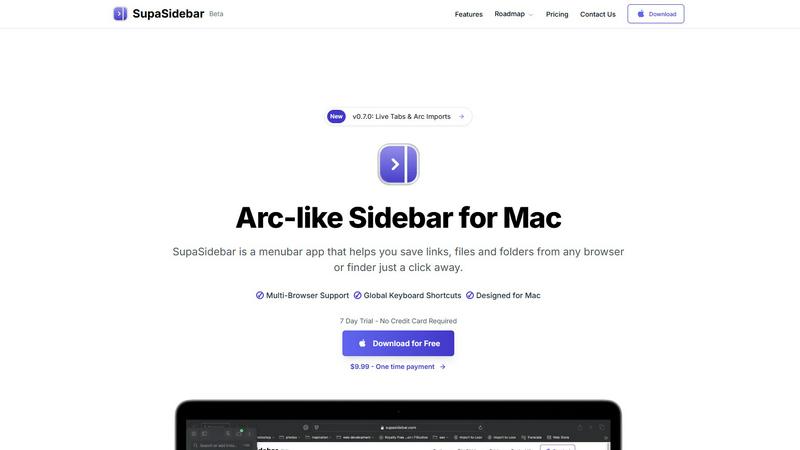
SupaSidebar boosts Mac productivity by providing instant keyboard access to links, files, and folders.
Last updated: February 28, 2026

SureThing.io
SureThing.io is an autonomous business agent with persistent memory that drives productivity and ROI while you sleep.
Last updated: March 19, 2026
Visual Comparison
SupaSidebar
SureThing.io

Feature Comparison
SupaSidebar
Universal Browser Integration & Capture
SupaSidebar seamlessly integrates with all major web browsers, including Safari, Chrome, Arc, Firefox, and Brave. This allows users to capture or copy the current webpage URL from any browser instantly using dedicated, configurable global keyboard shortcuts (e.g., Command+Control+S to save, Command+Control+C to copy). This feature eliminates the cumbersome process of manually bookmarking or copying links across different platforms, centralizing web resource management into a single, always-accessible hub.
Intelligent Recents & Favorites Pinning
The application automatically tracks and displays every website accessed across all integrated browsers within the last 48 hours in a "Recents" section, serving as a powerful short-term memory aid. Users can pin frequently accessed links, files, or folders as Favorites, which are permanently elevated to the top of the sidebar for immediate, one-click access. This dual-system organization ensures both recent context and critical daily tools are always at hand, drastically reducing search time.
Global Instant Search (Command+Control+K)
Activating the universal search shortcut (Command+Control+K) opens a powerful search interface that indexes and retrieves items from across all saved links, files, folders, and applications in real-time. This feature enables users to bypass manual navigation entirely, finding any resource by name in seconds. It is engineered to minimize cognitive load and maintain workflow momentum, acting as a central command center for all digital assets on the Mac.
Native macOS Design & Local-Only Data
Built exclusively for macOS 13 and above, SupaSidebar adheres to Apple's Human Interface Guidelines, ensuring a familiar, intuitive, and performant user experience that feels like a native extension of the operating system. Critically, all user data—saved links, metadata, and organizational structures—is stored solely on the local device. This architecture guarantees maximum data privacy, security, and availability without reliance on external servers or cloud sync.
SureThing.io
Proactive Autonomous Operation
Unlike tools that require constant prompting, SureThing works continuously in the background. It actively monitors your designated data streams, such as your email inbox, identifies actionable items, and executes predefined tasks without waiting for instructions. This shifts your role from micro-manager to strategic overseer, ensuring momentum is maintained even when you are focused on deep work or offline.
Persistent, Contextual Memory
This is the cornerstone of the platform. SureThing's memory retains your goals, preferences, communication tone, contact details, and past decisions across weeks and months of use. It learns from corrections and adapts to your evolving work style, eliminating the need to repeat context or instructions. This creates a compounding efficiency effect where the agent becomes more capable and aligned the longer you collaborate.
Enterprise-Grade Security & Compliance
SureThing is built for professionals who handle sensitive data. It is SOC 2 Type II certified, demonstrating rigorous adherence to security, availability, and confidentiality principles. Furthermore, its Google CASA Tier 2 compliance ensures robust data protection standards are met for integrated Google Workspace environments, providing the trust foundation necessary for delegating real business workflows.
Cross-Application Action & Integration
The agent is designed to function as a central orchestrator for your tech stack. It can take authenticated actions across a variety of connected applications, such as calendar management, CRM updates, project management tools, and communication platforms. This breaks down data silos and automates multi-step processes that typically require manual switching between apps.
Use Cases
SupaSidebar
Research and Academic Workflows
Researchers, analysts, and students can use SupaSidebar to aggregate source materials, reference papers, and data sets from myriad browser tabs and local folders into a single, categorized sidebar. The "Recents" feature allows for easy backtracking through a research trail, while pinned project folders keep core references instantly accessible, streamlining literature reviews and data compilation phases and reducing project cycle times.
Software Development and Technical Teams
Developers and engineers can pin frequently accessed documentation (e.g., API docs, internal wikis), project folders, code repositories, and debugging tools. The global search allows for rapid switching between technical resources and local project files without leaving the coding environment. This minimizes disruptive context shifts, keeping developers in a state of deep focus, which is critical for complex problem-solving and efficient sprint execution.
Content Creation and Digital Marketing
Content creators, marketers, and social media managers can save inspiration links, campaign dashboards, graphic asset folders, and publishing calendars directly in the sidebar. The ability to swiftly capture URLs during browsing sessions and later organize them into dedicated spaces for different clients or campaigns prevents valuable ideas and resources from being lost in a sea of bookmarks or forgotten tabs, enhancing creative throughput.
Executive and Administrative Assistance
Executives, managers, and administrative professionals can leverage SupaSidebar to maintain immediate access to key performance dashboards, recurring report files, board meeting materials, and communication platforms. By pinning these mission-critical resources, they can shave minutes off daily preparation tasks, enabling quicker decision-making and more efficient management of high-volume information streams essential for leadership roles.
SureThing.io
Executive & Founder Productivity
For leaders and solo founders, SureThing acts as a force multiplier. It autonomously manages calendar scheduling, filters and prioritizes inbound communications, drafts first-pass responses, and tracks key deliverables for initiatives like go-to-market launches. This reclaims 15-20 hours per week otherwise lost to administrative tasks, allowing focused energy on high-level strategy and growth.
Client & Stakeholder Communication Management
The agent ensures no communication falls through the cracks. It monitors shared inboxes or project channels, identifies urgent queries, and drafts thoughtful, on-brand replies for review. By maintaining context from previous exchanges and remembering stakeholder preferences, it ensures consistent, professional, and timely follow-up, enhancing client satisfaction and trust.
Project & Campaign Coordination
SureThing serves as a persistent project coordinator. It tracks deadlines, milestones, and dependencies across ongoing campaigns or development sprints. It can proactively nudge team members for updates, synthesize status reports, and log actions in project management tools, providing a single, always-updated source of truth and reducing the need for constant status meetings.
Personal Workflow Automation
Beyond predefined tasks, SureThing learns and automates individual user patterns. This includes automating repetitive data entry between apps, setting up intelligent meeting agendas based on participants and goals, compiling daily briefings from various sources, and managing personal task lists based on priority and available time slots.
Overview
About SupaSidebar
SupaSidebar is an enterprise-grade productivity application for macOS, engineered to streamline digital workflow and eliminate context-switching inefficiencies. It functions as a universal, Arc-inspired sidebar that provides instant, organized access to critical resources—including web links, local files, folders, and applications—directly from a persistent menubar interface. Designed for professionals, knowledge workers, researchers, and teams, its core value proposition is a significant reduction in time spent searching for information and managing digital clutter, directly translating to measurable gains in focused work time and operational throughput. By leveraging global keyboard shortcuts and deep system integration, SupaSidebar ensures that essential assets are never more than a keystroke away, fostering a state of continuous workflow. All data is stored locally on the user's Mac, guaranteeing privacy, security, and offline access. This tool is not merely an organizer; it is a strategic productivity companion that empowers users to reclaim an estimated 1-2 hours per week by minimizing disruptive tab and application hunting, thereby delivering a rapid and substantial return on investment through enhanced individual and team efficiency.
About SureThing.io
SureThing.io is an enterprise-grade autonomous AI agent engineered to function as a persistent, proactive extension of your professional self. It transcends the reactive limitations of standard chatbots by operating 24/7 on your behalf. The platform's core value proposition lies in its state-of-the-art agentic memory, which allows it to learn and remember your unique work patterns, communication style, preferences, and long-term goals across every interaction. This enables SureThing to autonomously manage critical workflows: it monitors your communications, drafts context-aware replies in your authentic voice, orchestrates your schedule, tracks complex project milestones, and executes tasks across your connected application ecosystem. Designed for executives, founders, and knowledge workers who require reliable, hands-off automation, SureThing is built on a foundation of enterprise security, boasting SOC 2 certification and Google CASA Tier 2 compliance. It delivers measurable ROI by reclaiming strategic hours, reducing administrative overhead, and ensuring continuity of operations, establishing itself as a trustworthy asset for real-world business execution, not just a conceptual demo.
Frequently Asked Questions
SupaSidebar FAQ
Is SupaSidebar a browser extension?
No, SupaSidebar is not a browser extension. It is a standalone macOS menubar application that runs independently on your computer. It integrates with your browsers at the system level to capture URLs and activity, but it operates as a central hub outside of any single browser window, providing a unified interface for all your resources regardless of their origin.
Which browsers does SupaSidebar work with?
SupaSidebar offers comprehensive support for all major browsers on macOS, including Safari, Google Chrome, Arc, Mozilla Firefox, and Brave. This universal compatibility ensures that your workflow remains uninterrupted regardless of your browser preference or if you use multiple browsers for different tasks, making it a truly agnostic productivity solution.
What macOS version do I need?
SupaSidebar requires macOS 13 (Ventura) or a later version. This requirement ensures the application can utilize the latest macOS frameworks and security features, providing a stable, performant, and native-feeling experience that aligns with modern Apple system design and capabilities.
Where is my data stored?
All data captured and organized within SupaSidebar—including saved URLs, file references, and your organizational structure—is stored exclusively locally on your Mac. Nothing is sent to or stored on external servers. This local-first approach prioritizes user privacy, data security, and ensures instant access to your information even without an internet connection.
SureThing.io FAQ
How does SureThing's "memory" actually work?
SureThing utilizes a sophisticated agentic memory architecture that creates a persistent, evolving profile of your work identity. It securely stores and semantically indexes your interactions, decisions, stated preferences, and feedback. This allows the AI to reference past context, maintain consistency in your communication voice, and make informed predictions about your likely actions, reducing manual instruction over time.
Is my company's data secure with SureThing?
Absolutely. Security is a foundational pillar. SureThing is SOC 2 Type II certified, meaning its security controls have been independently audited. It is also Google CASA Tier 2 compliant, adhering to strict standards for data handling within Google Workspace. Data is encrypted in transit and at rest, and access is rigorously controlled, making it suitable for enterprise and professional use.
What applications can SureThing connect to and act upon?
SureThing is built with an extensible integration framework. It natively connects with core productivity and communication suites like Google Workspace (Gmail, Calendar) and Microsoft 365. The platform continuously expands its connector library to include popular CRM, project management, support ticket, and collaboration tools, allowing it to orchestrate workflows across your essential software ecosystem.
How is SureThing different from an AI chatbot or Copilot?
Traditional chatbots and Copilots are reactive assistants; they respond to direct prompts within a single session. SureThing is a proactive, autonomous agent. It operates independently 24/7, makes decisions based on learned goals and context, and executes multi-step actions across applications. Its persistent memory differentiates it further, providing continuity and deep personalization that session-based tools cannot offer.
Alternatives
SupaSidebar Alternatives
SupaSidebar is a premium Mac productivity application designed to centralize and streamline access to digital resources. It operates within the browser enhancement and workflow management category, helping professionals reduce context-switching and digital clutter by providing instant sidebar access to links, files, and folders from any application. Users may explore alternatives for several strategic reasons. These include budget considerations, specific feature requirements not covered by a single solution, or the need for cross-platform compatibility beyond macOS. Evaluating the total cost of ownership against potential productivity gains is a common driver in this decision-making process. When selecting an alternative, key evaluation criteria should include seamless integration with your existing browser and tool stack, the efficiency of capture and retrieval workflows, and robust organization capabilities. The optimal solution should demonstrably reduce time spent on repetitive navigation tasks, thereby delivering a clear return on investment through recovered productive hours.
SureThing.io Alternatives
SureThing.io is an autonomous AI agent for business management, operating within the productivity and management software category. It proactively handles tasks like email, scheduling, and project tracking with persistent memory, distinguishing itself from reactive chatbots. Users often explore alternatives for various reasons, including budget constraints, specific feature requirements not covered by a single platform, or the need for integration with a particular tech stack. The search typically stems from a need to find the optimal balance of capability, cost, and compliance for their unique operational scale. When evaluating options, key considerations should include the level of autonomous proactivity, the robustness of the system's memory and learning, and enterprise-grade security certifications. The goal is to identify a solution that delivers reliable, set-and-forget efficiency and a tangible return on investment through measurable time savings and operational streamlining.