
LuxSign vs SupaSidebar
Side-by-side comparison to help you choose the right AI tool.

LuxSign enables fast, secure electronic signatures for documents, ensuring compliance and efficiency across the EU.
Last updated: February 26, 2026
SupaSidebar
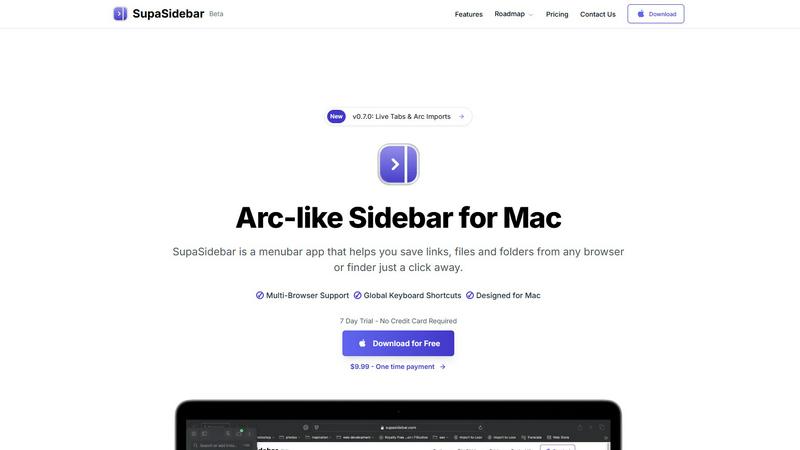
SupaSidebar boosts Mac productivity by providing instant keyboard access to links, files, and folders.
Last updated: February 28, 2026
Visual Comparison
LuxSign

SupaSidebar
Feature Comparison
LuxSign
Multiple Signature Methods
LuxSign provides various methods for signing documents, allowing users to draw their signature, type their name, or upload an image. This flexibility ensures a user-friendly experience and quick document signing, catering to diverse preferences.
Advanced Security
The platform employs industry-standard encryption protocols to protect documents during upload, storage, and transmission. Coupled with secure storage in EU data centers, LuxSign guarantees that sensitive information remains safeguarded against unauthorized access.
Complete Audit Trail
LuxSign offers detailed audit trails that log every action taken within the platform. These logs include timestamps, IP addresses, and signer information, ensuring compliance and providing transparency for all document-related activities.
Collaboration Workspaces
Teams can create shared workspaces within LuxSign, allowing for organized document management. Members can collaborate seamlessly on signing workflows, manage access permissions, and store documents in structured folders, fostering teamwork and efficiency.
SupaSidebar
Universal Browser Integration & Capture
SupaSidebar seamlessly integrates with all major web browsers, including Safari, Chrome, Arc, Firefox, and Brave. This allows users to capture or copy the current webpage URL from any browser instantly using dedicated, configurable global keyboard shortcuts (e.g., Command+Control+S to save, Command+Control+C to copy). This feature eliminates the cumbersome process of manually bookmarking or copying links across different platforms, centralizing web resource management into a single, always-accessible hub.
Intelligent Recents & Favorites Pinning
The application automatically tracks and displays every website accessed across all integrated browsers within the last 48 hours in a "Recents" section, serving as a powerful short-term memory aid. Users can pin frequently accessed links, files, or folders as Favorites, which are permanently elevated to the top of the sidebar for immediate, one-click access. This dual-system organization ensures both recent context and critical daily tools are always at hand, drastically reducing search time.
Global Instant Search (Command+Control+K)
Activating the universal search shortcut (Command+Control+K) opens a powerful search interface that indexes and retrieves items from across all saved links, files, folders, and applications in real-time. This feature enables users to bypass manual navigation entirely, finding any resource by name in seconds. It is engineered to minimize cognitive load and maintain workflow momentum, acting as a central command center for all digital assets on the Mac.
Native macOS Design & Local-Only Data
Built exclusively for macOS 13 and above, SupaSidebar adheres to Apple's Human Interface Guidelines, ensuring a familiar, intuitive, and performant user experience that feels like a native extension of the operating system. Critically, all user data—saved links, metadata, and organizational structures—is stored solely on the local device. This architecture guarantees maximum data privacy, security, and availability without reliance on external servers or cloud sync.
Use Cases
LuxSign
Streamlining Contract Signing
Businesses can utilize LuxSign to expedite the contract signing process. By allowing multiple signers to access documents simultaneously, organizations can significantly reduce turnaround times, enabling faster decision-making and project initiation.
Enhancing Compliance in Legal Transactions
LuxSign's compliance with eIDAS SES standards makes it an ideal solution for legal firms that require secure and legally binding signatures on documents. This enhances the legitimacy of transactions and minimizes the risk of legal disputes.
Facilitating Remote Work
As remote work becomes increasingly prevalent, LuxSign provides an efficient solution for teams spread across different locations. Employees can sign documents from anywhere, ensuring business continuity and operational efficiency without the need for physical presence.
Improving Document Management for HR
Human resource departments can leverage LuxSign for managing employee contracts, onboarding documents, and policy agreements. The platform simplifies the signing process, reduces paperwork, and ensures all documents are securely stored and easily retrievable.
SupaSidebar
Research and Academic Workflows
Researchers, analysts, and students can use SupaSidebar to aggregate source materials, reference papers, and data sets from myriad browser tabs and local folders into a single, categorized sidebar. The "Recents" feature allows for easy backtracking through a research trail, while pinned project folders keep core references instantly accessible, streamlining literature reviews and data compilation phases and reducing project cycle times.
Software Development and Technical Teams
Developers and engineers can pin frequently accessed documentation (e.g., API docs, internal wikis), project folders, code repositories, and debugging tools. The global search allows for rapid switching between technical resources and local project files without leaving the coding environment. This minimizes disruptive context shifts, keeping developers in a state of deep focus, which is critical for complex problem-solving and efficient sprint execution.
Content Creation and Digital Marketing
Content creators, marketers, and social media managers can save inspiration links, campaign dashboards, graphic asset folders, and publishing calendars directly in the sidebar. The ability to swiftly capture URLs during browsing sessions and later organize them into dedicated spaces for different clients or campaigns prevents valuable ideas and resources from being lost in a sea of bookmarks or forgotten tabs, enhancing creative throughput.
Executive and Administrative Assistance
Executives, managers, and administrative professionals can leverage SupaSidebar to maintain immediate access to key performance dashboards, recurring report files, board meeting materials, and communication platforms. By pinning these mission-critical resources, they can shave minutes off daily preparation tasks, enabling quicker decision-making and more efficient management of high-volume information streams essential for leadership roles.
Overview
About LuxSign
LuxSign is a cutting-edge electronic signature platform designed for businesses that require stringent compliance and security in document management. Developed in Luxembourg, LuxSign offers a fully cloud-based solution that ensures all documents are encrypted end-to-end and stored exclusively within Luxembourg's secure data centers. This guarantees adherence to GDPR regulations, making LuxSign a reliable choice for organizations concerned about data protection. The platform is compliant with eIDAS SES standards, allowing for legally binding signatures on contracts across the European Union. With user-friendly features such as drag-and-drop signature field placement, automated notifications, and flexible signing workflows, LuxSign empowers businesses to streamline their document signing processes. It caters to various industries, enhancing productivity by reducing the time and effort required to obtain signatures.
About SupaSidebar
SupaSidebar is an enterprise-grade productivity application for macOS, engineered to streamline digital workflow and eliminate context-switching inefficiencies. It functions as a universal, Arc-inspired sidebar that provides instant, organized access to critical resources—including web links, local files, folders, and applications—directly from a persistent menubar interface. Designed for professionals, knowledge workers, researchers, and teams, its core value proposition is a significant reduction in time spent searching for information and managing digital clutter, directly translating to measurable gains in focused work time and operational throughput. By leveraging global keyboard shortcuts and deep system integration, SupaSidebar ensures that essential assets are never more than a keystroke away, fostering a state of continuous workflow. All data is stored locally on the user's Mac, guaranteeing privacy, security, and offline access. This tool is not merely an organizer; it is a strategic productivity companion that empowers users to reclaim an estimated 1-2 hours per week by minimizing disruptive tab and application hunting, thereby delivering a rapid and substantial return on investment through enhanced individual and team efficiency.
Frequently Asked Questions
LuxSign FAQ
What types of documents can I sign with LuxSign?
You can sign a variety of document formats including PDF, DOC, and DOCX. LuxSign also supports automatic conversion for easy handling of different file types.
How does LuxSign ensure document security?
LuxSign employs end-to-end encryption, ensuring that all documents are secured during upload, storage, and transmission. Additionally, documents are stored on secure servers located in Luxembourg, complying with EU data protection regulations.
Can I track the signing progress of my documents?
Yes, LuxSign provides real-time tracking of document status. You will receive automatic email notifications when documents are sent, viewed, and signed, keeping you informed throughout the process.
Is LuxSign compliant with GDPR?
Absolutely. LuxSign is fully compliant with GDPR and Luxembourg data protection laws, ensuring that your documents and personal information are handled with the highest levels of privacy and security.
SupaSidebar FAQ
Is SupaSidebar a browser extension?
No, SupaSidebar is not a browser extension. It is a standalone macOS menubar application that runs independently on your computer. It integrates with your browsers at the system level to capture URLs and activity, but it operates as a central hub outside of any single browser window, providing a unified interface for all your resources regardless of their origin.
Which browsers does SupaSidebar work with?
SupaSidebar offers comprehensive support for all major browsers on macOS, including Safari, Google Chrome, Arc, Mozilla Firefox, and Brave. This universal compatibility ensures that your workflow remains uninterrupted regardless of your browser preference or if you use multiple browsers for different tasks, making it a truly agnostic productivity solution.
What macOS version do I need?
SupaSidebar requires macOS 13 (Ventura) or a later version. This requirement ensures the application can utilize the latest macOS frameworks and security features, providing a stable, performant, and native-feeling experience that aligns with modern Apple system design and capabilities.
Where is my data stored?
All data captured and organized within SupaSidebar—including saved URLs, file references, and your organizational structure—is stored exclusively locally on your Mac. Nothing is sent to or stored on external servers. This local-first approach prioritizes user privacy, data security, and ensures instant access to your information even without an internet connection.
Alternatives
LuxSign Alternatives
LuxSign is a sophisticated electronic signature platform designed for businesses that demand stringent compliance and security. Built in Luxembourg, it adheres to eIDAS SES standards, ensuring that signatures are legally recognized across all EU member states. As a cloud-based solution, LuxSign emphasizes end-to-end encryption and GDPR compliance, making it a reliable choice for organizations handling sensitive documents. Users often seek alternatives to LuxSign for various reasons, including pricing constraints, specific feature requirements, or the need for integration with existing systems. When evaluating alternatives, it's crucial to consider factors such as compliance with legal standards, ease of use, scalability, and the ability to customize workflows and branding. These elements can significantly impact productivity and return on investment for businesses relying on electronic signature solutions.
SupaSidebar Alternatives
SupaSidebar is a premium Mac productivity application designed to centralize and streamline access to digital resources. It operates within the browser enhancement and workflow management category, helping professionals reduce context-switching and digital clutter by providing instant sidebar access to links, files, and folders from any application. Users may explore alternatives for several strategic reasons. These include budget considerations, specific feature requirements not covered by a single solution, or the need for cross-platform compatibility beyond macOS. Evaluating the total cost of ownership against potential productivity gains is a common driver in this decision-making process. When selecting an alternative, key evaluation criteria should include seamless integration with your existing browser and tool stack, the efficiency of capture and retrieval workflows, and robust organization capabilities. The optimal solution should demonstrably reduce time spent on repetitive navigation tasks, thereby delivering a clear return on investment through recovered productive hours.