
Seedream 5.0 AI vs Shrinkpad
Side-by-side comparison to help you choose the right AI tool.

Seedream 5.0 AI generates stunning 2K images and cinematic videos from text prompts, enhancing creative productivity.
Last updated: February 26, 2026

Shrinkpad
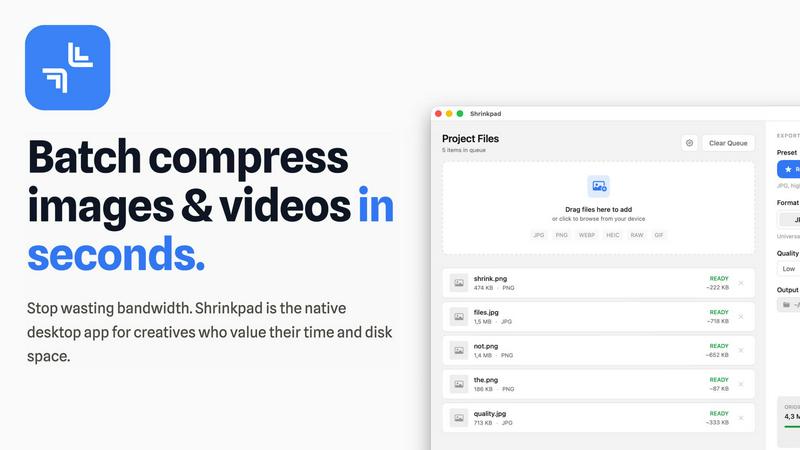
Shrinkpad is a native Mac app that batch compresses images and videos to optimize assets and boost productivity.
Last updated: February 28, 2026
Visual Comparison
Seedream 5.0 AI

Shrinkpad
Feature Comparison
Seedream 5.0 AI
Text-to-Image Generation at 2K Resolution
Seedream 5.0 AI enables users to describe any visual concept and generate images at an impressive 2048x2048 resolution. Whether you need portraits, product shots, or landscapes, this feature guarantees high-quality output that meets professional standards.
Image-to-Image Editing with Natural Language
This innovative feature allows users to upload existing images and provide natural language descriptions for edits. Whether it's style transfer, object removal, or background swaps, Seedream 5.0 AI processes these requests quickly and accurately, making image editing intuitive and accessible.
Multi-Subject Composition with Individual Control
With the capability to compose scenes featuring three or more distinct subjects, Seedream 5.0 AI preserves individual attributes and spatial relationships among subjects. This feature enables creators to craft complex narratives and compositions with ease, enhancing storytelling through visuals.
Native Style Control Across Visual Aesthetics
Users can choose from a variety of artistic styles, including photorealism, anime, and watercolor, and control these styles through text prompts or reference images. This versatility allows for tailored outputs that resonate with specific project requirements or creative visions.
Shrinkpad
Intelligent Batch Processing
Shrinkpad eliminates manual, file-by-file workflows by enabling unlimited batch processing of mixed media. Users can drag and drop entire folders containing thousands of images and videos, and the application automatically detects and queues over 30 supported formats. This feature leverages multi-threaded compression optimized for Apple Silicon, processing massive queues without crashing, which translates to hours of saved labor and consistent, reliable output for large-scale projects.
Privacy-First Local Processing
All compression algorithms run entirely on the user's Mac, ensuring that sensitive client work, proprietary designs, and unreleased media never leave the local device. This feature is critical for businesses handling confidential assets, as it eliminates the security risks and bandwidth costs associated with cloud-based uploads, providing full compliance with internal data governance policies.
Smart Quality Optimization
The application automatically analyzes the visual complexity of each asset to apply a perfect, artifact-free compression ratio. This removes the guesswork from manual quality settings, ensuring optimal file size reduction while preserving perceptual quality. For professionals, this means consistently high-quality outputs suitable for web, app, and presentation use without iterative manual adjustments.
Advanced Format & Workflow Support
Shrinkpad supports a comprehensive range of professional formats including JPG, PNG, WEBP, AVIF, HEIC, RAW camera files, MP4, and MOV. It includes power features like automatic renaming, metadata stripping, and subfolder preservation. This seamless integration into existing creative pipelines allows teams to export assets at high resolutions from tools like Figma or Photoshop and let Shrinkpad handle final optimization in bulk.
Use Cases
Seedream 5.0 AI
Marketing and Advertising
Seedream 5.0 AI is an invaluable tool for marketing teams looking to create eye-catching visuals for campaigns. With the ability to generate high-quality images quickly, teams can produce promotional materials that captivate audiences and drive engagement.
Concept Art and Design
Artists and designers can leverage Seedream 5.0 AI to generate concept art and visual prototypes rapidly. This capability not only enhances the creative process but also allows for quick iterations based on client feedback, improving overall productivity.
E-commerce Product Visualization
E-commerce businesses can utilize Seedream 5.0 AI to create stunning product images that enhance online listings. By generating high-resolution visuals, companies can present their offerings more attractively, ultimately boosting conversion rates.
Educational Content Creation
Educators and content creators can employ Seedream 5.0 AI to generate illustrative images for educational materials. This feature allows for the creation of engaging visuals that enhance learning experiences, making complex concepts more accessible.
Shrinkpad
Web Development & Digital Publishing Teams
Development and publishing teams use Shrinkpad to batch-optimize website assets, reducing bundle sizes and improving Core Web Vitals like Largest Contentful Paint (LCP). By compressing hero images, product shots, and promotional videos by an average of 70-90%, teams can achieve faster page load times, enhance user experience, and improve SEO rankings, directly contributing to higher conversion rates and reduced bounce rates.
Creative Agencies & Design Studios
Agencies handling multiple client projects compress final deliverables for email delivery, client portals, and digital campaigns. Shrinkpad's folder mode and mixed-media batching allow them to process entire project directories in one action, ensuring fast turnaround times, professional presentation, and significant savings on cloud storage and file transfer service costs.
Photographers & Videographers
Professionals managing large libraries of high-resolution RAW photos and 4K video footage use Shrinkpad to create optimized previews for client galleries and streamlined archives for long-term storage. The local processing guarantees client privacy, while the dramatic file size reduction frees up terabytes of expensive SSD storage, extending hardware lifecycle and improving system performance.
In-House Marketing & Content Teams
Marketing departments regularly produce large volumes of social media graphics, blog images, and webinar recordings. Shrinkpad enables them to maintain a consistent, optimized asset library, reducing upload times to CMS platforms and social networks by over 40%, thereby accelerating campaign deployment and improving team throughput.
Overview
About Seedream 5.0 AI
Seedream 5.0 AI is a state-of-the-art fifth-generation diffusion transformer model that transforms image generation as we know it. Designed for creators, designers, and teams, this powerful tool allows users to generate professional-quality images in mere seconds, unlocking unparalleled creative potential. With its current limited-time offer of 50% off, Seedream 5.0 AI stands out as the premier solution for producing stunning visuals across various applications. The model employs advanced artificial intelligence to interpret text prompts and convert them into breathtakingly realistic images. Its key features include high-resolution 2K image generation, photorealistic skin textures, and intricate light reflections, rivaling the quality of traditional photography. The model's impressive prompt comprehension ensures that even complex descriptions are accurately interpreted, resulting in images that align seamlessly with the user's vision. Whether for marketing materials, artistic projects, or product showcases, Seedream 5.0 AI is engineered to elevate creative workflows and enhance productivity.
About Shrinkpad
Shrinkpad is an enterprise-grade desktop application engineered for macOS, delivering powerful batch compression for images and videos directly on your local machine. It is designed for professionals—including photographers, designers, content creators, developers, and marketing teams—who manage large volumes of digital assets and prioritize efficiency, data privacy, and storage optimization. The core value proposition lies in its ability to process hundreds or even thousands of files in seconds, reducing file sizes by up to 90% without ever uploading sensitive data to the cloud. This local-first approach ensures complete confidentiality for proprietary media while providing a significant return on investment. By reclaiming gigabytes of disk space and drastically reducing time spent on manual optimization, Shrinkpad streamlines workflows, accelerates project delivery, and improves key performance metrics like website load times, directly impacting operational productivity and cost savings.
Frequently Asked Questions
Seedream 5.0 AI FAQ
What types of images can I create with Seedream 5.0 AI?
Users can create a wide variety of images, including portraits, landscapes, product shots, and concept art, all generated from text prompts at high resolutions.
How does the image-to-image editing feature work?
The image-to-image editing feature allows users to upload an image and describe the desired edits in natural language, such as removing objects or changing backgrounds, resulting in precise transformations.
Can I control the style of the images I generate?
Yes, Seedream 5.0 AI offers native style control, enabling users to select from various artistic styles like photorealism, anime, and watercolor, allowing for customization based on project needs.
Is there a limit to the number of subjects in a scene?
No, Seedream 5.0 AI can handle multi-subject compositions, allowing users to create scenes with three or more distinct subjects while preserving individual details and interactions.
Shrinkpad FAQ
Can I use Shrinkpad for free?
Yes, Shrinkpad offers a Free Starter tier that provides essential compression tools for casual use. This plan includes standard compression for common formats like JPG and PNG, with a limit of 10 files per batch and a maximum 1GB file size. It is an excellent way to evaluate the core functionality before upgrading to a paid plan for unlimited, professional use.
What file formats does Shrinkpad support?
Shrinkpad supports an extensive range of over 30 image and video formats. This includes standard web formats (JPG, PNG, WEBP, AVIF), professional and Apple formats (HEIC, RAW files from various cameras), and major video formats (MP4, MOV). The application automatically detects and optimally compresses each file type within a mixed batch.
Does Shrinkpad support video compression?
Absolutely. Shrinkpad provides robust video compression capabilities, allowing users to reduce the file size of MP4, MOV, and other common video formats by significant percentages. This is included in both the Personal and Team paid plans, enabling users to process images and videos together in the same, efficient batch workflow.
How many files can I process at once?
With the paid Personal and Team plans, Shrinkpad supports unlimited batch processing. You can queue and process thousands of images and videos simultaneously. The application is engineered for heavy-duty use and handles massive queues with stability, unlike many web-based tools that crash under large loads.
Alternatives
Seedream 5.0 AI Alternatives
Seedream 5.0 AI is a state-of-the-art image generation tool categorized as a fifth-generation diffusion transformer model. It specializes in producing photorealistic 2K visuals based on text prompts, making it an essential resource for creators and designers. Users often seek alternatives to Seedream 5.0 AI for various reasons, including pricing concerns, specific feature requirements, or compatibility with different platforms and workflows. When selecting an alternative, it is crucial to consider factors such as image quality, ease of use, prompt comprehension capabilities, and the overall versatility of the tool. Evaluating these elements will ensure that users find a solution that meets their creative and professional needs, ultimately enhancing productivity and ROI.
Shrinkpad Alternatives
Shrinkpad is a specialized macOS application for batch compression of images and videos, falling into the digital asset optimization category. It is engineered for professionals who need to process large volumes of media files locally to save storage and streamline workflows. Users may explore alternatives for various strategic reasons, such as budget constraints, specific feature requirements not met by Shrinkpad, or the need for cross-platform compatibility beyond macOS. The search often centers on finding a tool that delivers a comparable return on investment through time savings and storage reclamation. When evaluating an alternative, key considerations should include the solution's processing methodology—local versus cloud—for data security, its support for required file formats, the efficiency of its batch processing engine, and the overall impact on team productivity. The optimal choice balances robust functionality with a clear, measurable benefit to operational efficiency.