
poseup vs Shrinkpad
Side-by-side comparison to help you choose the right AI tool.

poseup
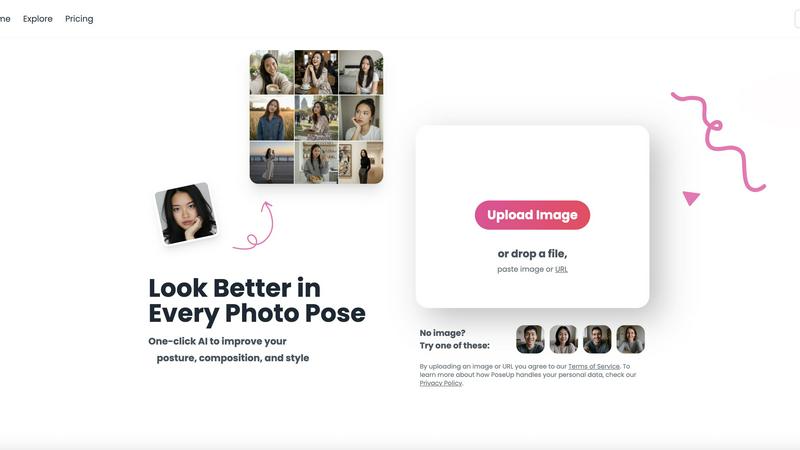
PoseUp's AI instantly enhances photo posture and composition to deliver professional-grade results.
Last updated: February 28, 2026

Shrinkpad
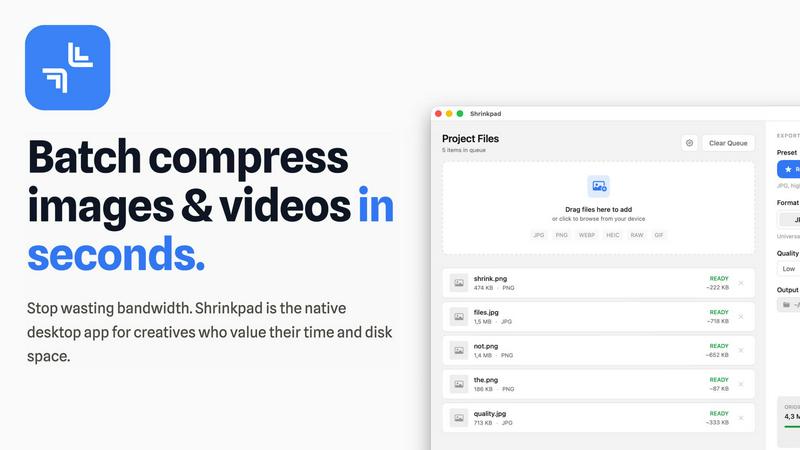
Shrinkpad is a native Mac app that batch compresses images and videos to optimize assets and boost productivity.
Last updated: February 28, 2026
Visual Comparison
poseup
Shrinkpad
Feature Comparison
poseup
One-Click AI Pose Enhancement
PoseUp's core technology provides a single-click solution to automatically analyze and improve photo poses. The AI examines human posture, body alignment, and positioning within the frame to suggest and apply optimal adjustments. This eliminates the need for manual retouching or professional photography knowledge, delivering professional-grade results in seconds and directly contributing to workflow efficiency and asset throughput.
Advanced Posture Correction & Composition Analysis
The platform employs sophisticated AI models specifically trained to correct posture and optimize image composition. It intelligently assesses factors like lighting, subject placement, and balance to enhance the overall visual appeal. This feature ensures every image meets professional standards, strengthening brand presentation and increasing the perceived value of products and services depicted.
Multi-Scene Stylistic Optimization
PoseUp is engineered to deliver professional results across diverse photographic contexts, from casual lifestyle and outdoor adventure shots to professional headshots and fitness imagery. The AI adapts its enhancement algorithms to suit the specific stylistic requirements of each scene, ensuring appropriate and impactful optimizations whether for an e-commerce product page or a corporate social media campaign.
Batch Processing & Scalable Asset Creation
Designed for enterprise workflows, PoseUp supports the processing of multiple images to maintain consistency across large-scale campaigns. This capability allows marketing and e-commerce teams to rapidly enhance entire catalogs or campaign libraries, enabling scalable visual content creation that aligns with brand guidelines and drives cohesive audience engagement without bottlenecking production timelines.
Shrinkpad
Intelligent Batch Processing
Shrinkpad eliminates manual, file-by-file workflows by enabling unlimited batch processing of mixed media. Users can drag and drop entire folders containing thousands of images and videos, and the application automatically detects and queues over 30 supported formats. This feature leverages multi-threaded compression optimized for Apple Silicon, processing massive queues without crashing, which translates to hours of saved labor and consistent, reliable output for large-scale projects.
Privacy-First Local Processing
All compression algorithms run entirely on the user's Mac, ensuring that sensitive client work, proprietary designs, and unreleased media never leave the local device. This feature is critical for businesses handling confidential assets, as it eliminates the security risks and bandwidth costs associated with cloud-based uploads, providing full compliance with internal data governance policies.
Smart Quality Optimization
The application automatically analyzes the visual complexity of each asset to apply a perfect, artifact-free compression ratio. This removes the guesswork from manual quality settings, ensuring optimal file size reduction while preserving perceptual quality. For professionals, this means consistently high-quality outputs suitable for web, app, and presentation use without iterative manual adjustments.
Advanced Format & Workflow Support
Shrinkpad supports a comprehensive range of professional formats including JPG, PNG, WEBP, AVIF, HEIC, RAW camera files, MP4, and MOV. It includes power features like automatic renaming, metadata stripping, and subfolder preservation. This seamless integration into existing creative pipelines allows teams to export assets at high resolutions from tools like Figma or Photoshop and let Shrinkpad handle final optimization in bulk.
Use Cases
poseup
E-commerce Product & Model Photography
E-commerce brands can use PoseUp to instantly enhance photos of models wearing apparel or using products. The AI corrects model posture and optimizes composition, creating a more professional and appealing catalog. This elevates product presentation, reduces return rates influenced by poor imagery, and increases conversion rates, delivering direct ROI by maximizing the value of in-house photography.
Marketing & Social Media Content Production
Marketing teams and social media managers can transform standard team photos, event shots, and influencer content into polished visual assets. PoseUp ensures all public-facing imagery reflects a high-quality brand standard, increasing engagement rates and strengthening brand perception across digital channels while drastically reducing content production costs and turnaround time.
Professional Photography & Portrait Studios
Photographers and studios can integrate PoseUp into their post-production workflow to deliver client previews faster and handle high-volume sessions efficiently. The AI provides a powerful first-pass enhancement, allowing professionals to focus on creative adjustments and client relationships rather than tedious manual corrections, thereby increasing studio capacity and profitability.
Corporate Branding & Communications
Enterprises can ensure all employee headshots, team photos for websites, and executive portraits maintain a consistent, professional standard. PoseUp standardizes visual assets across global teams, enhancing corporate branding for annual reports, "About Us" pages, and press materials, which builds trust and authority with stakeholders, investors, and clients.
Shrinkpad
Web Development & Digital Publishing Teams
Development and publishing teams use Shrinkpad to batch-optimize website assets, reducing bundle sizes and improving Core Web Vitals like Largest Contentful Paint (LCP). By compressing hero images, product shots, and promotional videos by an average of 70-90%, teams can achieve faster page load times, enhance user experience, and improve SEO rankings, directly contributing to higher conversion rates and reduced bounce rates.
Creative Agencies & Design Studios
Agencies handling multiple client projects compress final deliverables for email delivery, client portals, and digital campaigns. Shrinkpad's folder mode and mixed-media batching allow them to process entire project directories in one action, ensuring fast turnaround times, professional presentation, and significant savings on cloud storage and file transfer service costs.
Photographers & Videographers
Professionals managing large libraries of high-resolution RAW photos and 4K video footage use Shrinkpad to create optimized previews for client galleries and streamlined archives for long-term storage. The local processing guarantees client privacy, while the dramatic file size reduction frees up terabytes of expensive SSD storage, extending hardware lifecycle and improving system performance.
In-House Marketing & Content Teams
Marketing departments regularly produce large volumes of social media graphics, blog images, and webinar recordings. Shrinkpad enables them to maintain a consistent, optimized asset library, reducing upload times to CMS platforms and social networks by over 40%, thereby accelerating campaign deployment and improving team throughput.
Overview
About poseup
PoseUp is an enterprise-grade AI platform engineered to deliver immediate, measurable ROI by transforming standard photography into professional-grade visual assets. It directly addresses a critical business inefficiency: the prohibitive cost and extensive time investment traditionally required for professional photoshoots or labor-intensive post-production editing. By leveraging advanced artificial intelligence, PoseUp automatically analyzes and enhances human posture, composition, and stylistic elements in any photo with a single click. This technology is purpose-built for professionals and businesses where image quality directly impacts revenue, brand perception, and audience engagement. Its core value proposition lies in democratizing high-quality visual content creation, enabling marketing teams, e-commerce brands, social media managers, and photographers to scale their output exponentially without compromising on quality or inflating operational budgets. PoseUp delivers tangible productivity gains by reducing editing time from hours to seconds and improves campaign performance metrics by ensuring a consistent, polished visual identity across all marketing and sales channels.
About Shrinkpad
Shrinkpad is an enterprise-grade desktop application engineered for macOS, delivering powerful batch compression for images and videos directly on your local machine. It is designed for professionals—including photographers, designers, content creators, developers, and marketing teams—who manage large volumes of digital assets and prioritize efficiency, data privacy, and storage optimization. The core value proposition lies in its ability to process hundreds or even thousands of files in seconds, reducing file sizes by up to 90% without ever uploading sensitive data to the cloud. This local-first approach ensures complete confidentiality for proprietary media while providing a significant return on investment. By reclaiming gigabytes of disk space and drastically reducing time spent on manual optimization, Shrinkpad streamlines workflows, accelerates project delivery, and improves key performance metrics like website load times, directly impacting operational productivity and cost savings.
Frequently Asked Questions
poseup FAQ
What types of images does PoseUp work best with?
PoseUp is optimized for photographs containing one or more human subjects. It delivers exceptional results across a wide range of scenarios including professional headshots, casual lifestyle images, outdoor adventures, fitness photos, and e-commerce model shots. The AI analyzes posture and composition, making it ideal for portraits and full-body images where human presentation is key.
How does PoseUp ensure the privacy and security of my uploaded images?
PoseUp takes data security seriously. Uploaded images are processed securely for the purpose of enhancement. The company's Privacy Policy outlines strict data handling procedures. For enterprise clients with specific compliance needs, it is recommended to contact support directly to discuss data processing agreements and security protocols tailored to business requirements.
What is the typical time savings when using PoseUp compared to manual editing?
PoseUp delivers dramatic time efficiency gains. A task that might take a skilled editor 15-30 minutes per image for posture correction and compositional tweaks is reduced to mere seconds with PoseUp's one-click AI. This translates to editing time reductions of over 95%, allowing teams to reallocate hundreds of hours per quarter to strategic initiatives rather than manual labor.
Can PoseUp be integrated into existing business workflows or content management systems?
While the primary interface is the web platform, PoseUp is built with enterprise scalability in mind. Businesses looking to integrate AI-enhanced photo processing directly into their digital asset management (DAM) systems, e-commerce platforms, or automated marketing pipelines should contact PoseUp support to explore available API options and custom integration solutions for seamless workflow incorporation.
Shrinkpad FAQ
Can I use Shrinkpad for free?
Yes, Shrinkpad offers a Free Starter tier that provides essential compression tools for casual use. This plan includes standard compression for common formats like JPG and PNG, with a limit of 10 files per batch and a maximum 1GB file size. It is an excellent way to evaluate the core functionality before upgrading to a paid plan for unlimited, professional use.
What file formats does Shrinkpad support?
Shrinkpad supports an extensive range of over 30 image and video formats. This includes standard web formats (JPG, PNG, WEBP, AVIF), professional and Apple formats (HEIC, RAW files from various cameras), and major video formats (MP4, MOV). The application automatically detects and optimally compresses each file type within a mixed batch.
Does Shrinkpad support video compression?
Absolutely. Shrinkpad provides robust video compression capabilities, allowing users to reduce the file size of MP4, MOV, and other common video formats by significant percentages. This is included in both the Personal and Team paid plans, enabling users to process images and videos together in the same, efficient batch workflow.
How many files can I process at once?
With the paid Personal and Team plans, Shrinkpad supports unlimited batch processing. You can queue and process thousands of images and videos simultaneously. The application is engineered for heavy-duty use and handles massive queues with stability, unlike many web-based tools that crash under large loads.
Alternatives
poseup Alternatives
PoseUp is an enterprise-grade AI platform in the image and photo enhancement category. It transforms standard photography into professional visual assets by automatically correcting posture and optimizing composition, delivering immediate ROI through significant time and cost savings. Businesses may seek alternatives for various strategic reasons. Common drivers include budget constraints, the need for different feature sets like batch processing or specific integrations, or a preference for a different deployment model such as on-premise versus cloud-based solutions. Evaluating the total cost of ownership against required capabilities is essential. When assessing an alternative, prioritize solutions that offer measurable productivity gains and a clear return on investment. Key evaluation criteria should include the accuracy and speed of AI enhancements, scalability for enterprise workflows, data security protocols, and the platform's ability to integrate seamlessly into existing content creation and marketing technology stacks.
Shrinkpad Alternatives
Shrinkpad is a specialized macOS application for batch compression of images and videos, falling into the digital asset optimization category. It is engineered for professionals who need to process large volumes of media files locally to save storage and streamline workflows. Users may explore alternatives for various strategic reasons, such as budget constraints, specific feature requirements not met by Shrinkpad, or the need for cross-platform compatibility beyond macOS. The search often centers on finding a tool that delivers a comparable return on investment through time savings and storage reclamation. When evaluating an alternative, key considerations should include the solution's processing methodology—local versus cloud—for data security, its support for required file formats, the efficiency of its batch processing engine, and the overall impact on team productivity. The optimal choice balances robust functionality with a clear, measurable benefit to operational efficiency.