
LuxSign vs Phishly
Side-by-side comparison to help you choose the right AI tool.

LuxSign enables fast, secure electronic signatures for documents, ensuring compliance and efficiency across the EU.
Last updated: February 26, 2026

Phishly
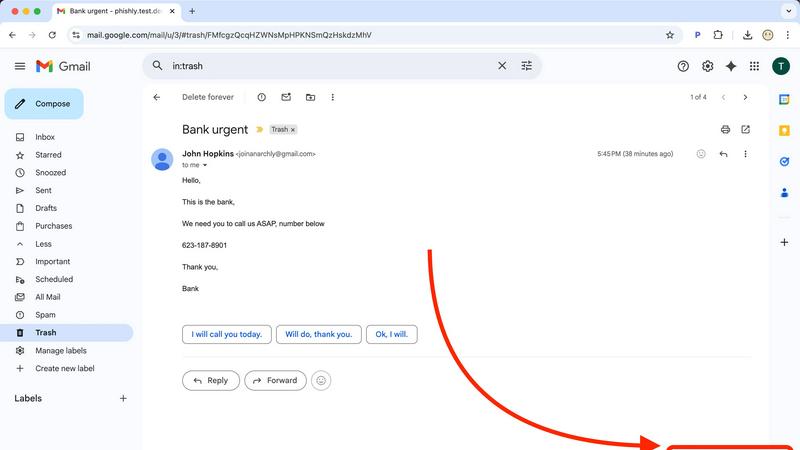
Phishly leverages AI to swiftly detect phishing emails, enhancing security and productivity for Gmail users.
Visual Comparison
LuxSign

Phishly
Feature Comparison
LuxSign
Multiple Signature Methods
LuxSign provides various methods for signing documents, allowing users to draw their signature, type their name, or upload an image. This flexibility ensures a user-friendly experience and quick document signing, catering to diverse preferences.
Advanced Security
The platform employs industry-standard encryption protocols to protect documents during upload, storage, and transmission. Coupled with secure storage in EU data centers, LuxSign guarantees that sensitive information remains safeguarded against unauthorized access.
Complete Audit Trail
LuxSign offers detailed audit trails that log every action taken within the platform. These logs include timestamps, IP addresses, and signer information, ensuring compliance and providing transparency for all document-related activities.
Collaboration Workspaces
Teams can create shared workspaces within LuxSign, allowing for organized document management. Members can collaborate seamlessly on signing workflows, manage access permissions, and store documents in structured folders, fostering teamwork and efficiency.
Phishly
AI-Powered Phishing Detection
Phishly utilizes cutting-edge artificial intelligence to analyze emails for various phishing indicators. This includes identifying suspicious domains, urgent language, and spoofed sender addresses, ensuring that users receive accurate assessments of potential threats.
Risk Assessment Classification
Upon scanning an email, Phishly provides a clear risk assessment categorized into Safe, Medium Risk, or High Risk. This classification helps users quickly understand the level of risk associated with an email, enabling them to take appropriate action.
User-Friendly Interface
The Phishly Chrome extension and web tool are designed with user experience in mind. With simple navigation and straightforward instructions, users can easily scan emails without needing any technical knowledge, making it accessible for everyone.
Privacy-Focused Analysis
Phishly respects user privacy by only analyzing emails that users explicitly choose to scan. This ensures that sensitive data remains confidential and only relevant information is processed, providing peace of mind for individuals and small businesses alike.
Use Cases
LuxSign
Streamlining Contract Signing
Businesses can utilize LuxSign to expedite the contract signing process. By allowing multiple signers to access documents simultaneously, organizations can significantly reduce turnaround times, enabling faster decision-making and project initiation.
Enhancing Compliance in Legal Transactions
LuxSign's compliance with eIDAS SES standards makes it an ideal solution for legal firms that require secure and legally binding signatures on documents. This enhances the legitimacy of transactions and minimizes the risk of legal disputes.
Facilitating Remote Work
As remote work becomes increasingly prevalent, LuxSign provides an efficient solution for teams spread across different locations. Employees can sign documents from anywhere, ensuring business continuity and operational efficiency without the need for physical presence.
Improving Document Management for HR
Human resource departments can leverage LuxSign for managing employee contracts, onboarding documents, and policy agreements. The platform simplifies the signing process, reduces paperwork, and ensures all documents are securely stored and easily retrievable.
Phishly
Individual Email Safety
Individuals can utilize Phishly to scan their personal emails for phishing attempts. By quickly assessing the safety of emails, users can avoid falling victim to scams and protect their personal information.
Small Business Email Security
Small businesses often face unique cybersecurity threats. Phishly equips small business owners with the necessary tools to detect phishing attempts in their business communications, safeguarding client relationships and company reputation.
Educational Institutions
Educational institutions can benefit from Phishly by training staff and students on identifying phishing emails. With Phishly, they can promote a culture of cybersecurity awareness and reduce the risk of compromised accounts.
Remote Workforce Protection
As remote work becomes increasingly common, Phishly provides an additional layer of security for employees working from home. By scanning emails for phishing indicators, remote workers can confidently navigate their inboxes without jeopardizing company data.
Overview
About LuxSign
LuxSign is a cutting-edge electronic signature platform designed for businesses that require stringent compliance and security in document management. Developed in Luxembourg, LuxSign offers a fully cloud-based solution that ensures all documents are encrypted end-to-end and stored exclusively within Luxembourg's secure data centers. This guarantees adherence to GDPR regulations, making LuxSign a reliable choice for organizations concerned about data protection. The platform is compliant with eIDAS SES standards, allowing for legally binding signatures on contracts across the European Union. With user-friendly features such as drag-and-drop signature field placement, automated notifications, and flexible signing workflows, LuxSign empowers businesses to streamline their document signing processes. It caters to various industries, enhancing productivity by reducing the time and effort required to obtain signatures.
About Phishly
Phishly is an innovative AI-powered phishing detection platform designed specifically to enhance email security for individuals and small businesses. Available as a convenient Chrome extension for Gmail and as a web tool, Phishly simplifies the process of identifying potentially harmful emails. Users can easily scan emails by clicking "Scan with Phishly" in Gmail or by pasting suspicious emails on the Phishly website for immediate analysis. The platform employs advanced artificial intelligence to detect a variety of phishing indicators, including suspicious domains, urgent language, spoofed senders, and social engineering tactics. By providing clear and actionable risk assessments categorized as Safe, Medium Risk, or High Risk, Phishly empowers users to make informed decisions about their email interactions. This user-friendly solution offers a straightforward approach to phishing protection, eliminating the complexities often associated with enterprise-level cybersecurity tools. With a focus on privacy, Phishly only analyzes emails that users explicitly choose to scan, ensuring that sensitive information remains secure. Ideal for those seeking effective phishing protection without requiring technical expertise, Phishly delivers instant answers, thereby significantly enhancing productivity and peace of mind.
Frequently Asked Questions
LuxSign FAQ
What types of documents can I sign with LuxSign?
You can sign a variety of document formats including PDF, DOC, and DOCX. LuxSign also supports automatic conversion for easy handling of different file types.
How does LuxSign ensure document security?
LuxSign employs end-to-end encryption, ensuring that all documents are secured during upload, storage, and transmission. Additionally, documents are stored on secure servers located in Luxembourg, complying with EU data protection regulations.
Can I track the signing progress of my documents?
Yes, LuxSign provides real-time tracking of document status. You will receive automatic email notifications when documents are sent, viewed, and signed, keeping you informed throughout the process.
Is LuxSign compliant with GDPR?
Absolutely. LuxSign is fully compliant with GDPR and Luxembourg data protection laws, ensuring that your documents and personal information are handled with the highest levels of privacy and security.
Phishly FAQ
How does Phishly detect phishing emails?
Phishly employs advanced artificial intelligence algorithms to analyze email content and identify common phishing indicators, including suspicious domains, urgent wording, and other red flags.
Is Phishly easy to use for non-technical users?
Yes, Phishly is designed with user-friendliness in mind. The interface is intuitive, allowing users with no technical background to easily scan and assess the safety of their emails.
Does Phishly compromise my email privacy?
No, Phishly prioritizes user privacy by only analyzing emails that you explicitly choose to scan. Your personal information remains secure and confidential throughout the scanning process.
Is Phishly free to use?
Phishly is free to use, making it an accessible tool for individuals and small businesses looking to enhance their email security without incurring costs or engaging in complex setups.