
NB2 Hub vs Shrinkpad
Side-by-side comparison to help you choose the right AI tool.

NB2 Hub
Nano Banana Pro generates production-ready 4K images with precise text and layout control for enterprise workflows.
Last updated: March 1, 2026

Shrinkpad
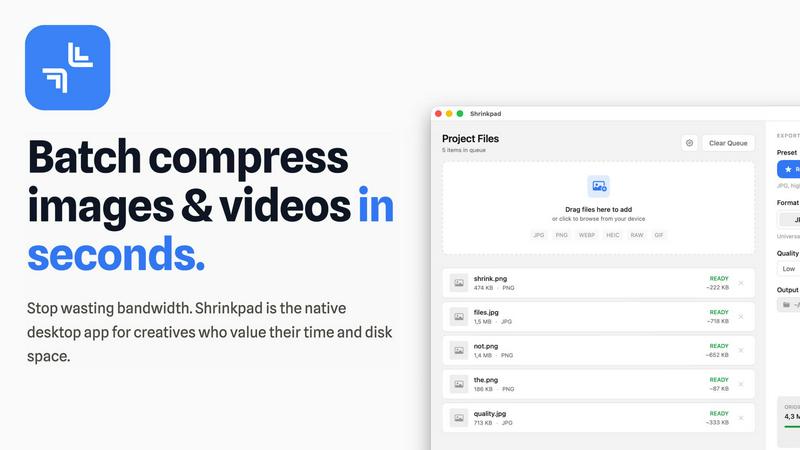
Shrinkpad is a native Mac app that batch compresses images and videos to optimize assets and boost productivity.
Last updated: February 28, 2026
Visual Comparison
NB2 Hub
Shrinkpad
Feature Comparison
NB2 Hub
Faithful Text & Image Remix
This feature allows professionals to upload a reference image and provide a short prompt. NB2 Hub intelligently preserves the original composition, layout, and lighting while upgrading specific details, textures, or elements as instructed. This is critical for iterative design processes, enabling rapid UI/UX iterations, refined product shot variations, and consistent comic panel creation without starting from scratch each time.
Crisp On-Image Text Generation
NB2 Hub excels at generating clean, legible text directly within images, supporting multilingual typography without common artifacts like blurring or halos. This solves a significant pain point in automated design, allowing for the direct creation of posters, advertisement creatives, and social media covers with integrated headlines and body text that meet professional branding and readability standards.
Multi-Reference Fusion & Identity Consistency
This advanced capability enables the fusion of multiple reference images while maintaining strict consistency across characters, products, or brand elements. It is indispensable for creating coherent storyboards, multi-angle product sets, and campaign visuals where a unified identity is paramount, ensuring brand integrity across all generated assets.
Pro-Level Lighting & Camera Control
Users gain fine-grained control over cinematic aspects of their images. This includes adjusting lens type, framing, depth of field, color grading, and performing local edits like day-to-night conversions. This feature provides on-demand cinematic quality, allowing creative directors and marketers to achieve specific dramatic effects and moods without extensive post-production.
Shrinkpad
Intelligent Batch Processing
Shrinkpad eliminates manual, file-by-file workflows by enabling unlimited batch processing of mixed media. Users can drag and drop entire folders containing thousands of images and videos, and the application automatically detects and queues over 30 supported formats. This feature leverages multi-threaded compression optimized for Apple Silicon, processing massive queues without crashing, which translates to hours of saved labor and consistent, reliable output for large-scale projects.
Privacy-First Local Processing
All compression algorithms run entirely on the user's Mac, ensuring that sensitive client work, proprietary designs, and unreleased media never leave the local device. This feature is critical for businesses handling confidential assets, as it eliminates the security risks and bandwidth costs associated with cloud-based uploads, providing full compliance with internal data governance policies.
Smart Quality Optimization
The application automatically analyzes the visual complexity of each asset to apply a perfect, artifact-free compression ratio. This removes the guesswork from manual quality settings, ensuring optimal file size reduction while preserving perceptual quality. For professionals, this means consistently high-quality outputs suitable for web, app, and presentation use without iterative manual adjustments.
Advanced Format & Workflow Support
Shrinkpad supports a comprehensive range of professional formats including JPG, PNG, WEBP, AVIF, HEIC, RAW camera files, MP4, and MOV. It includes power features like automatic renaming, metadata stripping, and subfolder preservation. This seamless integration into existing creative pipelines allows teams to export assets at high resolutions from tools like Figma or Photoshop and let Shrinkpad handle final optimization in bulk.
Use Cases
NB2 Hub
Marketing & Advertising Campaigns
Marketing teams can rapidly generate a high volume of cohesive, brand-accurate visual assets for multi-channel campaigns. From social media ads with integrated text to product mockups and lifestyle imagery, NB2 Hub streamlines content creation, enabling faster campaign deployment and A/B testing at scale.
Product Design & UI/UX Prototyping
Product designers and UI/UX professionals can use the image remix feature to quickly iterate on interface designs, app screens, and product concepts. By uploading a wireframe or mockup, they can generate multiple styled variants, explore different textures, and create realistic prototypes to accelerate the design feedback loop.
Educational & Infographic Content Creation
Educators and content strategists can transform complex data and concepts into visually engaging infographics and educational materials. Leveraging the model's grounding in real-world facts, users can generate accurate, easy-to-understand visual explanations, enhancing learning materials and internal documentation.
E-commerce & Product Visualization
E-commerce businesses can create consistent, high-quality product shots from multiple angles, apply logos to 3D mockups, and visualize products in various settings. This reduces dependency on costly photoshoots and enables the rapid scaling of product imagery for online catalogs and digital storefronts.
Shrinkpad
Web Development & Digital Publishing Teams
Development and publishing teams use Shrinkpad to batch-optimize website assets, reducing bundle sizes and improving Core Web Vitals like Largest Contentful Paint (LCP). By compressing hero images, product shots, and promotional videos by an average of 70-90%, teams can achieve faster page load times, enhance user experience, and improve SEO rankings, directly contributing to higher conversion rates and reduced bounce rates.
Creative Agencies & Design Studios
Agencies handling multiple client projects compress final deliverables for email delivery, client portals, and digital campaigns. Shrinkpad's folder mode and mixed-media batching allow them to process entire project directories in one action, ensuring fast turnaround times, professional presentation, and significant savings on cloud storage and file transfer service costs.
Photographers & Videographers
Professionals managing large libraries of high-resolution RAW photos and 4K video footage use Shrinkpad to create optimized previews for client galleries and streamlined archives for long-term storage. The local processing guarantees client privacy, while the dramatic file size reduction frees up terabytes of expensive SSD storage, extending hardware lifecycle and improving system performance.
In-House Marketing & Content Teams
Marketing departments regularly produce large volumes of social media graphics, blog images, and webinar recordings. Shrinkpad enables them to maintain a consistent, optimized asset library, reducing upload times to CMS platforms and social networks by over 40%, thereby accelerating campaign deployment and improving team throughput.
Overview
About NB2 Hub
NB2 Hub is an enterprise-grade AI image generation platform engineered for professional production workflows. It leverages the advanced capabilities of Google Nano Banana Pro, built on the Gemini 3 Pro image architecture, to deliver unprecedented accuracy, control, and speed in visual asset creation. Designed for creators, marketing teams, product designers, and businesses, NB2 Hub transforms text prompts and reference photos into high-fidelity, production-ready images. Its core value proposition lies in eliminating the traditional trade-offs between creative vision and technical execution. The platform ensures robust character consistency, precise layout fidelity, and the generation of crisp, legible text within images—capabilities often lacking in standard AI tools. With a user-friendly interface that enables quick onboarding and immediate generation, NB2 Hub empowers organizations to drastically reduce the time and cost associated with professional photography, graphic design, and content creation, delivering a measurable ROI through enhanced productivity and visual quality.
About Shrinkpad
Shrinkpad is an enterprise-grade desktop application engineered for macOS, delivering powerful batch compression for images and videos directly on your local machine. It is designed for professionals—including photographers, designers, content creators, developers, and marketing teams—who manage large volumes of digital assets and prioritize efficiency, data privacy, and storage optimization. The core value proposition lies in its ability to process hundreds or even thousands of files in seconds, reducing file sizes by up to 90% without ever uploading sensitive data to the cloud. This local-first approach ensures complete confidentiality for proprietary media while providing a significant return on investment. By reclaiming gigabytes of disk space and drastically reducing time spent on manual optimization, Shrinkpad streamlines workflows, accelerates project delivery, and improves key performance metrics like website load times, directly impacting operational productivity and cost savings.
Frequently Asked Questions
NB2 Hub FAQ
What makes NB2 Hub different from other AI image generators?
NB2 Hub is built on the Google Nano Banana Pro model, which is specifically engineered for production work. Key differentiators include superior layout fidelity, reliable generation of readable text within images, and strong consistency for characters and objects across multiple generations. These features address critical professional needs that are often unmet by consumer-focused tools.
Is there a free tier available?
Yes, NB2 Hub offers a free tier that includes sign-up with Google and provides users with initial free generations to experience the platform's core capabilities. This allows teams to evaluate the tool's fit for their production workflow before committing to a paid plan.
How does NB2 Hub ensure brand consistency?
Through its multi-reference fusion and identity consistency feature, NB2 Hub can maintain specific visual elements—such as logos, character designs, color palettes, and product shapes—across a series of generated images. This ensures that all assets align with brand guidelines, creating a cohesive visual identity for campaigns and product lines.
What output resolutions does NB2 Hub support?
NB2 Hub provides precise size and aspect ratio control, supporting export targets for production-ready resolutions including 1K, 2K, and 4K. The platform uses robust resampling to ensure clean, high-quality outputs suitable for both digital platforms and print materials.
Shrinkpad FAQ
Can I use Shrinkpad for free?
Yes, Shrinkpad offers a Free Starter tier that provides essential compression tools for casual use. This plan includes standard compression for common formats like JPG and PNG, with a limit of 10 files per batch and a maximum 1GB file size. It is an excellent way to evaluate the core functionality before upgrading to a paid plan for unlimited, professional use.
What file formats does Shrinkpad support?
Shrinkpad supports an extensive range of over 30 image and video formats. This includes standard web formats (JPG, PNG, WEBP, AVIF), professional and Apple formats (HEIC, RAW files from various cameras), and major video formats (MP4, MOV). The application automatically detects and optimally compresses each file type within a mixed batch.
Does Shrinkpad support video compression?
Absolutely. Shrinkpad provides robust video compression capabilities, allowing users to reduce the file size of MP4, MOV, and other common video formats by significant percentages. This is included in both the Personal and Team paid plans, enabling users to process images and videos together in the same, efficient batch workflow.
How many files can I process at once?
With the paid Personal and Team plans, Shrinkpad supports unlimited batch processing. You can queue and process thousands of images and videos simultaneously. The application is engineered for heavy-duty use and handles massive queues with stability, unlike many web-based tools that crash under large loads.
Alternatives
NB2 Hub Alternatives
NB2 Hub is a leading AI-powered image generation platform within the image and photo category. It leverages advanced architecture to transform text and photos into high-fidelity 4K visuals, serving professionals who require strong character consistency and layout fidelity for marketing, design, and educational content. Users often evaluate alternatives for several strategic reasons. These include budget considerations and pricing model flexibility, the need for specific niche features or integrations, and platform compatibility requirements for enterprise workflows. A thorough assessment ensures the chosen tool aligns with both creative demands and operational infrastructure. When selecting an alternative, prioritize solutions that demonstrate clear ROI through productivity gains and output quality. Key evaluation criteria should include the robustness of text-to-image and image-to-image capabilities, the reliability of features like on-image text generation and factual grounding, and the overall security and scalability of the platform to support business growth.
Shrinkpad Alternatives
Shrinkpad is a specialized macOS application for batch compression of images and videos, falling into the digital asset optimization category. It is engineered for professionals who need to process large volumes of media files locally to save storage and streamline workflows. Users may explore alternatives for various strategic reasons, such as budget constraints, specific feature requirements not met by Shrinkpad, or the need for cross-platform compatibility beyond macOS. The search often centers on finding a tool that delivers a comparable return on investment through time savings and storage reclamation. When evaluating an alternative, key considerations should include the solution's processing methodology—local versus cloud—for data security, its support for required file formats, the efficiency of its batch processing engine, and the overall impact on team productivity. The optimal choice balances robust functionality with a clear, measurable benefit to operational efficiency.