
Mod vs Skene
Side-by-side comparison to help you choose the right AI tool.
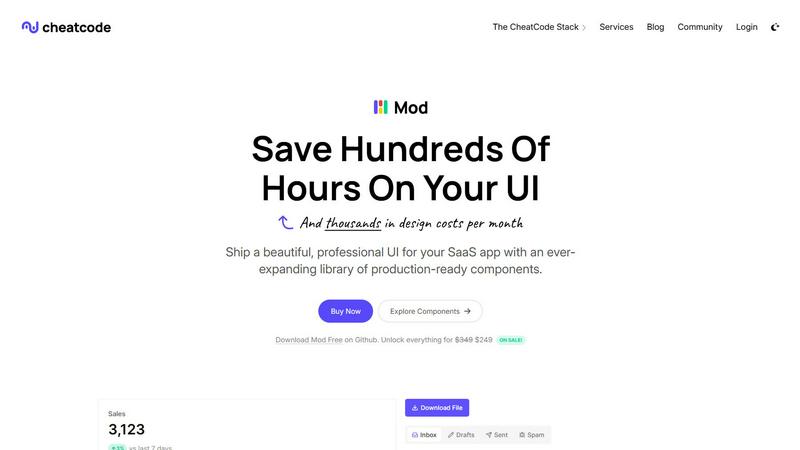
Mod accelerates SaaS app development with a robust CSS framework for rapid UI component deployment and enhanced produ...

Skene automates product-led growth by optimizing onboarding and retention directly from your codebase for seamless.
Last updated: February 28, 2026
Visual Comparison
Mod
Skene

Feature Comparison
Mod
Extensive Component Library
Mod provides a comprehensive library of over 88 components that cover a wide range of UI needs. From buttons and forms to modals and navigation bars, these pre-built elements allow developers to quickly assemble user interfaces while maintaining a coherent design style.
Diverse Styling Options
With 168 unique styles included, Mod allows developers to customize the appearance of their applications easily. This flexibility ensures that teams can align their UI with brand guidelines without sacrificing development speed or quality.
Dark Mode Support
Mod includes built-in dark mode capabilities, enabling developers to create applications that cater to user preferences and enhance accessibility. This feature not only improves user experience but also keeps applications modern and visually appealing.
Framework-Agnostic Compatibility
One of Mod's standout features is its compatibility with various frameworks such as Next.js, Nuxt, Vite, Svelte, Rails, and Django. This allows developers to leverage Mod’s capabilities regardless of their chosen technology stack, thus improving workflow efficiency.
Skene
Automated Growth Optimization
Skene employs an innovative algorithm to continuously analyze user interactions with the product, identifying areas for improvement. This automation allows for real-time adjustments to onboarding processes, ensuring that user experiences are always optimized without manual intervention.
Codebase Integration
By connecting directly to your GitHub or GitLab repository, Skene reads your codebase and generates growth signals based on actual user interactions. This feature eliminates the need for third-party scripts that can disrupt performance and data visibility.
Self-Learning Analytics
The platform provides a comprehensive analytics dashboard that tracks user progress, engagement metrics, and completion rates. These insights enable developers to make data-driven decisions that enhance user journeys and maximize retention.
Outcome-Based Pricing Model
Skene’s pricing structure is designed to align with success, charging only when users complete their onboarding journey. This model encourages startups to focus on delivering value to customers, knowing their investment is tied to tangible outcomes.
Use Cases
Mod
Rapid SaaS Development
Mod is ideal for startups and solo developers looking to accelerate the development of their SaaS applications. By utilizing pre-built components and styles, they can focus on core functionalities while delivering a polished product.
Customizable User Interfaces
Design teams can leverage Mod to create custom user interfaces that reflect their brand identity. With a wide array of components and styling options at their disposal, they can ensure a unique look for every project.
Responsive Web Applications
With a mobile-first approach, Mod enables developers to build responsive applications that provide optimal experiences across devices. This is crucial for businesses looking to engage users on both desktop and mobile platforms effectively.
Cost-Effective UI Solutions
For teams aiming to reduce design costs, Mod offers an efficient solution by minimizing the need for extensive design resources. With its comprehensive library and styling tools, teams can achieve professional results without the high overhead.
Skene
Streamlining Onboarding Processes
Indie developers can utilize Skene to optimize their onboarding experience, ensuring new users can seamlessly navigate the product and achieve initial success, which is crucial for long-term engagement.
Enhancing User Activation Rates
Startups can leverage Skene to identify and address activation drop-offs within the user journey. By analyzing user behavior, Skene helps create targeted interventions that improve activation rates and foster user engagement.
Increasing Customer Retention
With its focus on continuous improvement, Skene aids businesses in refining retention strategies. By monitoring user interactions and satisfaction, companies can proactively address issues that may lead to churn.
Automating Growth Loops
Skene allows developers to implement self-optimizing growth loops that continually adapt to user feedback. This feature ensures that the product evolves alongside user needs, driving sustainable growth without extensive manual input.
Overview
About Mod
Mod is an innovative CSS framework designed specifically for Software as a Service (SaaS) applications. It empowers developers to create aesthetically pleasing and highly functional user interfaces with ease. By offering a robust suite of over 88 components, 168 styles, and more than 1,500 icons, Mod streamlines the UI development process while ensuring that applications maintain a consistent look and feel. This framework is particularly beneficial for both individual developers and teams, enabling them to launch polished applications faster and with reduced design costs. Mod's framework-agnostic approach allows seamless integration with popular technologies, including Next.js, Nuxt, Vite, Svelte, Rails, and Django. With responsive and mobile-first design principles at its core, Mod ensures that applications are not only visually appealing but also user-friendly across a variety of devices. The commitment to simple pricing and annual updates makes Mod a valuable resource for developers aiming to enhance productivity and deliver high-quality SaaS products.
About Skene
Skene is a cutting-edge, fully automated Product-Led Growth (PLG) iteration engine that revolutionizes how indie developers and early-stage startups approach growth. By eliminating the necessity for dedicated growth teams, Skene empowers users to achieve remarkable growth through continuous optimization of onboarding, activation, and retention processes. The platform leverages sophisticated algorithms to analyze customer behavior, identifying friction points and activation drop-offs. With its unique self-learning growth engine, Skene automatically generates and tests improved user flow variations, transforming onboarding into a self-optimizing process. Startups can rely on Skene as their all-in-one "growth team in a box," allowing them to enhance activation strategies and extend customer lifetime value without incurring additional headcount costs. With its seamless integration into existing workflows, Skene streamlines growth efforts, enabling developers to focus on what they do best—building exceptional products.
Frequently Asked Questions
Mod FAQ
What is Mod?
Mod is a CSS framework tailored for SaaS applications, offering a library of components and styles to facilitate efficient UI development.
How many components does Mod provide?
Mod features over 88 components, designed to meet a diverse range of UI needs, allowing for quick and cohesive application development.
Is Mod compatible with popular frameworks?
Yes, Mod is framework-agnostic and works seamlessly with technologies like Next.js, Nuxt, Vite, Svelte, Rails, and Django, ensuring flexibility in development.
Does Mod support dark mode?
Absolutely, Mod includes built-in dark mode support, enabling developers to create applications that cater to users' preferences and improve accessibility.
Skene FAQ
What is PLG software?
PLG (Product-Led Growth) software allows users to experience value in a product without requiring manual input from sales or customer success teams. By automating the user journey, PLG software guides users towards activation and feature adoption.
How is Skene different from traditional customer experience software?
Unlike traditional tools that rely on manual setup and maintenance, Skene automatically generates onboarding and lifecycle automation by analyzing your codebase. This leads to seamless updates and less reliance on brittle overlays that can malfunction with code changes.
How long does it take to set up?
Setup is incredibly quick and straightforward, taking less than 60 seconds. By simply connecting your GitHub or GitLab repository in read-only mode, Skene automatically analyzes your codebase to generate the necessary PLG flows without any code modifications.
Is my code secure with Skene?
Yes, Skene prioritizes security. It only requires read-only access to your repository, and all analysis occurs in a secure, isolated environment, ensuring your code remains protected throughout the process.