
Hush Touch | Voice-to-Text for MacOS vs StudyPal
Side-by-side comparison to help you choose the right AI tool.

Hush Touch | Voice-to-Text for MacOS
Hush Touch offers offline voice-to-text for Mac, learning your vocabulary and enhancing productivity with every use.
Last updated: February 26, 2026

StudyPal
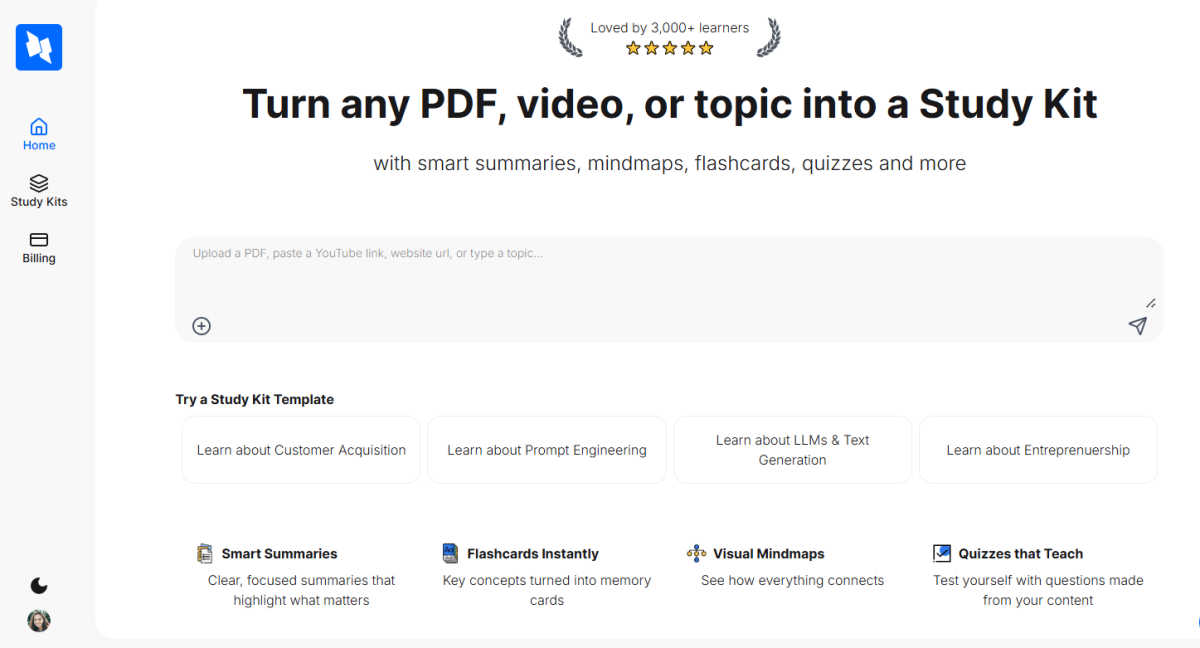
StudyPal transforms any content into effective study kits with summaries, flashcards, quizzes, and mindmaps for.
Last updated: March 1, 2026
Visual Comparison
Hush Touch | Voice-to-Text for MacOS

StudyPal
Feature Comparison
Hush Touch | Voice-to-Text for MacOS
Dual-Engine Recognition
Hush Touch employs a dual-engine recognition system that combines DictationTranscriber and SFSpeechRecognizer. This innovative approach ensures that natural flow and punctuation are accurately captured while boosting recognition of custom vocabulary, enhancing overall transcription accuracy.
Custom Vocabulary
With the ability to store up to 500 custom vocabulary terms and an auto-learning feature, Hush Touch excels in recognizing technical jargon, brand names, and medical terms. This ensures that the app understands and accurately transcribes what users actually say, significantly reducing frustration and errors.
Smart Text Processing
Hush Touch incorporates intelligent text processing capabilities that include filler word removal, auto-correction, and formatted lists. By processing these elements in real-time on-device, users enjoy a polished and professional output without the hassle of manual editing.
Context Modes & Hands-Free Operation
The app offers four distinct context modes—General, Email, Code, and Notes—allowing users to switch seamlessly according to their dictation needs. Moreover, with hands-free operation activated by Siri, users can dictate messages effortlessly, with automatic text insertion after a brief pause.
StudyPal
Smart Summaries
StudyPal's smart summaries distill complex information into clear, concise overviews that highlight key points. This feature ensures learners grasp essential concepts quickly, saving time and improving focus on critical content.
Memory-Optimized Flashcards
The platform generates memory-optimized flashcards from the core concepts within the study material. These flashcards facilitate active recall, allowing learners to reinforce their understanding and retention of vital information effectively.
Visual Mind Maps
Visual mind maps provide a graphical representation of how different concepts interconnect. This feature aids in visual learning and helps users organize their thoughts, making it easier to see relationships between ideas and enhancing overall comprehension.
Auto-Generated Quizzes
StudyPal creates quizzes automatically based on the content ingested. These quizzes serve as an interactive tool for self-assessment, enabling learners to test their knowledge and identify areas needing further review, thereby enhancing learning outcomes.
Use Cases
Hush Touch | Voice-to-Text for MacOS
Efficient Email Drafting
Hush Touch streamlines the email drafting process, allowing users to compose messages swiftly and hands-free. This is particularly beneficial for busy professionals who need to manage communications efficiently without interrupting their workflow.
Medical Documentation
For healthcare professionals, Hush Touch serves as an invaluable tool for dictating medical notes. The app's ability to recognize complex medical terminology ensures accurate documentation, saving time and reducing administrative burdens.
Coding and Technical Writing
Software engineers and technical writers can leverage Hush Touch to dictate code comments and technical documentation. The app's dual-engine recognition and custom vocabulary capabilities ensure that specialized terms are accurately transcribed, enhancing productivity in technical fields.
Note-Taking in Meetings
Hush Touch facilitates seamless note-taking during meetings and lectures by allowing users to dictate their thoughts in real-time. This hands-free approach enables participants to focus on discussions without the distraction of manual note-taking.
StudyPal
Corporate Training and Onboarding
Organizations can utilize StudyPal to streamline corporate training and onboarding processes. By generating tailored study kits for new hires, companies can reduce training time and ensure consistent knowledge transfer across teams.
Academic Enhancements
Educational institutions can leverage StudyPal to support students in enhancing their learning experiences. The platform provides customized study kits that address specific curriculum needs, improving student engagement and retention rates.
Professional Development
Professionals in competitive fields can use StudyPal to accelerate their upskilling efforts. By converting industry-specific resources into interactive study kits, individuals can efficiently acquire new knowledge and competencies relevant to their careers.
Content Creation for Educators
Educators can benefit from StudyPal by using it as a content creation tool. The platform simplifies the process of developing comprehensive learning materials, enabling teachers to focus on delivering quality education rather than spending excessive time on preparation.
Overview
About Hush Touch | Voice-to-Text for MacOS
Hush Touch is an innovative voice-to-text application specifically designed for macOS users seeking a seamless dictation experience. By utilizing advanced on-device processing, Hush Touch ensures that your voice data remains private and secure, eliminating the need for cloud dependency. The app combines two powerful Apple transcription engines with a final pass from Apple Intelligence, resulting in cleaner and more accurate text output. Lightweight at just 5.5 MB, Hush Touch integrates effortlessly into daily writing workflows, allowing users to draft emails, messages, and documents hands-free. Designed for professionals who prioritize privacy and efficiency, Hush Touch learns your unique vocabulary and adapts over time, ultimately enhancing productivity. For a one-time cost of $20, you gain a lifetime license to a robust dictation tool that operates offline, making Hush Touch an invaluable addition to any macOS user's toolkit.
About StudyPal
StudyPal is an enterprise-grade, AI-powered learning acceleration platform that revolutionizes how individuals and organizations interact with information. By transforming unstructured data such as PDF documents, YouTube videos, and various typed topics into structured, actionable knowledge, StudyPal enhances productivity and efficiency in learning. Its primary value proposition lies in its ability to create comprehensive, interactive study kits that cater to diverse learning styles. Each study kit is a multi-modal learning module integrating clear summaries, visual mind maps, memory-optimized flashcards, auto-generated quizzes, and curated video recommendations. This platform is designed for professionals seeking to upskill, corporate training departments requiring scalable onboarding solutions, and academic institutions focused on improving student outcomes. By automating the content synthesis and study material creation processes, StudyPal delivers a significant return on investment, reducing study preparation time by 60-70% while leveraging cognitive science principles to enhance long-term retention and accelerate competency development.
Frequently Asked Questions
Hush Touch | Voice-to-Text for MacOS FAQ
Is Hush Touch fully offline?
Yes, Hush Touch operates entirely on-device, ensuring that all voice data is processed offline without any cloud dependency. This guarantees privacy and security for users.
How does Hush Touch learn my vocabulary?
Hush Touch features an adaptive learning system that detects corrections made during dictation. It automatically updates your custom vocabulary based on these corrections, allowing the app to better understand your unique language and terminology over time.
What is the cost of Hush Touch?
Hush Touch is available for a one-time purchase of $20, granting users a lifetime license with no subscription fees. This cost-effective model makes it an attractive option for anyone seeking dictation software.
Can I use Hush Touch for different types of writing?
Absolutely! Hush Touch includes various context modes, such as General, Email, Code, and Notes, allowing users to tailor their dictation experience according to their specific writing needs.
StudyPal FAQ
How does StudyPal transform unstructured information?
StudyPal uses advanced AI algorithms to analyze and synthesize unstructured information from various sources, turning it into structured study kits that enhance learning efficiency.
Can StudyPal be used by individuals as well as organizations?
Yes, StudyPal is designed for both individual learners seeking to enhance their knowledge and organizations aiming to improve training and onboarding processes.
What types of content can StudyPal ingest?
StudyPal can ingest a wide range of content, including PDF documents, YouTube videos, typed topics, and other digital resources, making it a versatile tool for learning.
How does StudyPal improve knowledge retention?
By leveraging proven cognitive science principles, such as spaced repetition and active recall, StudyPal helps users retain information more effectively, leading to better long-term learning outcomes.
Alternatives
Hush Touch | Voice-to-Text for MacOS Alternatives
Hush Touch | Voice-to-Text for MacOS is an innovative offline dictation tool specifically designed for macOS users. It leverages advanced Apple transcription engines to offer a seamless, natural dictation experience while maintaining user privacy through on-device processing. As part of the AI Assistants category, Hush Touch stands out by allowing users to create text hands-free, making it an efficient choice for drafting emails, messages, and documents. Users often seek alternatives to Hush Touch due to various factors, including pricing, feature sets, and platform compatibility. When searching for a suitable replacement, it’s essential to consider aspects like ease of use, transcription accuracy, and the level of offline functionality. Additionally, examining the app's ability to integrate into existing workflows and its privacy features can significantly influence the decision-making process.
StudyPal Alternatives
StudyPal is an enterprise-grade, AI-powered learning acceleration platform that specializes in transforming unstructured information into structured, actionable knowledge. It is designed to enhance learning productivity by creating comprehensive study kits from diverse content inputs, catering to both organizations and individuals who aim to maximize their learning efficiency and knowledge retention. Users often seek alternatives to StudyPal for various reasons, including pricing structures, feature sets, and compatibility with existing platforms. When looking for an alternative, it’s essential to consider the specific needs of your organization or study habits, such as the depth of content synthesis, the variety of study modalities offered, and the overall ease of use. A well-rounded alternative should maintain a focus on enhancing productivity and improving learning outcomes.