
Facejam vs Shrinkpad
Side-by-side comparison to help you choose the right AI tool.

Facejam
Transform your selfies into professional headshots in minutes, saving time and money on photography.
Last updated: February 26, 2026

Shrinkpad
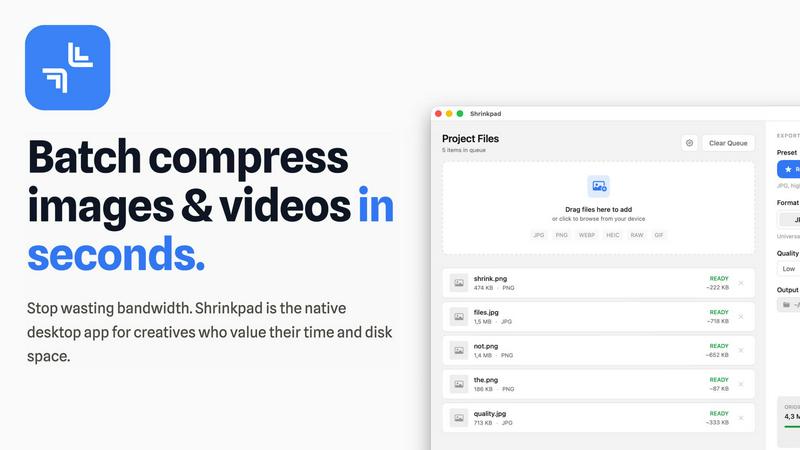
Shrinkpad is a native Mac app that batch compresses images and videos to optimize assets and boost productivity.
Last updated: February 28, 2026
Visual Comparison
Facejam

Shrinkpad
Feature Comparison
Facejam
Professional Headshots in Minutes
FaceJam allows users to generate high-quality headshots in just a few minutes. By eliminating the need for scheduling appointments or commuting to a studio, users can quickly obtain professional images that enhance their online presence and personal branding.
Industry-Specific Styles
With over 100 professional styles to choose from, FaceJam tailors headshots to fit various industries, such as real estate, coaching, law, and more. Each template is designed to reflect the unique aesthetic and expectations of different professions, ensuring users present themselves in the best possible light.
Private and Secure
FaceJam prioritizes user privacy and data security. The photos uploaded by users are solely utilized to generate their headshots and are not stored or used for any other purpose. This commitment to privacy ensures that users can confidently create their headshots without concerns over data misuse.
High-Resolution Outputs
The platform generates high-resolution images that are suitable for both digital and print use. This feature ensures that users receive headshots that look professional and polished, making them ideal for resumes, business profiles, or any professional context where quality matters.
Shrinkpad
Intelligent Batch Processing
Shrinkpad eliminates manual, file-by-file workflows by enabling unlimited batch processing of mixed media. Users can drag and drop entire folders containing thousands of images and videos, and the application automatically detects and queues over 30 supported formats. This feature leverages multi-threaded compression optimized for Apple Silicon, processing massive queues without crashing, which translates to hours of saved labor and consistent, reliable output for large-scale projects.
Privacy-First Local Processing
All compression algorithms run entirely on the user's Mac, ensuring that sensitive client work, proprietary designs, and unreleased media never leave the local device. This feature is critical for businesses handling confidential assets, as it eliminates the security risks and bandwidth costs associated with cloud-based uploads, providing full compliance with internal data governance policies.
Smart Quality Optimization
The application automatically analyzes the visual complexity of each asset to apply a perfect, artifact-free compression ratio. This removes the guesswork from manual quality settings, ensuring optimal file size reduction while preserving perceptual quality. For professionals, this means consistently high-quality outputs suitable for web, app, and presentation use without iterative manual adjustments.
Advanced Format & Workflow Support
Shrinkpad supports a comprehensive range of professional formats including JPG, PNG, WEBP, AVIF, HEIC, RAW camera files, MP4, and MOV. It includes power features like automatic renaming, metadata stripping, and subfolder preservation. This seamless integration into existing creative pipelines allows teams to export assets at high resolutions from tools like Figma or Photoshop and let Shrinkpad handle final optimization in bulk.
Use Cases
Facejam
LinkedIn Profiles
Professionals looking to enhance their LinkedIn profiles can use FaceJam to create polished headshots that stand out to potential employers and connections. High-quality images can significantly improve the first impression made on recruiters and network contacts.
Corporate Team Pages
Companies can utilize FaceJam to generate consistent, high-quality headshots for their team members. This uniformity helps establish a professional brand image across corporate websites, marketing materials, and internal directories.
Personal Branding
For freelancers and entrepreneurs, maintaining a consistent online presence is crucial. FaceJam allows users to create a suite of professional images that can be used across social media platforms, personal websites, and portfolios, ensuring a cohesive brand identity.
Event Promotions
Individuals participating in conferences, webinars, or networking events can use FaceJam to generate professional headshots in advance. This ensures they have quality images ready for promotional materials, enhancing their visibility and professionalism in various settings.
Shrinkpad
Web Development & Digital Publishing Teams
Development and publishing teams use Shrinkpad to batch-optimize website assets, reducing bundle sizes and improving Core Web Vitals like Largest Contentful Paint (LCP). By compressing hero images, product shots, and promotional videos by an average of 70-90%, teams can achieve faster page load times, enhance user experience, and improve SEO rankings, directly contributing to higher conversion rates and reduced bounce rates.
Creative Agencies & Design Studios
Agencies handling multiple client projects compress final deliverables for email delivery, client portals, and digital campaigns. Shrinkpad's folder mode and mixed-media batching allow them to process entire project directories in one action, ensuring fast turnaround times, professional presentation, and significant savings on cloud storage and file transfer service costs.
Photographers & Videographers
Professionals managing large libraries of high-resolution RAW photos and 4K video footage use Shrinkpad to create optimized previews for client galleries and streamlined archives for long-term storage. The local processing guarantees client privacy, while the dramatic file size reduction frees up terabytes of expensive SSD storage, extending hardware lifecycle and improving system performance.
In-House Marketing & Content Teams
Marketing departments regularly produce large volumes of social media graphics, blog images, and webinar recordings. Shrinkpad enables them to maintain a consistent, optimized asset library, reducing upload times to CMS platforms and social networks by over 40%, thereby accelerating campaign deployment and improving team throughput.
Overview
About Facejam
FaceJam is an innovative AI-driven platform that transforms your selfies into professional-quality headshots in just minutes. Designed for individuals and businesses alike, FaceJam enables users to create stunning headshots without the need for a photographer or extensive retouching. By simply uploading a few photos and selecting from over 100 styles tailored to specific industries, users can generate high-resolution images suitable for LinkedIn profiles, resumes, corporate directories, and personal branding. The platform is particularly beneficial for busy professionals who value efficiency and quality, allowing them to bypass traditional photo shoots that can be time-consuming and costly. With a focus on delivering realistic and polished results, FaceJam is revolutionizing how headshots are created, providing an accessible and secure solution for anyone looking to enhance their professional image.
About Shrinkpad
Shrinkpad is an enterprise-grade desktop application engineered for macOS, delivering powerful batch compression for images and videos directly on your local machine. It is designed for professionals—including photographers, designers, content creators, developers, and marketing teams—who manage large volumes of digital assets and prioritize efficiency, data privacy, and storage optimization. The core value proposition lies in its ability to process hundreds or even thousands of files in seconds, reducing file sizes by up to 90% without ever uploading sensitive data to the cloud. This local-first approach ensures complete confidentiality for proprietary media while providing a significant return on investment. By reclaiming gigabytes of disk space and drastically reducing time spent on manual optimization, Shrinkpad streamlines workflows, accelerates project delivery, and improves key performance metrics like website load times, directly impacting operational productivity and cost savings.
Frequently Asked Questions
Facejam FAQ
How does your AI headshot generator work?
FaceJam operates through a simple two-step process: users upload their selfies and select their preferred style template. The AI then processes this information to generate realistic headshots tailored to the user’s specifications.
What do you do with my uploaded photos?
Uploaded photos are used exclusively to create the AI-generated headshots. FaceJam ensures that user photos are not utilized for training purposes or shared with any third parties, maintaining strict privacy protocols.
How many good photos can I expect?
FaceJam guarantees at least one high-quality image in every pack. Users who follow the input guidelines closely often receive multiple impressive photos, enhancing their chances of finding the perfect headshot for their needs.
Who owns my AI photos?
Users retain full ownership of their AI-generated photos. FaceJam grants a commercial license for the images, allowing users to use them freely across various professional contexts without restrictions.
Shrinkpad FAQ
Can I use Shrinkpad for free?
Yes, Shrinkpad offers a Free Starter tier that provides essential compression tools for casual use. This plan includes standard compression for common formats like JPG and PNG, with a limit of 10 files per batch and a maximum 1GB file size. It is an excellent way to evaluate the core functionality before upgrading to a paid plan for unlimited, professional use.
What file formats does Shrinkpad support?
Shrinkpad supports an extensive range of over 30 image and video formats. This includes standard web formats (JPG, PNG, WEBP, AVIF), professional and Apple formats (HEIC, RAW files from various cameras), and major video formats (MP4, MOV). The application automatically detects and optimally compresses each file type within a mixed batch.
Does Shrinkpad support video compression?
Absolutely. Shrinkpad provides robust video compression capabilities, allowing users to reduce the file size of MP4, MOV, and other common video formats by significant percentages. This is included in both the Personal and Team paid plans, enabling users to process images and videos together in the same, efficient batch workflow.
How many files can I process at once?
With the paid Personal and Team plans, Shrinkpad supports unlimited batch processing. You can queue and process thousands of images and videos simultaneously. The application is engineered for heavy-duty use and handles massive queues with stability, unlike many web-based tools that crash under large loads.
Alternatives
Facejam Alternatives
Facejam is an innovative AI-powered platform that transforms selfies into studio-quality headshots, catering to professionals in various industries. Its user-friendly interface allows individuals to upload a few photos, select from over 50 styles, and generate polished images ready for immediate use. Users often seek alternatives to Facejam due to factors such as pricing, specific feature requirements, or compatibility with their preferred platforms. When evaluating options, it’s essential to consider image quality, customization features, turnaround time, and security of personal data, ensuring the alternative meets both aesthetic and professional standards.
Shrinkpad Alternatives
Shrinkpad is a specialized macOS application for batch compression of images and videos, falling into the digital asset optimization category. It is engineered for professionals who need to process large volumes of media files locally to save storage and streamline workflows. Users may explore alternatives for various strategic reasons, such as budget constraints, specific feature requirements not met by Shrinkpad, or the need for cross-platform compatibility beyond macOS. The search often centers on finding a tool that delivers a comparable return on investment through time savings and storage reclamation. When evaluating an alternative, key considerations should include the solution's processing methodology—local versus cloud—for data security, its support for required file formats, the efficiency of its batch processing engine, and the overall impact on team productivity. The optimal choice balances robust functionality with a clear, measurable benefit to operational efficiency.