
claude ide vs LLMWise
Side-by-side comparison to help you choose the right AI tool.

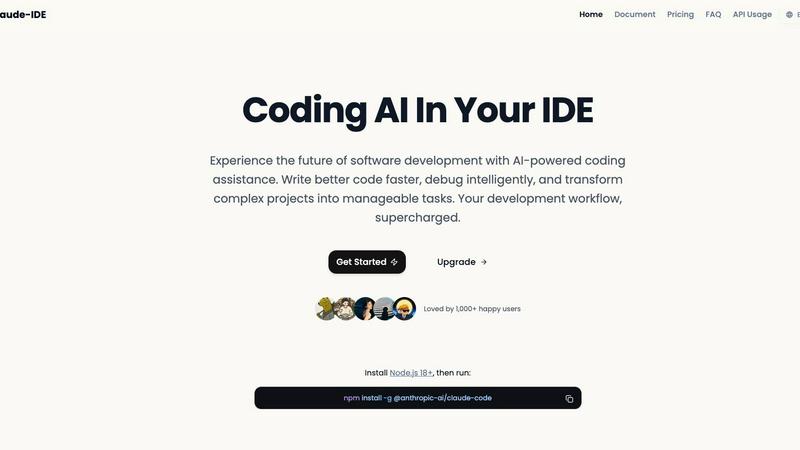
claude ide
Claude IDE delivers enterprise-grade AI coding assistance that boosts developer productivity and accelerates project.
Last updated: March 1, 2026

LLMWise
Access 62+ AI models from one API with auto-routing and pay only for usage, starting with 30 free models.
Last updated: February 26, 2026
Visual Comparison
claude ide
LLMWise

Feature Comparison
claude ide
Intelligent Codebase Understanding
Claude IDE transcends simple snippet generation by comprehensively analyzing your entire project structure, architecture, and dependencies. This deep contextual awareness enables it to make coordinated, accurate changes across multiple files, offer relevant suggestions that fit the project's specific patterns, and explain complex codebases in seconds. This feature ensures that AI-assisted modifications maintain functionality and coherence, directly reducing the risk of errors and rework that can derail project timelines and increase technical debt.
Seamless IDE and Terminal Integration
The assistant operates natively within your existing workflow, embedding directly into the terminal and IDE interfaces like VS Code and JetBrains. This deep integration means developers can access powerful AI capabilities without ever leaving their primary coding environment. The elimination of constant application switching minimizes cognitive load and context loss, leading to a smoother, more focused development experience and a measurable increase in daily productive coding time.
End-to-End Development Workflow Management
Claude IDE is deeply integrated with GitHub, GitLab, and command-line tools to manage the complete software development lifecycle. It can read issues, write corresponding code, execute tests, and submit Pull Requests (PRs) all from within the terminal. This consolidation of tools streamlines project management, enforces workflow consistency, and significantly accelerates the process from bug report or feature request to deployed code, enhancing team velocity.
Powerful Multi-File Editing Capabilities
Leveraging its deep understanding of project context and dependencies, Claude IDE can execute sophisticated, multi-file edits with a single command. Whether it's refactoring a component, updating an API across multiple services, or implementing a new feature that touches several parts of the codebase, the assistant ensures changes are accurate and functionally sound. This capability empowers developers to undertake large-scale code improvements confidently and efficiently, improving overall code quality and maintainability.
LLMWise
Smart Routing
LLMWise employs an intelligent routing system that automatically directs prompts to the most suitable model based on the task at hand. Whether it is coding, creative writing, or translation, users can trust that their input will reach the optimal AI model, ensuring maximum efficiency and output quality.
Compare & Blend
With LLMWise's compare feature, users can run prompts across multiple models simultaneously to see how different AIs respond. The blend feature allows users to combine the best parts of each model’s output into a single, coherent response, enhancing the overall quality and relevance of the results.
Always Resilient
LLMWise incorporates a circuit-breaker failover mechanism that reroutes requests to backup models if a primary provider experiences downtime. This resilience ensures that applications remain operational without interruptions, safeguarding against potential service outages and maintaining a seamless user experience.
Test & Optimize
The platform provides robust benchmarking suites and batch testing capabilities, allowing users to optimize their usage based on speed, cost, or reliability. Automated regression checks further enhance the testing process, ensuring that outputs remain consistent and high-quality over time.
Use Cases
claude ide
Rapid Codebase Onboarding and Auditing
For developers joining a new project or teams conducting code reviews, Claude IDE can instantly analyze and explain complex codebases. It provides high-level overviews of purpose, architecture, and key components, effectively compressing days of manual exploration into minutes. This accelerates the onboarding process for new hires and enables faster, more informed auditing and knowledge transfer, reducing the time to full productivity.
Automated Issue-to-PR Pipeline
Development teams can streamline their response to bug reports and feature requests. Claude IDE can read an issue from a connected repository, understand the required changes, write the corresponding code, run tests, and prepare a Pull Request—all within a continuous workflow. This automation drastically reduces manual overhead, minimizes human error in task handoff, and ensures faster turnaround times for critical fixes and updates.
Large-Scale Refactoring and Code Modernization
When a project requires significant refactoring, updating libraries, or modernizing architecture, Claude IDE manages the complexity of coordinated changes across numerous files. It understands the ripple effects of modifications, ensuring that updates are consistent and functional. This use case de-risks major technical initiatives, saves hundreds of developer hours, and allows teams to maintain modern, secure, and efficient codebases with less effort.
Intelligent Debugging and Problem Resolution
Developers can use Claude IDE as a first-line debugging partner. By providing error messages or describing unexpected behavior, the assistant can analyze the relevant code sections, understand the broader system context, and suggest precise fixes or explain root causes. This reduces mean time to resolution (MTTR) for bugs, decreases developer frustration, and frees senior engineers from routine debugging tasks to focus on more complex architectural challenges.
LLMWise
Software Development
Developers can utilize LLMWise to access the best AI models for coding tasks. By routing prompts to models like GPT for code generation, developers can quickly find solutions to complex problems, significantly reducing debugging time and enhancing productivity.
Content Creation
Content creators can leverage LLMWise for generating high-quality articles, blogs, and marketing materials. By blending outputs from models specialized in creative writing, users can produce engaging content that resonates with their target audience, streamlining the content creation process.
Language Translation
LLMWise excels in translation tasks by intelligently routing requests to models like Gemini, which specialize in linguistic nuances. This ensures that translations are not only accurate but also contextually appropriate, enhancing communication across languages.
Research and Analysis
Researchers can benefit from LLMWise by comparing outputs from various models on data analysis tasks. This enables them to evaluate different AI perspectives and insights, allowing for a more comprehensive understanding of their research topics and facilitating informed decision-making.
Overview
About claude ide
Claude IDE is an enterprise-grade AI coding assistant engineered to maximize developer productivity and accelerate software delivery cycles. It integrates directly into the terminal and popular Integrated Development Environments (IDEs) like Visual Studio Code and JetBrains, eliminating disruptive context switching. Powered by advanced models like Claude Opus 4.6, it provides deep, context-aware assistance that understands entire codebases, not just isolated snippets. This tool is designed for professional developers, engineering teams, students, and hobbyists who require professional-grade AI capabilities without enterprise-level costs. Its core value proposition is delivering a significant return on investment by reducing time spent on debugging, code familiarization, and repetitive tasks, thereby allowing developers to focus on high-value, complex problem-solving and feature development. By seamlessly integrating with version control systems and project workflows, Claude IDE transforms the development process into a more efficient, intelligent, and manageable operation.
About LLMWise
LLMWise is a revolutionary platform designed to streamline access to the leading large language models (LLMs) in the industry by providing a single API that connects developers to multiple AI providers. Eliminating the cumbersome task of managing various subscriptions and APIs, LLMWise aggregates models from renowned names such as OpenAI, Anthropic, Google, Meta, xAI, and DeepSeek. This enables users to select the most appropriate model for each specific task through intelligent routing. By matching prompts with the best-suited model, LLMWise enhances efficiency and optimizes output quality. Developers, startups, and enterprises benefit from reduced costs, increased productivity, and the flexibility to adapt to the evolving landscape of AI technologies. With LLMWise, organizations can leverage the power of AI without the complexity, making it an essential tool for anyone looking to harness the full potential of advanced AI capabilities.
Frequently Asked Questions
claude ide FAQ
How does Claude IDE differ from using the standard Claude chat interface?
Claude IDE is specifically engineered for software development, offering deep integration directly into your coding environment (terminal and IDE). Unlike a general chat interface, it has full context of your entire codebase, can execute commands, manage files, and interact with version control systems like Git. This specialized focus allows it to perform complex, multi-step development tasks such as coordinated refactoring and automated PR generation, which are beyond the scope of a standard conversational AI.
What are the system requirements for installing Claude IDE?
The primary requirement is having Node.js version 18 or higher installed on your system. Once Node.js is available, you can install Claude IDE globally via the npm package manager by running the command npm install -g @anthropic-ai/claude-code. This installs the CLI tool, which can then be integrated with your terminal and configured for use with supported IDEs like Visual Studio Code through appropriate extensions.
Can Claude IDE work with private or on-premise version control repositories?
Yes, Claude IDE is designed to integrate seamlessly with version control systems, including private repositories on platforms like GitHub and GitLab. It operates using your local Git configuration and credentials, allowing it to clone, read, and interact with your private codebases securely. For on-premise installations, it can connect to your internal Git servers as long as they are accessible from your development environment and you have the proper authentication configured.
Is my code secure when using Claude IDE?
Claude IDE is designed with a focus on local operation and developer privacy. The analysis and processing of your codebase are performed in the context of your own machine and development environment. It uses your local context to provide suggestions and does not arbitrarily send large volumes of proprietary source code to external servers for general processing. You maintain control over your intellectual property while leveraging the AI's analytical power.
LLMWise FAQ
How does LLMWise ensure optimal model selection?
LLMWise utilizes an intelligent routing algorithm that analyzes the nature of each prompt and directs it to the most suitable model based on its strengths and capabilities, ensuring high-quality outputs.
Is there a cost associated with using LLMWise?
LLMWise operates on a pay-as-you-go model, allowing users to pay only for what they use. There are no subscriptions, and users receive 20 free credits to start without any commitment.
Can I use my existing API keys with LLMWise?
Yes, LLMWise supports Bring Your Own Key (BYOK), enabling users to integrate their existing API keys from various providers seamlessly, thus reducing costs and complexity.
What types of models are available through LLMWise?
LLMWise offers access to over 62 models from 20 different AI providers, including popular names like OpenAI, Anthropic, and Google, covering a wide range of tasks and applications.
Alternatives
claude ide Alternatives
Claude IDE is an AI-powered coding assistant designed to integrate directly into developer workflows within terminals and popular IDEs. It belongs to the category of AI development tools, which aim to enhance productivity by providing intelligent code suggestions, debugging, and project management assistance. Developers may seek alternatives for various strategic reasons. Common drivers include budget constraints, as pricing models and tiers vary significantly across the market. Others may require specific feature sets, such as support for niche programming languages or advanced team collaboration tools, that better align with their enterprise project requirements. Platform compatibility and the depth of integration with existing development ecosystems are also critical decision factors. When evaluating alternatives, businesses should prioritize solutions that deliver measurable ROI through enhanced developer velocity and reduced time-to-market. Key considerations include the tool's ability to understand complex, multi-file codebases, its security and data handling protocols, and the total cost of ownership. The ideal alternative should seamlessly integrate into the current tech stack without disrupting established workflows, thereby protecting productivity gains.
LLMWise Alternatives
LLMWise is a cutting-edge API designed for AI assistants, offering seamless access to various large language models (LLMs) including GPT, Claude, and Gemini. By utilizing intelligent routing, it ensures that each prompt is directed to the most suitable model for optimal results. As businesses increasingly adopt AI technologies, users often seek alternatives to LLMWise to explore different pricing structures, feature sets, and platform compatibility that may better fit their unique needs. When evaluating alternatives, it is essential to consider factors such as the range of models offered, the flexibility in pricing, and the robustness of features like smart routing and failover capabilities. Additionally, users should assess the ease of integration, support for existing API keys, and the ability to test and optimize performance to ensure that their chosen solution delivers maximum ROI and enhances productivity.