
AI Photo Template vs dmaya
Side-by-side comparison to help you choose the right AI tool.

AI Photo Template
Create stunning, consistent photo templates that embody your brand identity effortlessly with AI Photo Template.
Last updated: March 1, 2026

dmaya
dMaya is an AI design platform that streamlines UI creation, client collaboration, and code export for agencies and teams.
Last updated: April 13, 2026
Visual Comparison
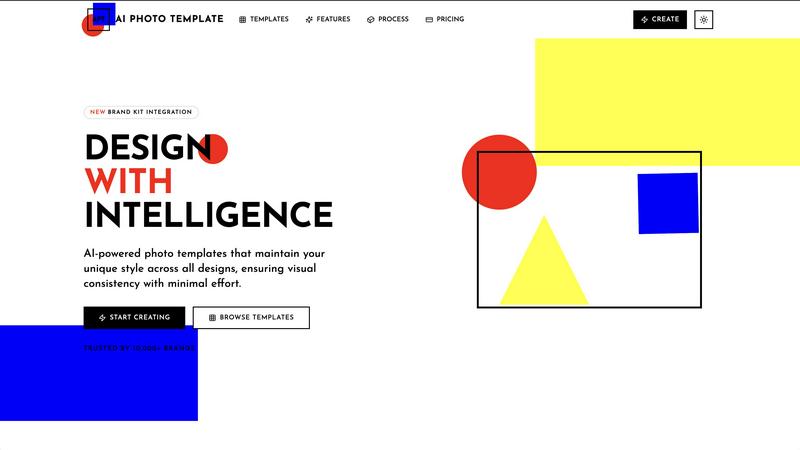
AI Photo Template
dmaya
Feature Comparison
AI Photo Template
AI Style Analysis
AI Photo Template utilizes advanced AI algorithms to study your existing visual content and replicate your unique style across all templates. This ensures that your brand's aesthetic is consistently represented, enhancing recognition and professionalism in all your designs.
Brand Kit Integration
The platform allows you to store your brand's colors, fonts, and logos, which can be instantly applied across all templates. This integration streamlines the design process and ensures that your branding remains cohesive, saving time and maintaining a professional appearance.
Smart Layout Engine
AI Photo Template features a smart layout engine that automatically arranges design elements according to professional design principles and golden ratios. This intelligent organization enhances visual appeal, ensuring that every template is not only functional but also aesthetically pleasing.
Responsive Templates
All templates created through AI Photo Template are responsive, meaning they automatically adjust to different dimensions while preserving design integrity. This feature is crucial for ensuring that your visuals look great across various platforms and devices, from social media to web pages.
dmaya
AI-Powered Design Generation
dMaya leverages advanced AI technology to generate production-ready UI designs in seconds. Users simply describe their design needs in plain language and receive complete layouts, component systems, and responsive variants, drastically speeding up the design process.
Multi-Screen Canvas
The platform features a multi-screen canvas that allows users to work across desktop and mobile frames simultaneously. This infinite workspace enables teams to drag, zoom, and organize screens seamlessly, similar to tools like Figma, but with the added advantage of AI assistance.
Built for Teams & Collaboration
dMaya enhances collaboration by allowing teams to invite members, share projects, and leave comments in real time. Role-based access ensures that everyone remains focused on their specific tasks, streamlining the design workflow and improving efficiency.
Client Presentation Mode
With dMaya's client presentation mode, users can share polished, interactive previews of their designs through a single link, eliminating the need for clients to create accounts. This feature facilitates instant feedback and quick iterations, enhancing the overall client experience.
Use Cases
AI Photo Template
Social Media Management
Social media managers can utilize AI Photo Template to create visually appealing posts and stories that maintain a consistent brand aesthetic. This tool enables them to quickly generate multiple templates tailored for platforms like Instagram and Facebook, significantly reducing the time spent on design.
Marketing Campaigns
Marketing teams can leverage AI Photo Template to develop cohesive visual content for campaigns across multiple channels. By using AI-generated templates, they can ensure that all marketing materials, from emails to presentations, are aligned with brand guidelines, enhancing overall campaign effectiveness.
Portfolio Presentations
Photographers and creative professionals can use AI Photo Template to design compelling portfolio presentations. The platform allows them to create visually consistent templates for showcasing their work, making it easier to impress clients and stakeholders with a polished and professional appearance.
Content Creation for Blogs
Content creators can take advantage of AI Photo Template to generate visually striking headers and images for blog posts. This streamlines the content creation process, allowing writers to focus on their writing while still ensuring that the visuals are of high quality and aligned with their brand identity.
dmaya
Agency Workflows
Agencies can use dMaya to pitch design concepts quickly during discovery calls, allowing them to present multiple design directions to stakeholders within hours rather than weeks. This accelerates the client acquisition process and enhances project turnaround times.
Product Development
Product teams can leverage dMaya to explore various UI directions without committing engineering resources upfront. By collaborating in a single workspace, they can compare design iterations side by side, ensuring that the final product aligns with initial visions.
Freelance Projects
Freelancers can significantly increase their output and fees by using dMaya to manage multiple projects simultaneously. The platform allows them to produce high-quality designs more quickly, enabling them to take on additional work without sacrificing quality.
Client Feedback Loops
dMaya streamlines client feedback loops by providing an easy-to-use platform for sharing interactive previews. Clients can review designs and provide feedback in real time, leading to faster approval cycles and reducing the risk of miscommunication.
Overview
About AI Photo Template
AI Photo Template is a cutting-edge design platform that harnesses the power of artificial intelligence to deliver customizable photo templates tailored to your unique brand identity. It serves a diverse range of users, including marketing teams, small businesses, social media managers, photographers, and content creators, enabling them to maintain a cohesive brand presence without the need for advanced design skills. By analyzing brand preferences and existing visuals, the platform generates professional-grade templates, ensuring visual consistency and aesthetic harmony across all your content. The main value proposition of AI Photo Template lies in its capability to significantly reduce design time while enhancing quality. This allows users to concentrate on their core objectives, maximizing productivity and return on investment. With an easy-to-use interface and intuitive controls, AI Photo Template is revolutionizing the way individuals and organizations approach design, making high-quality visuals accessible to everyone.
About dmaya
dMaya is an innovative design platform tailored specifically for agencies, teams, and freelancers who prioritize the design phase before diving into code. With dMaya, users can effortlessly converse with an AI agent to generate professional UI designs based on simple text descriptions, whether it’s for a SaaS dashboard, an e-commerce flow, or a mobile application. The platform revolutionizes the design process by enabling real-time iterations through conversational AI, allowing users to make instant adjustments to colors, layouts, typography, and more. This ensures that every design decision is intentional and aligns with the team's vision. Furthermore, dMaya facilitates a seamless client review process, where stakeholders can provide feedback and approve designs without the need for accounts. Once the design is finalized, users can export it as clean HTML, CSS, and JS code, ready for handoff to any coding agent for immediate development. With dMaya, teams can present, approve, and ship designs with confidence, significantly reducing the time it takes to move from concept to production-ready code.
Frequently Asked Questions
AI Photo Template FAQ
How does AI Photo Template ensure brand consistency?
AI Photo Template analyzes your existing visuals to replicate your unique style across all templates, ensuring that every piece of content reflects your brand's aesthetic and maintains visual consistency.
Can I customize the templates?
Yes, AI Photo Template offers easy customization options that allow users to modify templates while preserving professional design principles, making it accessible for those without extensive design skills.
What types of templates are available?
The platform features a wide range of templates, including social media posts, business presentations, product photography, and web headers, catering to various design needs and preferences.
Is there support available if I encounter issues?
Absolutely. AI Photo Template provides email support for all users, ensuring that you receive assistance whenever you face challenges or have questions about the platform.
dmaya FAQ
What types of designs can I create with dMaya?
dMaya allows users to create a variety of designs, including SaaS dashboards, e-commerce flows, and mobile applications. The platform's AI can generate tailored designs based on your descriptions.
How does the AI chat feature work?
The AI chat feature allows users to communicate their design preferences in natural language. You can ask the AI to change colors, swap layouts, or adjust typography, and see the changes applied in real time.
Is there a limit to the number of designs I can create?
While specific limitations may depend on your subscription plan, dMaya is designed to handle multiple projects and iterations simultaneously, making it suitable for both small and large teams.
Can I export my designs to different coding frameworks?
Yes, once your design is approved, dMaya allows you to export it as clean HTML, CSS, and JS code. You can then use this code with any coding agent to build in your preferred framework, such as React, Next.js, or Flutter.
Alternatives
AI Photo Template Alternatives
AI Photo Template is an innovative design platform that utilizes artificial intelligence to create customizable photo templates tailored to your brand identity. As part of the AI Assistants category, it streamlines the design process for users, including marketing teams, small businesses, and content creators. However, users often seek alternatives due to various factors such as pricing, specific feature sets, platform compatibility, or scalability to meet their unique needs. When searching for an alternative, consider key aspects such as ease of use, available features that align with your branding requirements, integration capabilities with existing tools, and the overall cost-effectiveness of the solution. A thorough evaluation of these elements can lead to a more suitable fit for your design objectives, allowing for a seamless brand presentation.
dmaya Alternatives
dmaya is an innovative AI-driven design platform tailored for agencies, teams, and freelancers. It empowers users to create professional UI designs through conversational AI, significantly streamlining the design process before coding begins. As businesses increasingly seek efficient design solutions, many users find themselves exploring alternatives to dmaya, often driven by factors such as pricing, feature sets, or specific platform requirements. When searching for a suitable alternative, it's essential to consider aspects like ease of use, collaboration capabilities, and the flexibility to adapt to your team's workflow. Finding the right alternative can ensure that your team maintains productivity and meets project deadlines while achieving high-quality design outcomes. Look for platforms that enhance collaboration, provide a seamless review process, and integrate well with your existing development tools. Ultimately, the goal is to find a solution that aligns with your team's unique needs and supports efficient design-to-code workflows.