

Seedance 2.0
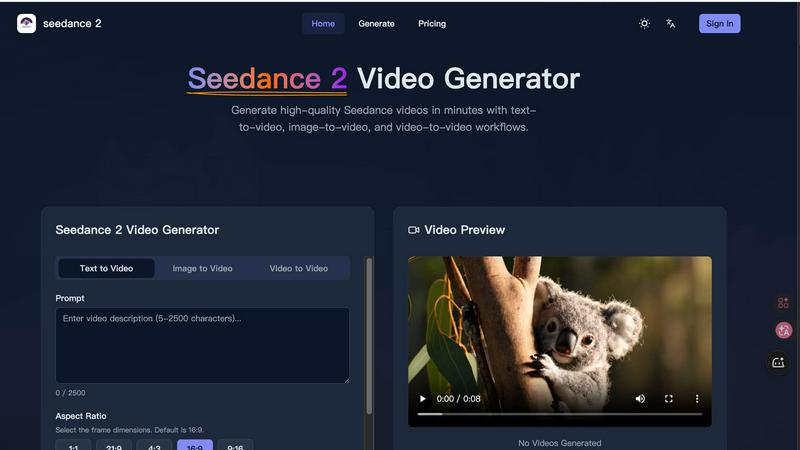
Seedance 2.0 makes AI video from prompts, images, and footage, combining reference-guided visuals with controls for motion, framing, and audio.
Categories
Pricing
About Seedance 2.0
Seedance 2.0 brings text-to-video, image-to-video, and video-to-video workflows together. A creator can begin with a written scene direction, animate a still, or use existing footage as a source, then describe how the subject and camera should move. Visual references help communicate the intended composition and style across drafts.
The official page lists MP4 H.264 export, flexible aspect ratios, up to 4K resolution, and clips up to 30 seconds. It also describes joint audio-video generation and multilingual lip-sync. Multiple models are available, and the page shows that duration, resolution, and generation cost vary with model and settings.
For a small creative team, this setup can help turn campaign ideas or product scenes into material for review. It is also relevant to filmmakers planning scenes and creators producing social content. The platform’s model comparison cautions that feature availability can change, which makes a current capability check sensible before selecting it for an ongoing workflow.
Features
- Text, image, and video generation modes.
- Reference inputs for visual direction and continuity.
- Prompt controls for camera framing, pacing, and movement.
- Listed support for synchronized audio, MP4 export, and up to 4K output.
Use cases
- Produce early film and scene prototypes.
- Create product video and advertising drafts.
- Make social clips in different aspect ratios.
- Animate an existing image or develop visual concepts.
Pricing
Seedance 2.0 has monthly and annual subscription plans with yearly credit allowances, alongside one-time credit packs. The listed starting subscription is $29 monthly or $290 billed annually; actual credit use depends on model and settings.
Frequently asked questions
What can I provide as input?
You can start from a text prompt, an image, or existing video footage.
Are audio and video generated together?
The product lists synchronized audio-video generation. Audio is optional in the examples shown on the page.
What should I verify before choosing a model?
Check current model availability, output limits, and credit requirements, since these vary by model and settings and may change over time.
Similar AI tools
Compare alternatives
FoxyLab
FoxyLab helps small marketing teams create product videos and banners from chat prompts, with a weekly usage allowance.

Goshortsai
Goshortsai makes short AI videos from text or images, with motion transfer, preset effects, and daily free credits for experimentation.

LobbyClip
Make Hotel Lobby style duo videos from two photos, with scene choices, flexible formats and one-time credit purchases.

AgentFabrica
AgentFabrica combines AI-assisted content creation, social publishing, advertising, and reporting for businesses coordinating digital marketing.

VidSyndicate
VidSyndicate helps creators prepare, schedule, and publish platform-specific content across connected social channels from one AI-assisted workspace.

Vidyst Studio

NewModelHub
NewModelHub offers free prompt generators and API cost calculators for new AI models, running in a browser without sign-up or uploads.

Bicep Heart
Make a seven-second bicep-heart clip from an adult photo, then download a silent vertical MP4 to share with your own sound.