
EditTextImage
EditTextImage lets you replace text in images online in 30 seconds while perfectly preserving font, color, and perspective.
Visit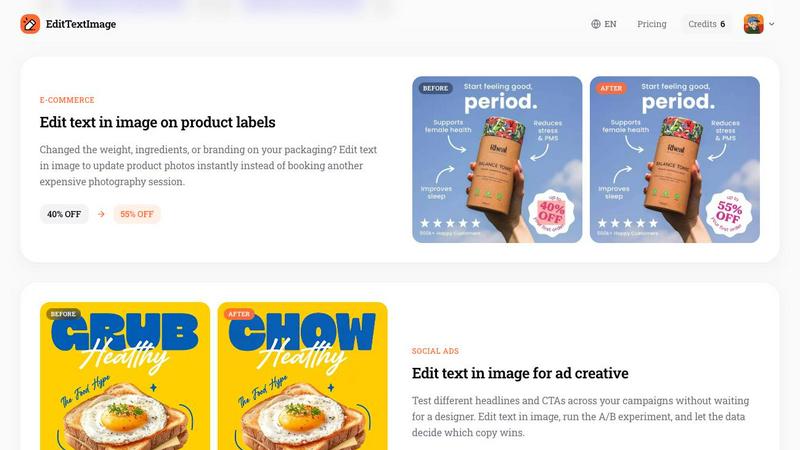
About EditTextImage
EditTextImage is a specialized AI-powered online tool that enables users to edit text within image files while preserving the original font, color, size, perspective, and background with pixel-perfect accuracy. The product addresses a critical pain point for marketing teams, designers, content creators, and business professionals who frequently need to modify text in finished images but lack access to the original design files, specific fonts, or expensive software like Adobe Photoshop. By leveraging advanced AI sampling technology, EditTextImage analyzes the typography directly from the pixels of the uploaded image, eliminating the need for font files, design templates, or technical expertise. The tool processes images up to 10 MB in PNG, JPEG, or WebP formats and delivers high-resolution 2K output in approximately 10 to 12 seconds. This efficiency translates directly into measurable productivity gains, reducing what traditionally takes hours of manual design work to a simple three-step process that any team member can execute. EditTextImage is particularly valuable for organizations managing localization projects, A/B testing creative assets, updating time-sensitive marketing materials, or correcting errors in documentation. The platform operates on a straightforward credit-based system with no recurring subscription fees, making it a cost-effective solution for businesses of all sizes seeking to streamline their image editing workflows and reduce dependency on external design resources.
Features of EditTextImage
AI-Powered Font Sampling from Pixels
The core technology behind EditTextImage is its ability to analyze and replicate typography directly from the image pixels. When a user uploads an image and specifies the text to replace, the AI engine examines the font characteristics including typeface, weight, size, color, drop shadow effects, and perspective distortion. This capability means that even commercially licensed fonts, custom hand-lettering, or rare typefaces that are not installed on the user's system can be perfectly matched and reproduced in the edited output. The feature eliminates the common workflow bottleneck of locating and installing specific font files before making text changes, saving significant time and reducing friction in content production pipelines.
Pixel-Perfect Background Reconstruction
Unlike traditional image editors that often leave visible artifacts, smeared backgrounds, or distorted textures around edited text areas, EditTextImage employs advanced inpainting algorithms to reconstruct the background exactly as it appeared before modification. When text is removed and replaced, the surrounding pixels including gradients, shadows, textures, and lighting remain completely intact. This precision ensures that the final image shows no evidence of editing, which is critical for professional applications such as product photography, advertising materials, and official documentation where visual authenticity is paramount. The result is a seamless edit that maintains the original image integrity.
High-Resolution 2K Output
EditTextImage processes all edits at a minimum resolution of 2K, ensuring that the output images are suitable for both digital and print applications. This high-resolution standard means that edited images can be used for large-format displays, high-resolution screens, professional presentations, and print materials without any loss of quality or pixelation. The tool maintains this output quality consistently across all image types, from small screenshots to large poster designs. For enterprise users, this feature eliminates the need for post-processing or upscaling, directly supporting production-ready deliverables that meet professional quality standards.
Rapid Processing in Under 12 Seconds
The platform is engineered for speed, with the average text replacement operation completing in approximately 12 seconds from upload to download. This rapid processing capability is a significant productivity multiplier for teams handling bulk image edits, time-sensitive campaign updates, or last-minute corrections. The efficiency gain is substantial when compared to traditional methods that require opening design software, locating font files, manual alignment, and export settings. For organizations managing high volumes of image edits, this feature directly reduces labor costs and accelerates time-to-market for visual content across marketing, localization, and documentation workflows.
Use Cases of EditTextImage
Document Corrections and Updates
Business professionals frequently encounter situations where source design files for scanned documents, contracts, or official forms are unavailable. EditTextImage enables rapid correction of typos, updates to invoice numbers, modification of dates on certificates, or changes to figures in financial documents directly from the image file. This use case is particularly valuable for legal departments, accounting teams, and administrative staff who need to produce corrected versions of official documents without recreating them from scratch. The tool preserves the exact document formatting, font choices, and layout, ensuring that the edited version maintains professional credibility and visual consistency with the original.
Marketing Creative A/B Testing
Marketing teams can leverage EditTextImage to rapidly create multiple variants of advertising creative for split testing without waiting for design resources. By simply uploading a finished ad image and swapping headlines, calls-to-action, or promotional offers, teams can generate test variants in minutes rather than hours. This capability accelerates the experimentation cycle, allowing data-driven optimization of campaign performance across social media, display advertising, and email marketing channels. The ability to produce pixel-perfect variants without designer involvement reduces campaign preparation costs and enables more frequent creative refreshes based on performance metrics.
App Store Localization and Screenshots
Mobile app developers and product managers face the challenge of creating localized screenshots for multiple App Store and Google Play listings across different languages. EditTextImage solves this problem by allowing teams to take a single set of UI screenshots and swap text content to match each target language. The AI preserves the exact UI layout, button styles, system fonts, and visual hierarchy, producing authentic-looking localized screenshots without rebuilding each mockup in design software. This use case directly reduces localization costs and accelerates international product launches, with each language variant taking only seconds to produce.
Product Packaging and Label Updates
E-commerce teams and product managers frequently need to update packaging images for changes in product weight, ingredient lists, pricing, or branding elements. EditTextImage enables instant updates to product photos without scheduling new photography sessions or waiting for graphic designers. The tool handles complex text placements on curved surfaces, angled labels, or packaging with shadows and reflections. This capability is particularly valuable for Amazon sellers, direct-to-consumer brands, and retail teams who need to maintain accurate and current product imagery across multiple marketplace listings, catalog pages, and promotional materials.
Frequently Asked Questions
What file formats and sizes does EditTextImage support?
EditTextImage accepts PNG, JPEG, and WebP file formats with a maximum file size of 10 MB. The tool processes these formats efficiently and outputs the edited image at a high-resolution 2K quality. Users should ensure their images are within these specifications before uploading to guarantee successful processing and optimal results.
Is it safe to upload confidential documents or sensitive images?
EditTextImage implements strict security protocols and acceptable use policies for uploaded content. The platform explicitly prohibits processing of IDs, passports, visa documents, official seals, bank statements, or tampered receipts. Violations of these policies result in account termination without refund, and request logs may be preserved and shared with law enforcement. Users should review the Acceptable Use policy before uploading any sensitive materials.
Do I need design skills or font files to use this tool?
No design skills or font files are required to use EditTextImage. The AI technology samples the typography directly from the pixels of the uploaded image, automatically matching the font, color, size, perspective, and any effects like drop shadows. This eliminates the need to identify or install specific typefaces, making the tool accessible to any team member regardless of their design experience or software access.
How does the free credit and pricing model work?
New users receive one free credit to test the service without providing credit card information. After the free edit, users can purchase a one-time credit pack of 30 edits for $9.90. These credits never expire and can be used at any time. The platform operates without subscription fees, meaning users only pay for the edits they actually need, making it a cost-effective solution for both occasional and regular use.
Pricing of EditTextImage
EditTextImage operates on a straightforward, no-subscription pricing model designed for maximum flexibility and cost efficiency. New users receive one free credit to test the service with no credit card required, allowing them to evaluate the tool's capabilities risk-free. After the initial free edit, users can purchase a one-time credit pack containing 30 edits for a flat fee of $9.90. These credits never expire, providing long-term value for users who need the tool periodically. Commercial use is included with all credit purchases, making this pricing suitable for business applications. This pay-per-use approach eliminates recurring subscription costs and allows organizations to budget precisely for their image editing needs without committing to monthly or annual contracts.
Similar to EditTextImage

Prompt-based Qwen Image Edit Online for background changes, text edits, product images, posters, outpainting, and creative workflows.

Turn flat images into editable transparent layers with AI.


Create photorealistic images, bilingual posters, ecommerce visuals, and social content with Z Image Turbo, flexible prompts, aspect ratios, seeds, and

Create and edit production-ready images with Seedream 5.0 Pro and Lite for ecommerce, marketing, social media, infographics, and branded content.

Create high-quality Hailuo AI videos from text or images with guided prompts, camera controls, flexible settings, task tracking, and downloads.

AI image and video studio. Generate from a prompt, animate stills, swap faces, restyle clips and edit — one credit pool, no subscription.

Kling AI video generator with text, image, motion control, lip sync, and API workflows.