
Easy Watermark Remover
Remove Gemini watermarks from images with zero signup, offering both AI Smart Removal for full-image preservation and Quick Crop for instant.
Visit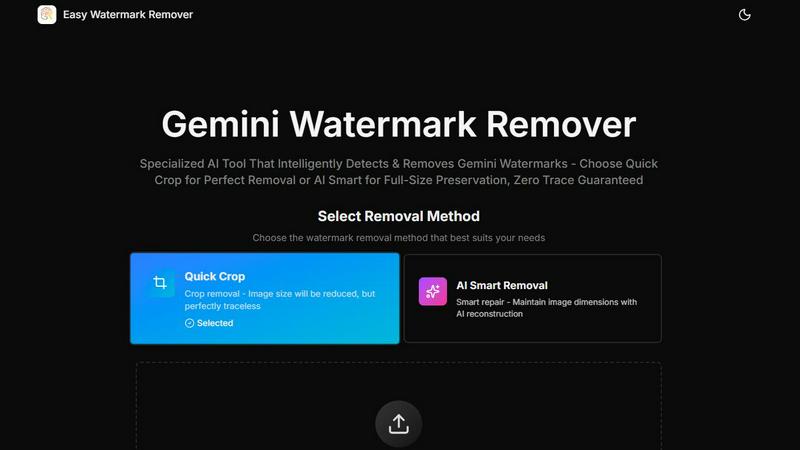
About Easy Watermark Remover
Easy Watermark Remover is a specialized, browser-based online tool engineered to remove both visible lightning logos and invisible SynthID watermarks from images generated by Google's Gemini AI and Imagen 3 models. This product addresses a critical workflow bottleneck for enterprises and content professionals who need to repurpose AI-generated visuals for commercial use, marketing campaigns, and client deliverables without the distraction of branding artifacts. The tool offers two distinct removal methodologies: Quick Crop, which trims the watermark area for a perfectly clean result, and AI Smart Removal, which leverages deep learning pixel reconstruction to intelligently fill the watermarked region while preserving the original image dimensions. All processing occurs entirely on the user's local device, ensuring zero server uploads and complete data privacy, a non-negotiable requirement for businesses handling proprietary or sensitive visual assets. Supporting PNG, JPG, and WebP formats up to 16MB, the tool enables batch processing, works seamlessly across all devices and operating systems, and exports cleaned images in original quality without requiring any signup, installation, or subscription. For content creators, marketing teams, e-commerce operators, and enterprise design departments, Easy Watermark Remover delivers a measurable reduction in image preparation time, eliminating the need for complex photo editing software or manual cleanup. By focusing specifically on the predictable lower-right corner placement of Gemini watermarks, the tool provides a targeted, efficient solution that generic object removers cannot match, translating directly into faster asset turnaround, lower operational overhead, and higher-quality visual outputs for business-critical applications.
Features of Easy Watermark Remover
AI Smart Removal
This feature employs advanced deep learning algorithms to reconstruct pixels in the watermarked area, preserving the original image dimensions and canvas size. Unlike simple cropping, AI Smart Removal analyzes surrounding textures, gradients, colors, and lighting conditions to generate a seamless repair that is visually consistent with the rest of the image. This method is essential for enterprise use cases where maintaining exact aspect ratios is critical, such as product mockups, presentation slides, blog thumbnails, and layout-sensitive graphics. The AI model is specifically trained to handle the unique noise and generation artifacts common in AI-created images, ensuring professional-grade results without visible patching or distortion.
Quick Crop
Quick Crop provides an instant, traceless watermark removal solution by trimming the lower-right corner where the Gemini logo is typically placed. This method is ideal for images where the corner contains no critical visual information, such as empty sky, plain backgrounds, or blurred walls. The process is virtually instantaneous, requiring no processing time or computational resources, making it the most efficient option for high-volume batch workflows. For enterprises processing hundreds of images daily, Quick Crop delivers a significant productivity gain by reducing per-image handling time to near zero while guaranteeing a perfectly clean output with zero risk of reconstruction artifacts.
Local Processing and Privacy
All image processing occurs entirely within the user's browser on their local device, with no data ever uploaded to external servers. This architecture ensures complete data sovereignty and compliance with enterprise security policies, making the tool suitable for handling confidential marketing assets, proprietary product images, and client deliverables. The local processing model eliminates concerns about data breaches, unauthorized access, or third-party storage, while also enabling offline functionality once the page is loaded. For organizations with strict data handling requirements, this feature provides a turnkey solution that requires no IT approval or security review.
Batch Processing and Format Support
The tool supports simultaneous processing of multiple images in PNG, JPG, and WebP formats, each up to 16MB in file size. Batch processing enables marketing teams, e-commerce managers, and content studios to clean entire libraries of Gemini-generated images in a single session, dramatically reducing per-asset labor costs. The format flexibility ensures compatibility with all common digital asset management systems, website platforms, and design software. Combined with the ability to export images in original quality without compression loss, this feature streamlines the entire post-generation workflow from AI output to final deployment.
Use Cases of Easy Watermark Remover
Enterprise Marketing Asset Repurposing
Marketing departments using Gemini AI to generate campaign visuals, social media graphics, and ad creatives can remove watermarks in bulk before distribution. The AI Smart Removal method preserves exact dimensions required for platform-specific ad formats, while Quick Crop handles images where corner content is non-critical. This workflow reduces the time from AI generation to campaign launch by up to 80%, eliminating the manual editing bottleneck that typically slows down content production pipelines. Enterprises can achieve faster time-to-market for promotional materials while maintaining brand consistency and visual quality.
E-Commerce Product Image Preparation
E-commerce teams generating product mockups, lifestyle images, and category banners with Gemini AI can remove watermarks without compromising image quality or dimensions. The AI Smart Removal feature is particularly valuable when watermarks overlap product edges, shadows, or layout-critical elements, ensuring that cleaned images meet platform requirements for Amazon, Shopify, or custom storefronts. By processing batches of product images in minutes rather than hours, e-commerce operations can scale their visual content production while reducing per-image editing costs by over 90% compared to manual Photoshop workflows.
Content Creator and Publisher Workflows
Bloggers, journalists, and digital publishers using Gemini-generated illustrations, thumbnails, and feature images can quickly remove watermarks to maintain a professional, unbranded appearance. The tool's local processing ensures that sensitive pre-publication content never leaves the creator's device, addressing confidentiality concerns around unreleased articles or exclusive visual assets. With support for up to 16MB files and batch processing, content teams can prepare entire article packages in a single session, accelerating publication schedules and reducing reliance on external design resources.
Presentation and Corporate Communication Assets
Corporate teams creating internal presentations, client proposals, and boardroom materials using AI-generated visuals can remove watermarks while preserving exact slide dimensions. The dimension-aware choice between Quick Crop and AI Smart Removal ensures that cleaned images fit perfectly into existing presentation templates without requiring layout adjustments. This capability reduces the time spent on visual asset preparation for quarterly reports, investor decks, and sales materials, allowing teams to focus on content strategy and messaging rather than technical cleanup.
Frequently Asked Questions
What types of Gemini watermarks does this tool remove?
The tool is specifically designed to remove both the visible lightning logo watermark and the invisible SynthID digital watermark embedded in images generated by Gemini AI and Imagen 3 models. The visible mark typically appears in the lower-right corner of the image, while the SynthID watermark is an imperceptible overlay that standard image editors cannot detect or remove. The tool's dual removal capability ensures that cleaned images are free from both visible branding artifacts and hidden tracking markers.
How does AI Smart Removal differ from Quick Crop?
AI Smart Removal uses deep learning to reconstruct pixels in the watermarked area, preserving the original image dimensions and canvas size. This method is recommended when the watermark overlaps important visual content such as product edges, subject outlines, text, or shadows. Quick Crop simply trims the corner containing the watermark, reducing the overall image size but providing an instant, traceless result. Quick Crop is ideal when the corner contains only empty space, sky, or plain backgrounds.
Is this tool safe for confidential or proprietary images?
Yes, all processing occurs entirely within the user's browser on their local device. No images are uploaded to any external server at any point during the watermark removal process. This local processing architecture ensures complete data privacy and compliance with enterprise security policies, making the tool suitable for handling confidential marketing assets, unreleased product images, and sensitive client deliverables without risk of data exposure.
What file formats and sizes are supported?
The tool supports PNG, JPG, and WebP image formats with a maximum file size of 16MB per image. These formats cover the vast majority of use cases for AI-generated images, including high-resolution marketing assets, product photos, and web graphics. The tool also supports batch processing, allowing users to select and process multiple images simultaneously, further improving workflow efficiency for high-volume content production.
Pricing of Easy Watermark Remover
Easy Watermark Remover is completely free to use with no signup, subscription, or payment required. There are no tiered plans, usage limits, or hidden fees. All features, including AI Smart Removal, Quick Crop, batch processing, and local privacy processing, are available at no cost. The tool does not require any software installation or browser extension, and it works on all devices and operating systems. This free pricing model is designed to provide maximum accessibility for individual creators, small businesses, and enterprise teams alike, removing financial barriers to professional-quality watermark removal.
Explore more in this category:
Similar to Easy Watermark Remover

Face recognition API, a drop-in replacement for AWS Rekognition. Index, search, compare and detect faces, billed per photo with no subscription.

AIPetGen turns a photo of your dog, cat, or other pet, or a written description, into a new picture or a short animation.


A free browser-based toolkit for creating, cutting, converting, and previewing sprite sheet animations.

Prompt-based Qwen Image Edit Online for background changes, text edits, product images, posters, outpainting, and creative workflows.

Turn flat images into editable transparent layers with AI.

Create photorealistic images, bilingual posters, ecommerce visuals, and social content with Z Image Turbo, flexible prompts, aspect ratios, seeds, and

Create and edit production-ready images with Seedream 5.0 Pro and Lite for ecommerce, marketing, social media, infographics, and branded content.