
conceptviz vs SimpleDraw
Side-by-side comparison to help you choose the right AI tool.

ConceptViz simplifies lesson preparation by generating clear, accurate science and math diagrams for educators and.
Last updated: March 1, 2026

SimpleDraw
SimpleDraw is a free browser based tool that creates precise floor plans and scale drawings to streamline project.
Last updated: March 1, 2026
Visual Comparison
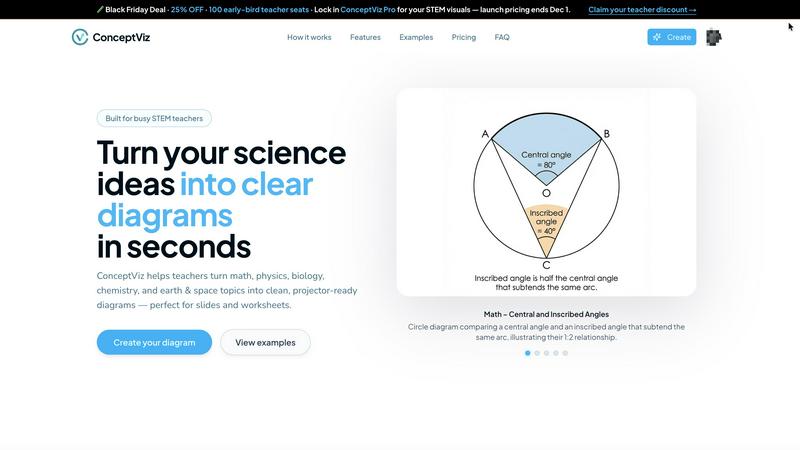
conceptviz
SimpleDraw
Feature Comparison
conceptviz
Easy Topic Selection
Upon signing in, users can effortlessly choose their subject and grade level, ranging from K-12 topics like physics and biology to advanced university research subjects. This streamlined selection process ensures that educators can quickly find the right visual assets tailored to their specific needs.
Plain-English Diagram Description
ConceptViz allows users to describe the diagrams they need in simple, plain-English terms. This feature empowers educators to generate complex visuals without needing specialized graphic design skills, making the tool accessible to all levels of users.
Projector-Ready Visuals
The diagrams produced by ConceptViz are designed with high contrast and readability in mind. They feature thick, legible lines and labels, ensuring that visuals remain clear and crisp, whether viewed from the front row or back of the classroom. This attention to detail enhances the learning experience for students.
High-Resolution Output
Users can download diagrams in high-resolution PNG format, ensuring that visuals are suitable for both digital presentations and printouts. The clean backgrounds and widescreen aspect ratio make it easy to integrate diagrams into existing materials like PowerPoint and Google Slides, further simplifying the lesson preparation process.
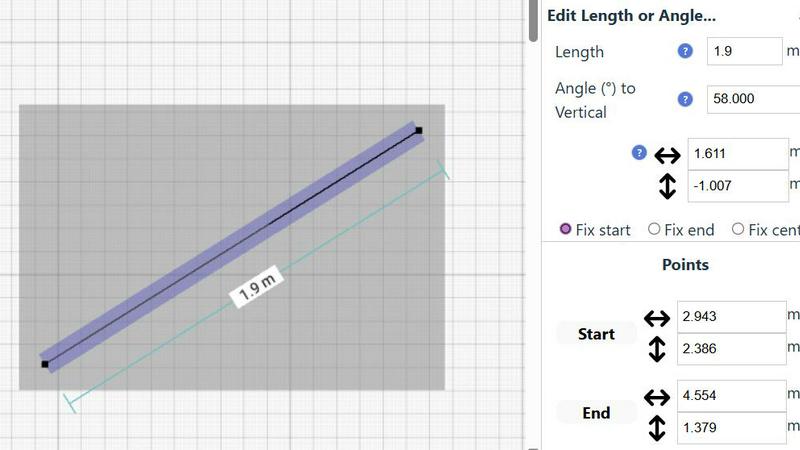
SimpleDraw
Specialized Floor Plan Creator
This dedicated mode is optimized for architectural drafting, allowing users to construct detailed floor plans with single-click placement of walls, doors, and windows. It includes a comprehensive library of standardized interior fixtures for kitchens, bathrooms, and living spaces. Real-time measurement display during adjustments ensures every element is placed to exact specifications, enabling the creation of professional-grade plans for renovations, space planning, and property listings without any CAD expertise required.
Smart Alignment & Precision Control
The integrated Smart Alignment System assists users in placing points and lines with exactitude by providing clear visual cues and snapping to intended points. Precision adapts dynamically based on zoom level, and users can lock movements to vertical or horizontal axes using keyboard shortcuts. This feature drastically reduces manual adjustment time and eliminates measurement errors, ensuring technical drawings are accurate and aligned to professional standards from the outset.
Non-Destructive Editing & Complete Control
Every element within a SimpleDraw project remains fully editable at any stage, providing 100% non-destructive workflow. Users can leverage unlimited undo/redo functions, group and manipulate multiple objects simultaneously, and input precise dimensions, lengths, and angles directly via keyboard. This level of control streamlines iterative design processes, such as optimizing kitchen layouts or office plans, allowing for rapid experimentation and refinement without starting over.
Comprehensive Measurement System
The platform supports a robust and flexible measurement framework, allowing users to toggle displayed measurements and switch seamlessly between metric and standard US (feet/inches) units. Contextual measurements update dynamically as users draw, providing immediate feedback. This system ensures all drawings are created to a consistent, accurate scale, which is critical for generating reliable quotes, ordering materials, and communicating clear specifications to stakeholders and contractors.
Use Cases
conceptviz
Classroom Instruction
Educators can use ConceptViz to create custom diagrams for their lessons, providing students with clear visual explanations of complex topics. This enhances comprehension and retention, making lessons more effective and engaging.
Curriculum Development
Curriculum developers can leverage ConceptViz to generate consistent and accurate visual assets that align with educational standards. This ensures that all materials produced are pedagogically sound and visually appealing, facilitating a cohesive learning experience.
Research Presentations
Academic researchers can utilize ConceptViz to create precise diagrams for their presentations and publications. By generating high-quality visuals quickly, researchers can focus on their findings and arguments rather than spending hours on graphic design.
Student Projects
Students can use ConceptViz to create diagrams for their projects and assignments. By allowing students to generate their own visuals, the platform fosters creativity and deepens their understanding of STEM concepts through active engagement.
SimpleDraw
Home Renovation & Contractor Planning
Contractors and renovation specialists use SimpleDraw to create precise floor plans and elevations for client projects. By visualizing kitchen and bathroom layouts with accurate measurements before demolition begins, professionals can identify potential issues, provide accurate material estimates, and set clear client expectations, thereby reducing costly change orders and improving project profitability and client satisfaction.
Real Estate & Property Management
Real estate agents and property managers utilize the tool to generate accurate floor plans for rental listings and property portfolios. These scale drawings provide prospective tenants and buyers with a reliable sense of space and layout, enhancing listing quality. This leads to more qualified inquiries, reduced vacancy rates, and more efficient space planning for multi-unit buildings.
Facility Management & Office Design
Facility managers and office planners employ SimpleDraw to design efficient workspace layouts, plan departmental moves, and manage office assets. The ability to experiment with furniture placement and workstation configurations in a scaled environment ensures optimal use of space, improves employee workflow, and supports data-driven decisions for capital planning and interior fit-outs.
Retail & Commercial Space Planning
Retail managers and small business owners leverage the platform to plan store layouts, product placement, and customer flow. Creating a scaled drawing of the commercial space allows for the strategic positioning of fixtures, shelves, and checkout areas to maximize sales floor efficiency and enhance the customer experience before physically rearranging the store, minimizing operational downtime.
Overview
About conceptviz
ConceptViz is an enterprise-grade AI diagramming platform specifically designed to transform intricate STEM concepts into visually appealing and classroom-ready diagrams. This innovative tool addresses the productivity challenges faced by educators and researchers in creating educational content. By automating the generation of precise, projector-optimized diagrams, ConceptViz significantly enhances the efficiency of lesson preparation. It's tailored for a professional audience, including STEM educators, curriculum developers, instructional designers, and academic researchers who demand high-quality, consistent, and pedagogically sound visuals. The core value proposition of ConceptViz lies in its ability to deliver a remarkable return on investment by drastically reducing the time educators spend on diagram creation—from hours of searching for appropriate visuals to mere seconds of input. By providing on-demand, specification-perfect visuals, ConceptViz enables educators to focus on what truly matters: effective teaching and student engagement.
About SimpleDraw
SimpleDraw is an enterprise-grade, browser-based platform engineered to transform the creation of precise scale drawings from a complex, specialized task into a streamlined, universally accessible business process. It serves as a powerful yet intuitive alternative to traditional CAD software, eliminating the steep learning curve and high licensing costs. The platform is designed for a broad professional audience, including facility managers, real estate professionals, interior designers, renovation contractors, and DIY project leads who require accurate spatial planning without the overhead of professional architectural software. Its core value proposition lies in maximizing productivity and return on investment by delivering professional-grade precision through a zero-friction, no-cost entry point. Requiring no software installation, user login, or registration, SimpleDrive enables immediate deployment across teams, ensuring projects can commence without delay. By combining a specialized Floor Plan Mode, a Smart Alignment System, and non-destructive editing with a community-driven development roadmap, SimpleDraw provides a scalable tool that enhances planning accuracy, reduces material and labor waste, and accelerates project timelines from initial concept to final execution.
Frequently Asked Questions
conceptviz FAQ
How does ConceptViz simplify the diagram creation process?
ConceptViz streamlines the diagram creation process by allowing users to describe what they need in plain English. This eliminates the need for graphic design skills and significantly reduces the time required to produce quality visuals.
Is there a trial version available for ConceptViz?
Yes, ConceptViz offers a free trial that allows users to explore its features and capabilities without any initial commitment. This helps educators and researchers determine whether the platform meets their needs.
Can I integrate ConceptViz with presentation software?
Absolutely! ConceptViz generates high-resolution diagrams that can be easily downloaded and integrated into popular presentation software like PowerPoint and Google Slides, making it simple to enhance your presentations.
What subjects and grade levels does ConceptViz cover?
ConceptViz caters to a wide range of subjects and grade levels, including physics, biology, chemistry, earth and space sciences, and mathematics. It supports K-12 education as well as university-level topics, making it versatile for various educational contexts.
SimpleDraw FAQ
Is SimpleDraw truly free to use for commercial purposes?
Yes, SimpleDraw is completely free to use for both personal and commercial projects. There is no tiered pricing, subscription fee, or hidden cost. The platform operates on a community-driven model and is accessible directly through a web browser with no login or registration required, making it a cost-effective solution for businesses of all sizes to integrate into their planning workflows.
What file formats can I export my drawings in?
While the provided context does not specify export formats, the platform's focus on browser-based operation and community-driven development suggests that core functionality prioritizes creation and editing within the tool. For sharing, users can typically utilize browser functions to print or save drawings as PDFs or image files. For specific vector export capabilities, users are encouraged to join the Discord community to request or stay updated on future feature developments.
How does SimpleDraw ensure the accuracy of scale drawings?
Accuracy is ensured through a combination of the Smart Alignment System, which provides precise snapping and alignment cues, and the Comprehensive Measurement System, which allows for direct numerical input of dimensions. Drawings are built to a user-defined scale, and all measurements are displayed and calculated within that scale, providing the same foundational precision as professional tools for reliable planning and execution.
Can multiple team members collaborate on the same drawing?
The current implementation of SimpleDraw, as described, is a browser-based tool that does not require an account, which typically indicates that real-time multi-user collaboration on a single document is not a native feature. Drawings are likely saved locally to the user's device. For team collaboration, drawings can be shared as exported files. The community-driven roadmap may include collaborative features based on user feedback from the Discord community.
Alternatives
conceptviz Alternatives
ConceptViz is an enterprise-grade AI diagramming platform designed to generate science and math diagrams tailored for educators. By streamlining the creation of complex STEM visuals, it boosts lesson clarity and significantly reduces preparation time, making it a vital tool for STEM educators, curriculum developers, and academic researchers. Users may seek alternatives to ConceptViz for various reasons, including pricing concerns, specific feature requirements, or the need for compatibility with different platforms. When choosing an alternative, consider factors such as the quality of visual outputs, user-friendliness, and the degree to which the tool meets your specific educational or research needs.
SimpleDraw Alternatives
SimpleDraw is a free, web-based application for creating precise scale drawings and floor plans, falling under the category of design tools. It is engineered for accessibility and productivity, requiring no installation or registration, which makes it a valuable asset for both individual projects and business workflows. Users may evaluate alternatives to SimpleDraw for several strategic reasons. These include the need for advanced, industry-specific features, integration with other enterprise software ecosystems, or different commercial licensing models. The decision often hinges on aligning tool capabilities with specific project complexity, team collaboration requirements, and long-term operational budgets. When selecting an alternative solution, key considerations should include the total cost of ownership, the tool's ability to enhance team productivity and reduce project timelines, and its scalability. Evaluating the precision of measurement systems, data security protocols, and the potential for a strong return on investment through streamlined design processes is crucial for business adoption.