
RemoveTexts vs Seedream 4.0
Side-by-side comparison to help you choose the right AI tool.

RemoveTexts
RemoveTexts is an AI tool that instantly removes text from images, boosting productivity by eliminating the need for Photoshop.
Last updated: March 11, 2026

Seedream 4.0
Seedream 4.0 empowers businesses to create stunning visuals effortlessly with AI-driven image generation and editing.
Last updated: March 1, 2026
Visual Comparison
RemoveTexts

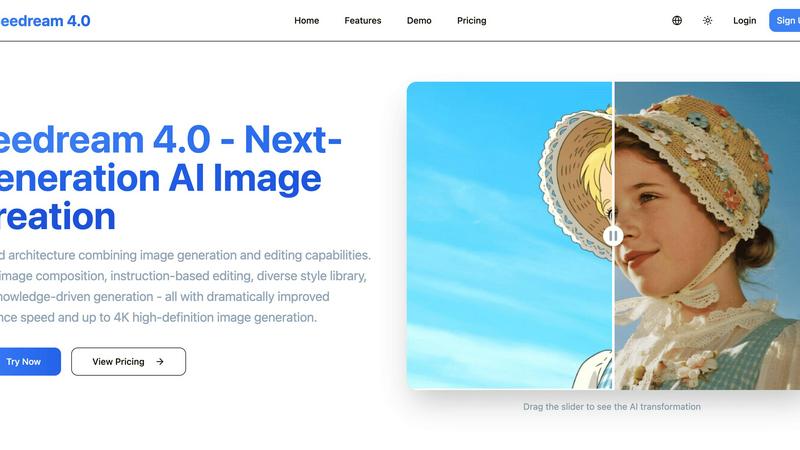
Seedream 4.0
Feature Comparison
RemoveTexts
Paint to Remove
This feature provides granular, user-directed control for precise editing. Users simply brush over specific text elements—such as a single watermark in a corner or a confidential data point in a document—and the AI erases only the painted areas. It intelligently analyzes the surrounding pixels to reconstruct the background perfectly, making it ideal for targeted redaction or cleaning specific parts of screenshots and product photos without affecting the rest of the image.
Auto Remove All Text
Engineered for maximum efficiency, this one-click feature automates the entire text cleansing process. The AI automatically detects and removes every text element within an image, including watermarks, subtitles, date stamps, and branded overlays. This is critical for processing bulk assets, such as e-commerce photo catalogs or presentation screenshots, where manual selection is impractical, ensuring 100% text removal and consistent output across large volumes of work.
Edit & Replace Text
Beyond deletion, this advanced feature allows users to modify existing text directly within an image. The AI not only removes the original text but also generates replacement text that matches the original font style, size, and color. This is invaluable for updating pricing on marketing materials, correcting labels in instructional graphics, or localizing content without needing access to the original design files or fonts.
Remove Objects
Extending its capability beyond text, this feature empowers users to erase any unwanted visual element. Whether it's an errant object in a product shot, a logo on a stock photo, or a person in the background, the AI seamlessly removes it and reconstructs the scene. This transforms otherwise unusable images into clean assets, saving significant costs on reshoots or premium stock photography licenses.
Seedream 4.0
Multi-Image Composition
This feature allows users to input multiple images and create complex compositions with a single descriptive sentence. It supports batch output, enhancing efficiency for creative workflows, making it ideal for intricate visual storytelling and brand asset creation.
Instruction-Based Editing
With Seedream 4.0, users can harness the power of instruction-based editing, which empowers them to generate and edit images simply by providing a clear sentence. This intuitive approach ensures users get exactly what they envision, making the image creation process straightforward and user-friendly.
Diverse Style Library
Seedream 4.0 boasts a rich library of professional styles that users can apply to their images. Whether users want to generate stylized images or enhance their own photos, they can choose from a variety of artistic styles, including watercolor, cyberpunk, and more, facilitating the creation of a unique visual language.
Knowledge-Driven Generation
The platform integrates rich knowledge and reasoning capabilities, allowing users to create accurate and aesthetically pleasing educational illustrations, charts, and professional images. This feature enhances content creation by ensuring that the generated visuals are not only beautiful but also informative and precise.
Use Cases
RemoveTexts
E-commerce Product Image Optimization
E-commerce teams and marketplace sellers use RemoveTexts to rapidly clean product photos by removing watermarks from supplier images, erasing promotional text overlays, or deleting price tags from lifestyle shots. This creates a consistent, professional catalog that enhances brand perception and improves conversion rates, all while avoiding costly reshoots or manual editing fees.
Marketing and Social Media Content Creation
Marketing agencies and content creators leverage the tool to repurpose visuals quickly. They can remove dated captions from memes, erase subtitles from video thumbnails, or delete intrusive logos from stock imagery. This accelerates the content production cycle, allowing teams to produce more high-quality, on-brand assets for campaigns and social channels without graphic design bottlenecks.
Legal and Document Redaction
Legal professionals and administrative staff utilize the Paint to Remove feature for secure and precise redaction of sensitive information from scanned documents, contracts, and evidentiary photographs. The AI ensures information is permanently and seamlessly erased, maintaining document integrity and compliance with privacy regulations more reliably than traditional digital marker tools that can be reversed.
Corporate Presentation and Report Preparation
Consultants, analysts, and executives clean screenshots and charts for internal and client-facing presentations. They remove irrelevant UI elements, browser tabs, or personal data from screenshots, and erase annotations from legacy reports. This polishes professional materials, enhances clarity, and protects confidential information, streamlining the slide deck creation process.
Seedream 4.0
Marketing Campaigns
Marketers can utilize Seedream 4.0 to create compelling visual content for advertising campaigns. By leveraging multi-image composition and the diverse style library, they can produce eye-catching graphics that resonate with their target audience, ultimately driving engagement and conversions.
Educational Content Creation
Educators and instructional designers can harness the knowledge-driven generation feature to create visually appealing educational materials. High-quality illustrations and charts can enhance understanding, making complex concepts more accessible to students.
Social Media Content
Content creators and social media managers can streamline their workflows by using Seedream 4.0 to generate engaging posts quickly. The instruction-based editing feature allows for rapid adjustments, ensuring that visuals are always fresh and relevant to current trends.
Brand Identity Development
Businesses looking to establish or refresh their brand identity can benefit from the comprehensive style library. Seedream 4.0 helps in crafting a cohesive visual language that reflects the brand's values and message, aiding in effective brand recognition and loyalty.
Overview
About RemoveTexts
RemoveTexts is an enterprise-grade, AI-powered image editing platform engineered to streamline visual asset management by removing unwanted text and objects with unprecedented speed and precision. It eliminates the traditional bottlenecks associated with manual photo editing software like Photoshop, enabling professionals to achieve clean, publication-ready images in under 30 seconds. The platform leverages state-of-the-art deep learning inpainting technology, based on architectures pioneered by industry leaders like NVIDIA and Adobe, to deliver over 95% structural similarity in reconstructed areas. This ensures background reconstruction is seamless and traceless, preserving the original image quality up to 4K resolution. Designed for scalability, it serves a global user base of over 100,000 creators, marketers, e-commerce managers, and legal professionals, directly impacting productivity by reducing image editing tasks from hours to seconds. The core value proposition lies in its ability to democratize high-fidelity image editing, removing the requirement for specialized design skills while delivering consistent, professional results that protect brand integrity and accelerate content workflows.
About Seedream 4.0
Seedream 4.0 is an innovative AI image generator and editor that is reshaping the landscape of visual content creation. Designed for both individuals and professionals, it offers a unified platform that combines advanced image generation and editing capabilities, streamlining the creative workflow. The primary value proposition of Seedream 4.0 lies in its ability to empower users to produce high-quality images tailored to their specific needs. With features such as multi-image composition, instruction-based editing, and an extensive style library, users can effortlessly create stunning visuals. Enhanced performance metrics, including significantly improved inference speed and the capacity to generate images in up to 4K high-definition, make Seedream 4.0 an essential tool for creative professionals, marketers, and educators alike. By simplifying the creative process and boosting productivity, Seedream 4.0 enables users to engage in effective visual storytelling with minimal effort.
Frequently Asked Questions
RemoveTexts FAQ
What image formats does RemoveTexts support?
RemoveTexts supports industry-standard image formats including JPG, PNG, and WebP. Users can upload files up to 10 MB in size. The processed images are delivered in high quality, preserving the original resolution without compression, making them suitable for both digital use and professional print materials.
How does the AI ensure the background looks natural after text removal?
The platform utilizes advanced deep learning inpainting models that analyze the pixels, textures, and patterns surrounding the removed text. It intelligently synthesizes new pixel data that matches the background, ensuring perfect edge blending and seamless reconstruction. Independent benchmarks note this technology achieves over 95% structural similarity, making the edit virtually undetectable.
Is RemoveTexts suitable for removing logos or trademarked content?
No, the tool is not designed for the removal of logos, trademarks, or other copyrighted visual branding elements. Its primary function is for removing text and generic objects. Users must ensure they have the appropriate rights or permissions to alter any image, respecting intellectual property laws and platform terms of service.
How long does it typically take to process an image?
Processing is exceptionally fast, with an average turnaround time of under 30 seconds per image. This includes the AI analysis, text/object removal, and background reconstruction. This speed enables batch processing of multiple images, offering significant time savings compared to manual editing methods which can take hours for complex tasks.
Seedream 4.0 FAQ
Can I try it for free?
Yes, Seedream 4.0 offers a trial period that allows new users to explore the platform's features without any financial commitment. This enables potential customers to understand the value it brings to their creative processes.
How does Seedream 4.0 work?
Seedream 4.0 operates by utilizing advanced AI algorithms to generate and edit images based on user-defined inputs. Users can upload images, provide descriptive instructions, and the AI will process these requests to deliver high-quality visuals promptly.
What makes Seedream 4.0 different?
Unlike traditional image editing tools, Seedream 4.0 combines image generation and editing in a single platform, offering an intuitive, instruction-based approach. This makes it easier for users to achieve precise results quickly, catering to both novices and experienced creators.
What image formats are supported?
Seedream 4.0 supports multiple image formats, including JPG, PNG, and WebP. This flexibility ensures that users can download their creations in the format that best suits their needs, whether for online use or print.
Alternatives
RemoveTexts Alternatives
RemoveTexts is an AI-powered image editing tool specializing in the precise removal of text and objects from any image. It belongs to the category of automated, generative AI photo editors designed for professional workflows. This tool eliminates the need for complex software like Photoshop, delivering clean, reconstructed backgrounds in seconds to enhance productivity. Users often explore alternatives to find a solution that aligns with their specific operational requirements. Common drivers include budget constraints, the need for different feature sets like batch processing or API access, and compatibility with existing enterprise platforms or operating systems. Evaluating total cost of ownership and integration capabilities is crucial for business adoption. When selecting an alternative, key considerations should include the core AI technology's accuracy and output quality, speed of processing to maintain team efficiency, and data security protocols for handling sensitive images. The ideal solution should demonstrably reduce manual editing time, provide a clear return on investment, and scale with organizational needs.
Seedream 4.0 Alternatives
Seedream 4.0 is an innovative AI image generator and editor that falls under the category of visual content creation tools. It is designed to streamline the process of generating and editing high-quality images, making it appealing to creative professionals, marketers, and educators. Users often seek alternatives to Seedream 4.0 for various reasons, including pricing structures, specific feature sets, or compatibility with different platforms. When considering alternatives, it is essential to evaluate factors such as ease of use, the breadth of available features, image quality, and the overall alignment of the tool with your creative objectives. Choosing the right alternative can significantly impact your productivity and the quality of your visual storytelling. Look for options that offer intuitive interfaces, robust editing capabilities, and a diverse selection of styles. Additionally, consider the scalability of the tool, ensuring it can meet both current and future needs as your projects evolve. By carefully assessing these criteria, users can find an alternative that best fits their requirements for efficient visual content creation.