
AI Photo Assistant vs PhotoWeather
Side-by-side comparison to help you choose the right AI tool.

AI Photo Assistant
Transform your photos effortlessly with AI Photo Assistant's one-click enhancements for professional-quality results.
Last updated: March 1, 2026

PhotoWeather
Get real-time alerts for optimal photo conditions, ensuring you never miss the perfect shot again.
Last updated: February 26, 2026
Visual Comparison
AI Photo Assistant
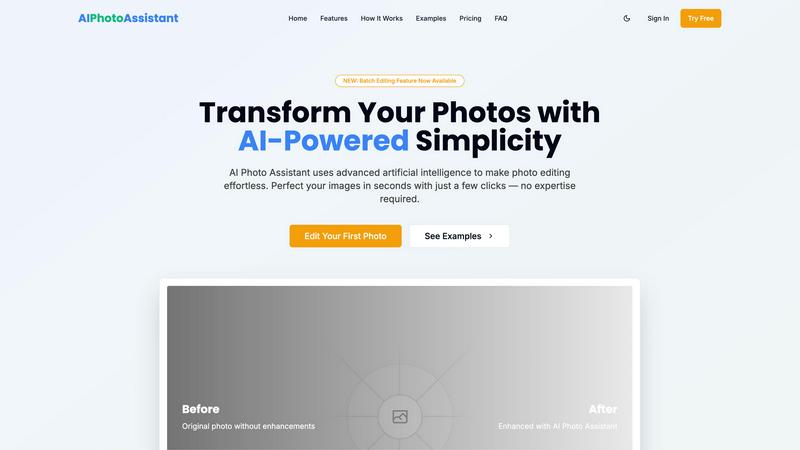
PhotoWeather

Feature Comparison
AI Photo Assistant
Intelligent Editing
AI Photo Assistant utilizes advanced machine learning techniques to understand the intricacies of photo aesthetics. It automatically applies optimal adjustments to lighting, color, and composition, ensuring that every image looks polished and professional without requiring any technical skills from the user.
One-Click Enhancement
With a single click, users can initiate the automated optimization process. This feature simplifies the editing workflow, allowing users to enhance multiple aspects of their photos at once, including brightness, contrast, and saturation, resulting in a dramatic improvement in image quality.
Batch Editing Feature
The newly introduced batch editing functionality allows users to process multiple photos simultaneously. This feature is a game-changer for professionals and businesses that need to edit large volumes of images quickly, significantly reducing the time spent on repetitive tasks.
Smart Auto-Enhancement
This feature employs AI algorithms to analyze and optimize photos in real-time. Users can select automatic improvements or make specific adjustments, streamlining the editing process and enabling high-quality results that cater to individual preferences.
PhotoWeather
Ready-Made Templates
PhotoWeather offers a selection of pre-made templates tailored for photographers, including alerts for fog, golden hour, aurora visibility, and storm intensity. These templates simplify the setup process, allowing users to quickly establish the conditions they want to monitor without extensive knowledge of meteorological data.
Powerful Rule Builder
The platform features an advanced rule builder that lets users define over 80 parameters, such as humidity, wind speed, and cloud types, to create highly specific alerts. This level of customization allows photographers to set precise rules, like "Golden hour + 20-60% clouds + wind <7 m/s," ensuring that they receive notifications only for the most relevant conditions.
Smart Notifications
PhotoWeather provides smart notifications that include daily digests, reminders for upcoming opportunities, and alerts when forecasts change. Users can sync these notifications directly with their calendars, ensuring they stay informed about potential shooting windows without cluttering their schedules.
Trusted Forecast Sources
PhotoWeather aggregates data from reputable weather services such as ECMWF, NOAA, and Météo-France, ensuring that users receive accurate and reliable forecasts. This trust in data sources empowers photographers to make informed decisions about when and where to shoot, enhancing the likelihood of capturing stunning images.
Use Cases
AI Photo Assistant
Social Media Content Creation
Influencers and content creators can utilize AI Photo Assistant to enhance their photos quickly, ensuring that their social media profiles remain visually appealing. The platform allows for rapid editing, making it easier to maintain a consistent aesthetic across multiple posts.
Small Business Product Photography
Small business owners can generate professional-quality product images without the expense of hiring a photographer. AI Photo Assistant provides the tools necessary to create eye-catching visuals that can improve online sales and customer engagement.
Event Photography
For individuals capturing special occasions such as weddings or parties, the AI Photo Assistant simplifies the editing process. Users can quickly enhance group photos or candid shots, preserving memories with a professional touch while saving time.
Personal Use for Family Photos
Families looking to enhance their personal photos can use AI Photo Assistant to create stunning prints or digital albums. The user-friendly interface makes it accessible for anyone, ensuring that cherished moments are beautifully preserved and shared.
PhotoWeather
Landscape Photography
Landscape photographers can leverage PhotoWeather to be alerted about optimal conditions like fog, sunrise, and storm clouds. By setting specific parameters for their favorite locations, they can ensure they are always ready for the perfect shot.
Astrophotography
For astrophotographers, the app provides alerts based on astronomical conditions, such as moon phases and cloud cover. This feature allows them to plan shoots when the night sky is most favorable, eliminating guesswork and enhancing their chances of capturing stunning celestial images.
Wildlife Photography
Wildlife photographers can benefit from real-time alerts about weather changes that might affect animal behavior, such as rain or wind. By knowing when conditions are ideal, they can position themselves strategically to capture unique moments in nature.
Event Photography
Event photographers can use PhotoWeather to monitor weather conditions for outdoor events. With smart notifications about changing weather, they can prepare for unexpected conditions, ensuring they capture every moment beautifully, regardless of the weather.
Overview
About AI Photo Assistant
AI Photo Assistant is a revolutionary photo editing platform that leverages the power of artificial intelligence to transform ordinary images into stunning visuals effortlessly. Designed for a wide range of users, including social media influencers, small business owners, and individuals with little to no photo editing experience, this platform democratizes high-quality photo editing by removing the barriers typically associated with traditional software. Users can benefit from its advanced AI algorithms that intelligently analyze photos, making automatic enhancements to aspects like brightness, contrast, saturation, and composition. The main value proposition lies in its ability to deliver professional-grade results in a fraction of the time, allowing busy professionals to edit multiple photos quickly and efficiently. With AI Photo Assistant, users can achieve remarkable visual outcomes without the need for extensive training, thereby maximizing productivity and enhancing their creative output.
About PhotoWeather
PhotoWeather is an innovative weather alert application designed specifically for outdoor photographers who want to optimize their shooting experiences. Understanding that lighting and weather conditions can significantly affect photo quality, PhotoWeather continuously monitors weather forecasts and alerts users when conditions align with their photography goals. Whether you are aiming for dramatic fog during sunrise, capturing the intensity of storms, or seeking the perfect golden-hour light, this tool ensures that you never miss an opportunity. The platform is tailored for landscape, astrophotography, and wildlife photographers who require precise weather data, allowing them to set specific conditions and receive targeted alerts. By automating weather checks, PhotoWeather enhances productivity and ensures that photographers can focus more on their art rather than constantly monitoring weather apps.
Frequently Asked Questions
AI Photo Assistant FAQ
How does AI Photo Assistant work?
AI Photo Assistant employs advanced artificial intelligence algorithms to analyze and enhance photos. Users simply upload their images, choose the desired enhancements, and the AI applies the optimal adjustments automatically.
Is AI Photo Assistant suitable for beginners?
Yes, AI Photo Assistant is designed with user-friendliness in mind. It requires no prior photo editing experience, making it accessible for beginners while still providing professional-quality results.
Can I edit multiple photos at once?
Absolutely! The batch editing feature allows users to process multiple images simultaneously, significantly speeding up the editing workflow, especially for those handling large volumes of photos.
What types of images can I edit?
AI Photo Assistant supports all popular image formats, making it versatile for various types of photos, including portraits, landscapes, product photos, and more, ensuring that users can enhance a wide range of visuals.
PhotoWeather FAQ
How do I get started?
To get started with PhotoWeather, simply sign up for a free account, select your favorite shooting locations, and choose the specific weather conditions you want to monitor. The intuitive interface makes it easy to set up alerts tailored to your photography needs.
How accurate are the forecasts?
PhotoWeather sources its data from some of the most reputable weather services globally, including NOAA and ECMWF. This ensures that users receive accurate forecasts, allowing them to make informed decisions based on reliable weather information.
Can I create my own rules?
Yes, PhotoWeather allows users to create custom rules based on over 80 different weather parameters. This flexibility means you can define alerts that are perfectly tailored to your unique photography requirements.
Do you support calendar sync?
Absolutely. PhotoWeather offers calendar sync features that allow users to integrate alerts and reminders directly into their personal calendars. This ensures you are always aware of upcoming photography opportunities without missing a beat.
Alternatives
AI Photo Assistant Alternatives
AI Photo Assistant is an advanced, AI-powered photo editing platform designed to elevate images to professional quality with ease. As part of the AI Assistants category, it serves various users, including social media creators and small business owners, by automating the photo enhancement process. However, many users seek alternatives due to factors such as pricing, specific feature sets, platform compatibility, or the need for more specialized tools catering to their unique editing requirements. When choosing an alternative, it's essential to consider aspects like usability, the range of features offered, customer support, and the overall value provided in terms of efficiency and output quality.
PhotoWeather Alternatives
PhotoWeather is an innovative tool designed for photographers seeking to optimize their shooting conditions. By monitoring weather patterns continuously, it provides timely alerts for ideal photography moments, such as golden hours and dramatic cloud formations. This category of applications caters specifically to individuals who want to enhance their photography experiences without the hassle of constantly checking weather forecasts. Users often search for alternatives to PhotoWeather due to various factors, including pricing, specific features that may not align with their needs, or platform compatibility issues. When considering an alternative, it's essential to evaluate the range of features offered, the flexibility of alerts and notifications, and the overall user experience. A comprehensive rule builder, customizable notifications, and the ability to cater to specific photography goals can significantly impact productivity and creativity for photographers.