
Octopods vs Playwriter
Side-by-side comparison to help you choose the right AI tool.

Octopods
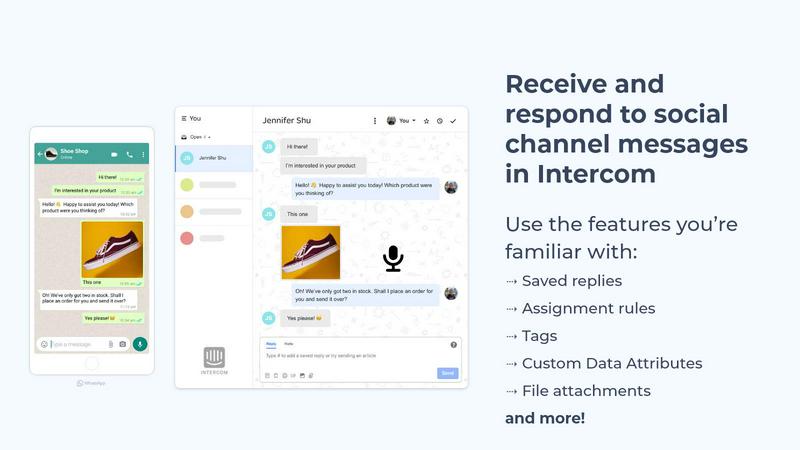
Octopods centralizes customer conversations from 15+ messaging channels into Intercom or HubSpot for seamless support.
Last updated: February 26, 2026

Playwriter
Playwriter enables seamless AI-driven control of your existing Chrome browser, enhancing productivity without the limitations of headless instances.
Last updated: March 18, 2026
Visual Comparison
Octopods
Playwriter

Feature Comparison
Octopods
Native Integrations
Octopods integrates seamlessly with Intercom and HubSpot, allowing messages from various platforms to flow directly into your existing workflows. This eliminates the need for a separate inbox, ensuring your team can manage all communications from a single interface.
Rich Media Support
Support for rich media types such as images, videos, audio files, documents, and GIFs enhances the quality of customer interactions. This feature enables teams to deliver engaging content that can enrich conversations and improve customer satisfaction.
Proactive Messaging Templates
With proactive outbound messaging capabilities, teams can utilize templates to initiate conversations and follow up with customers. This feature is essential for sales and support teams looking to engage with leads and customers at the right moments.
Automatic Contact Matching
To streamline communication and prevent duplicate entries, Octopods offers automatic contact matching. This ensures that every interaction is tracked against the correct customer profile, maintaining an organized and efficient communication history.
Playwriter
Integrated Browser Session
Playwriter allows AI agents to utilize your current browser session, ensuring that all logins, extensions, and cookies are available. This eliminates the common issues faced with fresh browser instances, such as instant bot detection and the need for additional memory.
Full Playwright API Access
With Playwriter, agents can execute any Playwright code without the constraints of pre-defined toolsets. This feature offers a comprehensive automation solution, allowing developers to leverage the full capabilities of the Playwright API for customized web interactions.
Real-Time Collaboration
The platform enables real-time collaboration between users and agents. As agents perform tasks, users can see their actions live, allowing for immediate intervention when necessary, such as resolving captchas or consent walls, enhancing overall efficiency.
Advanced Debugger and Editor
Playwriter comes equipped with an advanced debugger that includes breakpoints and live code editing capabilities. This feature allows users to troubleshoot and optimize automation scripts on the fly, significantly reducing the time required for debugging.
Use Cases
Octopods
Customer Support Management
Octopods enables customer support teams to manage inquiries from various messaging apps without leaving their primary support platform. This integrated approach fosters quicker response times and enhances customer experience.
Sales Engagement
Sales teams can reply to leads on their preferred messaging channels while keeping all conversations synchronized within Intercom or HubSpot. This ensures that follow-ups are timely and relevant, boosting conversion rates.
Omnichannel Strategy Development
By bringing multiple messaging apps into one consistent workflow, Octopods facilitates the development of an omnichannel strategy. Teams can ensure that no customer query goes unanswered and that all interactions are visible and manageable.
Workflow Automation
Teams can leverage Octopods for automated workflows across messaging channels, utilizing Intercom or HubSpot’s built-in features. This not only increases efficiency but also allows teams to focus on high-value tasks while automating routine responses.
Playwriter
Automated Web Testing
Playwriter is ideal for automated web testing, allowing developers to create and execute tests in real browser environments. This results in more reliable test outcomes and quicker identification of issues, ultimately leading to higher-quality software releases.
Data Scraping and Collection
Businesses can leverage Playwriter for data scraping tasks, enabling agents to gather information from multiple websites simultaneously. With access to your existing session, agents can bypass obstacles like logins and captchas, maximizing data collection efficiency.
Customer Support Automation
Customer support teams can use Playwriter to automate routine inquiries and support tasks. By allowing agents to navigate through customer platforms, organizations can improve response times and enhance customer satisfaction while reducing manual workload.
Training and Onboarding
Playwriter serves as an effective tool for training new employees by allowing them to observe automated processes in real time. This hands-on approach enhances learning experiences and accelerates the onboarding process, making it easier for new hires to adapt to their roles.
Overview
About Octopods
Octopods is an advanced integration tool designed to bridge the gap between over 18 popular messaging channels, including WhatsApp, Telegram, Instagram, LINE, Viber, SMS, and WeChat, directly into your Intercom or HubSpot inbox. It is specifically tailored for customer service, sales, and operations teams that need to engage with customers seamlessly across their preferred messaging platforms. The primary value proposition of Octopods lies in its ability to create native conversations within Intercom and HubSpot, allowing teams to utilize familiar tools such as tags, saved replies, assignment rules, workflows, and AI capabilities without the need for context switching. With Octopods, organizations can centralize communications, ensuring all customer interactions are tracked and managed efficiently in one place, thus enhancing productivity and response times.
About Playwriter
Playwriter is an advanced automation tool designed to empower AI agents by providing them with direct access to your existing web browser sessions. Unlike traditional AI agents that operate in isolated environments, Playwriter integrates seamlessly with your actual browser, complete with all your logins, extensions, and cookies. This means that agents can perform web tasks without the limitations imposed by headless instances or fixed toolsets, which often lead to increased bot detection and reduced efficiency. With Playwriter, businesses can dramatically enhance productivity by allowing agents to execute Playwright API commands directly in your browser, ensuring a streamlined, collaborative experience. Ideal for developers, QA testers, and data analysts, Playwriter not only saves time but also enables real-time collaboration, making it an invaluable tool in any tech-savvy organization.
Frequently Asked Questions
Octopods FAQ
How does Octopods ensure data security?
Octopods is built on official, fully verified APIs with enterprise security standards. This ensures reliable and compliant messaging at scale, protecting customer data throughout the communication process.
Is it easy to set up Octopods?
Yes, the setup process for Octopods is designed to be quick and straightforward. Most users can get started in minutes without extensive technical knowledge.
Can I use Octopods with other CRM platforms?
Octopods is specifically designed to work natively with Intercom and HubSpot. While it may not integrate with other CRM platforms, its capabilities within these environments are robust and comprehensive.
What kind of support does Octopods offer?
Octopods provides dedicated support during the implementation process and ongoing assistance to ensure teams can maximize the tool's capabilities for their customer engagement strategies.
Playwriter FAQ
How does Playwriter enhance automation for AI agents?
Playwriter enhances automation by allowing AI agents to work within your actual browser session, providing full access to cookies, extensions, and logins. This eliminates the challenges associated with isolated environments and boosts overall efficiency.
Is Playwriter compatible with existing browser extensions?
Yes, Playwriter fully supports existing browser extensions. Agents can utilize all the tools and functionalities provided by your installed extensions, ensuring a seamless automation experience tailored to your specific needs.
What programming knowledge is required to use Playwriter?
While basic knowledge of JavaScript and familiarity with the Playwright API is beneficial, Playwriter is designed to be user-friendly. The included skill installation guides agents on how to effectively use the tool without extensive programming expertise.
What security measures does Playwriter implement?
Playwriter prioritizes security by ensuring that all data and communications remain local to your machine. There are no remote servers involved, and sensitive information is not transmitted over the internet, providing peace of mind for users.
Alternatives
Octopods Alternatives
Octopods is a powerful integration tool designed to streamline customer communication by connecting over 18 messaging channels, including WhatsApp, Telegram, and Instagram, directly to your Intercom or HubSpot inbox. It falls under the category of customer support solutions, enabling businesses to manage all conversations in one unified platform. Users often seek alternatives to Octopods for various reasons such as pricing considerations, the need for specific features, or compatibility with different platforms that align better with their operational requirements. When selecting an alternative to Octopods, it's crucial to evaluate the range of messaging channels supported, the ease of integration with existing systems, and whether the solution allows for seamless conversation management without context switching. Additionally, consider features that enhance productivity and customer engagement, such as automation capabilities, rich media support, and robust reporting tools.
Playwriter Alternatives
Playwriter is a cutting-edge tool that falls within the automation category, specifically designed to enhance user control over the Chrome browser through AI via Command Line Interface (CLI) or Multi-Channel Protocol (MCP). It offers unique features such as the ability to automate tasks within your actual browser session, ensuring that users benefit from their existing logins and extensions. This capability addresses the common limitations faced with AI agents, which often struggle with proper web browsing due to lack of access or detection issues. Users frequently seek alternatives to Playwriter for various reasons, including pricing structures, feature sets, and specific platform requirements. As businesses look to optimize their workflows, they may prioritize tools that offer better integration, scalability, or enhanced functionality for their unique needs. When evaluating alternatives, it is essential to consider the tool's compatibility with existing systems, the robustness of its automation capabilities, and overall return on investment to ensure that productivity is maximized.