
Dokie AI vs SimpleDraw
Side-by-side comparison to help you choose the right AI tool.

Dokie AI
Dokie AI instantly creates professional presentations with Claude Opus 4.6, boosting productivity and saving hours of manual work.
Last updated: March 19, 2026

SimpleDraw
SimpleDraw is a free browser based tool that creates precise floor plans and scale drawings to streamline project.
Last updated: March 1, 2026
Visual Comparison
Dokie AI

SimpleDraw
Feature Comparison
Dokie AI
AI Generate PPT
This core feature allows users to generate complete, professional slide decks from a simple text description. By analyzing the topic and intent, Dokie AI's engine creates compelling content, selects appropriate layouts, integrates data visualizations like charts, and applies a cohesive design theme automatically. It moves beyond simple text-to-slide conversion to deliver a structurally sound, presentation-ready deck in minutes, rivaling the output of a professional designer.
AI Beautify PPT
Designed to elevate existing materials, this feature enables users to upload any presentation file. Dokie AI then intelligently enhances the design by fixing alignment and layout issues, applying modern color palettes and typography, and refining visual hierarchy—all while meticulously preserving the original content. This transforms outdated or inconsistent slides into a polished, professional asset without starting from scratch.
Multi-Format Conversion Suite
Dokie AI provides a comprehensive toolkit for converting various content formats directly into editable PowerPoint presentations. This includes converting PDF documents, Word files, HTML web pages, and even YouTube videos into structured slide decks. This feature streamlines content repurposing, turning existing reports, documents, or video content into presentation-ready formats with minimal effort.
Intelligent Speaker Notes & Reverse Prompting
The platform automates presentation delivery support by generating detailed speaker notes and talking points tailored to each slide's content. Furthermore, its unique Reverse Prompt feature can analyze an uploaded presentation and extract the core prompts and structure, providing valuable insight into the design logic and enabling easy replication or understanding of a deck's composition.
SimpleDraw
Specialized Floor Plan Creator
This dedicated mode is optimized for architectural drafting, allowing users to construct detailed floor plans with single-click placement of walls, doors, and windows. It includes a comprehensive library of standardized interior fixtures for kitchens, bathrooms, and living spaces. Real-time measurement display during adjustments ensures every element is placed to exact specifications, enabling the creation of professional-grade plans for renovations, space planning, and property listings without any CAD expertise required.
Smart Alignment & Precision Control
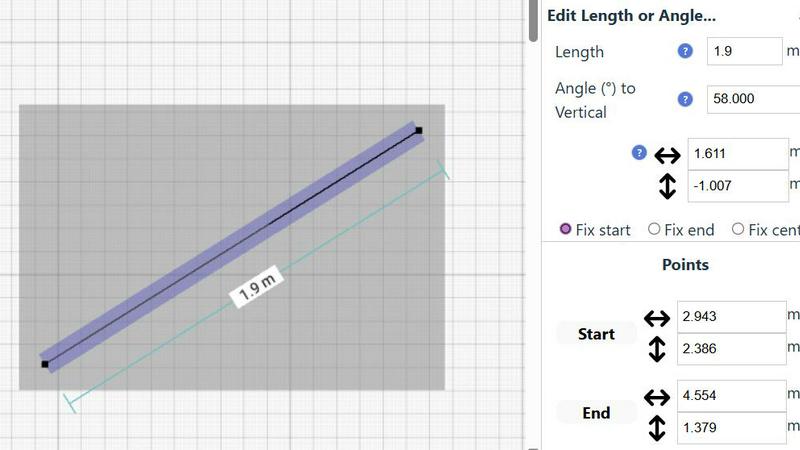
The integrated Smart Alignment System assists users in placing points and lines with exactitude by providing clear visual cues and snapping to intended points. Precision adapts dynamically based on zoom level, and users can lock movements to vertical or horizontal axes using keyboard shortcuts. This feature drastically reduces manual adjustment time and eliminates measurement errors, ensuring technical drawings are accurate and aligned to professional standards from the outset.
Non-Destructive Editing & Complete Control
Every element within a SimpleDraw project remains fully editable at any stage, providing 100% non-destructive workflow. Users can leverage unlimited undo/redo functions, group and manipulate multiple objects simultaneously, and input precise dimensions, lengths, and angles directly via keyboard. This level of control streamlines iterative design processes, such as optimizing kitchen layouts or office plans, allowing for rapid experimentation and refinement without starting over.
Comprehensive Measurement System
The platform supports a robust and flexible measurement framework, allowing users to toggle displayed measurements and switch seamlessly between metric and standard US (feet/inches) units. Contextual measurements update dynamically as users draw, providing immediate feedback. This system ensures all drawings are created to a consistent, accurate scale, which is critical for generating reliable quotes, ordering materials, and communicating clear specifications to stakeholders and contractors.
Use Cases
Dokie AI
Enterprise Sales & Pitch Decks
Sales teams and business development professionals can rapidly generate client-ready proposals, product pitches, and quarterly business review presentations. Dokie AI ensures brand consistency, incorporates persuasive data visualization, and drastically reduces the slide preparation time from days to hours, allowing teams to respond to opportunities with agility and professional polish.
Marketing Campaign Reports & Content
Marketing departments can efficiently create campaign retrospectives, social media strategy decks, and content calendars. The tool converts performance data and strategy documents into visually engaging presentations for stakeholder reviews, saving countless hours on design formatting and enabling marketers to focus on analysis and narrative.
Academic & Training Material Development
Educators, trainers, and instructional designers can transform lesson plans, research papers, and training manuals into engaging educational slide decks. Dokie AI structures complex information into digestible slides, incorporates relevant imagery, and creates a consistent learning aid, enhancing knowledge transfer and participant engagement.
Startup Founder Fundraising
Startup founders can quickly build and iterate on investor pitch decks. By inputting their business model and vision, they receive a professionally designed deck that effectively communicates their value proposition, market opportunity, and financials, helping them make a powerful first impression and secure funding more efficiently.
SimpleDraw
Home Renovation & Contractor Planning
Contractors and renovation specialists use SimpleDraw to create precise floor plans and elevations for client projects. By visualizing kitchen and bathroom layouts with accurate measurements before demolition begins, professionals can identify potential issues, provide accurate material estimates, and set clear client expectations, thereby reducing costly change orders and improving project profitability and client satisfaction.
Real Estate & Property Management
Real estate agents and property managers utilize the tool to generate accurate floor plans for rental listings and property portfolios. These scale drawings provide prospective tenants and buyers with a reliable sense of space and layout, enhancing listing quality. This leads to more qualified inquiries, reduced vacancy rates, and more efficient space planning for multi-unit buildings.
Facility Management & Office Design
Facility managers and office planners employ SimpleDraw to design efficient workspace layouts, plan departmental moves, and manage office assets. The ability to experiment with furniture placement and workstation configurations in a scaled environment ensures optimal use of space, improves employee workflow, and supports data-driven decisions for capital planning and interior fit-outs.
Retail & Commercial Space Planning
Retail managers and small business owners leverage the platform to plan store layouts, product placement, and customer flow. Creating a scaled drawing of the commercial space allows for the strategic positioning of fixtures, shelves, and checkout areas to maximize sales floor efficiency and enhance the customer experience before physically rearranging the store, minimizing operational downtime.
Overview
About Dokie AI
Dokie AI is a revolutionary, enterprise-grade AI presentation platform designed to eliminate the time, cost, and skill barriers associated with creating professional presentations. It transcends traditional template-based tools by leveraging true AI generation, powered by Claude Opus 4.6, to autonomously handle the entire presentation workflow. This includes intelligent content structuring, context-aware layout selection, professional typography, and cohesive visual design. The platform serves a critical need for business professionals, educators, marketers, and startup founders who require polished, impactful slides but lack dedicated design resources or time. Its core value proposition is delivering a 10x improvement in presentation creation speed, transforming hours of manual work into a process that takes mere minutes. By automating design and structural heavy lifting, Dokie AI empowers users to focus on their core message and strategy, ensuring consistent brand quality and significantly boosting productivity and ROI across an organization's communication efforts.
About SimpleDraw
SimpleDraw is an enterprise-grade, browser-based platform engineered to transform the creation of precise scale drawings from a complex, specialized task into a streamlined, universally accessible business process. It serves as a powerful yet intuitive alternative to traditional CAD software, eliminating the steep learning curve and high licensing costs. The platform is designed for a broad professional audience, including facility managers, real estate professionals, interior designers, renovation contractors, and DIY project leads who require accurate spatial planning without the overhead of professional architectural software. Its core value proposition lies in maximizing productivity and return on investment by delivering professional-grade precision through a zero-friction, no-cost entry point. Requiring no software installation, user login, or registration, SimpleDrive enables immediate deployment across teams, ensuring projects can commence without delay. By combining a specialized Floor Plan Mode, a Smart Alignment System, and non-destructive editing with a community-driven development roadmap, SimpleDraw provides a scalable tool that enhances planning accuracy, reduces material and labor waste, and accelerates project timelines from initial concept to final execution.
Frequently Asked Questions
Dokie AI FAQ
What makes Dokie AI different from traditional PowerPoint or Canva?
Unlike traditional tools that rely on manual design and static templates, Dokie AI uses advanced AI (Claude Opus 4.6) to generate and design presentations intelligently from the ground up. It doesn't just place your text into a template; it understands content, creates logical structure, designs appropriate layouts, and selects visuals autonomously, offering a true generative design experience that saves significant time.
What file formats can I upload to beautify or convert?
Dokie AI supports a wide range of input formats for its Beautify and conversion tools. You can upload existing PowerPoint files (PPT, PPTX), PDF documents, Microsoft Word documents (DOC, DOCX), and even provide YouTube video links or HTML content to be transformed into a structured presentation.
Does Dokie AI support custom branding and company templates?
While the current focus is on AI-generated professional designs, the platform's Beautify feature works to apply a cohesive, high-quality style to your content. For specific custom branding like exact logos, color hex codes, and proprietary templates, users can upload an existing company deck to be beautified and refined, ensuring the output aligns with established visual guidelines.
How does the pricing and credit system work?
Dokie AI operates on a credit-based system for its AI generation features. Plans include a flexible Pay-As-You-Go option starting at $39.80, a monthly subscription from $19.90 per month, and discounted annual plans from $15.90 per month, each providing a specific allocation of credits that can be used for generating, beautifying, or converting presentations.
SimpleDraw FAQ
Is SimpleDraw truly free to use for commercial purposes?
Yes, SimpleDraw is completely free to use for both personal and commercial projects. There is no tiered pricing, subscription fee, or hidden cost. The platform operates on a community-driven model and is accessible directly through a web browser with no login or registration required, making it a cost-effective solution for businesses of all sizes to integrate into their planning workflows.
What file formats can I export my drawings in?
While the provided context does not specify export formats, the platform's focus on browser-based operation and community-driven development suggests that core functionality prioritizes creation and editing within the tool. For sharing, users can typically utilize browser functions to print or save drawings as PDFs or image files. For specific vector export capabilities, users are encouraged to join the Discord community to request or stay updated on future feature developments.
How does SimpleDraw ensure the accuracy of scale drawings?
Accuracy is ensured through a combination of the Smart Alignment System, which provides precise snapping and alignment cues, and the Comprehensive Measurement System, which allows for direct numerical input of dimensions. Drawings are built to a user-defined scale, and all measurements are displayed and calculated within that scale, providing the same foundational precision as professional tools for reliable planning and execution.
Can multiple team members collaborate on the same drawing?
The current implementation of SimpleDraw, as described, is a browser-based tool that does not require an account, which typically indicates that real-time multi-user collaboration on a single document is not a native feature. Drawings are likely saved locally to the user's device. For team collaboration, drawings can be shared as exported files. The community-driven roadmap may include collaborative features based on user feedback from the Discord community.
Alternatives
Dokie AI Alternatives
Dokie AI is a leading AI presentation maker that automates the creation of professional slide decks. It operates within the AI-powered design and productivity software category, specifically targeting users who need to produce high-quality presentations efficiently without extensive design expertise. Businesses and professionals often evaluate such tools based on their specific operational requirements and budget constraints. Users may seek alternatives to Dokie AI for various reasons, including differing pricing models, specific feature integrations, or platform compatibility needs. Some organizations require tools that align with existing software ecosystems, while others prioritize different aspects of AI functionality or collaboration workflows. The search for a different solution is a standard part of the software evaluation process to ensure the best fit. When assessing an alternative AI presentation tool, key considerations should include the core AI model's capability for content and design generation, the flexibility of output and editing, and the overall return on investment in terms of time saved and presentation quality. It is also crucial to evaluate data security protocols, support for brand consistency, and the tool's ability to handle complex data visualization and multi-format inputs seamlessly.
SimpleDraw Alternatives
SimpleDraw is a free, web-based application for creating precise scale drawings and floor plans, falling under the category of design tools. It is engineered for accessibility and productivity, requiring no installation or registration, which makes it a valuable asset for both individual projects and business workflows. Users may evaluate alternatives to SimpleDraw for several strategic reasons. These include the need for advanced, industry-specific features, integration with other enterprise software ecosystems, or different commercial licensing models. The decision often hinges on aligning tool capabilities with specific project complexity, team collaboration requirements, and long-term operational budgets. When selecting an alternative solution, key considerations should include the total cost of ownership, the tool's ability to enhance team productivity and reduce project timelines, and its scalability. Evaluating the precision of measurement systems, data security protocols, and the potential for a strong return on investment through streamlined design processes is crucial for business adoption.