
Prompt Builder vs SVG to 3D
Side-by-side comparison to help you choose the right AI tool.

Prompt Builder
Prompt Builder streamlines AI prompt creation and management to boost productivity and ensure consistent, high-quality outputs across all major.
Last updated: April 13, 2026

SVG to 3D
Effortlessly convert SVG files into stunning 3D models in seconds with advanced controls and web-optimized exports.
Last updated: February 26, 2026
Visual Comparison
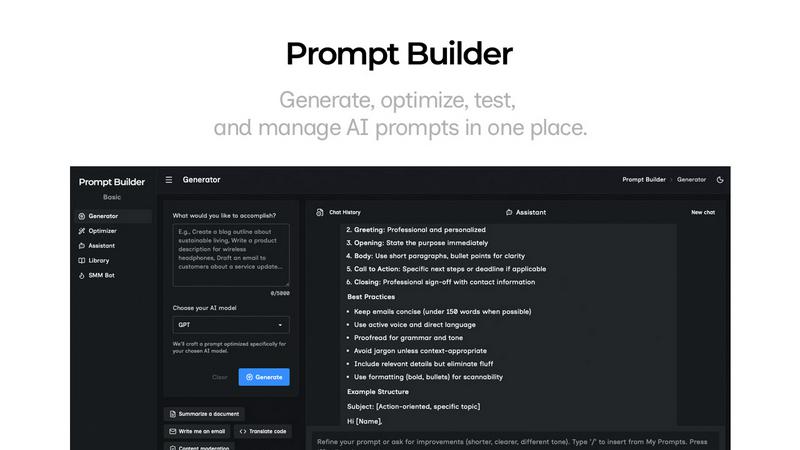
Prompt Builder
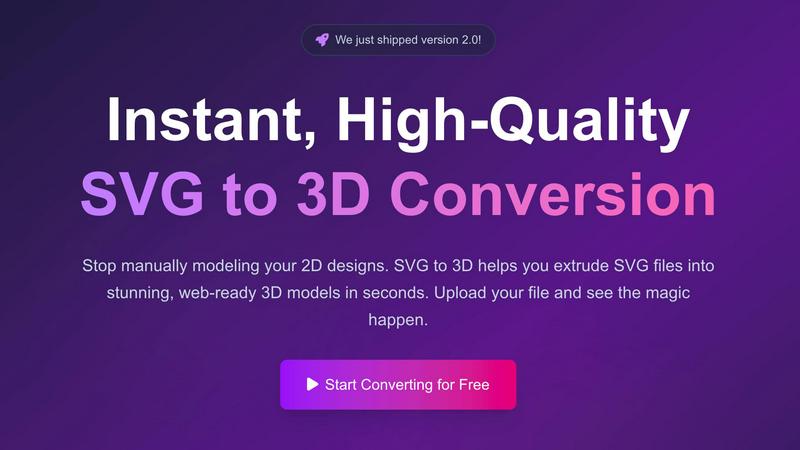
SVG to 3D
Feature Comparison
Prompt Builder
Model-Optimized Prompt Generator
This core feature allows users to generate professional-grade prompts tailored to specific AI models in seconds. By simply describing a task in plain English and selecting a target model (e.g., Gemini, Claude, GPT-4), the generator produces a structured prompt with appropriate constraints and output formats. This model-aware generation ensures higher quality initial drafts, significantly reducing the time spent on manual tuning and increasing first-attempt success rates across different AI systems.
Integrated Chat Assistant for Refinement & Testing
Prompt Builder includes a built-in chat workspace where users can instantly test and iterate on their prompts. The Assistant feature supports a wide range of models (Grok, Gemini, GPT, DeepSeek, etc.), allowing for real-time refinement without switching between external tools. Users can run a prompt, evaluate the output, make follow-up adjustments, and pin successful conversation threads, keeping the entire development cycle organized and efficient within a single interface.
Prompt Optimizer for Existing Prompts
The Optimizer tool enhances existing prompts by analyzing and improving their clarity, structure, and effectiveness. Users can paste any prompt or select one from their Library to receive an upgraded version with better-defined constraints, examples, and output formats. This feature is invaluable for rescuing underperforming prompts and standardizing prompt quality across an organization, ensuring every prompt deployed is optimized for performance.
Centralized Prompt Library with Community Templates
This feature provides a secure, searchable repository for all prompts. Users can save, categorize, and pin their best-performing prompts for easy reuse across projects and teams. Additionally, the Library includes a curated collection of Community Prompts and templates, offering inspiration and proven starting points for common use cases, accelerating the prompt creation process and fostering best-practice sharing.
SVG to 3D
One-Click GLB Export for Web
SVG to 3D provides developers with the ability to export their designs as lightweight, optimized GLB files ready for web use. This feature is particularly valuable for those working with frameworks like Three.js or React Three Fiber, allowing for seamless integration of 3D assets into web projects without the need for extensive coding or additional software.
3D-Print Ready STL Files
For users interested in bringing their designs to life, SVG to 3D supports clean STL exports that are directly compatible with 3D printing slicers. This feature simplifies the process of turning digital designs into physical objects, making it an ideal choice for artists and engineers who need reliable outputs for fabrication.
Comprehensive Modeling Tools
Unlike other basic conversion tools, SVG to 3D offers comprehensive modeling features that allow for fine-tuning of various parameters. Users can adjust thickness, add intricate bevels, and apply realistic PBR materials, all while previewing changes in real-time. This level of control ensures that the final model meets professional standards.
Privacy-Focused Processing
SVG to 3D prioritizes user privacy and security by processing files locally within the browser whenever possible. This means users can convert their designs without worrying about the security of their files, as no data is uploaded to external servers, ensuring peace of mind during the conversion process.
Use Cases
Prompt Builder
Accelerating Content Creation Workflows
Marketing and content teams can use Prompt Builder to rapidly generate and refine prompts for blog posts, social media copy, and advertising materials. The SMM Bot feature specifically creates platform-ready posts for X, LinkedIn, and Instagram. By saving successful prompt templates for different content types and tones, teams ensure brand consistency and drastically cut down the time from ideation to publishable draft.
Standardizing Developer & Technical Prompting
Developers and data scientists can build a library of reliable prompts for code generation, debugging, documentation, and system design. The model-specific optimization ensures prompts work effectively whether targeting GitHub Copilot, Claude for code, or GPT. This standardization reduces errors, improves code quality, and allows teams to share and reuse technical prompts as a form of institutional knowledge.
Enhancing Customer Support Operations
Support teams can leverage Prompt Builder to craft precise prompts for generating consistent, on-brand email responses, knowledge base articles, and troubleshooting guides. By optimizing prompts for clarity and specific output formats, they ensure AI-assisted support agents provide accurate and helpful information, improving resolution times and customer satisfaction while maintaining a unified voice.
Streamlining Research & Analysis Processes
Analysts, researchers, and strategists can use the platform to create sophisticated prompts for market research, competitive analysis, data summarization, and report drafting. The ability to test different prompt structures with the Assistant and then save the most effective versions allows for reproducible, high-quality analysis across multiple projects, turning ad-hoc research into a systematic, scalable operation.
SVG to 3D
Interactive Web Design
Web developers can easily enhance user experiences by converting SVG icons and logos into interactive 3D models. With SVG to 3D, they can create visually engaging websites that capture attention and improve user interaction, all while ensuring fast load times with optimized files.
Rapid Prototyping for 3D Printing
Designers and engineers can utilize SVG to 3D for rapid prototyping of their 3D printed designs. By converting 2D SVG files into STL formats, they can quickly create prototypes for testing and validation, significantly accelerating the product development cycle.
UI/UX Design Enhancement
UI/UX designers can add depth and realism to their mockups by using SVG to 3D to convert graphical elements into 3D models. This capability allows them to present their designs more effectively to stakeholders, enhancing the overall impact of their presentations.
Educational Projects and Presentations
Educators and students can leverage SVG to 3D for creating visually appealing educational materials or presentations. By transforming simple SVG graphics into 3D models, they can illustrate complex concepts more effectively, making learning more engaging and interactive.
Overview
About Prompt Builder
Prompt Builder is an enterprise-grade prompt engineering platform designed to transform how businesses and professionals interact with generative AI. It serves as a unified workspace for crafting, testing, optimizing, and managing AI prompts across multiple models. The core value proposition is eliminating the inefficiency and inconsistency of manual prompt engineering, directly translating into measurable productivity gains and a superior return on AI investment. Instead of spending hours rewriting prompts for different models like GPT, Claude, and Gemini, users describe their task in plain English. Prompt Builder then generates a model-optimized draft, provides a chat interface for rapid refinement, and offers a centralized library to save, organize, and deploy proven prompts. This end-to-end workflow ensures teams get consistent, high-quality outputs faster, reduce token waste on retries, and build a scalable repository of intellectual property. It is built for content teams, developers, marketers, and any knowledge worker who relies on multiple AI models to ship reliable results, turning a fragmented process into a streamlined, repeatable system.
About SVG to 3D
SVG to 3D is an innovative online tool that revolutionizes the way designers and developers convert 2D SVG vector graphics into stunning, professional-quality 3D models. Tailored for web developers, graphic designers, and 3D printing enthusiasts, this tool streamlines the conversion process, enabling users to generate high-performance GLB and STL files in seconds. Gone are the days of cumbersome software installations and complex workflows; SVG to 3D allows users to simply upload their SVG files and instantly see their designs transformed into 3D models. This solution not only saves time and enhances productivity but also empowers users to create interactive 3D content for web applications and prepare designs for physical 3D printing, all while maintaining exceptional output quality. With an intuitive interface, advanced controls, and robust features, SVG to 3D stands out as an essential tool for anyone looking to elevate their design projects with 3D elements.
Frequently Asked Questions
Prompt Builder FAQ
Which AI models does Prompt Builder support?
Prompt Builder is compatible with a wide array of leading and frontier AI models. This includes OpenAI's GPT series, Anthropic's Claude, Google's Gemini, Meta's Llama, Mistral AI, DeepSeek, xAI's Grok, Perplexity, and Cohere. The platform continuously updates to support new and updated models, ensuring users can work with their preferred tools.
How does the free plan work?
The free plan offers full access to the Prompt Generator, Optimizer, and Library features. It includes 25 Assistant requests per month, allowing users to test and refine prompts within the platform using various AI models at no cost. This plan requires no credit card to start and is designed for individuals to explore the core workflow and validate the platform's value.
Can I use prompts created in Prompt Builder elsewhere?
Absolutely. Prompts crafted and saved within Prompt Builder are your intellectual property. You can copy any prompt from the Generator, Optimizer, or your Library and use it directly in other interfaces like the official ChatGPT, Claude.ai, or Gemini websites. The platform is designed to enhance prompt creation for use anywhere.
How does Prompt Builder improve my team's productivity?
Prompt Builder eliminates the most time-consuming parts of prompt engineering: manual rewriting for different models, disjointed testing, and losing effective versions. By providing a model-tuned first draft, an integrated testing environment, and a centralized library, it reduces prompt development time from hours to minutes. This leads to faster project completion, more consistent outputs, and allows your team to focus on high-value tasks rather than prompt mechanics.
SVG to 3D FAQ
How does SVG to 3D work?
SVG to 3D allows users to upload SVG files, which are then processed to create a 3D model. Users can adjust parameters like thickness and materials before exporting the final model in various formats.
What file formats can I export my 3D model to?
Users can export their 3D models in multiple formats, including GLB, GLTF, OBJ, and STL, ensuring compatibility with popular 3D frameworks and printing applications.
Is SVG to 3D free to use?
Yes, SVG to 3D offers a free version that allows users to convert SVG files to 3D models without any registration or hidden costs, making it accessible for everyone.
How secure is my data when using SVG to 3D?
SVG to 3D takes user privacy seriously. Files are processed locally in the browser where possible, minimizing the risk of data breaches as no files are uploaded to external servers.
Alternatives
Prompt Builder Alternatives
Prompt Builder is a comprehensive prompt engineering workspace designed for enterprise teams. It falls into the category of AI productivity and management tools, enabling users to systematically generate, optimize, test, and deploy AI prompts across multiple models from a single interface. This centralized approach turns conceptual ideas into production-ready prompts in seconds, directly impacting team velocity and AI ROI. Businesses may explore alternatives for several strategic reasons. Common drivers include specific budget constraints, the need for deeper integration with existing tech stacks like CRM or data platforms, or requirements for advanced features such as enterprise-grade security protocols, team collaboration suites, or specialized analytics. The evaluation is often part of a broader procurement process to ensure the tool aligns with both technical and operational mandates. When assessing any solution in this category, key decision criteria should include multi-model support, the efficiency of the prompt development lifecycle, and the robustness of features for version control and team sharing. The ultimate goal is to select a platform that reduces prompt engineering overhead, standardizes outputs, and provides measurable gains in productivity and consistency across AI initiatives.
SVG to 3D Alternatives
SVG to 3D is an innovative tool designed to transform 2D SVG vector graphics into high-quality 3D models. This product falls under the category of AI Assistants, specifically targeting designers, web developers, and 3D printing enthusiasts who seek a more efficient way to create three-dimensional representations of their designs. Users often search for alternatives due to factors such as pricing, specific feature sets, or compatibility with various platforms. When choosing an alternative, it is essential to consider the ease of use, the quality of output, and how well the tool integrates into existing workflows. --- [{"question": "What is SVG to 3D?", "answer": "SVG to 3D is a tool that converts 2D SVG vector graphics into high-quality 3D models quickly and easily."}, {"question": "Who is SVG to 3D for?", "answer": "SVG to 3D is designed for web developers, designers, and 3D printing enthusiasts looking to enhance their projects with 3D models."}, {"question": "Is SVG to 3D free?", "answer": "The pricing model for SVG to 3D may vary, and users should check the official site for current details."}, {"question": "What are the main features of SVG to 3D?", "answer": "Main features include one-click GLB exports for web, STL support for 3D printing, and real-time modeling adjustments in the browser."}]