
Dokie AI vs Image3D AI
Side-by-side comparison to help you choose the right AI tool.

Dokie AI
Dokie AI instantly creates professional presentations with Claude Opus 4.6, boosting productivity and saving hours of manual work.
Last updated: March 19, 2026

Image3D AI
Image3D AI instantly converts 2D images into production-ready 3D models, accelerating asset creation for enterprise.
Last updated: March 1, 2026
Visual Comparison
Dokie AI

Image3D AI
Feature Comparison
Dokie AI
AI Generate PPT
This core feature allows users to generate complete, professional slide decks from a simple text description. By analyzing the topic and intent, Dokie AI's engine creates compelling content, selects appropriate layouts, integrates data visualizations like charts, and applies a cohesive design theme automatically. It moves beyond simple text-to-slide conversion to deliver a structurally sound, presentation-ready deck in minutes, rivaling the output of a professional designer.
AI Beautify PPT
Designed to elevate existing materials, this feature enables users to upload any presentation file. Dokie AI then intelligently enhances the design by fixing alignment and layout issues, applying modern color palettes and typography, and refining visual hierarchy—all while meticulously preserving the original content. This transforms outdated or inconsistent slides into a polished, professional asset without starting from scratch.
Multi-Format Conversion Suite
Dokie AI provides a comprehensive toolkit for converting various content formats directly into editable PowerPoint presentations. This includes converting PDF documents, Word files, HTML web pages, and even YouTube videos into structured slide decks. This feature streamlines content repurposing, turning existing reports, documents, or video content into presentation-ready formats with minimal effort.
Intelligent Speaker Notes & Reverse Prompting
The platform automates presentation delivery support by generating detailed speaker notes and talking points tailored to each slide's content. Furthermore, its unique Reverse Prompt feature can analyze an uploaded presentation and extract the core prompts and structure, providing valuable insight into the design logic and enabling easy replication or understanding of a deck's composition.
Image3D AI
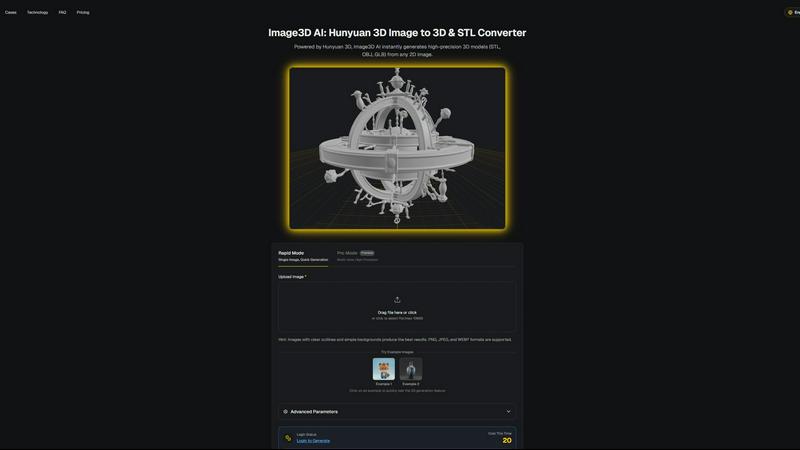
Hunyuan 3D-Powered Engine
At its core, Image3D AI is powered by Tencent's proprietary Hunyuan 3D engine, a cutting-edge AI technology designed for high-precision 3D reconstruction. This engine performs sophisticated inference from 2D data, enabling the generation of detailed geometry and textures without requiring complex manual modeling. It ensures professional-grade output suitable for demanding applications like 3D printing and game asset development, setting it apart from basic conversion tools.
Dual Generation Modes (Rapid & Pro)
The platform offers two distinct operational modes to match project requirements and resource constraints. Rapid Mode allows for quick generation from a single image, ideal for initial concepts or assets with less geometric complexity. Pro Mode utilizes multi-view images to perform a physically accurate reconstruction, delivering superior precision and detail for complex objects like real-world products, maximizing the quality of the final 3D model.
Multi-Format Export for Professional Workflows
Image3D AI seamlessly integrates into existing professional pipelines by exporting models in industry-standard formats. Users can download assets as STL files for immediate 3D printing, OBJ files for further editing in software like Maya or Blender, or GLB files for web, AR, and real-time applications. This flexibility ensures the generated assets are immediately usable, eliminating post-conversion format barriers.
Optimized Input Guidance & Best Practices
To guarantee optimal results and user success, the platform provides clear, actionable guidance. This includes recommendations for source image selection (high-contrast, clear outlines), explanations of different generation modes, and a comprehensive best practices guide. This proactive support minimizes trial and error, ensuring users achieve high-quality conversions efficiently, which is critical for business productivity.
Use Cases
Dokie AI
Enterprise Sales & Pitch Decks
Sales teams and business development professionals can rapidly generate client-ready proposals, product pitches, and quarterly business review presentations. Dokie AI ensures brand consistency, incorporates persuasive data visualization, and drastically reduces the slide preparation time from days to hours, allowing teams to respond to opportunities with agility and professional polish.
Marketing Campaign Reports & Content
Marketing departments can efficiently create campaign retrospectives, social media strategy decks, and content calendars. The tool converts performance data and strategy documents into visually engaging presentations for stakeholder reviews, saving countless hours on design formatting and enabling marketers to focus on analysis and narrative.
Academic & Training Material Development
Educators, trainers, and instructional designers can transform lesson plans, research papers, and training manuals into engaging educational slide decks. Dokie AI structures complex information into digestible slides, incorporates relevant imagery, and creates a consistent learning aid, enhancing knowledge transfer and participant engagement.
Startup Founder Fundraising
Startup founders can quickly build and iterate on investor pitch decks. By inputting their business model and vision, they receive a professionally designed deck that effectively communicates their value proposition, market opportunity, and financials, helping them make a powerful first impression and secure funding more efficiently.
Image3D AI
E-commerce & Product Visualization
Online retailers and brands can instantly convert 2D product photos into interactive 3D models. These models can be used for AR previews, 360-degree viewers, or online 3D showcases, significantly enhancing customer engagement, reducing return rates by providing accurate product representation, and driving sales conversions in a competitive digital marketplace.
Game Development & Interactive Media
Game studios and indie developers can rapidly prototype and generate game-ready 3D assets directly from concept art, sketches, or reference images. The support for PBR materials and standard export formats allows for direct import into engines like Unity or Unreal Engine, dramatically accelerating the asset creation pipeline and reducing dependency on specialized 3D modelers.
3D Printing & Rapid Prototyping
For engineers, product designers, and 3D printing enthusiasts, Image3D AI acts as a powerful image-to-STL converter. It transforms logos, sketches, or photographs of objects into high-precision, watertight mesh files ready for slicing and printing. This streamlines the process of creating physical prototypes, custom parts, and artistic pieces from digital inspiration.
Architectural Visualization & Design
Architects and interior designers can quickly generate basic 3D forms of buildings, furniture, or design elements from sketches or reference images. While not a replacement for detailed CAD work, it provides a rapid starting point for conceptual models, client presentations, and spatial studies, saving valuable time in the early design phases.
Overview
About Dokie AI
Dokie AI is a revolutionary, enterprise-grade AI presentation platform designed to eliminate the time, cost, and skill barriers associated with creating professional presentations. It transcends traditional template-based tools by leveraging true AI generation, powered by Claude Opus 4.6, to autonomously handle the entire presentation workflow. This includes intelligent content structuring, context-aware layout selection, professional typography, and cohesive visual design. The platform serves a critical need for business professionals, educators, marketers, and startup founders who require polished, impactful slides but lack dedicated design resources or time. Its core value proposition is delivering a 10x improvement in presentation creation speed, transforming hours of manual work into a process that takes mere minutes. By automating design and structural heavy lifting, Dokie AI empowers users to focus on their core message and strategy, ensuring consistent brand quality and significantly boosting productivity and ROI across an organization's communication efforts.
About Image3D AI
Image3D AI is a professional-grade, AI-powered platform that transforms 2D images into production-ready 3D assets within seconds. It directly addresses the significant time and resource investment traditionally required for 3D modeling, offering a strategic solution for businesses and professionals seeking to accelerate digital content creation. By leveraging Tencent's advanced Hunyuan 3D engine, the platform enables users of any skill level to generate high-fidelity 3D models from a single photo or a series of multi-view images. This eliminates the steep learning curve and expensive licensing associated with conventional 3D software like Blender or Maya. The core value proposition lies in its ability to streamline workflows, drastically reduce project timelines from hours to minutes, and unlock new creative and commercial opportunities. Image3D AI is engineered for a diverse enterprise audience, including game developers, e-commerce platforms, 3D printing services, and architectural visualization firms, providing them with a tangible ROI through enhanced productivity and the rapid conversion of visual concepts into tangible, usable 3D assets in formats like STL, OBJ, and GLB.
Frequently Asked Questions
Dokie AI FAQ
What makes Dokie AI different from traditional PowerPoint or Canva?
Unlike traditional tools that rely on manual design and static templates, Dokie AI uses advanced AI (Claude Opus 4.6) to generate and design presentations intelligently from the ground up. It doesn't just place your text into a template; it understands content, creates logical structure, designs appropriate layouts, and selects visuals autonomously, offering a true generative design experience that saves significant time.
What file formats can I upload to beautify or convert?
Dokie AI supports a wide range of input formats for its Beautify and conversion tools. You can upload existing PowerPoint files (PPT, PPTX), PDF documents, Microsoft Word documents (DOC, DOCX), and even provide YouTube video links or HTML content to be transformed into a structured presentation.
Does Dokie AI support custom branding and company templates?
While the current focus is on AI-generated professional designs, the platform's Beautify feature works to apply a cohesive, high-quality style to your content. For specific custom branding like exact logos, color hex codes, and proprietary templates, users can upload an existing company deck to be beautified and refined, ensuring the output aligns with established visual guidelines.
How does the pricing and credit system work?
Dokie AI operates on a credit-based system for its AI generation features. Plans include a flexible Pay-As-You-Go option starting at $39.80, a monthly subscription from $19.90 per month, and discounted annual plans from $15.90 per month, each providing a specific allocation of credits that can be used for generating, beautifying, or converting presentations.
Image3D AI FAQ
What image formats are supported for upload?
Image3D AI supports common web image formats including PNG, JPEG, and WEBP. For the best AI processing results, ensure your uploaded file is clear, has a high resolution, and is under the maximum file size limit of 10MB. Images with strong contrast and simple backgrounds typically yield the highest quality 3D conversions.
What is the difference between Rapid Mode and Pro Mode?
Rapid Mode is designed for speed and convenience, generating a 3D model from a single uploaded image in approximately 60 seconds. Pro Mode is for high-precision requirements; it uses multiple images of an object from different angles (multi-view) to create a more accurate and detailed 3D reconstruction, which is essential for complex or symmetrical objects.
Which 3D file format should I download for my project?
The optimal format depends on your intended use. Choose .STL for 3D printing, as it is the standard format for slicer software. Select .OBJ if you plan to edit the model further in traditional 3D software applications. Use .GLB for web, mobile, or augmented reality (AR) applications, as it is a compact, modern format containing both model and texture data.
Do I need any prior 3D modeling experience to use this tool?
No, one of the primary advantages of Image3D AI is that it requires no prior 3D modeling skills. The platform is built to be intuitive and accessible. The AI handles the complex reconstruction process, allowing anyone from entrepreneurs to marketing professionals to generate 3D assets by simply uploading an image and selecting their desired output parameters.
Alternatives
Dokie AI Alternatives
Dokie AI is a leading AI presentation maker that automates the creation of professional slide decks. It operates within the AI-powered design and productivity software category, specifically targeting users who need to produce high-quality presentations efficiently without extensive design expertise. Businesses and professionals often evaluate such tools based on their specific operational requirements and budget constraints. Users may seek alternatives to Dokie AI for various reasons, including differing pricing models, specific feature integrations, or platform compatibility needs. Some organizations require tools that align with existing software ecosystems, while others prioritize different aspects of AI functionality or collaboration workflows. The search for a different solution is a standard part of the software evaluation process to ensure the best fit. When assessing an alternative AI presentation tool, key considerations should include the core AI model's capability for content and design generation, the flexibility of output and editing, and the overall return on investment in terms of time saved and presentation quality. It is also crucial to evaluate data security protocols, support for brand consistency, and the tool's ability to handle complex data visualization and multi-format inputs seamlessly.
Image3D AI Alternatives
Image3D AI is a professional-grade AI-powered 3D modeling tool within the Design Tools category. It specializes in converting 2D images into high-fidelity, production-ready 3D models, significantly accelerating workflows for 3D printing, game development, and digital content creation. Businesses and professionals often evaluate alternatives to optimize their technology stack. Common drivers include budget constraints, specific feature requirements not covered by a single platform, or the need for integration with existing enterprise software ecosystems. A thorough assessment of total cost of ownership, output quality, and scalability is crucial. When selecting an alternative solution, key considerations should include the accuracy and quality of the generated 3D geometry, the range of supported export formats for downstream use, and the tool's ability to handle complex textures and materials. The ideal platform should demonstrably reduce project timelines and lower the skill barrier for creating viable 3D assets, delivering a clear return on investment.