
Formflow
Formflow is a no-code AI form builder that quickly creates interactive, tailored forms to enhance conversions and.
Visit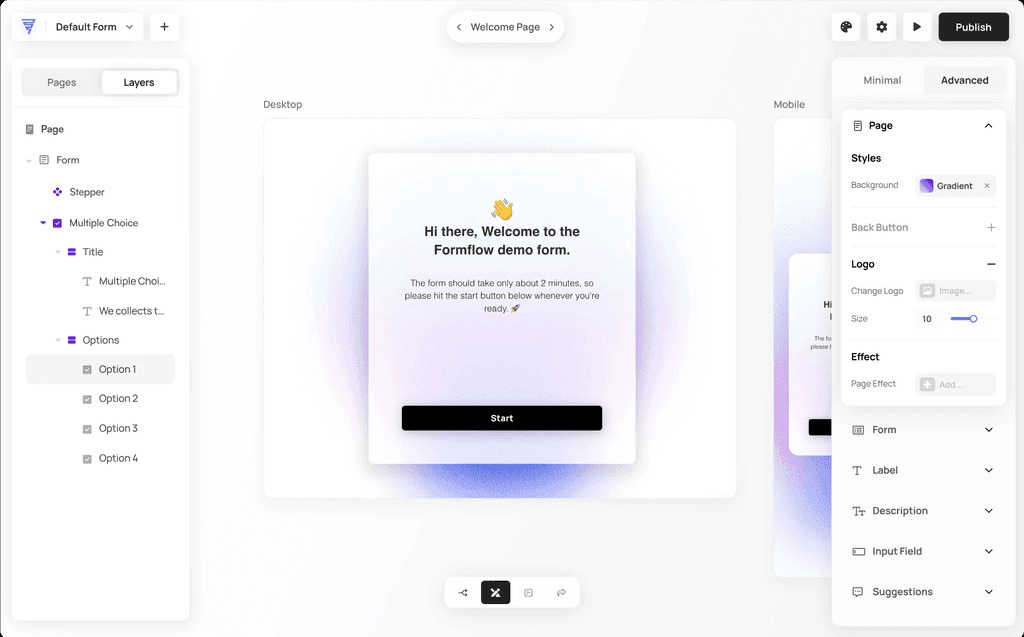
About Formflow
Formflow is a revolutionary interactive experience builder tailored for marketers and business owners who seek more than just basic form creation. It empowers users to design forms that not only capture essential data but also engage users by reflecting a brand's unique identity. With its intuitive no-code editor, Formflow enables users to create sophisticated forms quickly, eliminating the need for programming skills and significantly reducing development time. Key features, including real-time email validation and seamless integrations with existing platforms, streamline business processes effectively. Formflow transforms the mundane task of form creation into an engaging and creative journey, allowing marketers to craft forms that act as extensions of their websites. This enhancement not only improves user interaction but also optimizes lead generation, making Formflow a must-have tool for any marketer looking to elevate their online presence. Experience the future of form building with Formflow, designed by marketers, for marketers.
Features of Formflow
Interactive AI Form Builder
Formflow's AI-powered Copilot allows users to create forms in seconds, simplifying the form-building process. By simply entering a prompt, users can watch as the AI generates a fully functional form with smart logic and professional styling, making form creation faster and more accessible.
Visual Logic Builder
The visual logic builder allows users to create smart forms with branching logic easily. This feature enables complex logic to be implemented without the need for coding, ensuring that users can design dynamic forms that adapt based on user responses.
Fully Customizable Designs
With Formflow, users can create on-brand forms that enhance the user experience. The platform allows for extensive customization, enabling businesses to implement dynamic, multi-step forms that can significantly increase conversion rates.
In-Flow Analytics
Gain immediate insights into form performance with in-flow analytics. Users can monitor visitor numbers, exit rates, and conversion metrics directly within the form builder, empowering them to optimize their forms for maximum impact and improved lead generation.
Use Cases of Formflow
Lead Generation Forms
Marketers can create lead generation forms that capture essential user information seamlessly. By leveraging Formflow's features, businesses can enhance their contact lists and improve their outreach efforts, leading to increased sales opportunities.
Customer Feedback Surveys
Formflow can be employed to build customer feedback surveys that provide valuable insights into user experiences. This data helps businesses identify areas for improvement and tailor their services to meet customer needs more effectively.
Event Registration
Organizations can create interactive event registration forms that streamline the sign-up process. With customizable fields and real-time validation, Formflow ensures a smooth experience for attendees, reducing drop-off rates.
Payment Processing
Businesses can implement payment forms using Formflow to facilitate transactions directly through their websites. By integrating payment options, organizations can enhance user convenience and drive revenue growth.
Frequently Asked Questions
What is Formflow?
Formflow is an interactive form-building platform designed for marketers and business owners. It allows users to create dynamic, customizable forms quickly without the need for coding expertise.
How does the AI Form Builder work?
The AI Form Builder, known as Formflow Copilot, allows users to create forms by entering a simple prompt. The AI then generates a fully functional form complete with smart logic and design in seconds.
Can I customize my forms?
Yes, Formflow offers extensive customization options. Users can modify designs, content, and functionality to ensure their forms align with their brand identity and user expectations.
Is there a cost associated with using Formflow?
Formflow provides a free tier that allows users to build and publish forms without requiring a credit card. This ensures that businesses can try the platform risk-free.
Explore more in this category:
Similar to Formflow

AI Email Filter sorts incoming mail into folders using plain-language prompts you write. Works with any IMAP mailbox; bring your own LLM if you want.

Free collection of online developer utilities, code formatters, and digital converters designed to streamline your daily workflow.

The #1 Native Form Builder Plugin for Framer - No Code, No Embeds, No External Platforms.

A free launch checklist for SaaS, apps, AI tools and more. Every step says why it matters and when you can skip it.

Practical, independent guides to home repairs, maintenance, costs, troubleshooting, and everyday fixes.

Highlight faster. Study in flow with custom shortcuts and a workflow built around you. Print smarter, or turn any page into a tiled poster.


Build Mode is a Mac app that turns focused sessions into visible progress, so you can see the work adding up before the results arrive.